AylinCE
Grandmaster Cheater Supreme
 Reputation: 39 Reputation: 39
Joined: 16 Feb 2017
Posts: 1590
|
 Posted: Thu May 14, 2026 8:14 am Post subject: Universal Group Scanner & Editor Posted: Thu May 14, 2026 8:14 am Post subject: Universal Group Scanner & Editor |
 |
|
(I will be giving very technical explanations, please associate this with the understanding of "what can be done with CE" rather than "arrogance")
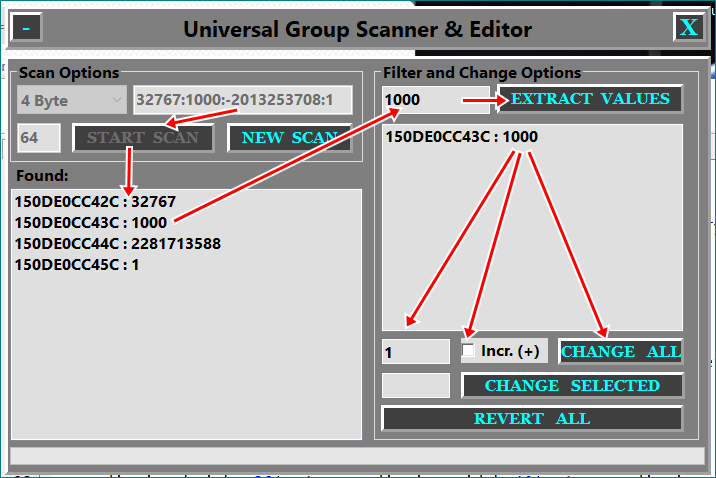
UGS Pro - Technical Overview
UGS Pro is an all-in-one memory manipulation module that combines the standard "Group Scan" logic with a modern user interface and a dynamic search algorithm. Here are the prominent features and working logic of this module:
1. What Does the Module Do?
Dynamic Group Scanning:
Detects groups of values located at different distances (padding) in a single pass without requiring manual calculation.
Hierarchical Data Management:
Divides the found results into two lists: a main list and a filtering list, allowing you to extract the target address from thousands of results with surgical precision.
Batch Data Manipulation:
Instead of dealing with the values in the detected address group one by one, it updates them with a single click, either with a fixed value or incrementally.
Secure Undo:
Keeps a record of all changes made to memory; in case of an erroneous operation, it restores all values to their original state in seconds with the "Revert All" button.
2. How Does It Work? (Algorithm and Logic)
Variable Padding Loop:
The module scans all possibilities in increments of 4, starting from 0, within the maximum distance defined by the user. This allows the algorithm to answer the question, "How many bytes of space are there between value A and value B?" for you.
Automatic Memory Alignment:
It uses fsmAligned and vtGrouped to run Cheat Engine's core scanning engine in the most efficient way.
DPI-Aware Interface Design:
Using the getScreenDPI() function, it ensures that the module is displayed correctly and without distortion on both 1080p and 4K screens.
Memory Record Integration:
With the double-click feature, it automatically assigns the correct data type (Float, Double, 2-4 Byte) to Cheat Engine's own address list.
3. Outstanding User Experience (UX)
AylinStyle UI:
Instead of standard Windows buttons, it uses custom panels that provide visual feedback (with Hover and Click effects).
Real-time Feedback:
During scanning, it shows the progress of the process instantly with a Progress Bar and the number of results with Labels.
Error Management:
It includes logical controls that prevent scanning from starting without data entry or updating an empty list.
| Code: | function showUGSPro()
if ACEfrm then ACEfrm.Destroy() ACEfrm=nil end
DP1=getScreenDPI()/96
ACEfrm=createForm()
ACEfrm.height=435*DP1 ACEfrm.width=650*DP1 ACEfrm.left=309*DP1 ACEfrm.top=118*DP1
ACEfrm.PopupMode=0 ACEfrm.caption="AylinCE Trainers (2026)"
ACEfrm.Position="poDesktopCenter" ACEfrm.ShowInTaskBar="stAlways"
ACEfrm.BorderStyle="bsNone"
ACEfrm.setLayeredAttributes(0x000100, 255, LWA_COLORKEY | LWA_ALPHA )
ACEfrm.Color=0x000100
-------------------------
local gse = {}
----------------------- gse.mPnl1 -----
gse.mPnl1=createPanel(ACEfrm)
gse.mPnl1.AutoSize=false
gse.mPnl1.height=40*DP1 gse.mPnl1.width=640*DP1 gse.mPnl1.left=5*DP1 gse.mPnl1.top=5*DP1
gse.mPnl1.caption="Universal Group Scanner & Editor"
gse.mPnl1.Color=0x7F7F7F gse.mPnl1.BevelInner="bvRaised"
gse.mPnl1.BevelWidth=3
gse.mPnl1.Font.Style="fsBold" gse.mPnl1.Font.Size=14*DP1
gse.mPnl1.OnMouseDown=function() ACEfrm.DragNow() end
-----------------------
----------------------- gse.bPnl1 -----
gse.bPnl1=createPanel(gse.mPnl1)
gse.bPnl1.AutoSize=false
gse.bPnl1.height=28*DP1 gse.bPnl1.width=30*DP1 gse.bPnl1.left=5*DP1 gse.bPnl1.top=6*DP1
-----------------------
----------------------- gse.bPnl2 -----
gse.bPnl2=createPanel(gse.mPnl1)
gse.bPnl2.AutoSize=false
gse.bPnl2.height=28*DP1 gse.bPnl2.width=30*DP1 gse.bPnl2.left=605*DP1 gse.bPnl2.top=6*DP1
-----------------------
----------------------- gse.mPnl2 -----
gse.mPnl2=createPanel(ACEfrm)
gse.mPnl2.AutoSize=false
gse.mPnl2.height=380*DP1 gse.mPnl2.width=640*DP1 gse.mPnl2.left=5*DP1 gse.mPnl2.top=50*DP1
gse.mPnl2.Color=0x7F7F7F gse.mPnl2.BevelInner="bvRaised"
gse.mPnl2.BevelWidth=3
gse.mPnl2.Font.Style="fsBold" gse.mPnl2.Font.Size=10*DP1
-----------------------
----------------------- gse.sGrpbox1 -----
gse.sGrpbox1=createGroupBox(gse.mPnl2)
gse.sGrpbox1.AutoSize=false
gse.sGrpbox1.height=93*DP1 gse.sGrpbox1.width=320*DP1 gse.sGrpbox1.left=5*DP1 gse.sGrpbox1.top=5*DP1
gse.sGrpbox1.caption="Scan Options"
gse.sGrpbox1.Font.Style="fsBold" gse.sGrpbox1.Font.Size=10*DP1
-----------------------
----------------------- gse.btnScan -----
gse.btnScan=createPanel(gse.sGrpbox1)
gse.btnScan.AutoSize=false
gse.btnScan.height=28*DP1 gse.btnScan.width=130*DP1 gse.btnScan.left=55*DP1 gse.btnScan.top=35*DP1
gse.btnScan.alignment="2"
gse.btnScan.Font.Style="fsBold" gse.btnScan.Font.Size=10*DP1
-----------------------
----------------------- gse.btnNewScan -----
gse.btnNewScan=createPanel(gse.sGrpbox1)
gse.btnNewScan.AutoSize=false
gse.btnNewScan.height=28*DP1 gse.btnNewScan.width=115*DP1 gse.btnNewScan.left=195*DP1 gse.btnNewScan.top=35*DP1
gse.btnNewScan.alignment="2"
gse.btnNewScan.Font.Style="fsBold" gse.btnNewScan.Font.Size=10*DP1
-----------------------
----------------------- gse.comboType -----
gse.comboType=createComboBox(gse.sGrpbox1)
gse.comboType.AutoSize=true
gse.comboType.height=28*DP1 gse.comboType.width=100*DP1 gse.comboType.left=5*DP1 gse.comboType.top=0*DP1
gse.comboType.text=""
gse.comboType.Font.Style="fsBold" gse.comboType.Font.Size=10*DP1
gse.comboType.ReadOnly=false gse.comboType.Style="csDropDownList"
gse.comboType.ItemIndex=0
-----------------------
----------------------- gse.editSig -----
gse.editSig=createEdit(gse.sGrpbox1)
gse.editSig.AutoSize=false
gse.editSig.height=28*DP1 gse.editSig.width=200*DP1 gse.editSig.left=110*DP1 gse.editSig.top=0*DP1
gse.editSig.text="32767:1000:-2013253708:1"
gse.editSig.color=0xDFDFDF
gse.editSig.Font.Style="fsBold" gse.editSig.Font.Size=10*DP1
-----------------------
----------------------- gse.editDist -----
gse.editDist=createEdit(gse.sGrpbox1)
gse.editDist.AutoSize=false
gse.editDist.height=28*DP1 gse.editDist.width=40*DP1 gse.editDist.left=5*DP1 gse.editDist.top=35*DP1
gse.editDist.text="64"
gse.editDist.color=0xDFDFDF
gse.editDist.Font.Style="fsBold" gse.editDist.Font.Size=10*DP1
-----------------------
----------------------- gse.sLbl1 -----
gse.sLbl1=createLabel(gse.mPnl2)
gse.sLbl1.AutoSize=true
gse.sLbl1.height=20*DP1 gse.sLbl1.width=52*DP1 gse.sLbl1.left=10*DP1 gse.sLbl1.top=98*DP1
gse.sLbl1.caption="Found: "
gse.sLbl1.alignment="taLeftJustify"
gse.sLbl1.Font.Style="fsBold" gse.sLbl1.Font.Size=10*DP1
-----------------------
----------------------- gse.listMain -----
gse.listMain=createListBox(gse.mPnl2)
gse.listMain.AutoSize=false
gse.listMain.height=230*DP1 gse.listMain.width=320*DP1 gse.listMain.left=5*DP1 gse.listMain.top=120*DP1
gse.listMain.color=0xDFDFDF gse.listMain.Font.Size=10*DP1
-----------------------
----------------------- gse.sGrpbox2 -----
gse.sGrpbox2=createGroupBox(gse.mPnl2)
gse.sGrpbox2.AutoSize=false
gse.sGrpbox2.height=345*DP1 gse.sGrpbox2.width=295*DP1 gse.sGrpbox2.left=335*DP1 gse.sGrpbox2.top=5*DP1
gse.sGrpbox2.caption="Filter and Change Options"
gse.sGrpbox2.Font.Style="fsBold" gse.sGrpbox2.Font.Size=10*DP1
-----------------------
----------------------- gse.btnFilter -----
gse.btnFilter=createPanel(gse.sGrpbox2)
gse.btnFilter.AutoSize=false
gse.btnFilter.height=28*DP1 gse.btnFilter.width=170*DP1 gse.btnFilter.left=110*DP1 gse.btnFilter.top=-1*DP1
gse.btnFilter.alignment="2"
gse.btnFilter.Font.Style="fsBold" gse.btnFilter.Font.Size=10*DP1
-----------------------
----------------------- gse.btnMassUpdate -----
gse.btnMassUpdate=createPanel(gse.sGrpbox2)
gse.btnMassUpdate.AutoSize=false
gse.btnMassUpdate.height=25*DP1 gse.btnMassUpdate.width=115*DP1 gse.btnMassUpdate.left=165*DP1 gse.btnMassUpdate.top=230*DP1
gse.btnMassUpdate.alignment="2"
gse.btnMassUpdate.Font.Style="fsBold" gse.btnMassUpdate.Font.Size=10*DP1
-----------------------
----------------------- gse.editFilter -----
gse.editFilter=createEdit(gse.sGrpbox2)
gse.editFilter.AutoSize=false
gse.editFilter.height=28*DP1 gse.editFilter.width=100*DP1 gse.editFilter.left=5*DP1 gse.editFilter.top=0*DP1
gse.editFilter.text=""
gse.editFilter.color=0xDFDFDF
gse.editFilter.Font.Style="fsBold" gse.editFilter.Font.Size=10*DP1
-----------------------
----------------------- gse.editSingleValue -----
gse.editSingleValue=createEdit(gse.sGrpbox2)
gse.editSingleValue.AutoSize=false
gse.editSingleValue.height=25*DP1 gse.editSingleValue.width=64*DP1 gse.editSingleValue.left=5*DP1 gse.editSingleValue.top=260*DP1
gse.editSingleValue.text=""
gse.editSingleValue.color=0xDFDFDF
gse.editSingleValue.Font.Style="fsBold" gse.editSingleValue.Font.Size=10*DP1
-----------------------
----------------------- gse.listSub -----
gse.listSub=createListBox(gse.sGrpbox2)
gse.listSub.AutoSize=false
gse.listSub.height=190*DP1 gse.listSub.width=275*DP1 gse.listSub.left=5*DP1 gse.listSub.top=35*DP1
gse.listSub.color=0xDFDFDF gse.listSub.Font.Size=10*DP1
-----------------------
----------------------- gse.editMassValue -----
gse.editMassValue=createEdit(gse.sGrpbox2)
gse.editMassValue.AutoSize=false
gse.editMassValue.height=25*DP1 gse.editMassValue.width=64*DP1 gse.editMassValue.left=5*DP1 gse.editMassValue.top=230*DP1
gse.editMassValue.text="1"
gse.editMassValue.color=0xDFDFDF
gse.editMassValue.Font.Style="fsBold" gse.editMassValue.Font.Size=10*DP1
-----------------------
----------------------- CheckBox Colors -----
function setCheckBoxColors(chk,clr,fclr)
executeCodeLocalEx('uxtheme.SetWindowTheme', chk.handle, "", "")
chk.Color = clr
chk.Font.Color = fclr
end
load("return registerLuaFunctionHighlight('setCheckBoxColors')")()
-------------------------
----------------------- gse.cbIncremental -----
gse.cbIncremental=createCheckBox(gse.sGrpbox2)
gse.cbIncremental.AutoSize=false
gse.cbIncremental.height=23*DP1 gse.cbIncremental.width=79*DP1 gse.cbIncremental.left=77*DP1 gse.cbIncremental.top=230*DP1
gse.cbIncremental.caption="Incr. (+)"
gse.cbIncremental.alignment="taRightJustify"
gse.cbIncremental.Font.Style="fsBold" gse.cbIncremental.Font.Size=10*DP1
setCheckBoxColors(gse.cbIncremental,0xDFDFDF,536870912)
-----------------------
----------------------- gse.btnChangeSelected -----
gse.btnChangeSelected=createPanel(gse.sGrpbox2)
gse.btnChangeSelected.AutoSize=false
gse.btnChangeSelected.height=25*DP1 gse.btnChangeSelected.width=203*DP1 gse.btnChangeSelected.left=77*DP1 gse.btnChangeSelected.top=260*DP1
gse.btnChangeSelected.alignment="2"
gse.btnChangeSelected.Font.Style="fsBold" gse.btnChangeSelected.Font.Size=10*DP1
-----------------------
----------------------- gse.btnUndo -----
gse.btnUndo=createPanel(gse.sGrpbox2)
gse.btnUndo.AutoSize=false
gse.btnUndo.height=25*DP1 gse.btnUndo.width=275*DP1 gse.btnUndo.left=5*DP1 gse.btnUndo.top=290*DP1
gse.btnUndo.alignment="2"
gse.btnUndo.Font.Style="fsBold" gse.btnUndo.Font.Size=10*DP1
-----------------------
----------------------- gse.pb -----
gse.pb=createProgressBar(gse.mPnl2)
gse.pb.AutoSize=false
gse.pb.height=17*DP1 gse.pb.width=630*DP1 gse.pb.left=5*DP1 gse.pb.top=355*DP1
gse.pb.Font.Style="fsBold" gse.pb.Font.Size=10*DP1
-----------------------
--############################################################################--
--############################################################################--
function applyAylinStyle(p, text, baseColor, fontColor)
-- Temel Ayarlar
p.Caption = text
p.Color = baseColor
p.Font.Color = fontColor or 0xFFFFFF
p.Font.Style = "[fsBold]"
p.Font.Name = "Georgia"
p.Cursor = -21 -- crHandPoint
p.BevelInner="bvRaised"
p.BevelWidth=3
-- Renk Matematiği: Basıldığında rengi %20 karartır (Basit bir HEX işlemi)
local function adjustColor(color, factor)
local r = math.floor((color % 0x100) * factor)
local g = math.floor(((color / 0x100) % 0x100) * factor)
local b = math.floor(((color / 0x10000) % 0x100) * factor)
return r + (g * 0x100) + (b * 0x10000)
end
local dark color = adjustColor(baseColor, 0.2) -- %20 daha koyu
-- Hover (Hover'da kenarlık rengini belirginleştir)
p.OnMouseMove = function() p.BevelColor = 0xffff00 end
p.OnMouseLeave = function() p.BevelColor = clDefault end
-- Click Efekti (Renk kırılması)
p.OnMouseDown = function() p.Color = dark color end
p.OnMouseUp = function() p.Color = baseColor end
end
applyAylinStyle(gse.bPnl1, "-", 0x3F3F3F, 0xFFFF00)
applyAylinStyle(gse.bPnl2, "X", 0x3F3F3F, 0xFFFF00)
applyAylinStyle(gse.btnScan, "START SCAN", 0x3F3F3F, 0xFFFF00)
applyAylinStyle(gse.btnNewScan, "NEW SCAN", 0x3F3F3F, 0xFFFF00)
applyAylinStyle(gse.btnFilter, 'EXTRACT VALUES', 0x3F3F3F, 0xFFFF00)
applyAylinStyle(gse.btnMassUpdate, "CHANGE ALL", 0x3F3F3F, 0xFFFF00)
applyAylinStyle(gse.btnChangeSelected, "CHANGE SELECTED", 0x3F3F3F, 0xFFFF00)
applyAylinStyle(gse.btnUndo, "REVERT ALL", 0x3F3F3F, 0xFFFF00)
--############################################################################--
local scanResultsLog = {}
-- GLOBAL TYPE SETTINGS --
local typeSettings = {
["2 Byte"] = { read = readSmallInteger, write = writeSmallInteger, size = 2, code = "2" },
["4 Byte"] = { read = readInteger, write = writeInteger, size = 4, code = "4" },
["Float"] = { read = readFloat, write = writeFloat, size = 4, code = "f" },
["Double"] = { read = readDouble, write = writeDouble, size = 8, code = "d" }
}
for k, _ in pairs(typeSettings) do gse.comboType.Items.add(k) end
gse.comboType.ItemIndex = 1
--############################################################################--
--- LOGIC FUNCTIONS ---
-- Move to CE Address List
function moveToAddressList(addr, val)
local al = getAddressList()
local mr = al.createMemoryRecord()
mr.Address = "0x" .. addr
mr.Description = "GrpScn: "
local tName = gse.comboType.Text
if tName == "Float" then mr.Type = 4
elseif tName == "Double" then mr.Type = 5
elseif tName == "2 Byte" then mr.Type = 1
elseif tName == "4 Byte" then mr.Type = 2 end
--print("Address " .. addr .. " moved to Address List.")
end
-- Double Click Assignments
gse.listMain.OnDblClick = function(sender)
if sender.ItemIndex == -1 then return end
local addr = sender.Items[sender.ItemIndex]:match("(%x+)%s*:")
if addr then moveToAddressList(addr, "Value") end
end
gse.listSub.OnDblClick = gse.listMain.OnDblClick -- Same logic for both
-- Change Selected Button
gse.btnChangeSelected.OnClick = function()
if gse.listSub.ItemIndex == -1 then return end
local line = gse.listSub.Items[gse.listSub.ItemIndex]
local addr = line:match("(%x+)%s*:")
local newVal = tonumber(gse.editSingleValue.Text)
if addr and newVal then
local cfg = typeSettings[gse.comboType.Text]
cfg.write("0x"..addr, newVal)
gse.listSub.Items[gse.listSub.ItemIndex] = string.format("%s : %s", addr:upper(), tostring(newVal))
--print("Updated " .. addr .. " to " .. newVal)
end
end
-- SCAN MOTOR
gse.btnScan.OnClick = function()
gse.listMain.Items.clear()
scanResultsLog = {}
local tName = gse.comboType.Text
local cfg = typeSettings[tName]
local sig = gse.editSig.Text
local maxDist = tonumber(gse.editDist.Text) or 64
local parts = {}
for v in sig:gmatch("([^:]+)") do table.insert(parts, v) end
local ms = createMemScan()
local fl = createFoundList(ms)
gse.pb.Max = maxDist
for padding = 0, maxDist, 4 do
gse.pb.Position = padding
processMessages()
local query = ""
for i, v in ipairs(parts) do
query = query .. cfg.code .. ":" .. v
if i < #parts then query = query .. " w:" .. padding .. " " end
end
ms.firstScan(soExactValue, vtGrouped, rtRounded, query, "", 0, 0xffffffffffffffff, "", fsmAligned, "4", false, false, false, false)
ms.waitTillDone()
fl.initialize()
if fl.Count > 0 then
for i=0, fl.Count-1 do
local base = fl.Address[i]
local entry = { base = base, p = padding, items = {}, type = tName }
for idx, _ in ipairs(parts) do
local offset = tonumber(base, 16) + ((idx-1) * (cfg.size + padding))
local val = cfg.read(offset)
gse.listMain.Items.add(string.format("%X : %s", offset, tostring(val)))
table.insert(entry.items, { addr = offset, val = val })
end
table.insert(scanResultsLog, entry)
end
gse.btnScan.setEnabled(false)
gse.comboType.setEnabled(false)
gse.editSig.setEnabled(false)
gse.editDist.setEnabled(false)
end
end
gse.pb.Position = 0
fl.destroy()
ms.destroy()
end
-- FILTERING
gse.btnFilter.OnClick = function()
gse.listSub.Items.clear()
local target = tonumber(gse.editFilter.Text)
if not target then return end
for _, grp in ipairs(scanResultsLog) do
for _, itm in ipairs(grp.items) do
if itm.val == target then
gse.listSub.Items.add(string.format("%X : %s", itm.addr, tostring(itm.val)))
end
end
end
end
-- NEW SCAN
gse.btnNewScan.OnClick = function()
gse.listMain.Items.clear()
gse.listSub.Items.clear()
scanResultsLog = {}
gse.pb.Position = 0
gse.btnScan.setEnabled(true)
gse.comboType.setEnabled(true)
gse.editSig.setEnabled(true)
gse.editDist.setEnabled(true)
--print("System reset. Ready for new scan.")
end
-- MASS UPDATE
gse.btnMassUpdate.OnClick = function()
local tName = gse.comboType.Text
local cfg = typeSettings[tName]
local baseVal = tonumber(gse.editMassValue.Text) or 0
local isIncremental = gse.cbIncremental.State
local i1 = 1
if gse.listSub.Items.Count == 0 then return end
for i = 0, gse.listSub.Items.Count - 1 do
local line = gse.listSub.Items[i]
local addr = line:match("(%x+)%s*:")
if addr then
local writeVal = cfg.read(addr)
--print("writeVal1: "..writeVal)
if isIncremental == 1 then
writeVal = writeVal + (i1 * baseVal)
i1 = i1 + 1
cfg.write("0x"..addr, writeVal)
--print("writeVal2: "..writeVal)
gse.listSub.Items[i] = string.format("%s : %s", addr, tostring(writeVal))
else
cfg.write("0x"..addr, baseVal)
gse.listSub.Items[i] = string.format("%s : %s", addr, tostring(baseVal))
end
end
end
end
-- REVERT (UNDO)
gse.btnUndo.OnClick = function()
if #scanResultsLog == 0 then
showMessage("No data to revert!")
return
end
local tName = gse.comboType.Text
local cfg = typeSettings[tName]
for _, grp in ipairs(scanResultsLog) do
local gCfg = typeSettings[grp.type]
for _, itm in ipairs(grp.items) do
gCfg.write(itm.addr, itm.val)
end
end
local function refreshListValues(list)
list.Items.beginUpdate()
for i = 0, list.Items.Count - 1 do
local line = list.Items[i]
local addr = line:match("(%x+)%s*:")
if addr then
local currentVal = cfg.read("0x"..addr)
list.Items[i] = string.format("%s : %s", addr:upper(), tostring(currentVal))
end
end
list.Items.endUpdate()
end
refreshListValues(gse.listMain)
refreshListValues(gse.listSub)
showMessage("Memory reverted to original values.")
end
end
--############################################################################--
-- CHEAT ENGINE MENÜ
--############################################################################--
local mainMenu = MainForm.Menu
if ugsMenu then ugsMenu.Destroy() ugsMenu=nil end
ugsMenu = createMenuItem(mainMenu)
ugsMenu.Caption = "UGSPro"
local openScanner = createMenuItem(ugsMenu)
openScanner.Caption = "Open Group Scanner"
openScanner.Shortcut = "Ctrl+Alt+G"
openScanner.OnClick = showUGSPro
local aboutMenu = createMenuItem(ugsMenu)
aboutMenu.Caption = "About AylinCE"
aboutMenu.OnClick = function()
showMessage("UGSPro v1.0\nUniversal Group Scanner & Editor\nCreated by AylinCE (2026)")
end
ugsMenu.add(openScanner)
ugsMenu.add(createMenuItem(ugsMenu, "-"))
ugsMenu.add(aboutMenu)
mainMenu.Items.insert(mainMenu.Items.Count - 1, ugsMenu) |
How to Install UGSPro Menu:
Copy the code into a text file, save it as UGSPro.lua, and place it in the autorun folder of your Cheat Engine directory. It will autorun load every time you start Cheat Engine!
-----------------------------------------------
And we've reviewed another article together. Enjoy it until we meet again for another crazy coding project. 
| Description: |
|
| Filesize: |
38.06 KB |
| Viewed: |
10442 Time(s) |
|
_________________
|
|

 FAQ
FAQ Search
 Memberlist
 Usergroups
 Register
 Profile
 Log in to check your private messages
 Log in


