 |
Cheat Engine
The Official Site of Cheat Engine
|
| View previous topic :: View next topic |
| Author |
Message |
S-nonymous027
Newbie cheater
![]() Reputation: 0 Reputation: 0
Joined: 25 Jul 2021
Posts: 11
Location: Earth
|
 Posted: Sat Jan 03, 2026 9:11 am Post subject: Clip image in form from left Posted: Sat Jan 03, 2026 9:11 am Post subject: Clip image in form from left |
 |
|
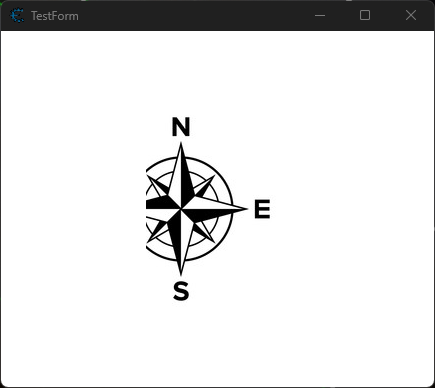
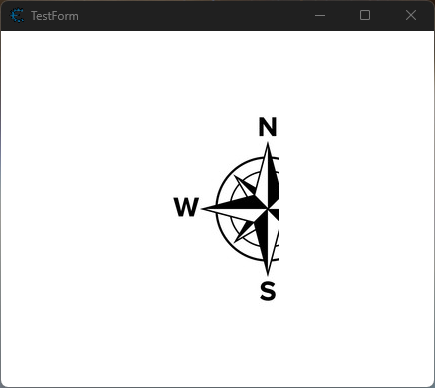
In cheat table forms, if you shrink image borders they'll clip from right to left, bottom-up, and there isn't a setting to control this.
One of my cheat tables requires an image to be clipped from left instead.
My current workaround is akin to making an "array of sprites," creating copies of the same image but successively clip one more pixel from the left. This method gets tedious the larger the image.
Is there a way to procedurally do that in Lua without this spriting method?
| Description: |
| What I want: clip from left |
|
| Filesize: |
20.6 KB |
| Viewed: |
17291 Time(s) |
|
| Description: |
| Cheat Engine / WinForms default, clip from right |
|
| Filesize: |
19.02 KB |
| Viewed: |
17291 Time(s) |
|
_________________
A health bar is useless if it cannot protect its owner from death |
|
| Back to top |
|
 |
Dark Byte
Site Admin
 Reputation: 475 Reputation: 475
Joined: 09 May 2003
Posts: 25985
Location: The netherlands
|
| Posted: Sat Jan 03, 2026 3:05 pm Post subject: |
|
|
have you tried canvas.copyRect ?
_________________
Tools give you results. Knowledge gives you control.
Like my help? Join me on Patreon so i can keep helping |
|
| Back to top |
|
|
S-nonymous027
Newbie cheater
![]() Reputation: 0 Reputation: 0
Joined: 25 Jul 2021
Posts: 11
Location: Earth
|
| Posted: Sat Jan 03, 2026 4:39 pm Post subject: |
|
|
Not yet, never did it before
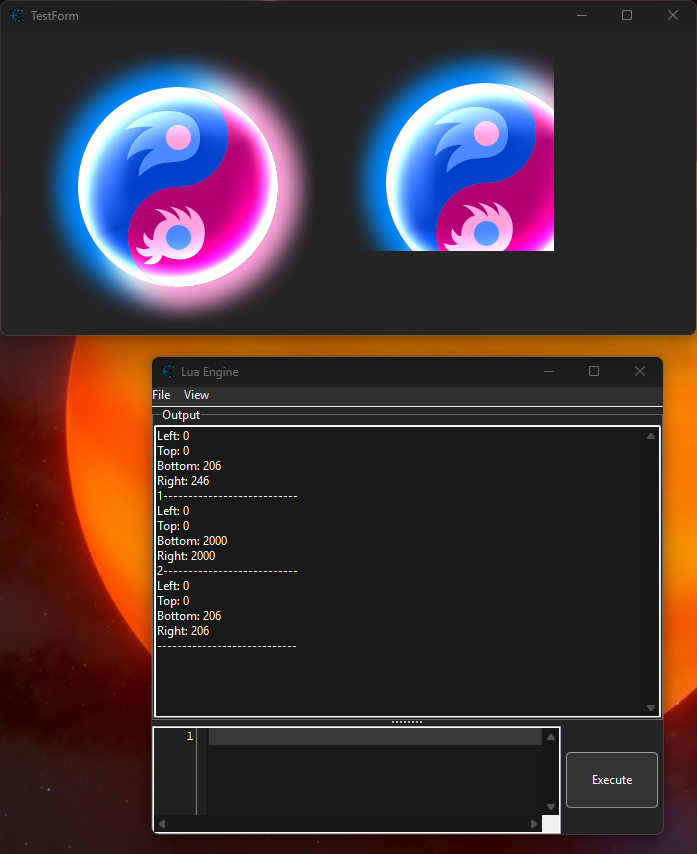
Edit: I tried and I got it to work. But I want it to work with transparent images so I can't just use Canvas.clear() since it replaces every pixel with white.
Also, I need the image to resize in response. But when I tried to resize the image, it undoes this clip operation for some reason.
(first click of execute script -> clipped only from bottom-right, second click -> correct clipping)
Resizing the image should resize the canvas, but not like this where it 'resets' to 2000.
| Code: | local clip = {
left = 50,
right = 20,
top = 30,
bottom = 40
}
function clip:getH()
return self.left + self.right
end
function clip:getV()
return self.top + self.bottom
end
canvas1 = TestForm.TestImage.getCanvas()
canvas2 = TestForm.TestImage1.getCanvas()
function changeWidth(w, h)
TestForm.TestImage1.Width, TestForm.TestImage1.Height = w, h
end
function clipImage()
canvas2.clear()
canvas2.copyRect(0, 0, 276-clip:getH(), 276-clip:getV(), canvas1, clip.left, clip.top, 276-clip.right, 276-clip.bottom)
end
printTable(canvas2.getClipRect())
print("1---------------------------")
changeWidth(276-clip:getH(), 276-clip:getV())
printTable(canvas2.getClipRect())
print("2---------------------------")
clipImage()
printTable(canvas2.getClipRect())
print("----------------------------") |
| Description: |
| Unwanted canvas resizing behavior |
|
| Filesize: |
351.32 KB |
| Viewed: |
17229 Time(s) |
|
_________________
A health bar is useless if it cannot protect its owner from death |
|
| Back to top |
|
|
AylinCE
Grandmaster Cheater Supreme
 Reputation: 39 Reputation: 39
Joined: 16 Feb 2017
Posts: 1587
|
| Posted: Sun Jan 04, 2026 4:40 pm Post subject: |
|
|
To ensure transparency, make the process more complicated.
Here's an example from @Daspamer:
| Code: | function setTransparentSize(obj, x, y)
obj.Picture.Bitmap.Width = x
obj.Picture.Bitmap.Height = y
obj.canvas.getPixel(0,0) -- Initializes the canvas handle
obj.picture.Bitmap.TransparentColor = 0x000100
obj.Transparent = false
obj.Transparent = true
end |
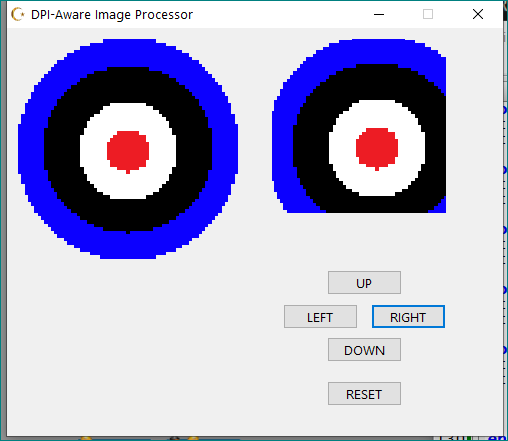
And here's the coding that simulates cropping an image from 4 directions:
Play with the buttons...
| Code: | -- Global DPI Scaling Calculation (Standard 96 DPI base)
local DPIScale = getScreenDPI() / 96
-- 1. TRANSPARENCY FUNCTION
-- Forces the bitmap to handle transparency by setting a specific color key (0x000100)
function setTransparentSize(obj, x, y)
obj.Picture.Bitmap.Width = x
obj.Picture.Bitmap.Height = y
obj.canvas.getPixel(0,0) -- Initializes the canvas handle
obj.picture.Bitmap.TransparentColor = 0x000100
obj.Transparent = false
obj.Transparent = true
end
-- 2. CORE CROP & REFRESH FUNCTION
-- Handles positional data, screen capturing, and visual updates
function refreshCrop(status, srcImg, dstImg, parentForm, direction, stepValue)
local step = (stepValue or 0) -- Use 0 if step is nil (initial draw)
-- Update internal status values based on direction
if direction == "L" then status.L = status.L + step
elseif direction == "R" then status.R = status.R + step
elseif direction == "T" then status.T = status.T + step
elseif direction == "B" then status.B = status.B + step
elseif direction == "RESET" then
-- Return to initial physical properties
dstImg.Height, dstImg.Width = srcImg.Height, srcImg.Width
dstImg.Top, dstImg.Left = status.initialTop, status.initialLeft
status.L, status.R, status.T, status.B = 0,0,0,0
end
-- Safety Check: Prevent image from disappearing entirely
if status.L + status.R >= srcImg.Width then status.L, status.R = 0, 0 end
if status.T + status.B >= srcImg.Height then status.T, status.B = 0, 0 end
-- Screen Coordinates Calculation
-- + 0 - 8 and + 22 - 30 are standard Windows TitleBar/Border offsets for windowed forms
local sc = getScreenCanvas()
local screenX = parentForm.Left + srcImg.Left + 4
local screenY = parentForm.Top + srcImg.Top + 28
-- Calculate current dimensions after cropping
local baseW = srcImg.Width
local baseH = srcImg.Height
local curW = baseW - (status.L + status.R)
local curH = baseH - (status.T + status.B)
-- Physical Component Resizing & Relocation
-- Updates the 'Target' image component on the form
if direction == "L" then
dstImg.Width = dstImg.Width - step
dstImg.Left = dstImg.Left + step
elseif direction == "R" then
dstImg.Width = dstImg.Width - step
elseif direction == "T" then
dstImg.Height = dstImg.Height - step
dstImg.Top = dstImg.Top + step
elseif direction == "B" then
dstImg.Height = dstImg.Height - step
end
-- Update Bitmap Canvas to match new size and maintain transparency
setTransparentSize(dstImg, curW, curH)
local cv = dstImg.getCanvas()
cv.clear()
-- Map the Screen Area to the Local Image Canvas
-- Source: ScreenCanvas (Original image location)
-- Destination: Local Image (0,0 point)
cv.copyRect(
0, 0, curW, curH,
sc,
screenX + status.L, screenY + status.T, (screenX + baseW) - status.R, (screenY + baseH) - status.B
)
end
-- 3. FORM SETUP & UI
if mainCropForm then mainCropForm.destroy() end
mainCropForm = createForm(false)
mainCropForm.Width, mainCropForm.Height = 450 * DPIScale, 370 * DPIScale
mainCropForm.Caption = "DPI-Aware Image Processor"
-- Source Image (Reference Point)
local img1 = createImage(mainCropForm)
img1.Width, img1.Height = 200 * DPIScale, 200 * DPIScale
img1.Left, img1.Top = 10 * DPIScale, 10 * DPIScale
-- example local image..
img1.picture.loadFromFile(getCheatEngineDir()..[[badassets\shieldedtarget.png]])
img1.Stretch = true
-- Destination Image (Cropped Output)
local img2 = createImage(mainCropForm)
img2.Width, img2.Height = 200 * DPIScale, 200 * DPIScale
img2.Left, img2.Top = 240 * DPIScale, 10 * DPIScale
img2.Stretch = true
-- State Tracking (History for specific image instances)
local myStatus = {
L=0, R=0, T=0, B=0,
initialLeft = 240 * DPIScale,
initialTop = 10 * DPIScale
}
-- UI BUTTONS with Parametric OnClick Events
local btnTop = createButton(mainCropForm)
btnTop.Caption = "UP" btnTop.Left = 290 * DPIScale btnTop.Top = 220 * DPIScale
btnTop.OnClick = function() refreshCrop(myStatus, img1, img2, mainCropForm, "T", 20 * DPIScale) end
local btnLeft = createButton(mainCropForm)
btnLeft.Caption = "LEFT" btnLeft.Left = 250 * DPIScale btnLeft.Top = 250 * DPIScale
btnLeft.OnClick = function() refreshCrop(myStatus, img1, img2, mainCropForm, "L", 20 * DPIScale) end
local btnRight = createButton(mainCropForm)
btnRight.Caption = "RIGHT" btnRight.Left = 330 * DPIScale btnRight.Top = 250 * DPIScale
btnRight.OnClick = function() refreshCrop(myStatus, img1, img2, mainCropForm, "R", 20 * DPIScale) end
local btnBottom = createButton(mainCropForm)
btnBottom.Caption = "DOWN" btnBottom.Left = 290 * DPIScale btnBottom.Top = 280 * DPIScale
btnBottom.OnClick = function() refreshCrop(myStatus, img1, img2, mainCropForm, "B", 20 * DPIScale) end
local btnReset = createButton(mainCropForm)
btnReset.Caption = "RESET" btnReset.Left = 290 * DPIScale btnReset.Top = 320 * DPIScale
btnReset.OnClick = function()
-- Fully re-initialize status and call refresh
myStatus.L, myStatus.R, myStatus.T, myStatus.B = 0,0,0,0
refreshCrop(myStatus, img1, img2, mainCropForm, "RESET", 0)
end
mainCropForm.Show()
-- INITIAL DRAW (Reset to default)
myStatus = { L=0, R=0, T=0, B=0, initialLeft=240*DPIScale, initialTop=10*DPIScale }
refreshCrop(myStatus, img1, img2, mainCropForm, "RESET", 0) |
| Description: |
|
| Filesize: |
13.04 KB |
| Viewed: |
17116 Time(s) |
|
_________________
|
|
| Back to top |
|
|
|
|
You cannot post new topics in this forum
You cannot reply to topics in this forum
You cannot edit your posts in this forum
You cannot delete your posts in this forum
You cannot vote in polls in this forum
You cannot attach files in this forum
You can download files in this forum
|
|
 FAQ
FAQ Search
 Memberlist
 Usergroups
 Register
 Profile
 Log in to check your private messages
 Log in


