 |
Cheat Engine
The Official Site of Cheat Engine
|
| View previous topic :: View next topic |
| Author |
Message |
mitosu7410
How do I cheat?
![]() Reputation: 0 Reputation: 0
Joined: 31 Oct 2022
Posts: 7
|
 Posted: Fri Feb 14, 2025 1:24 am Post subject: Is it possible to search dropdown list with description? Posted: Fri Feb 14, 2025 1:24 am Post subject: Is it possible to search dropdown list with description? |
 |
|
I would like to search hex in dropdown list by description.
If dropdown holds so many many item IDs, it is really annoying to find what a certain item's hex ID is.
So I want to find it by searching description(i.e. Item name).
Example:
Dropdown list is like
0001:ABC
0005:DEF
000A:EFG
Is it possible to find the entry of "000A:EFG" by searching "EFG"?
Is there anyway to search dropdown list?
|
|
| Back to top |
|
 |
Csimbi
I post too much
 Reputation: 99 Reputation: 99
Joined: 14 Jul 2007
Posts: 3434
|
| Posted: Fri Feb 14, 2025 2:50 am Post subject: |
|
|
| Type "ABC" and hit the cursor down key before you hit enter, it should jump to the correct record (if exists). That's the closest I think.
|
|
| Back to top |
|
|
cannonfodderex
Advanced Cheater
![]() Reputation: 0 Reputation: 0
Joined: 30 Oct 2012
Posts: 70
|
| Posted: Fri Oct 31, 2025 2:45 am Post subject: |
|
|
| Csimbi wrote: | | Type "ABC" and hit the cursor down key before you hit enter, it should jump to the correct record (if exists). That's the closest I think. |
How can I match a substring in dropdown?
for example, if I type cowl, it can match:
Vampire's Cowl
|
|
| Back to top |
|
|
AylinCE
Grandmaster Cheater Supreme
 Reputation: 39 Reputation: 39
Joined: 16 Feb 2017
Posts: 1596
|
| Posted: Fri Oct 31, 2025 5:56 am Post subject: |
|
|
Where is this drop-down list?
Form etc.
Which list are you searching in?
_________________
|
|
| Back to top |
|
|
cannonfodderex
Advanced Cheater
![]() Reputation: 0 Reputation: 0
Joined: 30 Oct 2012
Posts: 70
|
| Posted: Mon Nov 03, 2025 2:49 am Post subject: |
|
|
I have a 4 bytes address in the table, it has a dropdown list refering to
(iItemList)
in iItemList, it's like:
0:Spell Book
1:Spell Scroll
2:The Grail
3:Catapult
|
|
| Back to top |
|
|
AylinCE
Grandmaster Cheater Supreme
Reputation: 39
Joined: 16 Feb 2017
Posts: 1596
|
| Posted: Mon Nov 03, 2025 12:09 pm Post subject: |
|
|
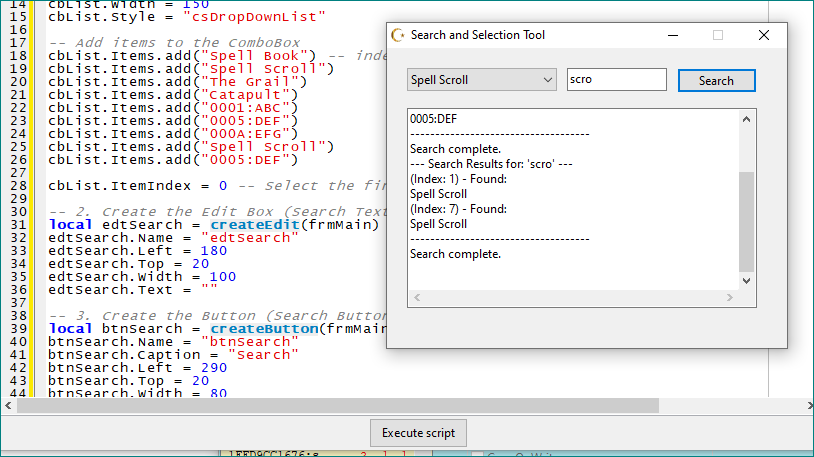
Tested with a sample list.
| Code: | -- Create the main form
if frmMain then frmMain.Destroy() frmMain=nil end
frmMain = createForm(true)
frmMain.Caption = "Search and Selection Tool"
frmMain.Width = 400
frmMain.Height = 300
frmMain.Position = 'poScreenCenter' -- Center the form on the screen
-- 1. Create the ComboBox (Dropdown List)
local cbList = createComboBox(frmMain)
cbList.Name = "cbList"
cbList.Left = 20
cbList.Top = 20
cbList.Width = 150
cbList.Style = "csDropDownList"
-- Add items to the ComboBox
cbList.Items.add("Spell Book") -- index: 0
cbList.Items.add("Spell Scroll")
cbList.Items.add("The Grail")
cbList.Items.add("Catapult")
cbList.Items.add("0001:ABC")
cbList.Items.add("0005:DEF")
cbList.Items.add("000A:EFG")
cbList.Items.add("Spell Scroll")
cbList.Items.add("0005:DEF")
cbList.ItemIndex = 0 -- Select the first item by default
-- 2. Create the Edit Box (Search Text)
local edtSearch = createEdit(frmMain)
edtSearch.Name = "edtSearch"
edtSearch.Left = 180
edtSearch.Top = 20
edtSearch.Width = 100
edtSearch.Text = ""
-- 3. Create the Button (Search Button)
local btnSearch = createButton(frmMain)
btnSearch.Name = "btnSearch"
btnSearch.Caption = "Search"
btnSearch.Left = 290
btnSearch.Top = 20
btnSearch.Width = 80
-- 4. Create the Memo Box (Results Display Area)
local mmoResult = createMemo(frmMain)
mmoResult.Name = "mmoResult"
mmoResult.Left = 20
mmoResult.Top = 60
mmoResult.Width = 350
mmoResult.Height = 200
mmoResult.WordWrap=false mmoResult.ScrollBars="ssAutoBoth"
mmoResult.ReadOnly = true -- Set to read-only
--------------------- Search function -----------------------
-- your controls names?
ddlist = cbList -- or form UDF1, controls: UDF1.CEComboBox1
reslist = mmoResult -- or UDF1.CEMemo1
function searchList(text)
local searchTerm = string.lower(text) -- Convert search term to lowercase
local items = ddlist.Items
--reslist.Lines.clear() -- Clear previous results
if searchTerm == "" then
reslist.Lines.add("Please enter a search term.")
return
end
reslist.Lines.add("--- Search Results for: '" .. searchTerm .. "' ---")
local found = false
-- Loop through ComboBox items
for i=0, items.Count - 1 do
local itemText = items[i]
local lowerItemText = string.lower(itemText) -- Convert item text to lowercase
-- Use string.find for case-insensitive partial match
if string.find(lowerItemText, searchTerm, 1, true) then -- The last 'true' disables pattern matching
reslist.Lines.add("(Index: " .. i .. ") - Found:")
--ddlist.ItemIndex = i -- The drop-down list scrolls to the index of the found result.
reslist.Lines.add(itemText)
found = true
end
end
if not found then
reslist.Lines.add("No matches found.")
else
reslist.Lines.add("------------------------------------")
reslist.Lines.add("Search complete.")
end
end
------------------------ Search Gui options ----------------
-- Assign the click event to the Search button
btnSearch.OnClick = function()
local text = edtSearch.Text
searchList(text)
end
-- Cleanup when the form is closed
function formClosed(sender)
if frmMain then frmMain.Destroy() frmMain=nil end
end
frmMain.OnClose = formClosed
-- Show the form
frmMain.Show() |
| Description: |
|
| Filesize: |
47.7 KB |
| Viewed: |
10819 Time(s) |
|
_________________
|
|
| Back to top |
|
|
cannonfodderex
Advanced Cheater
![]() Reputation: 0 Reputation: 0
Joined: 30 Oct 2012
Posts: 70
|
| Posted: Mon Nov 03, 2025 7:43 pm Post subject: |
|
|
Thank you for your reply.
I implemented your script to my table, the search result only appear in a text, it's different from what I needed.
Sorry, I might have not explained my question thoroughly.
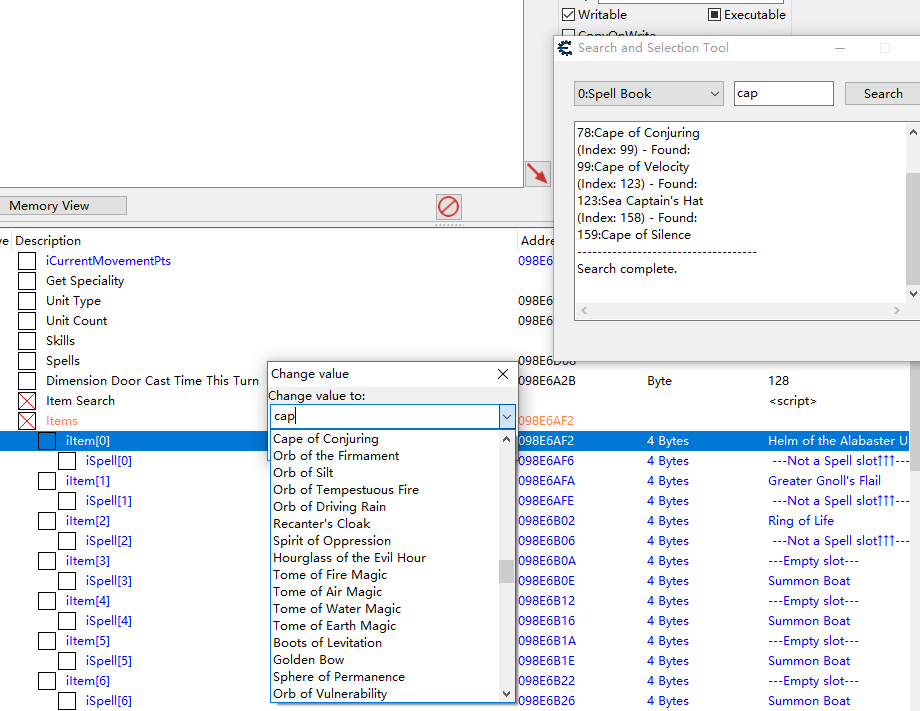
When I try to change a value of address with dropdown, a "change value" dialog popup.
When typing something in the text box, and press up or down on keyboard, it only matches the start of a string.
I want to make the input text becomes a filter for the dropdown list, and match any substring, not just the start, so I can click to select a value from the filtered list.
| Description: |
|
| Filesize: |
62.78 KB |
| Viewed: |
10783 Time(s) |
|
|
|
| Back to top |
|
|
AylinCE
Grandmaster Cheater Supreme
Reputation: 39
Joined: 16 Feb 2017
Posts: 1596
|
| Posted: Tue Nov 04, 2025 1:30 am Post subject: |
|
|
| Code: | -- The data extracted from the user's "Change value" dropdown list in the image.
-- Key: The value that should be written to memory (e.g., an Item ID).
-- Value: The description shown in the list.
local DROPDOWN_DATA = {
-- Items from the user's screenshot
["78"] = "Cape of Conjuring",
["99"] = "Cape of Velocity",
["123"] = "Sea Captain's Hat",
["158"] = "Cape of Silence",
["700"] = "Helm of the Alabaster Unit",
["801"] = "Orb of Silt",
["802"] = "Orb of Tempestuous Fire",
["803"] = "Orb of Driving Rain",
["804"] = "Recanter's Cloak",
["805"] = "Spirit of Oppression",
["806"] = "Hourglass of the Evil Hour",
["807"] = "Tome of Fire Magic",
["808"] = "Tome of Air Magic",
["809"] = "Tome of Water Magic",
["810"] = "Tome of Earth Magic",
["811"] = "Boots of Levitation",
["812"] = "Golden Bow",
["813"] = "Sphere of Permanence",
["814"] = "Orb of Vulnerability"
-- Note: Keys (Item IDs) are assumed based on typical CE usage.
}
-- Global reference to the custom ComboBox
local ddlist
-- --- FORM CREATION ---
if frmFilter then frmFilter.Destroy() frmFilter=nil end
frmFilter = createForm(true)
frmFilter.Caption = "Dynamic Filter Selector"
frmFilter.Width = 350
frmFilter.Height = 150
frmFilter.Position = 'poScreenCenter'
-- 1. Create the ComboBox (The custom filterable dropdown)
local cbFilter = createComboBox(frmFilter)
cbFilter.Name = "cbFilter"
cbFilter.Left = 20
cbFilter.Top = 20
cbFilter.Width = 200
cbFilter.Style = 'csDropDown' -- Essential: Allows typing for filtering
ddlist = cbFilter -- Assign the global reference
-- 2. Create the Apply Button
local btnApply = createButton(frmFilter)
btnApply.Name = "btnApply"
btnApply.Caption = "Apply to Selected"
btnApply.Left = 230
btnApply.Top = 20
btnApply.Width = 100
-- 3. Info/Result Memo Box
local mmoInfo = createMemo(frmFilter)
mmoInfo.Name = "mmoInfo"
mmoInfo.Left = 20
mmoInfo.Top = 60
mmoInfo.Width = 310
mmoInfo.Height = 40
mmoInfo.ReadOnly = true
mmoInfo.Lines.add("Type here (e.g., 'cap') to filter the list.")
-- --- CORE LOGIC ---
-- Function to filter and refresh the ComboBox items
function filterList(sender)
local searchTerm = string.lower(ddlist.Text)
local cursorPos = ddlist.SelStart
ddlist.Items.clear() -- Clear the list
local matchCount = 0
for key, description in pairs(DROPDOWN_DATA) do
local lowerDescription = string.lower(description)
-- Substring search logic (finds 'cap' even if it's in the middle of a string)
if searchTerm == "" or string.find(lowerDescription, searchTerm, 1, true) then
-- Format: "Description (Value)"
ddlist.Items.add(string.format("%s", description))
matchCount = matchCount + 1
end
end
mmoInfo.Lines.clear()
mmoInfo.Lines.add(string.format("Filtered: %d items.", matchCount))
-- Restore the cursor position
ddlist.SelStart = cursorPos
end
-- Function to handle typing/changing text in the ComboBox
function cbFilterChange(sender)
filterList(sender)
end
-- Function to apply the selected value to a target memory record
function applyValue(sender)
-- *** ADAPTATION POINT 1: Retrieve the currently selected memory record ***
-- This assumes the user has clicked on the record they want to change in the Address List.
local addressList = getAddressList()
local targetRecord = addressList.SelectedRecord -- Get the currently highlighted record
if not targetRecord then
mmoInfo.Lines.clear()
mmoInfo.Lines.add("ERROR: No memory record is selected in the Cheat Table.")
return
end
local selectedItem = ddlist.Text
local valueToApply = nil
-- Extract the ID from the format "Description (ID: Value)"
local startPos, endPos, extractedID = string.find(selectedItem, "%(ID: (.+)%)")
if extractedID then
valueToApply = extractedID
-- *** ADAPTATION POINT 2: Write the value to memory ***
-- Note: Ensure the target record's Value Type is compatible (e.g., 4 Bytes)
targetRecord.Value = valueToApply
mmoInfo.Lines.clear()
mmoInfo.Lines.add(string.format("Value '%s' applied to: %s", valueToApply, targetRecord.Description))
-- Update the Cheat Table display immediately
addressList.revertSelectedRecord(targetRecord)
addressList.refresh()
else
mmoInfo.Lines.clear()
mmoInfo.Lines.add("Please select a valid item from the filtered list (Format: Desc (ID: X)).")
end
end
-- --- EVENT ASSIGNMENT ---
ddlist.OnChange = cbFilterChange
btnApply.OnClick = applyValue
-- Initial population (show all items when the form opens)
filterList(ddlist)
-- Cleanup
function formClosed(sender)
if frmFilter then frmFilter.Destroy() frmFilter=nil end
end
frmFilter.OnClose = formClosed
-- Show the form
frmFilter.Show() |
_________________
|
|
| Back to top |
|
|
cannonfodderex
Advanced Cheater
![]() Reputation: 0 Reputation: 0
Joined: 30 Oct 2012
Posts: 70
|
| Posted: Wed Nov 05, 2025 12:47 am Post subject: |
|
|
Thanks again.
After some research, I made a form with list box based on your code.
Unfortunately CE does not seem to support an event like OnDoubleClickValue for MemoryRecord class in lua.
|
|
| Back to top |
|
|
Dark Byte
Site Admin
 Reputation: 475 Reputation: 475
Joined: 09 May 2003
Posts: 26017
Location: The netherlands
|
| Posted: Wed Nov 05, 2025 2:57 am Post subject: |
|
|
you need to use
| Code: |
AddressList.OnValueChange=function(addresslist,memrec)
if memrec.DropDownList.Count>0 then
--show my own editor
return true
else
return false
end
end
|
_________________
Tools give you results. Knowledge gives you control.
Like my help? Join me on Patreon so i can keep helping |
|
| Back to top |
|
|
AylinCE
Grandmaster Cheater Supreme
Reputation: 39
Joined: 16 Feb 2017
Posts: 1596
|
| Posted: Wed Nov 05, 2025 1:06 pm Post subject: |
|
|
Version 2.
Select from list, change (Apply button)
Filter, select, and change the list.
Filter terms apply only to values.
Search for value, select value, change value.
| Code: |
local ddlist = nil
local listTbl = {}
local mmoInfo
local selectedInfo = "true"
local key1 = ""
function load_ListOn()
local addressList = getAddressList()
local count = addressList.Count
listTbl = {}
if mmoInfo then mmoInfo.Lines.clear() end
if count == 0 then
if mmoInfo then mmoInfo.Lines.add("ERROR: Address List is empty. Cannot load data.") end
ddlist.Items.clear()
return
end
local loadCount = 0
local addedValues = {}
ddlist.Items.clear()
for i=0, count - 1 do
local record = addressList[i]
local description = record.Description or ""
local value = record.Value or ""
local address = record.Address or ""
if value ~= "" and description ~= "" then
local itemData = { value = value, description = description, address = address, recordIndex = i }
table.insert(listTbl, itemData)
if value ~= "" then
ddlist.Items.add(string.format("[%s] %s", i, value))
addedValues[value] = true
loadCount = loadCount + 1
end
end
end
if mmoInfo then mmoInfo.Lines.add(string.format("Data loaded: %d unique item values.", loadCount)) end
end
function filterList(sender)
local searchTerm = string.lower(ddlist.Text)
local cursorPos = ddlist.SelStart
local matchCount = 0
local filteredItems = {}
local addedValues = {}
for _, itemData in ipairs(listTbl) do
local lowerDescription = string.lower(itemData.description)
local value = string.lower(itemData.value)
local isMatch = false
if string.find(lowerDescription, searchTerm, 1, true) or string.find(value, searchTerm, 1, true) then
isMatch = true
end
if isMatch then
if value ~= "" then
table.insert(filteredItems, string.format("[%s] %s", itemData.recordIndex, value))
addedValues[value] = true
matchCount = matchCount + 1
end
end
end
ddlist.Items.clear()
for _, itemText in ipairs(filteredItems) do
ddlist.Items.add(itemText)
end
mmoInfo.Lines.clear()
mmoInfo.Lines.add(string.format("Filtered: %d unique item values.", matchCount))
ddlist.SelStart = cursorPos
end
function cbFilterChange(sender)
if selectedInfo=="false" then
filterList(sender)
key1=""
selectedInfo = "true"
end
end
function applyValue(sender)
local addressList = getAddressList()
local selectedItemText = ddlist.Text
local indexStart, indexEnd, extractedIndex = string.find(selectedItemText, "%[(%d+)%]")
if not extractedIndex then
mmoInfo.Lines.clear()
mmoInfo.Lines.add("ERROR: Please select a valid item from the filtered list (Format: [Index] Value).")
return
end
local recordIndex = tonumber(extractedIndex)
local initialValue = string.sub(selectedItemText, indexEnd + 2)
initialValue = string.trim(initialValue)
if recordIndex < 0 or recordIndex >= addressList.Count then
mmoInfo.Lines.clear()
mmoInfo.Lines.add("ERROR: Invalid record index found.")
return
end
local targetRecord = addressList[recordIndex]
local newValue = inputQuery(
"Change Record Value",
string.format("Enter new value for record index [%d]: %s", recordIndex, targetRecord.Description),
initialValue
)
if newValue and newValue ~= "" then
targetRecord.Value = newValue
mmoInfo.Lines.clear()
mmoInfo.Lines.add(string.format("SUCCESS: New value '%s' applied to: %s", newValue, targetRecord.Description))
addressList.refresh()
load_ListOn()
elseif newValue == "" then
mmoInfo.Lines.clear()
mmoInfo.Lines.add("Value cannot be empty. Canceled.")
elseif newValue == nil then
mmoInfo.Lines.clear()
mmoInfo.Lines.add("Value change canceled by user.")
end
end
function ListOnKeyDown(sender, key)
key1 = key or "" or nil
if key1~="" or key1~=nil then
selectedInfo = "false"
else
selectedInfo = "true"
end
end
if frmFilter then frmFilter.Destroy() frmFilter=nil end
frmFilter = createForm(true)
frmFilter.Caption = "Dynamic Item Value Filter"
frmFilter.Width = 350
frmFilter.Height = 150
frmFilter.Position = 'poScreenCenter'
local cbFilter = createComboBox(frmFilter)
cbFilter.Name = "cbFilter"
cbFilter.Left = 20
cbFilter.Top = 20
cbFilter.Width = 200
cbFilter.Style = 'csDropDown'
ddlist = cbFilter
local btnApply = createButton(frmFilter)
btnApply.Name = "btnApply"
btnApply.Caption = "Apply Value"
btnApply.Left = 230
btnApply.Top = 20
btnApply.Width = 100
mmoInfo = createMemo(frmFilter)
mmoInfo.Name = "mmoInfo"
mmoInfo.Left = 20
mmoInfo.Top = 60
mmoInfo.Width = 310
mmoInfo.Height = 40
mmoInfo.ReadOnly = true
ddlist.OnKeyDown = ListOnKeyDown
ddlist.OnChange = cbFilterChange
btnApply.OnClick = applyValue
function formClosed(sender)
if frmFilter then frmFilter.Destroy() frmFilter=nil end
end
frmFilter.OnClose = formClosed
load_ListOn()
frmFilter.Show() |
_________________
|
|
| Back to top |
|
|
cannonfodderex
Advanced Cheater
![]() Reputation: 0 Reputation: 0
Joined: 30 Oct 2012
Posts: 70
|
|
| Back to top |
|
|
|
|
You cannot post new topics in this forum
You cannot reply to topics in this forum
You cannot edit your posts in this forum
You cannot delete your posts in this forum
You cannot vote in polls in this forum
You cannot attach files in this forum
You can download files in this forum
|
|
 FAQ
FAQ Search
 Memberlist
 Usergroups
 Register
 Profile
 Log in to check your private messages
 Log in


