 |
Cheat Engine
The Official Site of Cheat Engine
|
| View previous topic :: View next topic |
| Author |
Message |
vil33
Cheater
![]() Reputation: 0 Reputation: 0
Joined: 29 Jul 2020
Posts: 34
|
 Posted: Mon Sep 07, 2020 5:08 am Post subject: [HELP] auto hit dont want to stop Posted: Mon Sep 07, 2020 5:08 am Post subject: [HELP] auto hit dont want to stop |
 |
|
hello master...
let me ask something about my problem
i'm so confuse 
First i wanted make checkbox click = on and uncheck = off
here is code
| Code: | function CETrainer_CECheckbox1Change(sender)
if readInteger("example+1F8D2D4") == 1 then
mouse_event(MOUSEEVENTF_LEFTDOWN, nil, nil, nil, nil)
mouse_event(MOUSEEVENTF_LEFTDOWN, nil, nil, nil, nil)
else
if readInteger("example+1F8D2D4") == 0 then
end
end
if t then t.destroy(); t=nil end
t = createTimer()
t.interval = 10
t.ontimer =CETrainer_CECheckbox1Change |
| Code: | | if readInteger("example+1F8D2D4") == 1 then |
1 = on and 0=off
then i make script to stop
| Code: | else
if readInteger("example+1F8D2D4") == 0 then |
but it dont want to stop
please i help me master ,i need your help so much
thank you,
Last edited by vil33 on Mon Sep 07, 2020 9:20 pm; edited 3 times in total |
|
| Back to top |
|
 |
blankTM
Cheater
![]() Reputation: 1 Reputation: 1
Joined: 03 May 2020
Posts: 49
|
| Posted: Mon Sep 07, 2020 5:36 am Post subject: Re: [HELP] auto hit dont want to stop |
|
|
Need to lift the button
| Code: |
mouse_event(MOUSEEVENTF_LEFTUP)
|
Click the left mouse button
| Code: |
mouse_event(MOUSEEVENTF_LEFTDOWN,x,y)
mouse_event(MOUSEEVENTF_LEFTUP)
|
|
|
| Back to top |
|
|
vil33
Cheater
![]() Reputation: 0 Reputation: 0
Joined: 29 Jul 2020
Posts: 34
|
| Posted: Mon Sep 07, 2020 5:51 am Post subject: Re: [HELP] auto hit dont want to stop |
|
|
| blankTM wrote: | Need to lift the button
| Code: |
mouse_event(MOUSEEVENTF_LEFTUP)
|
Click the left mouse button
| Code: |
mouse_event(MOUSEEVENTF_LEFTDOWN,x,y)
mouse_event(MOUSEEVENTF_LEFTUP)
|
|
still same master ,still do not want to stop when i uncheck
|
|
| Back to top |
|
|
n1vX
Advanced Cheater
![]() Reputation: 0 Reputation: 0
Joined: 27 May 2007
Posts: 61
|
| Posted: Mon Sep 07, 2020 8:55 am Post subject: |
|
|
| Check your AutoShoot function
|
|
| Back to top |
|
|
Oxijen
Expert Cheater
![]() Reputation: 0 Reputation: 0
Joined: 07 May 2020
Posts: 163
Location: On The Moon
|
| Posted: Mon Sep 07, 2020 12:28 pm Post subject: |
|
|
| Code: | else
if readInteger("example+1F8D2D4") == 0 then
mouse_event(MOUSEEVENTF_LEFTUP)
end |

_________________
I can see you Hitler
Especially When I am On the Moon!!
You are Right now in cheat engine forum  |
|
| Back to top |
|
|
AylinCE
Grandmaster Cheater Supreme
 Reputation: 39 Reputation: 39
Joined: 16 Feb 2017
Posts: 1587
|
| Posted: Mon Sep 07, 2020 2:19 pm Post subject: |
|
|
I could not figure out the purpose of the mouse click.
And I don't know what's in the "AutoShoot" control.
If you just want it to stop at "1", edit the code below.
| Code: | if t then t.destroy(); t=nil end
t = createTimer()
t.interval = 10
t.ontimer = AutoShoot
t.Enabled=false
function CETrainer_CECheckbox1Change(sender)
if readInteger("example+1F8D2D4") == 0 then
-- mouse_event(MOUSEEVENTF_LEFTDOWN, nil, nil, nil, nil)
-- mouse_event(MOUSEEVENTF_LEFTDOWN, nil, nil, nil, nil)
t.Enabled=true
else
-- if readInteger("example+1F8D2D4") == 0 then
t.Enabled=false
--sender.Checked=false
end
end
function AutoShoot()
--add code
if readInteger("example+1F8D2D4") == 1 then CETrainer.CECheckbox1.Checked=false end
end |
_________________
|
|
| Back to top |
|
|
Corroder
Grandmaster Cheater Supreme
 Reputation: 75 Reputation: 75
Joined: 10 Apr 2015
Posts: 1675
|
| Posted: Mon Sep 07, 2020 6:36 pm Post subject: |
|
|
Couldn't test read Integer because I don't have any games or addresses and really it's hard to understand the return value of read integer as 0 and 1. Did the value 0 and 1 mean as check box checked state or the value from the address in the game?. Anyhow, for me just make it simple, example:
| Code: | function AutoShoot()
if UDF1.CECheckBox1.Checked == true then
t.Enabled = true
mouse_event(MOUSEEVENTF_LEFTDOWN, nil, nil, nil, nil)
print('Left mouse button clicking')
UDF1.CECheckBox1.Caption = 'Auto Shoot ON'
your_case = [[
readInteger("example+1F8D2D4") = 1 then
mouse_event(MOUSEEVENTF_LEFTDOWN, nil, nil, nil, nil)
mouse_event(MOUSEEVENTF_LEFTDOWN, nil, nil, nil, nil)
]]
else
t.Enabled = false
mouse_event(MOUSEEVENTF_LEFTUP, nil, nil, nil, nil)
print('Left mouse button stop clicking')
UDF1.CECheckBox1.Caption = 'Auto Shoot OFF'
end
end
if t then t.destroy() t=nil end
t = createTimer()
t.interval = 10
t.Enabled = false
t.OnTimer = AutoShoot
UDF1.Show()
UDF1.CECheckBox1.OnChange = AutoShoot
|
_________________
Stealing Code From Stolen Code...
And Admit It.. Hmmm....Typically LOL |
|
| Back to top |
|
|
vil33
Cheater
![]() Reputation: 0 Reputation: 0
Joined: 29 Jul 2020
Posts: 34
|
| Posted: Mon Sep 07, 2020 9:21 pm Post subject: |
|
|
| n1vX wrote: | | Check your AutoShoot function |
sorry master i mean
| Code: | | t.ontimer =CETrainer_CECheckbox1Change |
here that code
| Code: | function CETrainer_CECheckbox1Change(sender)
if readInteger("example+1F8D2D4") == 1 then
mouse_event(MOUSEEVENTF_LEFTDOWN, nil, nil, nil, nil)
mouse_event(MOUSEEVENTF_LEFTDOWN, nil, nil, nil, nil)
else
if readInteger("example+1F8D2D4") == 0 then
end
end
if t then t.destroy(); t=nil end
t = createTimer()
t.interval = 10
t.ontimer = CETrainer_CECheckbox1Change |
i'm so sorry master i cant reply one on one
-Corroder
-Aylin
-FIRELESS_BOUNTY
but when i try your code at on top it didn't solved my problem
|
|
| Back to top |
|
|
AylinCE
Grandmaster Cheater Supreme
Reputation: 39
Joined: 16 Feb 2017
Posts: 1587
|
| Posted: Tue Sep 08, 2020 2:19 am Post subject: |
|
|
| Code: | function CETrainer_CECheckbox1Change(sender)
if readInteger("example+1F8D2D4") == 1 then
mouse_event(MOUSEEVENTF_LEFTDOWN, nil, nil, nil, nil)
mouse_event(MOUSEEVENTF_LEFTDOWN, nil, nil, nil, nil) end
--else
if readInteger("example+1F8D2D4") == 0 then
t.Enabled=false
end
end |
or
| Code: | t.OnTimer=function()
if readInteger("example+1F8D2D4") == 1 then
mouse_event(MOUSEEVENTF_LEFTDOWN, nil, nil, nil, nil)
mouse_event(MOUSEEVENTF_LEFTUP, nil, nil, nil, nil)
-- Auto click mouse
-- mouse_event(MOUSEEVENTF_LEFTDOWN)
-- mouse_event(MOUSEEVENTF_LEFTUP)
end
--else
if readInteger("example+1F8D2D4") == 0 then
t.Enabled=false
end
end
function t_htkey()
if t.Enabled==false then
t.Enabled=true
else
t.Enabled=false
end
end
--A hot key was assigned for the "F8" timer. (stop - start click F8)
if tKey then tKey.destroy() end
tKey=createHotkey(t_htkey, VK_F8) |
_________________
|
|
| Back to top |
|
|
Oxijen
Expert Cheater
![]() Reputation: 0 Reputation: 0
Joined: 07 May 2020
Posts: 163
Location: On The Moon
|
| Posted: Tue Sep 08, 2020 4:14 am Post subject: |
|
|
| Corroder wrote: | | Did the value 0 and 1 mean as check box checked state or the value from the address in the game?. |
And are you sure about your pointer
_________________
I can see you Hitler
Especially When I am On the Moon!!
You are Right now in cheat engine forum |
|
| Back to top |
|
|
vil33
Cheater
![]() Reputation: 0 Reputation: 0
Joined: 29 Jul 2020
Posts: 34
|
| Posted: Tue Sep 08, 2020 8:48 pm Post subject: |
|
|
| Aylin wrote: | | Code: | function CETrainer_CECheckbox1Change(sender)
if readInteger("example+1F8D2D4") == 1 then
mouse_event(MOUSEEVENTF_LEFTDOWN, nil, nil, nil, nil)
mouse_event(MOUSEEVENTF_LEFTDOWN, nil, nil, nil, nil) end
--else
if readInteger("example+1F8D2D4") == 0 then
t.Enabled=false
end
end |
or
| Code: | t.OnTimer=function()
if readInteger("example+1F8D2D4") == 1 then
mouse_event(MOUSEEVENTF_LEFTDOWN, nil, nil, nil, nil)
mouse_event(MOUSEEVENTF_LEFTUP, nil, nil, nil, nil)
-- Auto click mouse
-- mouse_event(MOUSEEVENTF_LEFTDOWN)
-- mouse_event(MOUSEEVENTF_LEFTUP)
end
--else
if readInteger("example+1F8D2D4") == 0 then
t.Enabled=false
end
end
function t_htkey()
if t.Enabled==false then
t.Enabled=true
else
t.Enabled=false
end
end
--A hot key was assigned for the "F8" timer. (stop - start click F8)
if tKey then tKey.destroy() end
tKey=createHotkey(t_htkey, VK_F8) |
|
sorry master...
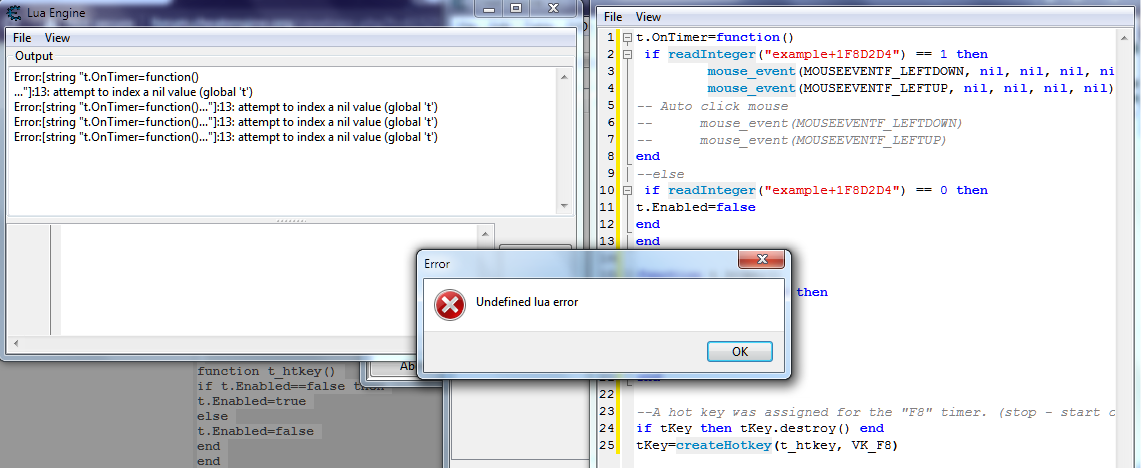
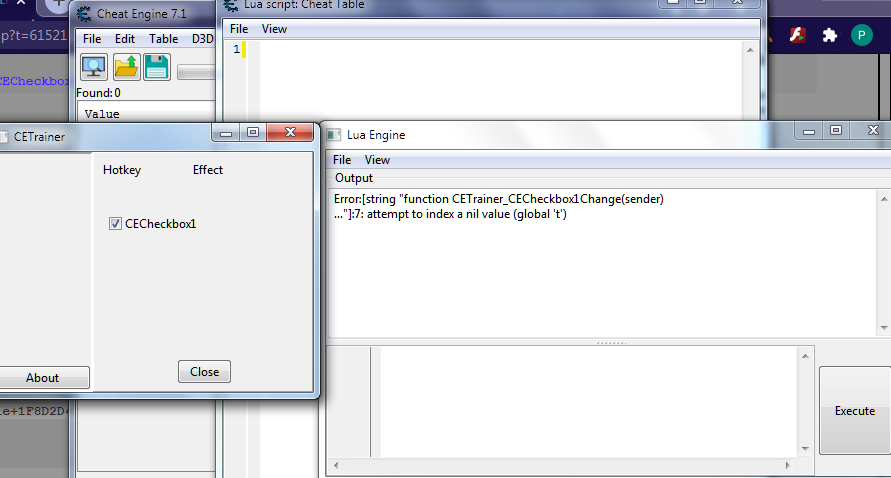
when i try code 1 [ sc1 ] = show error
" attempt to index a nil value ( global 't')
when i try code 2 [ sc 2] = cant compile script
| FIRELESS_BOUNTY wrote: | | Corroder wrote: | | Did the value 0 and 1 mean as check box checked state or the value from the address in the game?. |
And are you sure about your pointer |
sorry master 1 and 0 is value in a game
1= on
0 = off
i wanted to make trainer when i check = on [ value change to 1 ]
and when i uncheck = off [ value change to 0 ]
| Description: |
|
| Filesize: |
117.63 KB |
| Viewed: |
5005 Time(s) |
|
| Description: |
|
| Filesize: |
87.12 KB |
| Viewed: |
5005 Time(s) |
|
|
|
| Back to top |
|
|
Corroder
Grandmaster Cheater Supreme
Reputation: 75
Joined: 10 Apr 2015
Posts: 1675
|
| Posted: Tue Sep 08, 2020 10:06 pm Post subject: |
 |
|
If 0 and 1 is the value from your game address, then:
| Code: | function AutoShoot()
if UDF1.CECheckBox1.Checked == true then
if readInteger("example+1F8D2D4") == 1 then
t.Enabled = true
mouse_event(MOUSEEVENTF_LEFTDOWN, nil, nil, nil, nil)
--print('Left mouse button clicking')
UDF1.CECheckBox1.Caption = 'Auto Shoot ON'
elseif readInteger("example+1F8D2D4") == 0 then
t.Enabled = false
mouse_event(MOUSEEVENTF_LEFTUP, nil, nil, nil, nil)
--print('Left mouse button stop clicking')
UDF1.CECheckBox1.Caption = 'Auto Shoot OFF'
end
else
t.Enabled = false
mouse_event(MOUSEEVENTF_LEFTUP, nil, nil, nil, nil)
--print('Left mouse button stop clicking')
UDF1.CECheckBox1.Caption = 'Auto Shoot OFF'
end
end
if t then t.destroy() t=nil end
t = createTimer()
t.interval = 10
t.Enabled = false
t.OnTimer = AutoShoot
UDF1.Show()
UDF1.CECheckBox1.OnChange = AutoShoot
|
or something like this:
| Code: | function AutoShoot()
if UDF1.CECheckBox1.Checked == true then
writeInteger("example+1F8D2D4", 1)
t.Enabled = true
mouse_event(MOUSEEVENTF_LEFTDOWN, nil, nil, nil, nil)
--print('Left mouse button clicking')
UDF1.CECheckBox1.Caption = 'Auto Shoot ON'
elseif UDF1.CECheckBox1.Checked == false then
writeInteger("example+1F8D2D4", 0)
t.Enabled = false
mouse_event(MOUSEEVENTF_LEFTUP, nil, nil, nil, nil)
--print('Left mouse button stop clicking')
UDF1.CECheckBox1.Caption = 'Auto Shoot OFF'
end
end
if t then t.destroy() t=nil end
t = createTimer()
t.interval = 10
t.Enabled = false
t.OnTimer = AutoShoot
UDF1.Show()
UDF1.CECheckBox1.OnChange = AutoShoot |
_________________
Stealing Code From Stolen Code...
And Admit It.. Hmmm....Typically LOL |
|
| Back to top |
|
|
vil33
Cheater
![]() Reputation: 0 Reputation: 0
Joined: 29 Jul 2020
Posts: 34
|
| Posted: Tue Sep 08, 2020 11:08 pm Post subject: |
|
|
| Corroder wrote: | If 0 and 1 is the value from your game address, then:
| Code: | function AutoShoot()
if UDF1.CECheckBox1.Checked == true then
if readInteger("example+1F8D2D4") == 1 then
t.Enabled = true
mouse_event(MOUSEEVENTF_LEFTDOWN, nil, nil, nil, nil)
--print('Left mouse button clicking')
UDF1.CECheckBox1.Caption = 'Auto Shoot ON'
elseif readInteger("example+1F8D2D4") == 0 then
t.Enabled = false
mouse_event(MOUSEEVENTF_LEFTUP, nil, nil, nil, nil)
--print('Left mouse button stop clicking')
UDF1.CECheckBox1.Caption = 'Auto Shoot OFF'
end
else
t.Enabled = false
mouse_event(MOUSEEVENTF_LEFTUP, nil, nil, nil, nil)
--print('Left mouse button stop clicking')
UDF1.CECheckBox1.Caption = 'Auto Shoot OFF'
end
end
if t then t.destroy() t=nil end
t = createTimer()
t.interval = 10
t.Enabled = false
t.OnTimer = AutoShoot
UDF1.Show()
UDF1.CECheckBox1.OnChange = AutoShoot
|
or something like this:
| Code: | function AutoShoot()
if UDF1.CECheckBox1.Checked == true then
writeInteger("example+1F8D2D4", 1)
t.Enabled = true
mouse_event(MOUSEEVENTF_LEFTDOWN, nil, nil, nil, nil)
--print('Left mouse button clicking')
UDF1.CECheckBox1.Caption = 'Auto Shoot ON'
elseif UDF1.CECheckBox1.Checked == false then
writeInteger("example+1F8D2D4", 0)
t.Enabled = false
mouse_event(MOUSEEVENTF_LEFTUP, nil, nil, nil, nil)
--print('Left mouse button stop clicking')
UDF1.CECheckBox1.Caption = 'Auto Shoot OFF'
end
end
if t then t.destroy() t=nil end
t = createTimer()
t.interval = 10
t.Enabled = false
t.OnTimer = AutoShoot
UDF1.Show()
UDF1.CECheckBox1.OnChange = AutoShoot |
|
yeahhhh... finally it works master
thank you master....
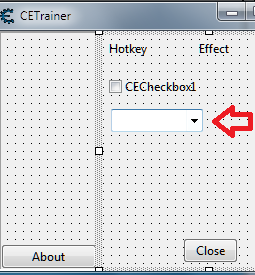
but it runing at all program outside my game ,will you teach me something about combo box? ,then when i select combo box there appear game what i run
then the script running only at my game / select process
i use this code but when i select the program no appear
| Code: |
function Combo1Box()
items= combobox_getItems(ComboBox1)
stringlist_add(items,'example')
function CETrainer_CEComboBox1OnChange(sender)
item=getProperty(ComboBox1,'ItemIndex')
if(item=='0') then
if(getProcessIDFromProcessName("example.exe") == nil ) then
showMessage("Berhasil!")
return end
game='example.exe'
end
OpenProcess(game)
showMessage("Berhasil!")
end
SetMethodProperty(ComboBox1,'OnChange',CETrainer_CEComboBox1OnChange)
CETrainer_CEComboBox1OnChange = Combo1Box
|
sorry for disturbing your time master...
| Description: |
|
| Filesize: |
14.54 KB |
| Viewed: |
4964 Time(s) |
|
|
|
| Back to top |
|
|
Corroder
Grandmaster Cheater Supreme
Reputation: 75
Joined: 10 Apr 2015
Posts: 1675
|
| Posted: Wed Sep 09, 2020 7:36 am Post subject: |
|
|
This is an example, on your combo box case.
| Code: | --- Manambahkan koleksi game ke combobox
CETrainer.CEComboBox1.Clear()
CETrainer.CEComboBox1.Items.Add('Pilih Game....')
CETrainer.CEComboBox1.Items.Add('Example')
CETrainer.CEComboBox1.Items.Add('Growtopia')
CETrainer.CEComboBox1.Items.Add('Farm Together')
CETrainer.CEComboBox1.Items.Add('Dead Cells')
CETrainer.CEComboBox1.Items.Add('PUBG')
CETrainer.CEComboBox1.ItemIndex = 0 -- index 'Pilih Game....'
--- cegah akses jika proses game terhubung belum dibuka
CETrainer.CECheckBox1.Enabled = false
--- fungsi memilih game dan aktivasi auto shoot check box
function selectGame()
cb = CETrainer.CEComboBox1
local idx = cb.ItemIndex
if idx ~= 1 then CETrainer.CECheckBox1.Enabled = false end
if idx == 1 then -- index 'example'
if getProcessIDFromProcessName("example.exe") ~= nil then
openProcess('example.exe')
showMessage('example.exe berhasil dibuka')
CETrainer.CECheckBox1.Enabled = true
else
showMessage('game example.exe tidak ditemukan. Jalankan game lebih dulu')
return nil
end
elseif idx == 2 then -- index 'Growtopia'
-- lakukan sesuatu
elseif idx == 3 then -- index 'Farm Together'
-- lakukan sesuatu
-- dan seterusya -- index game selanjutnya
end
end
CETrainer.CEComboBox1.OnChange = selectGame
|
_________________
Stealing Code From Stolen Code...
And Admit It.. Hmmm....Typically LOL |
|
| Back to top |
|
|
vil33
Cheater
![]() Reputation: 0 Reputation: 0
Joined: 29 Jul 2020
Posts: 34
|
| Posted: Wed Sep 09, 2020 4:11 pm Post subject: |
|
|
| Corroder wrote: | This is an example, on your combo box case.
| Code: | --- Manambahkan koleksi game ke combobox
CETrainer.CEComboBox1.Clear()
CETrainer.CEComboBox1.Items.Add('Pilih Game....')
CETrainer.CEComboBox1.Items.Add('Example')
CETrainer.CEComboBox1.Items.Add('Growtopia')
CETrainer.CEComboBox1.Items.Add('Farm Together')
CETrainer.CEComboBox1.Items.Add('Dead Cells')
CETrainer.CEComboBox1.Items.Add('PUBG')
CETrainer.CEComboBox1.ItemIndex = 0 -- index 'Pilih Game....'
--- cegah akses jika proses game terhubung belum dibuka
CETrainer.CECheckBox1.Enabled = false
--- fungsi memilih game dan aktivasi auto shoot check box
function selectGame()
cb = CETrainer.CEComboBox1
local idx = cb.ItemIndex
if idx ~= 1 then CETrainer.CECheckBox1.Enabled = false end
if idx == 1 then -- index 'example'
if getProcessIDFromProcessName("example.exe") ~= nil then
openProcess('example.exe')
showMessage('example.exe berhasil dibuka')
CETrainer.CECheckBox1.Enabled = true
else
showMessage('game example.exe tidak ditemukan. Jalankan game lebih dulu')
return nil
end
elseif idx == 2 then -- index 'Growtopia'
-- lakukan sesuatu
elseif idx == 3 then -- index 'Farm Together'
-- lakukan sesuatu
-- dan seterusya -- index game selanjutnya
end
end
CETrainer.CEComboBox1.OnChange = selectGame
|
|
yeay... it works master the game appear at combo box
but the script still running outstide the game 
master... how to make select box 1 process only active at one game even the game is same
in case if we dual tab ,1trainer active for screen 1 and if we open trainer again we choose screen 2....
thank you master
|
|
| Back to top |
|
|
|
|
You cannot post new topics in this forum
You cannot reply to topics in this forum
You cannot edit your posts in this forum
You cannot delete your posts in this forum
You cannot vote in polls in this forum
You cannot attach files in this forum
You can download files in this forum
|
|
 FAQ
FAQ Search
 Memberlist
 Usergroups
 Register
 Profile
 Log in to check your private messages
 Log in


