| View previous topic :: View next topic |
| Author |
Message |
Cissamannen
Cheater
![]() Reputation: 0 Reputation: 0
Joined: 16 Jul 2009
Posts: 38
|
 Posted: Tue Sep 08, 2020 2:33 am Post subject: Pointers based on parent value Posted: Tue Sep 08, 2020 2:33 am Post subject: Pointers based on parent value |
 |
|
Hi!
NOTE: It's a physical file edit, and not memory editing.
New issue I'm trying to overcome.
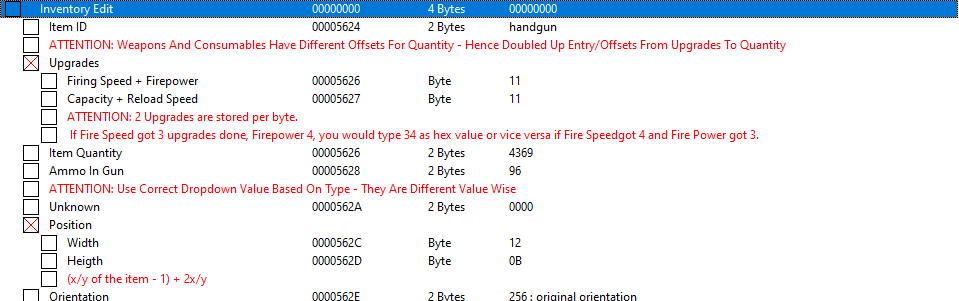
So to be able to condense the file a bit, it possible to use a parents or another entry's value as offsets for child/other entries?
Though in this case, its for editing a file directly, and not memory, so the parent entry should be without an address so it wont write shit to the file when said Value on it is to be used as reference only.
I've uploaded a picture as example. The parent "Inventory Edit" to have its value say be sat to 0x00005624 - and then have its children use that as base offset+pointer to adjust to correct offset.
Note this function would be used for 20 different "slots" as this is only for first save slot. So if it can be copied and applied accordingly to each slot by changing the parent value selections \o/
| Description: |
|
| Filesize: |
21.36 KB |
| Viewed: |
3434 Time(s) |
|
Last edited by Cissamannen on Tue Sep 08, 2020 3:21 am; edited 1 time in total |
|
| Back to top |
|
 |
Dark Byte
Site Admin
 Reputation: 475 Reputation: 475
Joined: 09 May 2003
Posts: 25983
Location: The netherlands
|
| Posted: Tue Sep 08, 2020 2:46 am Post subject: |
|
|
If you use as address
the address will be that of the parent + 1234
_________________
Tools give you results. Knowledge gives you control.
Like my help? Join me on Patreon so i can keep helping |
|
| Back to top |
|
|
Cissamannen
Cheater
![]() Reputation: 0 Reputation: 0
Joined: 16 Jul 2009
Posts: 38
|
| Posted: Tue Sep 08, 2020 3:00 am Post subject: |
|
|
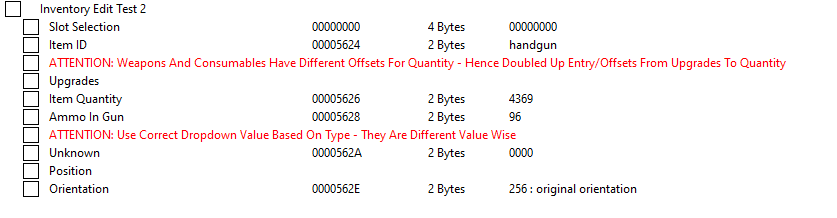
This is where its get finnicky for me. I do not want an address on the parent, but rather a value I can change to each slot offset and have the children change accordingly.
Since it will cycle between 383 slots. Each with 0xC length. Figured it would be easier to cycle slots using drop down list by adding offsets as values accordingly.
By using address, and then value, itll put that said offset value onto the file aswell, which I do not want, as it'll most likely corrupt it from loading.
Hope I managed to make it simple enough to see my issue 
EDIT:
Another option could be as here, parent just being parent, but having the "Slot Selection" as reference. By changing it's value into Item slot offsets that I can use for the entries below. Again, it should be without an address though, as I do not want anything written on the address it has on the entry. Just the value as reference
| Description: |
|
| Filesize: |
12.9 KB |
| Viewed: |
3420 Time(s) |
|
|
|
| Back to top |
|
|
door02
Newbie cheater
![]() Reputation: 0 Reputation: 0
Joined: 28 Aug 2020
Posts: 20
|
| Posted: Tue Sep 08, 2020 3:19 am Post subject: a |
|
|
| which game is this?
|
|
| Back to top |
|
|
Cissamannen
Cheater
![]() Reputation: 0 Reputation: 0
Joined: 16 Jul 2009
Posts: 38
|
| Posted: Tue Sep 08, 2020 3:21 am Post subject: |
|
|
| This is for Resident Evil 4. But it's a savefile loaded in, and not memory. Also it's PS4 version of the file, so the offsets are a little off from steam. And completely off from PS3/Old PC version.
|
|
| Back to top |
|
|
door02
Newbie cheater
![]() Reputation: 0 Reputation: 0
Joined: 28 Aug 2020
Posts: 20
|
| Posted: Tue Sep 08, 2020 8:41 am Post subject: |
|
|
| Bro can u help me?
|
|
| Back to top |
|
|
Cissamannen
Cheater
![]() Reputation: 0 Reputation: 0
Joined: 16 Jul 2009
Posts: 38
|
| Posted: Tue Sep 08, 2020 1:16 pm Post subject: |
|
|
| Dark Byte wrote: | If you use as address
the address will be that of the parent + 1234 |
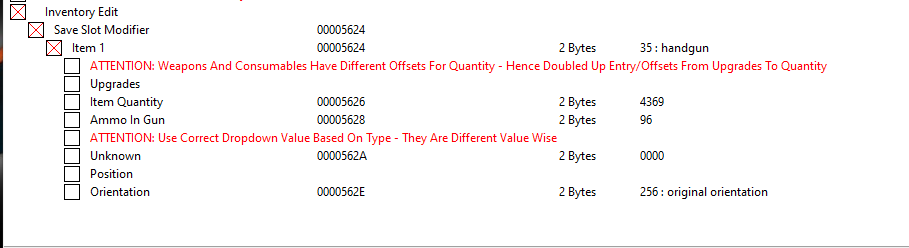
So I've decided on a little workaround for it. By using header with address as you mentioned, and rather keep a comment in table extras with offsets for each 20 Slots. What I notice though, is when copying an item that uses +X for its address, you cannot copy/paste and change value with address change. Is there a workaround for this? Because currently, it will just display the same value as the copied one (even if applying changes).
Or is this back to scripting to do it? See screenshot for an example again. In this case, I have "Item 1" as +0 and its children fixed with +x towards Item 1's current offset. Copy Paste will just paste same offset again even if I set address change to +C for example. Because again, copying this 383 times and manually editing each entries offset with correct +X value is oof.
The length between Item 1 and Item 2 is 0xC - Basically Item 1 -> Item 383
Structure going:
Inventory Edit (Group with no address)
-> Save Slot Modifier (Group with address)
--> Item 1 (Cheat entry with child entries)
Again I am not sure if its possible to change Save Slot Modifier's address using a dropdown list of values. But thats not the worst here to worry about :p
EDIT: After some more testing. Seems a simple Copy Paste script is whats needed again x)
Item 1 (offset +0 since using group address) * 383 with offset +C per entry, while not changing child entry offsets.
| Description: |
|
| Filesize: |
15.08 KB |
| Viewed: |
3359 Time(s) |
|
|
|
| Back to top |
|
|
Cissamannen
Cheater
![]() Reputation: 0 Reputation: 0
Joined: 16 Jul 2009
Posts: 38
|
| Posted: Fri Sep 11, 2020 7:25 am Post subject: |
|
|
| Quick bump in case anyone would be able to assist with a copy script for those parameters <3
|
|
| Back to top |
|
|
|

 FAQ
FAQ Search
 Memberlist
 Usergroups
 Register
 Profile
 Log in to check your private messages
 Log in


