| View previous topic :: View next topic |
| Author |
Message |
.lua
Expert Cheater
 Reputation: 1 Reputation: 1
Joined: 13 Sep 2018
Posts: 203
|
 Posted: Thu Jun 04, 2020 10:18 pm Post subject: How to open a folder and select a file? Posted: Thu Jun 04, 2020 10:18 pm Post subject: How to open a folder and select a file? |
 |
|
| Code: | | ShellExecute("C:\\lua") |
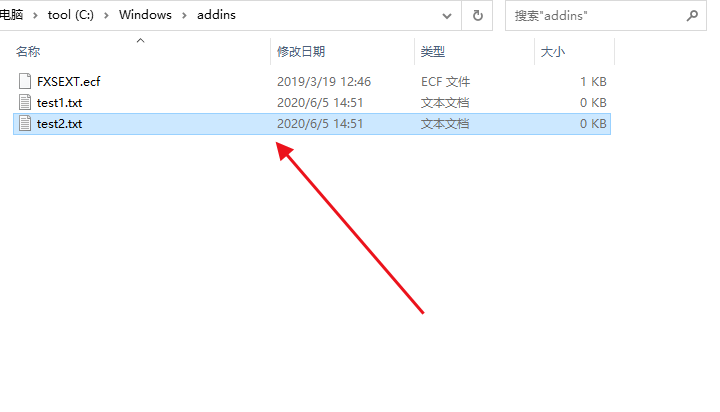
I have opened the folder. How can I select a file in it
|
|
| Back to top |
|
 |
Dark Byte
Site Admin
 Reputation: 475 Reputation: 475
Joined: 09 May 2003
Posts: 25993
Location: The netherlands
|
| Posted: Thu Jun 04, 2020 11:14 pm Post subject: |
|
|
Use the OpenDialog instead
_________________
Tools give you results. Knowledge gives you control.
Like my help? Join me on Patreon so i can keep helping
Last edited by Dark Byte on Fri Jun 05, 2020 1:25 am; edited 1 time in total |
|
| Back to top |
|
|
.lua
Expert Cheater
Reputation: 1
Joined: 13 Sep 2018
Posts: 203
|
| Posted: Fri Jun 05, 2020 12:53 am Post subject: |
|
|
| Dark Byte wrote: | | Use the OpenFileDialog instead |
I just want to select the file
| Description: |
|
| Filesize: |
13.43 KB |
| Viewed: |
2878 Time(s) |
|
|
|
| Back to top |
|
|
Dark Byte
Site Admin
Reputation: 475
Joined: 09 May 2003
Posts: 25993
Location: The netherlands
|
| Posted: Fri Jun 05, 2020 1:25 am Post subject: |
|
|
| Code: |
d=createOpenDialog(nil)
d.InitialDir=[[c:\windows\addins]]
if d.execute() then
showMessage('You selected '..d.FileName)
else
showMessage('No file selected')
end
d.destroy()
|
_________________
Tools give you results. Knowledge gives you control.
Like my help? Join me on Patreon so i can keep helping |
|
| Back to top |
|
|
.lua
Expert Cheater
Reputation: 1
Joined: 13 Sep 2018
Posts: 203
|
| Posted: Fri Jun 05, 2020 1:38 am Post subject: |
|
|
| Code: | | ShellExecute(NULL, "open", "explorer.exe", "/select,C:\\a.txt", NULL, SW_SHOWNORMAL) |
That's what I want,But this code doesn't work in the cheating engine
|
|
| Back to top |
|
|
Corroder
Grandmaster Cheater Supreme
 Reputation: 75 Reputation: 75
Joined: 10 Apr 2015
Posts: 1675
|
| Posted: Fri Jun 05, 2020 5:22 am Post subject: |
|
|
If doesn't want use file dialog, then:
| Code: | | os.execute("explorer D:\\a.txt") |
_________________
Stealing Code From Stolen Code...
And Admit It.. Hmmm....Typically LOL |
|
| Back to top |
|
|
.lua
Expert Cheater
Reputation: 1
Joined: 13 Sep 2018
Posts: 203
|
| Posted: Fri Jun 05, 2020 6:00 am Post subject: |
|
|
| Corroder wrote: | If doesn't want use file dialog, then:
| Code: | | os.execute("explorer D:\\a.txt") |
|
NO NO,What I want is very simple. When you open a folder, you do not need to click. I want to automatically select a file by code (just select it, no need to open it)
|
|
| Back to top |
|
|
Corroder
Grandmaster Cheater Supreme
Reputation: 75
Joined: 10 Apr 2015
Posts: 1675
|
| Posted: Fri Jun 05, 2020 9:29 am Post subject: |
|
|
| .lua wrote: | | Code: | | ShellExecute(NULL, "open", "explorer.exe", "/select,C:\\a.txt", NULL, SW_SHOWNORMAL) |
That's what I want,But this code doesn't work in the cheating engine |
You mean something like this in CE ?
| Code: | | os.execute("explorer /n, /select, C:\\a.txt") |
_________________
Stealing Code From Stolen Code...
And Admit It.. Hmmm....Typically LOL |
|
| Back to top |
|
|
.lua
Expert Cheater
Reputation: 1
Joined: 13 Sep 2018
Posts: 203
|
| Posted: Sun Jun 07, 2020 6:36 am Post subject: |
|
|
| Corroder wrote: | | You mean something like this in CE ? |
You're great,that's what I want
|
|
| Back to top |
|
|
|

 FAQ
FAQ Search
 Memberlist
 Usergroups
 Register
 Profile
 Log in to check your private messages
 Log in


