 |
Cheat Engine
The Official Site of Cheat Engine
|
| View previous topic :: View next topic |
| Author |
Message |
blankTM
Cheater
![]() Reputation: 1 Reputation: 1
Joined: 03 May 2020
Posts: 49
|
 Posted: Thu May 07, 2020 11:31 pm Post subject: How to correctly call DwmExtendFrameIntoClientArea Posted: Thu May 07, 2020 11:31 pm Post subject: How to correctly call DwmExtendFrameIntoClientArea |
 |
|
I tried this but it didn't work
| Code: |
MARGINS={
cxLeftWidth=-1,
cxRightWidth=-1,
cyTopHeight=-1,
cyBottomHeight=-1
}
executeCodeLocalEx('dwmapi.DwmExtendFrameIntoClientArea',UDF1.Handle,MARGINS)
|
|
|
| Back to top |
|
 |
atom0s
Moderator
 Reputation: 205 Reputation: 205
Joined: 25 Jan 2006
Posts: 8588
Location: 127.0.0.1
|
| Posted: Thu May 07, 2020 11:44 pm Post subject: |
|
|
Use a memory stream instead. Try this:
| Code: |
local margins = createMemoryStream();
margins.writeDword(-1);
margins.writeDword(-1);
margins.writeDword(-1);
margins.writeDword(-1);
executeCodeLocalEx('dwmapi.DwmExtendFrameIntoClientArea', UDF1.Handle, margins.Memory);
|
_________________
- Retired. |
|
| Back to top |
|
|
blankTM
Cheater
![]() Reputation: 1 Reputation: 1
Joined: 03 May 2020
Posts: 49
|
| Posted: Fri May 08, 2020 12:19 am Post subject: no effect |
|
|
| atom0s wrote: | Use a memory stream instead. Try this:
| Code: |
local margins = createMemoryStream();
margins.writeDword(-1);
margins.writeDword(-1);
margins.writeDword(-1);
margins.writeDword(-1);
executeCodeLocalEx('dwmapi.DwmExtendFrameIntoClientArea', UDF1.Handle, margins.Memory);
|
|
no effect
|
|
| Back to top |
|
|
Corroder
Grandmaster Cheater Supreme
 Reputation: 75 Reputation: 75
Joined: 10 Apr 2015
Posts: 1675
|
| Posted: Fri May 08, 2020 6:27 am Post subject: |
|
|
Not work, because value that indicates whether Desktop Window Manager (DWM) composition is not checked and set to enabled.
Check for : DwmIsCompositionEnabled (on MSDN)
Here an work example:
| Code: | f = createForm(true)
f.Caption = 'Extended Frame'
function DwmIsCompositionEnabled(en)
return executeCodeLocalEx("dwmapi.DwmIsCompositionEnabled",en)
end
local margins = createMemoryStream();
margins.writeDword(25)
margins.writeDword(25)
margins.writeDword(25)
margins.writeDword(25)
ver = 6.1 -- This is windows 7 (check for other windows version first)
DwmIsCompositionEnabled(ver)
executeCodeLocalEx('dwmapi.DwmExtendFrameIntoClientArea', f.Handle, margins.Memory) |
_________________
Stealing Code From Stolen Code...
And Admit It.. Hmmm....Typically LOL |
|
| Back to top |
|
|
blankTM
Cheater
![]() Reputation: 1 Reputation: 1
Joined: 03 May 2020
Posts: 49
|
| Posted: Fri May 08, 2020 7:42 am Post subject: |
|
|
| Corroder wrote: | Not work, because value that indicates whether Desktop Window Manager (DWM) composition is not checked and set to enabled.
Check for : DwmIsCompositionEnabled (on MSDN)
Here an work example:
| Code: | f = createForm(true)
f.Caption = 'Extended Frame'
function DwmIsCompositionEnabled(en)
return executeCodeLocalEx("dwmapi.DwmIsCompositionEnabled",en)
end
local margins = createMemoryStream();
margins.writeDword(25)
margins.writeDword(25)
margins.writeDword(25)
margins.writeDword(25)
ver = 6.1 -- This is windows 7 (check for other windows version first)
DwmIsCompositionEnabled(ver)
executeCodeLocalEx('dwmapi.DwmExtendFrameIntoClientArea', f.Handle, margins.Memory) |
|
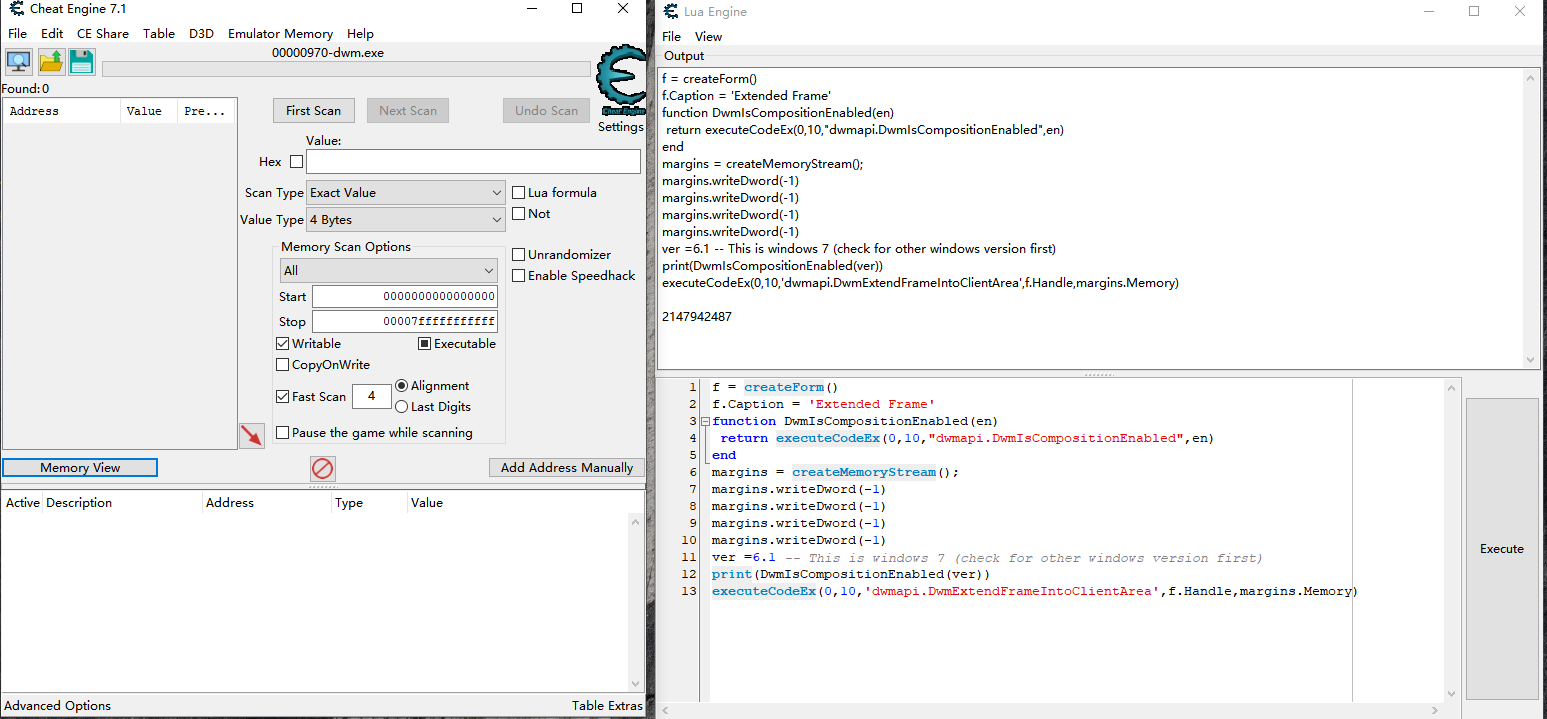
I tried using executeCodeEx but it lasted for a second
| Description: |
|
| Filesize: |
130.87 KB |
| Viewed: |
3752 Time(s) |
|
|
|
| Back to top |
|
|
Corroder
Grandmaster Cheater Supreme
Reputation: 75
Joined: 10 Apr 2015
Posts: 1675
|
| Posted: Fri May 08, 2020 8:04 am Post subject: |
|
|
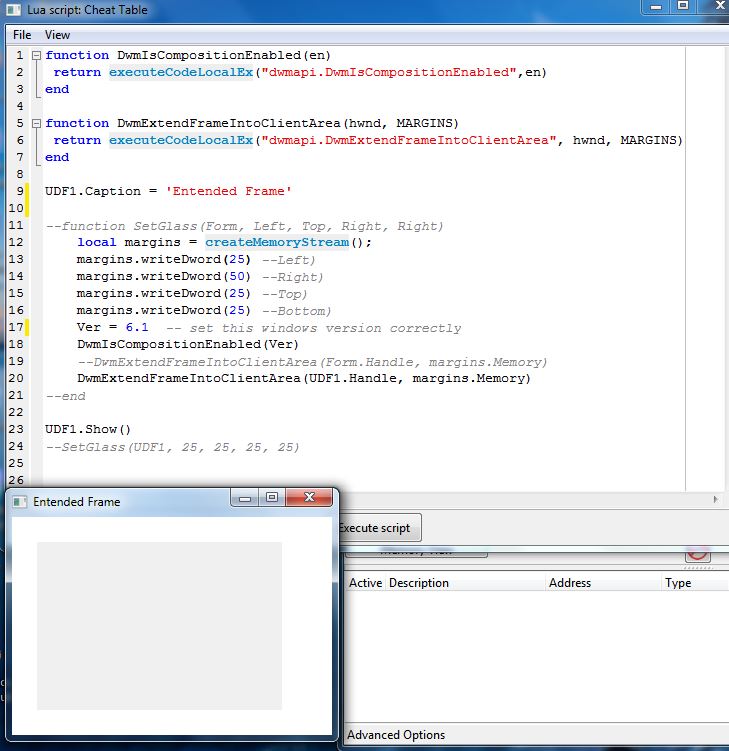
What windows version you use?.
Windows 7 version value = 6.1
Windows 8 version value = 6.2
Windows 10 version value = 10,0
You need set this windows version correctly, also try change:
to
| Code: | | f = createForm(true) |
And this another version using dwmapi.DwmExtendFrameIntoClientArea:
| Code: | function DwmIsCompositionEnabled(en)
return executeCodeLocalEx("dwmapi.DwmIsCompositionEnabled",en)
end
function DwmExtendFrameIntoClientArea(hwnd, MARGINS)
return executeCodeLocalEx("dwmapi.DwmExtendFrameIntoClientArea", hwnd, MARGINS)
end
UDF1.Caption = 'Entended Frame'
--function SetGlass(Form, Left, Top, Right, Right)
local margins = createMemoryStream();
margins.writeDword(25) --Left)
margins.writeDword(50) --Right)
margins.writeDword(25) --Top)
margins.writeDword(25) --Bottom)
Ver = 6.1 -- set this windows version correctly
DwmIsCompositionEnabled(Ver)
--DwmExtendFrameIntoClientArea(Form.Handle, margins.Memory)
DwmExtendFrameIntoClientArea(UDF1.Handle, margins.Memory)
--end
UDF1.Show()
--SetGlass(UDF1, 25, 25, 25, 25) |
| Description: |
|
| Filesize: |
86.34 KB |
| Viewed: |
3747 Time(s) |
|
_________________
Stealing Code From Stolen Code...
And Admit It.. Hmmm....Typically LOL |
|
| Back to top |
|
|
blankTM
Cheater
![]() Reputation: 1 Reputation: 1
Joined: 03 May 2020
Posts: 49
|
| Posted: Fri May 08, 2020 8:28 am Post subject: |
|
|
| Corroder wrote: | What windows version you use?.
Windows 7 version value = 6.1
Windows 8 version value = 6.2
Windows 10 version value = 10,0
You need set this windows version correctly, also try change:
to
| Code: | | f = createForm(true) |
And this another version using dwmapi.DwmExtendFrameIntoClientArea:
| Code: | function DwmIsCompositionEnabled(en)
return executeCodeLocalEx("dwmapi.DwmIsCompositionEnabled",en)
end
function DwmExtendFrameIntoClientArea(hwnd, MARGINS)
return executeCodeLocalEx("dwmapi.DwmExtendFrameIntoClientArea", hwnd, MARGINS)
end
UDF1.Caption = 'Entended Frame'
--function SetGlass(Form, Left, Top, Right, Right)
local margins = createMemoryStream();
margins.writeDword(25) --Left)
margins.writeDword(50) --Right)
margins.writeDword(25) --Top)
margins.writeDword(25) --Bottom)
Ver = 6.1 -- set this windows version correctly
DwmIsCompositionEnabled(Ver)
--DwmExtendFrameIntoClientArea(Form.Handle, margins.Memory)
DwmExtendFrameIntoClientArea(UDF1.Handle, margins.Memory)
--end
UDF1.Show()
--SetGlass(UDF1, 25, 25, 25, 25) |
|
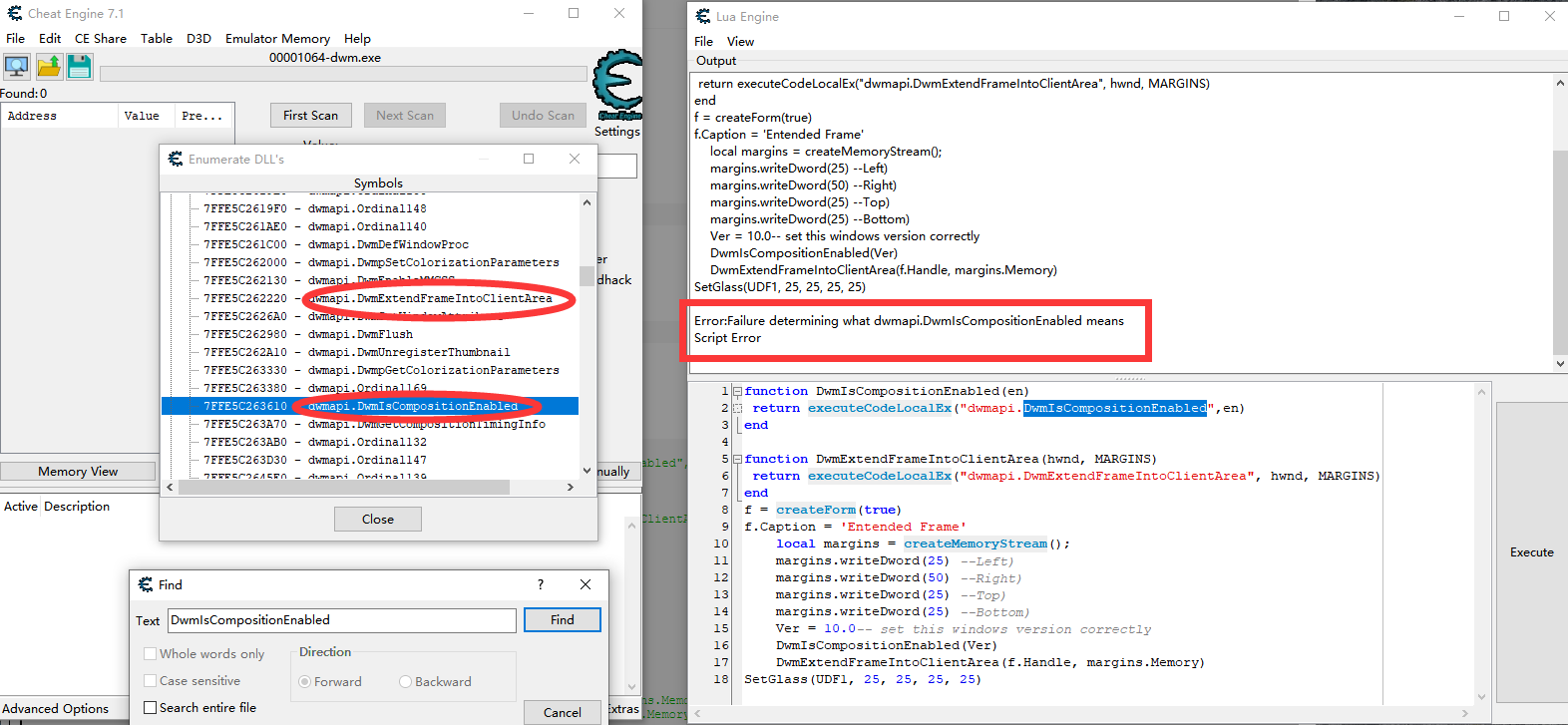
I don't quite understand why this problem occurs
| Description: |
|
| Filesize: |
149.36 KB |
| Viewed: |
3742 Time(s) |
|
|
|
| Back to top |
|
|
Corroder
Grandmaster Cheater Supreme
Reputation: 75
Joined: 10 Apr 2015
Posts: 1675
|
| Posted: Fri May 08, 2020 2:11 pm Post subject: |
|
|
Note from: https://docs.microsoft.com/en-us/windows/win32/dwm/composition-ovw?redirectedfrom=MSDN
As of Windows 8, the information in this section is no longer valid. DWM can no longer be programmatically disabled, nor is it disabled when an application attempts to draw to the primary display surface. The following information applies to only Windows 7 and earlier systems.
In Windows 8, Desktop Window Manager (DWM) is always ON and cannot be disabled by end users and apps.
In Windows 8, DWM desktop composition is a core operating system component and cannot be disabled. With a few exceptions, desktop composition is always on; it’s started before the user logon and remains active for the duration of a session.
All of the options for disabling desktop composition that exist in Window 7 are removed
Apps cannot use DwmEnableComposition to disable desktop composition. In order to maintain backward compatibility, a call to this API will return success; however, desktop composition is not disabled.
So, try run code without or remove this line (if use Windows 8 or later):
| Code: | | DwmIsCompositionEnabled(Ver) |
_________________
Stealing Code From Stolen Code...
And Admit It.. Hmmm....Typically LOL |
|
| Back to top |
|
|
blankTM
Cheater
![]() Reputation: 1 Reputation: 1
Joined: 03 May 2020
Posts: 49
|
| Posted: Fri May 08, 2020 4:43 pm Post subject: |
|
|
| Corroder wrote: |
As of Windows 8, the information in this section is no longer valid. DWM can no longer be programmatically disabled, nor is it disabled when an application attempts to draw to the primary display surface. The following information applies to only Windows 7 and earlier systems.
In Windows 8, Desktop Window Manager (DWM) is always ON and cannot be disabled by end users and apps.
In Windows 8, DWM desktop composition is a core operating system component and cannot be disabled. With a few exceptions, desktop composition is always on; it’s started before the user logon and remains active for the duration of a session.
All of the options for disabling desktop composition that exist in Window 7 are removed
Apps cannot use DwmEnableComposition to disable desktop composition. In order to maintain backward compatibility, a call to this API will return success; however, desktop composition is not disabled.
So, try run code without or remove this line (if use Windows 8 or later):
| Code: | | DwmIsCompositionEnabled(Ver) |
|
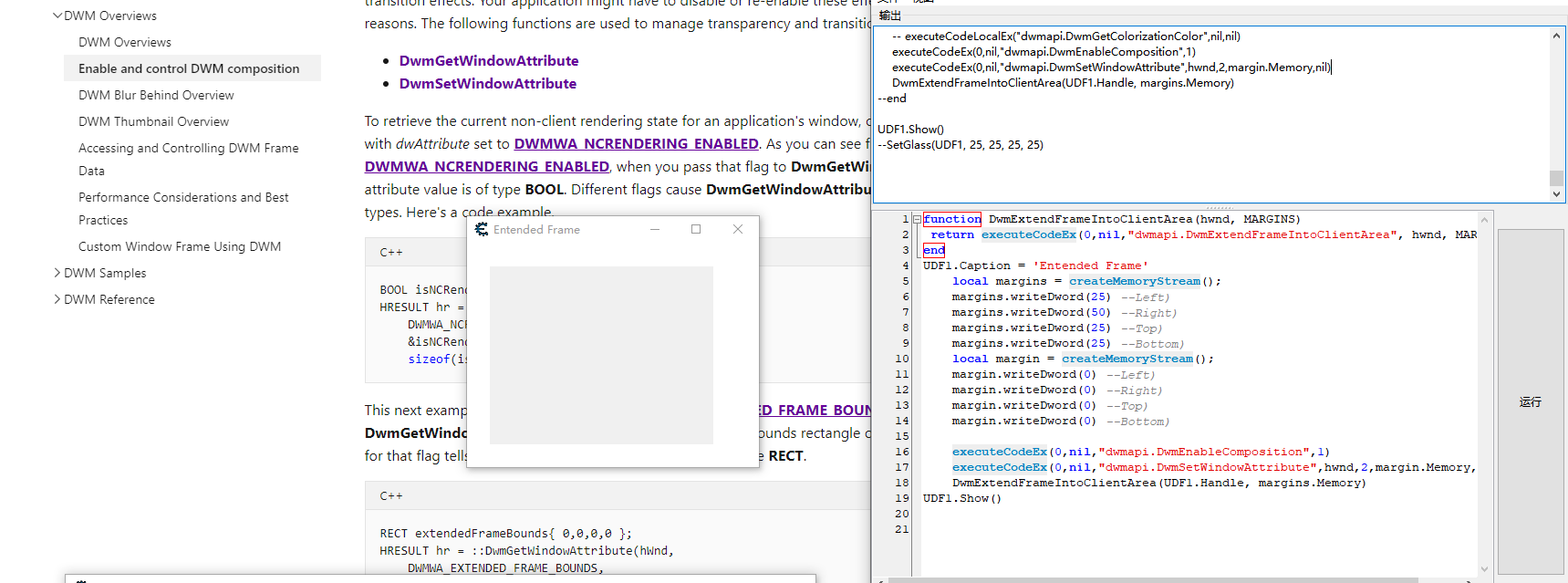
Thank you! I try to use:
package.loadlib ("dwmapi.dll", '')
very successful!
| Description: |
|
| Filesize: |
142.71 KB |
| Viewed: |
3702 Time(s) |
|
|
|
| Back to top |
|
|
|
|
You cannot post new topics in this forum
You cannot reply to topics in this forum
You cannot edit your posts in this forum
You cannot delete your posts in this forum
You cannot vote in polls in this forum
You cannot attach files in this forum
You can download files in this forum
|
|
 FAQ
FAQ Search
 Memberlist
 Usergroups
 Register
 Profile
 Log in to check your private messages
 Log in


