 |
Cheat Engine
The Official Site of Cheat Engine
|
| View previous topic :: View next topic |
| Author |
Message |
Loveness
Newbie cheater
![]() Reputation: 0 Reputation: 0
Joined: 30 Aug 2016
Posts: 14
|
 Posted: Sun Apr 12, 2020 5:07 am Post subject: Some big suggestions! Posted: Sun Apr 12, 2020 5:07 am Post subject: Some big suggestions! |
 |
|
Hi!
I'm surprised that version 7 already appears soon, but some suggestions (which I list below) have not yet been implemented. I'm not used to post suggestions, opinions on forums, but Cheat Engine is my favorite one and I would like to contribute with some suggestions. I apologize in advance for not looking for similar topics, where my suggestions can already be posted maybe.
1) Since working with Cheat Engine can often cause crashes, because we make mistakes sometimes , you are welcome to enter the recover option, similar to Microsoft Office (Word, Excel) when the program gives you the opportunity to continue what you have done, in case you accidentally kill with force the program or an unwanted crash happened. This option is not difficult to do. When the user saves a script, a pointer, or makes some changes, the program automatically saves it to a temporary folder and in the event of an unplanned shutdown, when you open Cheat Engine, it will prompt you to restore the work where you last stopped.
2) Sometimes when we open a lot of windows of the application and we need, for example, one of them to be always on top to see what happens in the given window, very often, the given window may disappear in the background after another window, and it's uncomfortable to move to another windows to find it. Therefore, I propose to add a button that will give the given window the ON TOP function, that is to say, the given window to be always displayed above the others.
3) The program should look for paths like Windows, in unicode, because the program always gives errors. For example, I have a file saved in the folder with the path: D:\Motănaș\Cheat\Doom.ct .. When I want to open this file, the program gives me the error: Failure loading the trainer. Reason: Unable to open the file: "D:\Motana?\Cheat\Doom.ct"
Thank you :)
|
|
| Back to top |
|
 |
mgr.inz.Player
I post too much
 Reputation: 223 Reputation: 223
Joined: 07 Nov 2008
Posts: 4438
Location: W kraju nad Wisla. UTC+01:00
|
| Posted: Sun Apr 12, 2020 6:58 am Post subject: |
|
|
1) For now, many people are using Lua script for this. As a CE feature I think it can be done with ease. Maybe I will finish GitHub PR before official CE7.1
2) Maybe a small AlwaysOnTop window "Bring to front lost window" we can enable.
3) it is a launcher problem. If you drag and drop Doom.ct from location which has non-ascii chars on "Cheat Engine.exe", you will see the error. If you drag&drop on "cheatengine-i386.exe" or "cheatengine-x86_64.exe" it will open without issues.
_________________
|
|
| Back to top |
|
|
Corroder
Grandmaster Cheater Supreme
 Reputation: 75 Reputation: 75
Joined: 10 Apr 2015
Posts: 1675
|
| Posted: Sun Apr 12, 2020 7:32 am Post subject: |
|
|
| mgr.inz.Player wrote: | 1) For now, many people are using Lua script for this. As a CE feature I think it can be done with ease. Maybe I will finish GitHub PR before official CE7.1
2) Maybe a small AlwaysOnTop window "Bring to front lost window" we can enable.
|
Maybe should be better if adding menus inside CE Setting Tab under General or new menu, which give users some options to set:
- CE GUI (eq. CE forms colors or themes, fonts, CE window state, start location, etc)
- Default working directory/path choose by user
- Set warning message on/off to let users to ignoring or not when to save a project
- CE Windows form title + user project name (ie. Cheat Engine 7.0 - [project name])
- Add new components/LCL components (ie. buttonEdit, buttonValue, web browser CEF, Gecko, etc)
That is from me.

_________________
Stealing Code From Stolen Code...
And Admit It.. Hmmm....Typically LOL |
|
| Back to top |
|
|
mgr.inz.Player
I post too much
Reputation: 223
Joined: 07 Nov 2008
Posts: 4438
Location: W kraju nad Wisla. UTC+01:00
|
|
| Back to top |
|
|
Loveness
Newbie cheater
![]() Reputation: 0 Reputation: 0
Joined: 30 Aug 2016
Posts: 14
|
| Posted: Sun Apr 12, 2020 10:59 am Post subject: |
|
|
| mgr.inz.Player wrote: |
1) For now, many people are using Lua script for this. As a CE feature I think it can be done with ease. Maybe I will finish GitHub PR before official CE7.1
2) Maybe a small AlwaysOnTop window "Bring to front lost window" we can enable.
3) it is a launcher problem. If you drag and drop Doom.ct from location which has non-ascii chars on "Cheat Engine.exe", you will see the error. If you drag&drop on "cheatengine-i386.exe" or "cheatengine-x86_64.exe" it will open without issues.
|
Thank you for your answer.
1) I'm not an advanced expert to know LUA scripting.. many users like me use Cheat Engine to cheat the games: find the value, make a simple script or pointers and that's all  Of course, i know how make dissect, to find a value, to make a script etc. but i'm not advanced to make trainers for other etc. That's why, my opinion is to not be focused on those who know LUA scripting, but for simple users also. By the way, i'll be thankful if you give me that LUA scripting to resolve my big issue and to explain how to do that Of course, i know how make dissect, to find a value, to make a script etc. but i'm not advanced to make trainers for other etc. That's why, my opinion is to not be focused on those who know LUA scripting, but for simple users also. By the way, i'll be thankful if you give me that LUA scripting to resolve my big issue and to explain how to do that
2) Good.
3) Thank you for your suggestion. But as i said in 1st point, will be welcome to resolve this issue in all ways Not so many users know about how to do that
P.S. Super! Cheat Egine.exe that you gave me, works fine! This is the solution
Also i want to add an another suggestion: Is possible to add multilanguage support, i.e. Cheat Engine to have multiple display languages? I can offer a help to translate in russian & romanian languages
|
|
| Back to top |
|
|
Dark Byte
Site Admin
 Reputation: 475 Reputation: 475
Joined: 09 May 2003
Posts: 25994
Location: The netherlands
|
| Posted: Sun Apr 12, 2020 12:09 pm Post subject: |
|
|
for the language support look at the languages folder in your ce install folder.
there create a new folder for your language, copy the .po files to there and do some translations.
There is already a russian translation for CE at https://github.com/cheat-engine/cheat-engine/tree/master/Cheat%20Engine/bin/languages/ru_RU
check out "how add languages.txt"
_________________
Tools give you results. Knowledge gives you control.
Like my help? Join me on Patreon so i can keep helping |
|
| Back to top |
|
|
Corroder
Grandmaster Cheater Supreme
Reputation: 75
Joined: 10 Apr 2015
Posts: 1675
|
| Posted: Sun Apr 12, 2020 12:17 pm Post subject: |
|
|
I found your post in CE Extensions subforum. Great work and thank you.
_________________
Stealing Code From Stolen Code...
And Admit It.. Hmmm....Typically LOL |
|
| Back to top |
|
|
mgr.inz.Player
I post too much
Reputation: 223
Joined: 07 Nov 2008
Posts: 4438
Location: W kraju nad Wisla. UTC+01:00
|
| Posted: Sun Apr 12, 2020 2:15 pm Post subject: |
|
|
I think I finished "Backupper" for CE. It is not a Lua script.
It works in two modes:
- normal: saves current work in justanexample.~ct when you are working on justanexample.ct
- paranoid: saves current work as justanexample.ct.fourrandomdigits inside backup folder. fourrandomdigits are generated once per session. Can create many copies if your PC or CE crash often.
Backupper detects ".~ct" backup file and will suggest loading it instead.
Before I sent as github PullRequest, you can test it here:

Binaries:
https://github.com/mgrinzPlayer/tmp/files/4467535/Backupper.zip
It's Backupper for CE. If you want to help me test this feature, first be sure to make manual backup of all your CT files, RAR or 7zip your "My Cheat Tables" folder
DIFF
https://github.com/cheat-engine/cheat-engine/compare/master...mgrinzPlayer:backupmaker?expand=1
Edit:
As usual something went wrong. I have to reinstall "GitHub Desktop"... eh
Edit:
Done. My native language is not english. Any suggestions are welcome.
Edit:
I changed it a little diff. Download and test again. Thank you.
Edit:
diff
Edit:
diff
_________________
Last edited by mgr.inz.Player on Sun Apr 12, 2020 7:17 pm; edited 1 time in total |
|
| Back to top |
|
|
daspamer
Grandmaster Cheater Supreme
 Reputation: 54 Reputation: 54
Joined: 13 Sep 2011
Posts: 1588
|
| Posted: Sun Apr 12, 2020 6:10 pm Post subject: |
|
|
@mgr.inz.Player
Backupper works flawlessly here, with on exception, if for instance the process is shut for instance via task manager (application not process) or taskkill (without forcing), it will shut down C.E and remove the backup, only if forcibly the backup remains.
If running into infinite loop in lua, crashing the process will keep the backup, very handy for all users.
On side note it seems that if closing C.E without saving, CE will not ask if we'd want to save the table,but rather instantly close, only if we load the table, that might be the reason why backups are removed when attempting to shut down the process.
Another bug, drag and drop fails to load the tables.
_________________
I'm rusty and getting older, help me re-learn lua. |
|
| Back to top |
|
|
mgr.inz.Player
I post too much
Reputation: 223
Joined: 07 Nov 2008
Posts: 4438
Location: W kraju nad Wisla. UTC+01:00
|
| Posted: Sun Apr 12, 2020 6:25 pm Post subject: |
|
|
Thank you for your feedback.
| Quote: | | Another bug, drag and drop fails to load the tables |
Already reported.
| DaSpamer wrote: | | On side note it seems that if closing C.E without saving, CE will not ask if we'd want to save the table |
It relies on internal editedsincelastsave flag. Some actions do not set this flag to true, e.g. editing/adding comments inside comment window
Edit: OK, I see the error.
Backupper, for now, is only for CE crashes. If you accidentally close CE, or just normally close CE, backup file will be deleted.
_________________
Last edited by mgr.inz.Player on Sun Apr 12, 2020 7:13 pm; edited 2 times in total |
|
| Back to top |
|
|
panraven
Grandmaster Cheater
![]() Reputation: 62 Reputation: 62
Joined: 01 Oct 2008
Posts: 960
|
| Posted: Sun Apr 12, 2020 6:35 pm Post subject: |
|
|
@'Lua Script:cheat table'
Add a backup step after clicking 'execute' but before actually run the lua script?
It probably remove the need of 5000ms delay or frequently backup.
Thank you~
_________________
- Retarded. |
|
| Back to top |
|
|
mgr.inz.Player
I post too much
Reputation: 223
Joined: 07 Nov 2008
Posts: 4438
Location: W kraju nad Wisla. UTC+01:00
|
| Posted: Sun Apr 12, 2020 6:46 pm Post subject: |
|
|
| panraven wrote: | @'Lua Script:cheat table'
Add a backup step after clicking 'execute' but before actually run the lua script?
It probably remove the need of 5000ms delay or frequently backup.
Thank you~ |
5s delay isn't that bad? Because, you know, otherwise if you type 'LOL', CE will save whole CT file after L, then again after 'O', then again after 'L'. Big tables with sounds and images will take some time when saving.
Additional 'set editedsincelastsave to true' for executing scripts 'Lua Script:cheat table' and LuaEngineForm in Backupper Paranoid Mode. OK. See you tomorrow.
I added 5000ms delay. Typing Lua script inside "Lua Script:cheat table" should be more smooth if your CT file is big.
https://github.com/mgrinzPlayer/tmp/files/4467535/Backupper.zip
If any suggestions or error, please provide:
- steps to reproduce (as little as possible)
- what's goes wrong/what you expect
- for now, only CE crashes. Periodic backups (when CE doesn't crash) will be added later.
{going to sleep see you soon, for real this time}
_________________
|
|
| Back to top |
|
|
mgr.inz.Player
I post too much
Reputation: 223
Joined: 07 Nov 2008
Posts: 4438
Location: W kraju nad Wisla. UTC+01:00
|
| Posted: Mon Apr 13, 2020 6:25 pm Post subject: |
|
|
Another update I think I'm close to submit it as github PR.

Info:
- "Make backup files while saving" - makes a copy example.~1.CT, then example.~2.CT, example.~3.CT, ..., then again example.~1.CT
- "Enable session backup" - creates example.~CT file and updates it
- "Paranoid mode" - creates example.ABCD-EFGH~CT, after 15 minutes, it will create example.QWER-TYUO~CT. You have to deal with those files manually (restoring,removing).
Download:
https://github.com/mgrinzPlayer/tmp/files/4472443/Backupper.zip
DIFF:
https://github.com/cheat-engine/cheat-engine/compare/master...mgrinzPlayer:Backupper?expand=1
Session backups are done when you are editing your CT.
I added additional point just before executing Lua script when you click button inside "Lua script:Cheat Table"
If you have CE source you can add (or DB) more "session backup points" with this line:
| Code: | //saves without delay
if mainform.editedsincelastsave and (mainform.BackupperSessionBackup) then mainform.SessionBackupFileCreate; |
_________________
|
|
| Back to top |
|
|
Loveness
Newbie cheater
![]() Reputation: 0 Reputation: 0
Joined: 30 Aug 2016
Posts: 14
|
| Posted: Tue Apr 14, 2020 9:15 am Post subject: |
|
|
| mgr.inz.Player wrote: | Another update I think I'm close to submit it as github PR.
...
|
I downloaded the last cheat engine exes from your link and tested.
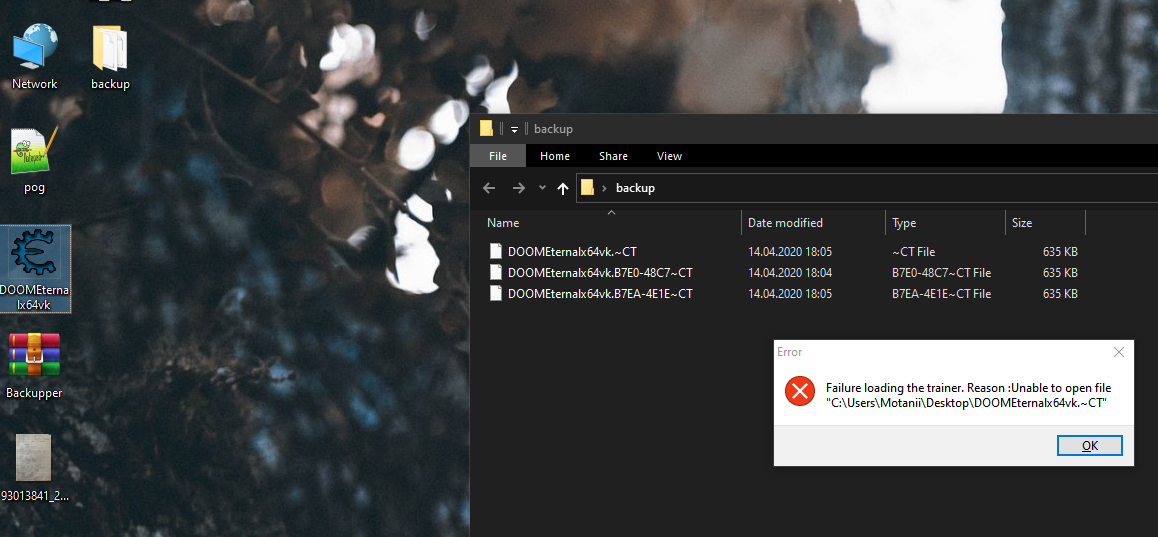
So i open DOOMEternalx64vk.ct, renamed a script just.. and i killed Cheat Engine Process forcely. After that, when i tried to open the file again, so an error appeared (see the screenshot attashed)
I've seen that Cheat Engine created a backup folder on desktop, in the same path with the original file.
Also i want to suggest that Cheat Engine not to ask on opening to open the backup or not, but to appear on startup a modal dialog with a list object where will be listed every backup, creation time of it, so the user will choose what backup to restore, instead to go to the backup folder and to guess what to restore.. even the user must change the extension from ~CT to CT.
Also, will be good if you add the following suggestion:
- Create backup on every change you make to scripts
Because, even i will set to save every 1 minute there's rare chance that what i've did not to be saved. For example, if i open the script editor dialog and add/modified a script, so when i finish it, i press OK to save it.. so from the moment i press OK and script is saved, the program can save it as backup at maximum 1 minute delay after i press OK.. and if a crash happens before this, so everything is lost.
In other words, if i press OK, or i renamed a description, add/delete an adress/script etc., the program in that moment automatically create the backup.
| Description: |
|
| Filesize: |
572.46 KB |
| Viewed: |
5218 Time(s) |
|
|
|
| Back to top |
|
|
mgr.inz.Player
I post too much
Reputation: 223
Joined: 07 Nov 2008
Posts: 4438
Location: W kraju nad Wisla. UTC+01:00
|
| Posted: Tue Apr 14, 2020 6:31 pm Post subject: |
|
|
| Loveness wrote: | | I have a file saved in the folder with the path: D:\Motănaș\Cheat\Doom.ct .. When I want to open this file, the program gives me the error: Failure loading the trainer. Reason: Unable to open the file: "D:\Motana?\Cheat\Doom.ct" |
In CheatEngine 7.1 public release this should be fixed.
About that Backupper error. I know what I missed. I fixed this issue:
https://github.com/mgrinzPlayer/tmp/files/4478415/Backupper.zip
| Quote: | | In other words, if i press OK, or i renamed a description, add/delete an adress/script etc., the program in that moment automatically create the backup |
This is exactly what "session backup" does (should do). It constantly updates .~CT file.
"Paranoid" mode, when "session backup" is also enabled (otherwise it does nothing), just saves additional file every XX minutes once with different/random ".~XXXX-YYYY.CT" extension.
Example with this mode enabled:
- user makes changes -> .~CT file created; additional file created .~B7E0-48C7.CT
- user makes changes -> .~CT file updated; additional file not created because last one was made less than X minutes ago
- user makes changes -> .~CT file updated; -//-
- user makes changes -> .~CT file updated; -//-
- user makes changes -> .~CT file updated; new file created .~B7EA-4E1E.CT
- user makes changes -> .~CT file updated; -//-
- user makes changes -> .~CT file updated; -//-
- user makes changes -> .~CT file updated; -//-
You have to treat those as file "version history" (something known from dropbox and etc.). Maybe I should call it "file version history" instead of "paranoid". Probably it should be inside subdirectory "file-version-history-cheattablename". And instead of random XXXX-YYYY, just a counter with leading zeros, .~000001.CT, then .~000002.CT, ....
"backup files while saving" - this option is for those people who accidentally remove something from their table, e.g. removed header record with many child records and compulsively saved. Personally I do CTRL+S every time after I've done even very small change in my table, few times I lost something because of this. For now it creates .~1.ct, then .~2.ct, then .~3.ct, ..., then again overwrite .~1.ct.
It has a major flaw. When you close CE and then open CE, it always starts with .~1.ct.
I think it can be fixed with renaming existing files first (1->2, 2->3), create new (1), then remove the oldest one.
OK. So next backupper version to do. Tomorrow.
| Quote: | | guess what to restore |
Which one is the recent one? Just click and sort by "creation date" inside any file explorer you want, total commander, windows explorer...
| Quote: | | but to appear on startup a modal dialog with a list object where will be listed every backup |
Maybe later. Or just use windows explorer and double click the recent one, then click on "save" icon...
_________________
|
|
| Back to top |
|
|
|
|
You cannot post new topics in this forum
You cannot reply to topics in this forum
You cannot edit your posts in this forum
You cannot delete your posts in this forum
You cannot vote in polls in this forum
You cannot attach files in this forum
You can download files in this forum
|
|
 FAQ
FAQ Search
 Memberlist
 Usergroups
 Register
 Profile
 Log in to check your private messages
 Log in


