 |
Cheat Engine
The Official Site of Cheat Engine
|
| View previous topic :: View next topic |
| Author |
Message |
Corroder
Grandmaster Cheater Supreme
 Reputation: 75 Reputation: 75
Joined: 10 Apr 2015
Posts: 1675
|
 Posted: Fri Feb 21, 2020 9:35 am Post subject: Launch Apps/Game Inside CE Form (Windows Form) Posted: Fri Feb 21, 2020 9:35 am Post subject: Launch Apps/Game Inside CE Form (Windows Form) |
 |
|
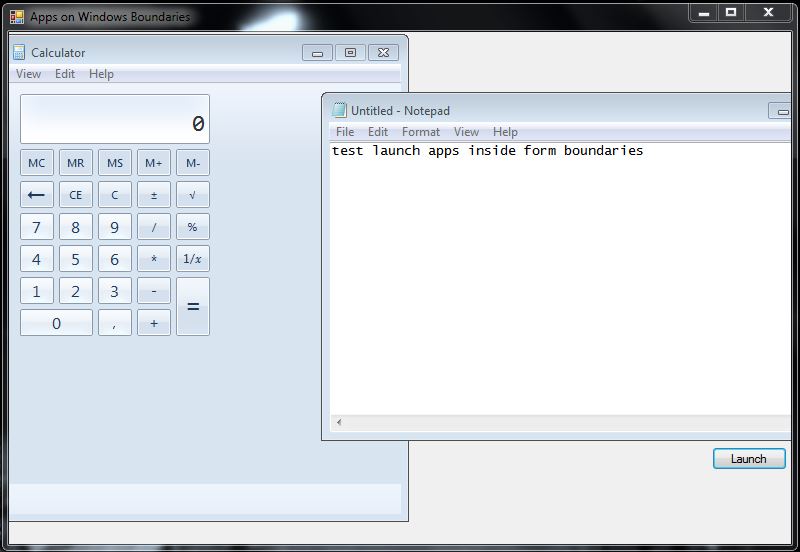
Are there any chances to launch a game app (or apps) inside a CE Form boundaries?. In Net 4.5.2 I can use:
| Code: |
[DllImport("user32.dll", SetLastError = true)]
private static extern long SetParent(IntPtr hWndChild, IntPtr hWndNewParent);
[DllImport("user32.dll", SetLastError = true)]
private static extern long SetWindowPos(IntPtr hwnd, long hWndInsertAfter, long x, long y, long cx, long cy, long wFlags);
[DllImport("user32.dll", SetLastError = true)]
private static extern bool MoveWindow(IntPtr hwnd, int x, int y, int cx, int cy, bool repaint);
IntPtr appWin1;
IntPtr appWin2; |
Hows with CE Lua script?. Maybe using executeCodeLocalEx()?.
I plan to make game trainer including the game run inside the game trainer boundaries.
| Description: |
| Sample run apps inside windows form boundaries |
|
| Filesize: |
51 KB |
| Viewed: |
3799 Time(s) |
|
_________________
Stealing Code From Stolen Code...
And Admit It.. Hmmm....Typically LOL |
|
| Back to top |
|
 |
Dark Byte
Site Admin
 Reputation: 475 Reputation: 475
Joined: 09 May 2003
Posts: 25983
Location: The netherlands
|
| Posted: Fri Feb 21, 2020 11:50 am Post subject: |
|
|
this is the code you posted ported to ce lua:
| Code: |
function SetParent(hWndChild, hWndNewParent)
executeCodeLocalEx('SetParent', hWndChild, hWndNewParent)
end
function SetWindowPos(hwnd, hWndInsertAfter, x, y, cx, cy, wFlags)
executeCodeLocalEx('SetWindowPos', hwnd, hWndInsertAfter, x, y, cx, cy, wFlags)
end
function MoveWindow(hwnd, x, y, cx, cy, repaint)
local rp
if repaint then
rp=1
else
rp=0
end
executeCodeLocalEx('MoveWindow', hwnd, x, y, cx, cy, rp)
end
|
_________________
Tools give you results. Knowledge gives you control.
Like my help? Join me on Patreon so i can keep helping |
|
| Back to top |
|
|
Corroder
Grandmaster Cheater Supreme
Reputation: 75
Joined: 10 Apr 2015
Posts: 1675
|
| Posted: Sat Feb 22, 2020 5:45 am Post subject: |
|
|
Thanks, DB for ported the code.
I try to get the app window handle by lending this function (by ParkourPenguin / Panraven), below:
| Code: | f = createForm()
f.setSize(640,500)
f.Caption = 'Test Apps Inside The Boundaries'
b = createButton(f)
b.setPosition(570,460)
b.setSize(60,30)
b.Caption = 'Launch'
function SetParent(hWndChild, hWndNewParent)
return executeCodeLocalEx('user32.SetParent', hWndChild, hWndNewParent)
end
function SetWindowPos(hwnd, hWndInsertAfter, x, y, cx, cy, wFlags)
return executeCodeLocalEx('user32.SetWindowPos', hwnd, hWndInsertAfter, x, y, cx, cy, wFlags)
end
function MoveWindow(hwnd, x, y, cx, cy, repaint)
local rp
if repaint then
rp=1
else
rp=0
end
return executeCodeLocalEx('user32.MoveWindow', hwnd, x, y, cx, cy, rp)
end
function EnumWindows()
if not readIntegerLocal"_enumWin" or readIntegerLocal"_enumWin+f8"~=1 then
local script= string.format([[
globalalloc(_enumWin,$4000)
define(cave,_enumWin)
define(proc,_enumWin+80)
define(wcnt,_enumWin+f0)
define(save,_enumWin+100)
cave+f8:
dd 1
cave:
push rsi
push rdi
xor rax,rax
mov rdi,wcnt
mov [rdi],rax
[32-bit]
push 0
push proc
call EnumWindows
[/32-bit]
[64-bit]
xor rdx,rdx
mov rcx,proc
mov rax,EnumWindows
sub rsp,20
call rax
add rsp,20
[/64-bit]
pop rdi
pop rsi
[32-bit]
ret 4
[/32-bit]
[64-bit]
ret
[/64-bit]
proc:
push rcx
[32-bit]
mov rcx,[rsp+08]
[/32-bit]
push rdx
push rdi
push rsi
mov rdx,wcnt
mov rsi,[rdx]
mov rdi,save
mov [rdi+rsi*8],rcx
inc dword ptr[rdx]
cmp dword ptr[rdx],7c0 // ~(4000-200)/8
jle %s @f
xor rax,rax
@@:
pop rsi
pop rdi
pop rdx
pop rcx
[32-bit]
ret 8
[/32-bit]
[64-bit]
ret
[/64-bit]
]],cheatEngineIs64Bit() and 'short' or '')
if not cheatEngineIs64Bit() then
script = script:gsub("%f[%w]r([abcds])([xip])","e%1%2")
end
autoAssemble(script,true)
-- print(tostring(autoAssemble(script,true)),script)
end -- autoAssemble
executeCodeLocal"_enumWin"
local addr = GetAddress("_enumWin+100",true)
local wcnt = readIntegerLocal"_enumWin+f0"
local ret = {}
for i=0,wcnt-1 do
local hwnd = readIntegerLocal(addr+i*8)
if not hwnd or hwnd==0 then break else
ret[1+#ret]=hwnd
end
end
return ret
end
function GetWindowByCaptionPID(cap,pid,onlyVisible)
onlyVisible = onlyVisible ~= false
local r,w = {},EnumWindows()
cap,pid = tostring(cap),pid or GetOpenedProcessID()
for i=1,#w do
local hwnd = w[i]
if pid == getWindowProcessID(hwnd) then
local max,wn,own = 1000,hwnd
while own==nil or own~=0 and own~=wn and max>0 do
wn,own,max = own or wn,GetWindow(wn,4),max-1
local txt = getWindowCaption(wn)
if txt:lower():find(cap:lower(),1,true) then
if not onlyVisible or 0~=executeCodeLocal("IsWindowVisible",wn) then
return wn
end
end
end
end
end
return 0
end
function launch()
os.execute('c:\\windows\\system32\\notepad.exe')
sleep(1000)
openProcess('notepad.exe')
local pid = pid or GetOpenedProcessID()
if pid and pid~=0 then
appWin1 = GetWindowByCaptionPID(getWindowlist()[pid],pid,onlyVisible)
SetParent(appWin1,f)
MoveWindow(appWin1, 0,0, f.Width/2, f.Height/2,1)
end
end
b.OnClick = launch |
It doesn't work. Use findWindow() ?
In C# its simple:
| Code: | IntPtr appWin1
Dim ps1 As New ProcessStartInfo("notepad.exe")
ps1.WindowStyle = ProcessWindowStyle.Minimized
Dim p1 As Process = Process.Start(ps1)
' Allow the process to open it's window
Thread.Sleep(1000)
appWin1 = p1.MainWindowHandle
' Put it into this form
SetParent(appWin1, Me.Handle)
' Move the window to overlay it on this window
MoveWindow(appWin1, 0, 0, Me.Width \ 2, Me.Height, True)
|
_________________
Stealing Code From Stolen Code...
And Admit It.. Hmmm....Typically LOL |
|
| Back to top |
|
|
Dark Byte
Site Admin
Reputation: 475
Joined: 09 May 2003
Posts: 25983
Location: The netherlands
|
| Posted: Sat Feb 22, 2020 6:30 am Post subject: |
|
|
I usually use this code to get the windows of the process i'm attached to:
| Code: |
w=getWindow(getForegroundWindow(), GW_HWNDFIRST)
pid=getOpenedProcessID()
while w and (w~=0) do
if (getWindowProcessID(w)==pid) and (executeCodeLocal("IsWindowVisible",w)~=0) then
print(w..' - '..getWindowCaption(w)..'('..getWindowClassName(w)..')')
end
w=getWindow(w,GW_HWNDNEXT)
end
|
anyhow, this code seems to work for me:
| Code: |
f=createForm()
wl={}
w=getWindow(getForegroundWindow(), GW_HWNDFIRST)
pid=getOpenedProcessID()
while w and (w~=0) do
if getWindowProcessID(w)==pid and (executeCodeLocal("IsWindowVisible",w)~=0) then
print(w..' - '..getWindowCaption(w)..'('..getWindowClassName(w)..')')
wl[#wl+1]=w;
end
w=getWindow(w,GW_HWNDNEXT)
end
if #wl==0 then
print("No window found")
return
end
if #wl>1 then
print("Too many windows found")
return
end
f.Width=300
f.Height=300
f.BorderStyle='bsSizeable'
SetParent(wl[1], f.Handle)
|
_________________
Tools give you results. Knowledge gives you control.
Like my help? Join me on Patreon so i can keep helping |
|
| Back to top |
|
|
Corroder
Grandmaster Cheater Supreme
Reputation: 75
Joined: 10 Apr 2015
Posts: 1675
|
| Posted: Sat Feb 22, 2020 7:52 am Post subject: |
|
|
I have tried open window calculator and attach as CE open process then run your last code, It seems SetParent doesn't work.
In this function:
| Code: | function launch()
ps1 = 'start notepad.exe'
p1 = os.execute(ps1)
sleep(1000)
openProcess('notepad.exe')
w=getWindow(getForegroundWindow(), GW_HWNDFIRST)
pid=getOpenedProcessID()
while w and (w~=0) do
if (getWindowProcessID(w)==pid) and (executeCodeLocal("IsWindowVisible",w)~=0) then
--print(w..' - '..getWindowCaption(w)..'('..getWindowClassName(w)..')')
SetParent(w, f)
MoveWindow(w, 10, 20, 400, f.Height-100, 1)
end
w=getWindow(w, GW_HWNDNEXT)
end
end
option = [[
GW_CHILD = 5
GW_ENABLEDPOPUP = 6
GW_HWNDFIRST = 0
GW_HWNDLAST = 1
GW_HWNDNEXT = 2
GW_HWNDPREV = 3
GW_OWNER = 4
]] |
results:
- The function success to handle the notepad window
- MoveWindow work fine
- SetParent doesn't work (notepad launched outside of form boundaries)
_________________
Stealing Code From Stolen Code...
And Admit It.. Hmmm....Typically LOL |
|
| Back to top |
|
|
Dark Byte
Site Admin
Reputation: 475
Joined: 09 May 2003
Posts: 25983
Location: The netherlands
|
| Posted: Sat Feb 22, 2020 8:11 am Post subject: |
|
|
try f.Handle
_________________
Tools give you results. Knowledge gives you control.
Like my help? Join me on Patreon so i can keep helping |
|
| Back to top |
|
|
Corroder
Grandmaster Cheater Supreme
Reputation: 75
Joined: 10 Apr 2015
Posts: 1675
|
| Posted: Sat Feb 22, 2020 8:49 am Post subject: |
|
|
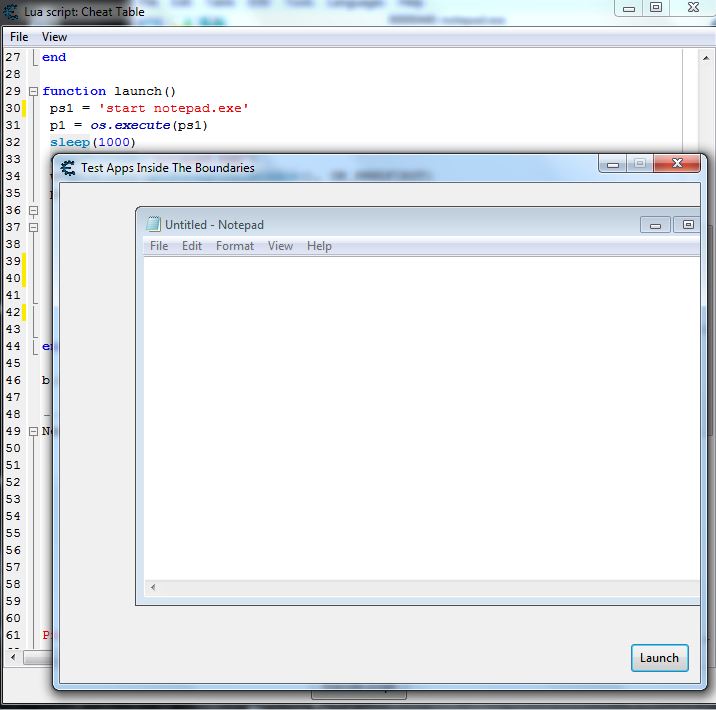
Right, solved it just straight before read your last post, DB.
| Code: | function launch()
ps1 = 'start notepad.exe'
p1 = os.execute(ps1)
sleep(1000)
openProcess('notepad.exe')
w=getWindow(getForegroundWindow(), GW_HWNDFIRST)
pid=getOpenedProcessID()
while w and (w~=0) do
if (getWindowProcessID(w)==pid) and (executeCodeLocal("IsWindowVisible",w)~=0) then
--print(w..' - '..getWindowCaption(w)..'('..getWindowClassName(w)..')')
SetParent(w, f.handle)
MoveWindow(w, 10, 20, 400, f.Height-100, 1)
end
w=getWindow(w, GW_HWNDNEXT)
end
end
b.OnClick = launch |
Thanks again
| Description: |
| Launch App Inside CE Form Bounds (CE Ver) |
|
| Filesize: |
62.9 KB |
| Viewed: |
3715 Time(s) |
|
_________________
Stealing Code From Stolen Code...
And Admit It.. Hmmm....Typically LOL |
|
| Back to top |
|
|
|
|
You cannot post new topics in this forum
You cannot reply to topics in this forum
You cannot edit your posts in this forum
You cannot delete your posts in this forum
You cannot vote in polls in this forum
You cannot attach files in this forum
You can download files in this forum
|
|
 FAQ
FAQ Search
 Memberlist
 Usergroups
 Register
 Profile
 Log in to check your private messages
 Log in


