| View previous topic :: View next topic |
| Author |
Message |
AylinCE
Grandmaster Cheater Supreme
 Reputation: 39 Reputation: 39
Joined: 16 Feb 2017
Posts: 1589
|
 Posted: Sun Jan 12, 2020 4:15 am Post subject: What is the required path and code for "require"? Posted: Sun Jan 12, 2020 4:15 am Post subject: What is the required path and code for "require"? |
 |
|
hi ..
What is the required path and code for "require"?
I have an auxiliary code index.
And I need to create a table integrated into the code inside.
But I don't know the code index to reconcile in CE Lua.
Is it possible to get an explanation with the example below?
CE How can I reconcile and encode the file I place in "autorun" or "autorun \ dlls"?
| Code: | | local http = require("socket.http") |
-- or
| Code: | local dir = = getCheatEngineDir()..'autorun'
local ba = require(dir.."\\Barracuda.dll") |
thanks in advance
_________________
|
|
| Back to top |
|
 |
Dark Byte
Site Admin
 Reputation: 475 Reputation: 475
Joined: 09 May 2003
Posts: 25994
Location: The netherlands
|
| Posted: Sun Jan 12, 2020 4:44 am Post subject: |
|
|
package.path and package.cpath are strings that decide where lua searches (note that it includes the extension types as well)
you can adjust that path at runtime
and in case of lua dll's make sure you compile using ce's lib files, else the dll will link to the wrong dllname (ce uses renamed lua dll names)
_________________
Tools give you results. Knowledge gives you control.
Like my help? Join me on Patreon so i can keep helping |
|
| Back to top |
|
|
AylinCE
Grandmaster Cheater Supreme
Reputation: 39
Joined: 16 Feb 2017
Posts: 1589
|
| Posted: Sun Jan 12, 2020 5:04 am Post subject: |
|
|
| Code: | Error:[string "cedir = getCheatEngineDir() ..'Cheat Engine.e..."]:3: module 'C:\Program Files (x86)\Cheat Engine 7.0\Cheat Engine.exe\autorun\Barracuda.dll' not found:
no field package.preload['C:\Program Files (x86)\Cheat Engine 7.0\Cheat Engine.exe\autorun\Barracuda.dll']
no file 'C:\Program Files (x86)\Cheat Engine 7.0\lua\C:\Program Files (x86)\Cheat Engine 7\0\Cheat Engine\exe\autorun\Barracuda\dll.lua' |
I think I still need a use case. 
_________________
|
|
| Back to top |
|
|
Dark Byte
Site Admin
Reputation: 475
Joined: 09 May 2003
Posts: 25994
Location: The netherlands
|
| Posted: Sun Jan 12, 2020 7:52 am Post subject: |
|
|
i need to see the full script because i don't think
| Code: |
C:\Program Files (x86)\Cheat Engine 7.0\Cheat Engine.exe\autorun\Barracuda.dll
C:\Program Files (x86)\Cheat Engine 7.0\lua\C:\Program Files (x86)\Cheat Engine 7\0\Cheat Engine\exe\autorun\Barracuda\dll.lua
|
are valid paths
print out package.path and package.cpath to see the formatting
also try putting your dll in clibs32 or clibs64 which is ce's default lua searchpath
_________________
Tools give you results. Knowledge gives you control.
Like my help? Join me on Patreon so i can keep helping
Last edited by Dark Byte on Sun Jan 12, 2020 8:09 am; edited 1 time in total |
|
| Back to top |
|
|
Corroder
Grandmaster Cheater Supreme
 Reputation: 75 Reputation: 75
Joined: 10 Apr 2015
Posts: 1675
|
| Posted: Sun Jan 12, 2020 8:06 am Post subject: |
 |
|
I am back on the first topic about Lua 'require' and example for luaSocket.
Example: Creatimg a module
| Code: | ---- This is a sample module
---- To show how to use Lua 'require' statement
---- Save these script as a file 'matchcalc.lua'
---- Put this 'matchcalc.lua' in same folder/Dir with the CE trainer
------------------------------------------------
module("mathcalc", package.seeall) --- using Lua 5.0/5.1 ols way
--local mathcalc = {}
function mathcalc.add(a,b)
print(a+b)
end
function mathcalc.sub(a,b)
print(a-b)
end
function mathcalc.mul(a,b)
print(a*b)
end
function mathcalc.div(a,b)
print(a/b)
end
return mathcalc
-------------------------------------------------
|
Then creating a CT file and execute:
| Code: | -- This is a example CT file to implementing Lua 'require' statement
-- The module name is "mathcalc.lua
-- Make sure 'matchcalc.lua' save in the correct path
require('mathcalc')
mathcalc.add(10,20)
mathcalc.sub(30,20)
mathcalc.mul(10,20)
mathcalc.div(30,20)
--- will print result:
30
10
200
1.5
|
When you load a module with require Lua uses the package paths to determine where to look for the module. Specifically, the section on package.path and package.cpath.
| Code: | package.path: The path used by require to search for a Lua loader (.lua modules)
package.cpath: The path used by require to search for a C loader (.so/.dll modules)
|
Example to check CE package.path and package.cpath:
| Code: | | print(package.path..'\n'..package.cpath) |
You can set the package paths relative to your project before you require the socket library (substitute /?.dll for /?.so on Linux)
You can modify the package paths before calling require. For example, if you create a folder for your project and extract the LuaSocket library to a sub-folder called libs within your project folder:
| Code: | Project
|
> libs
|
> lua
|
> socket
> socket
> mime
|
and set on your trainer script:
| Code: | package.path = package.path..';./libs/lua/?.lua'
package.cpath = package.cpath..';./libs/socket/?.dll;./libs/mime/?.dll'
local socket = require 'socket' |
Hope it work in CE path/libs.
EDIT:
I am not sure using barracuda.dll only will work, because I think barracuda we app need to the installation process.
_________________
Stealing Code From Stolen Code...
And Admit It.. Hmmm....Typically LOL |
|
| Back to top |
|
|
AylinCE
Grandmaster Cheater Supreme
Reputation: 39
Joined: 16 Feb 2017
Posts: 1589
|
| Posted: Sun Jan 12, 2020 5:35 pm Post subject: |
|
|
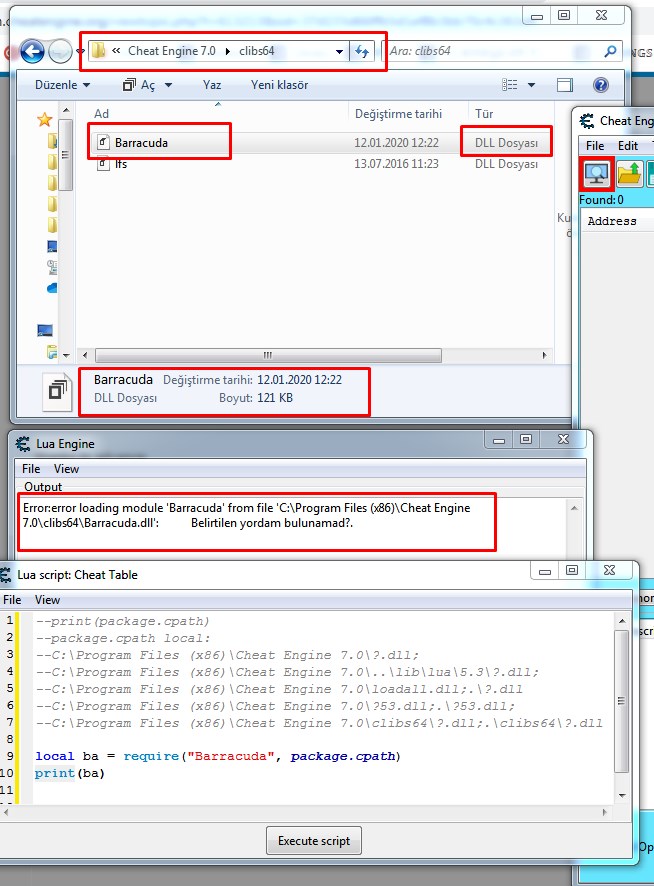
Although on the correct path: The specified procedure could not be found.
There are some features I want to use in this .dll.
For more information see:
https://realtimelogic.com/ba/doc/en/lua/lua.html#xlua
Barracuda.dll :
https://www.dosyaupload.com/fo1p
There may not be a .dll that CE can read. I am not sure.
With @Corroder's explanation, back to the topic:
How can I benefit by integrating a ".dll" into CE?
| Description: |
|
| Filesize: |
130.2 KB |
| Viewed: |
4660 Time(s) |
|
_________________
|
|
| Back to top |
|
|
Corroder
Grandmaster Cheater Supreme
Reputation: 75
Joined: 10 Apr 2015
Posts: 1675
|
| Posted: Sun Jan 12, 2020 8:57 pm Post subject: |
|
|
You can use "package.loadlib(module)".
Example :
| Code: |
package.loadlib('Barracuda.dll', 'luaopen_Barracuda') |
We could alternately pass an absolute path, example:
| Code: | | package.loadlib([[c:\path\to\Barracuda.dll.dll]], 'luaopen_Barracuda') |
see:
http://lua-users.org/wiki/LoadLibrary
https://docs.microsoft.com/en-us/windows/win32/dlls/dynamic-link-library-search-order?redirectedfrom=MSDN
Alternative, if you know the function name inside Barracuda.dll, then consider using "executeCodeLocalEx()" also.
Also, you need to consider how that 'Barracuda.dll' compiled. Is it matching to CE environment?
_________________
Stealing Code From Stolen Code...
And Admit It.. Hmmm....Typically LOL |
|
| Back to top |
|
|
|

 FAQ
FAQ Search
 Memberlist
 Usergroups
 Register
 Profile
 Log in to check your private messages
 Log in


