|
Cheat Engine
The Official Site of Cheat Engine
|
| View previous topic :: View next topic |
| Author |
Message |
Corroder
Grandmaster Cheater Supreme
 Reputation: 75 Reputation: 75
Joined: 10 Apr 2015
Posts: 1675
|
 Posted: Sun Jun 02, 2019 1:19 am Post subject: Synchronize Custom Progress Bar With Interval Timer Posted: Sun Jun 02, 2019 1:19 am Post subject: Synchronize Custom Progress Bar With Interval Timer |
 |
|
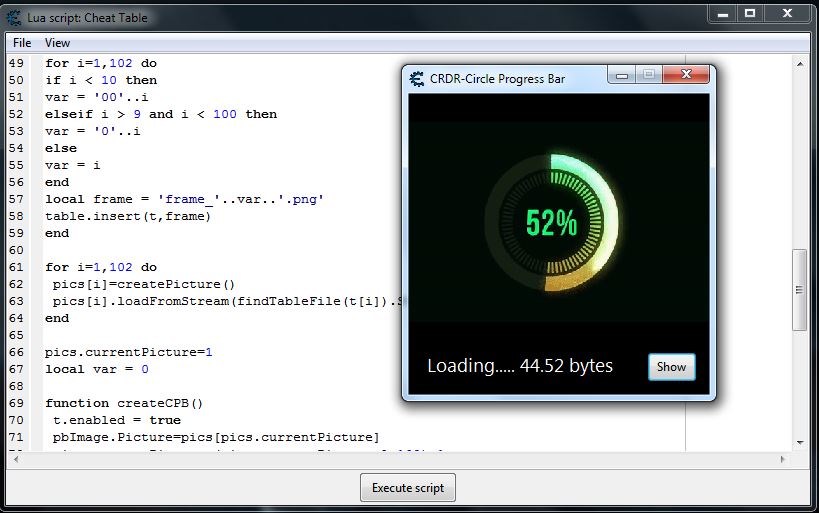
I made a custom circle progress bar using some PNG images as frames.
Now, I need synchronize interval timer to show each frame with a process times.
Example:
let said I have a form with an image and a button
| Code: | framesMax = 102 -- 102 png images as frames
local pics={}
local t = {}
for i=1,102 do
pics[i]=createPicture()
pics[i].loadFromStream(findTableFile(t[i]).Stream)
end
framesMax = 102 ----------- 102 png images as frames
pics.currentPicture=1
local var = 0
function createCPB()
t.enabled = true
pbImage.Picture=pics[pics.currentPicture]
pics.currentPicture=(pics.currentPicture % 102)+1
var = var + frames/100
if var > frameMax then
t.Enabled = false
lbl.Caption = 'Done'
else
lbl.Caption = 'Loading..... '..var..' bytes'
end
end
t = createTimer()
t.interval = 102000/1000
t.enabled = false
t.onTimer = createCPB
f.show()
btn.onClick = createCPB |
When executing the script is not synchronize between var and frame(s) display, at the timer stops var = 92 and frame = Max.
Then, how:
1. Calculation the correct timer interval so it synchronizes between var and frames display.
2. Calculation interval frames displays for unknown a duration of a process.
| Description: |
|
| Filesize: |
74.23 KB |
| Viewed: |
7911 Time(s) |
|
_________________
Stealing Code From Stolen Code...
And Admit It.. Hmmm....Typically LOL |
|
| Back to top |
|
 |
AylinCE
Grandmaster Cheater Supreme
 Reputation: 39 Reputation: 39
Joined: 16 Feb 2017
Posts: 1590
|
| Posted: Sun Jun 02, 2019 3:07 pm Post subject: |
|
|
To stop:
I used the following option, but:
102 photos (230x230) created 4 MB of memory.
| Code: | t.Interval = 100
t2 = createTimer()
t2.Interval = 11100 --t.Interval=100 x102 =11100 like ;)
t2.Enabled = true
t2.OnTimer = function()
t.Enabled=false
t2.Enabled=false
end |
When the code is complete, I would like you to share it.
Hopefully the memory uses less size.
=================================
And an unrelated question:
This code belongs to you:
l | Code: | ocal mf = getMainForm()
function attachIcon(mf,tblFile)
local p = createPicture()
p.loadFromStream(findTableFile(tblFile).Stream,'ico')
local b = p.getBitmap()
mf.Icon = b
end
attachIcon(mf,'aylin.ico')
defColor = '0xFFFFFF' |
While in the table, it changes the icon.
But how do I change it from the Autorun folder?
| Code: | local mf = getMainForm()
local p = createImage(mf)
cedir = getCheatEngineDir()..'Cheat Engine.exe'
scriptFile = getCheatEngineDir()..'autorun'
p.loadImageFromFile(scriptFile.."\\aylin.ico")
-- p.loadFromStream(findTableFile(tblFile).Stream,'ico')
local b = p.getBitmap()
mf.Icon = b
--end
--attachIcon(mf,'aylin.ico')
defColor = '0xFFFFFF' |
Thanks for your patience.
_________________
|
|
| Back to top |
|
|
Corroder
Grandmaster Cheater Supreme
Reputation: 75
Joined: 10 Apr 2015
Posts: 1675
|
| Posted: Sun Jun 02, 2019 10:41 pm Post subject: |
|
|
@Aylin, to stop the timer is not a problem. What I mean here is 'to synchronize' progress bar time with a process duration time.
This is not just for my custom progress bar but also for CE default progress bar.
Example:
We download a file from a website:
file size = 150 Mb
download speed = 500 kb/sec
so, you need calculating how long the download process will finish, it's download time = 150 x 1024 / 500
then, we ignoring download time duration first.
progress bar max = 100
progress bar step = ? (similar to progress bar interval timer)
progress bar interval = download time / progress bar step
Next is translate progress bar interval to the hour, minute, second or all as seconds.
The goal is when the download completed the progress bar reaches maximum value = 100.
It's not to be good if your download has completed but the progress bar shows 70% or less than 100%, right?.
That is my question on this topic.
Next, for your request:
Put this script below on CE autorun folder with name 'whatever.lua'.
These just small part from my helper autorun function.
| Code: | form = {}
---------------------------------------------------------------- 1. Fade in form
function form.fadein(f, nS)
if nS <=0 then nS = 0 end
f.DoubleBuffered = true
f.AlphaBlend = true
f.AlphaBlendValue = nS
local timer = createTimer(f,false)
timer.Interval = 1
timer.OnTimer = function(t)
f.AlphaBlendValue = f.AlphaBlendValue + 2
if f.AlphaBlendValue>=255 then f.AlphaBlendValue = 255
f.AlphaBlend = false
t.Enabled = false end
end
timer.Enabled = true
end
--- to use : form.fadein(UDF1, 10) -- range 0 to 255 -- UDF1 or form name
-------------------------------------------------------- 2. Clock / Date on form
function form.attachClock(f, nl, nt, sz, col)
if f == nil then return nil end
lbl = createLabel(f)
lbl.setPosition(nl,nt)
lbl.Font.Size = sz
lbl.Font.Color = col
t=createTimer(nil)
t.Interval=1000
t.OnTimer=function(t)
lbl.Caption = tostring(os.date('%d-%m-%Y / %H:%M:%S'))
end
t.Enabled=true
end
--- to use : form.fadein(UDF1, label name, 10, 10, 14, '1692367') -- UDF1 or form name
--------------------------------------------------------- 3. Attach Icon on form
function form.attachIcon(f, tblFile)
local f = f or getMainForm()
local p = createPicture()
p.loadFromStream(findTableFile(tblFile).Stream,'ico')
if tblFile == nil then return nil end
local b = p.getBitmap()
f.Icon = b
end
--- to use : add an icon file to table file
--- form.fadein(UDF1, 'your icon file name') -- UDF1 or form name
|
Next, you can open CE and test it, for example:
| Code: | --- test
myform = createForm()
mylabel = createLabel(myform)
mylabel.Caption = 'Hello World'
form.fadein(myform,20)
form.attachClock(myform, 120, 50, 14, '15639')
form.attachIcon(myform, 'crdr3.ico')
myform.show() |
_________________
Stealing Code From Stolen Code...
And Admit It.. Hmmm....Typically LOL |
|
| Back to top |
|
|
AylinCE
Grandmaster Cheater Supreme
Reputation: 39
Joined: 16 Feb 2017
Posts: 1590
|
| Posted: Mon Jun 03, 2019 4:14 am Post subject: |
|
|
Okay, now I get it.
I commented on the opening installation of the Trainer, ProgressBar.
File upload, progress bar, good idea.
Thanks for the examples.
I used the watch in the CE name bar.
FadeIn Show is in contrast with the Transparent form.
Icon upload failed. Loading from the table.
But I could not give Autorun folder path.
It does not load from the Autorun folder.
Please share if you find a solution.
Thank you for your interest.
_________________
|
|
| Back to top |
|
|
Corroder
Grandmaster Cheater Supreme
Reputation: 75
Joined: 10 Apr 2015
Posts: 1675
|
| Posted: Mon Jun 03, 2019 8:15 am Post subject: |
|
|
| Aylin wrote: | Okay, now I get it.
I used the watch in the CE name bar.
.................
Icon upload failed. Loading from the table.
But I could not give Autorun folder path.
It does not load from the Autorun folder.........
|
Sorry, not really understand what you mean about.
But, check first, is your ICON file is a real icon file?.
_________________
Stealing Code From Stolen Code...
And Admit It.. Hmmm....Typically LOL |
|
| Back to top |
|
|
AylinCE
Grandmaster Cheater Supreme
Reputation: 39
Joined: 16 Feb 2017
Posts: 1590
|
|
| Back to top |
|
|
Corroder
Grandmaster Cheater Supreme
Reputation: 75
Joined: 10 Apr 2015
Posts: 1675
|
|
| Back to top |
|
|
AylinCE
Grandmaster Cheater Supreme
Reputation: 39
Joined: 16 Feb 2017
Posts: 1590
|
| Posted: Sun Jun 09, 2019 2:51 am Post subject: |
|
|
| Corroder wrote: |
Then if you plan to change the Cheat Engine application name to 'Aylin Engine', you need a license and permit from DB. Maybe you need to pay him a ton $ for his CE original app.   |
I'm not thinking of going further. 
With logo will be final.
Also: The legend of Cheat Engine will always survive.
The code didn't work, man.
The following code: Working with the table.
But how do we set the file path to autorun?
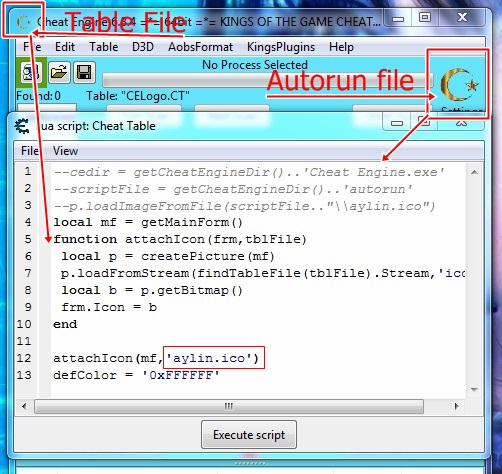
| Code: | --cedir = getCheatEngineDir()..'Cheat Engine.exe'
--scriptFile = getCheatEngineDir()..'autorun'
--p.loadImageFromFile(scriptFile.."\\aylin.ico")
local mf = getMainForm()
function attachIcon(frm,tblFile)
local p = createPicture(mf)
p.loadFromStream(findTableFile(tblFile).Stream,'ico') --how do we set the file path to autorun???
local b = p.getBitmap()
frm.Icon = b
end
attachIcon(mf,'aylin.ico')
defColor = '0xFFFFFF' |
_________________
|
|
| Back to top |
|
|
Corroder
Grandmaster Cheater Supreme
Reputation: 75
Joined: 10 Apr 2015
Posts: 1675
|
| Posted: Sun Jun 09, 2019 5:13 am Post subject: |
|
|
What you mean didn't work?. The last code I posted is work for me.
Maybe I didn't understand what you want, maybe you wanna make a trainer or hack table where people open it and automatic CE Logo and CE Icon will change whit your own icon, isn't it?.
But, to set path:
| Code: | path = getCheatEngineDir()..'\\autorun\\'
print(path) |
or use ENV.
_________________
Stealing Code From Stolen Code...
And Admit It.. Hmmm....Typically LOL |
|
| Back to top |
|
|
AylinCE
Grandmaster Cheater Supreme
Reputation: 39
Joined: 16 Feb 2017
Posts: 1590
|
| Posted: Sun Jun 09, 2019 5:20 am Post subject: |
|
|
Briefly: Icon not from the table
I want to install it from the Autorun folder.
If possible with the following code.
| Code: | --cedir = getCheatEngineDir()..'Cheat Engine.exe'
--scriptFile = getCheatEngineDir()..'autorun'
--p.loadImageFromFile(scriptFile.."\\aylin.ico")
local mf = getMainForm()
function attachIcon(frm,tblFile)
local p = createPicture(mf)
p.loadFromStream(findTableFile(tblFile).Stream,'ico') --how do we set the file path to autorun???
local b = p.getBitmap()
frm.Icon = b
end
attachIcon(mf,'aylin.ico')
defColor = '0xFFFFFF' |
Only: Table path will change
Autorun folder path will be given.
Despite repeatedly test to:
Sorry for "Google Translate" errors.
_________________
|
|
| Back to top |
|
|
Corroder
Grandmaster Cheater Supreme
Reputation: 75
Joined: 10 Apr 2015
Posts: 1675
|
| Posted: Sun Jun 09, 2019 6:03 am Post subject: |
|
|
Here :
--- save this script as Lua file to CE autorun folder
| Code: | function change_CE_Icon(iconame)
data = getCheatEngineDir()..'autorun\\'..iconame
file = io.open(data,'rb')
ICO = file:read('*all')
file:close()
local IM = createStringStream(ICO)
local p = createPicture()
p.loadFromStream(IM)
local b = p.getBitmap()
getApplication().Icon = b
CE = getMainForm()
CE.Icon = b
end |
--- put an image to CE autorun foder, example ('anna.jpg' has store on CE autorun folder):
| Code: | | change_CE_Icon('anna.jpg') |
Or to attach an icon to a form where the icon file store on autorun folder, means icon file did not store as a table file.
| Code: | function attach_Icon(f,iconame)
data = getCheatEngineDir()..'autorun\\'..iconame
file = io.open(data,'rb')
ICO = file:read('*all')
file:close()
local IM = createStringStream(ICO)
local p = createPicture()
p.loadFromStream(IM)
local b = p.getBitmap()
getApplication().Icon = b
f.Icon = b
end
myform = createForm()
attach_Icon(myform,'anna.jpg') |
_________________
Stealing Code From Stolen Code...
And Admit It.. Hmmm....Typically LOL |
|
| Back to top |
|
|
AylinCE
Grandmaster Cheater Supreme
Reputation: 39
Joined: 16 Feb 2017
Posts: 1590
|
| Posted: Sun Jun 09, 2019 6:41 am Post subject: |
|
|
Okay, I'm giving up.
I think we interpret it differently.
Both codes gave the same error.
And still loading from the table,
It does not install from the Autorun folder.
My PC (Windows7 Ultimate 64 bits)
CE Folder (Program Files)
| Code: | Error:Unknown picture format
Error:Unknown picture format
Error:Unknown picture format |
_________________
|
|
| Back to top |
|
|
Corroder
Grandmaster Cheater Supreme
Reputation: 75
Joined: 10 Apr 2015
Posts: 1675
|
| Posted: Sun Jun 09, 2019 7:53 am Post subject: |
|
|
Which code you use?. Did you use the code from the last post?. Or you use your own code?. Try, put an JPG Image, or PNG Image on CE Autorun folder,
example 'aylin.jpg' and run this code:
| Code: | function change_CE_Icon(iconame)
data = getCheatEngineDir()..'autorun\\'..iconame
file = io.open(data,'rb')
ICO = file:read('*all')
file:close()
local IM = createStringStream(ICO)
local p = createPicture()
p.loadFromStream(IM)
local b = p.getBitmap()
getApplication().Icon = b
CE = getMainForm()
CE.Icon = b
end
change_CE_Icon('aylin.jpg')
|
or try another code: create a form and run this code:
| Code: | function attach_Icon(f,iconame)
data = getCheatEngineDir()..'autorun\\'..iconame
file = io.open(data,'rb')
ICO = file:read('*all')
file:close()
local IM = createStringStream(ICO)
local p = createPicture()
p.loadFromStream(IM)
local b = p.getBitmap()
getApplication().Icon = b
f.Icon = b
end
myform = createForm()
attach_Icon(myform,'aylin.jpg')
|
NOTE: the image 'aylin.jpg' must place on CE autorun folder.
You want icon load NOT FORM TABLE FILE, so I make a function to load image (ICO, JPG, PNG, BMP) which must place on CE autorun folder and the function I made WILL load the image as CE or Form Icon.
EDIT:
If not work then yes, we have different interpret and my code is useless for others, at least work for me only.
EDIT 2:
| Code: | | Error:Unknown picture format |
Check the name of the image name. CE does not case sensitive for a filename. JPG is different from jpg, PNG vs png, ICO vs ico, and so on.
_________________
Stealing Code From Stolen Code...
And Admit It.. Hmmm....Typically LOL |
|
| Back to top |
|
|
AylinCE
Grandmaster Cheater Supreme
Reputation: 39
Joined: 16 Feb 2017
Posts: 1590
|
| Posted: Sun Jun 09, 2019 9:30 am Post subject: |
|
|
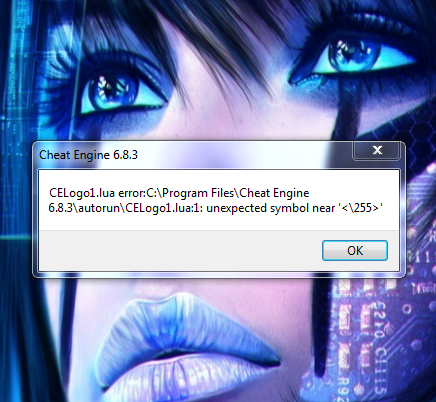
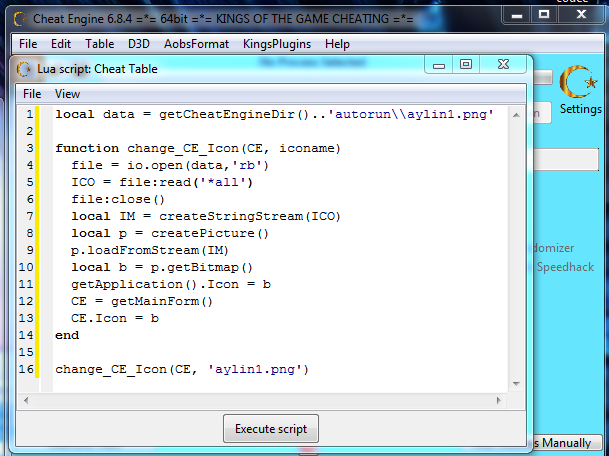
I hope the problem is clear. 
| Description: |
| Error message when command is in Autorun folder. |
|
| Filesize: |
400.87 KB |
| Viewed: |
7653 Time(s) |
|
| Description: |
| It works in Script. No problem. |
|
| Filesize: |
108.8 KB |
| Viewed: |
7653 Time(s) |
|
_________________
|
|
| Back to top |
|
|
Corroder
Grandmaster Cheater Supreme
Reputation: 75
Joined: 10 Apr 2015
Posts: 1675
|
| Posted: Sun Jun 09, 2019 10:08 am Post subject: |
|
|
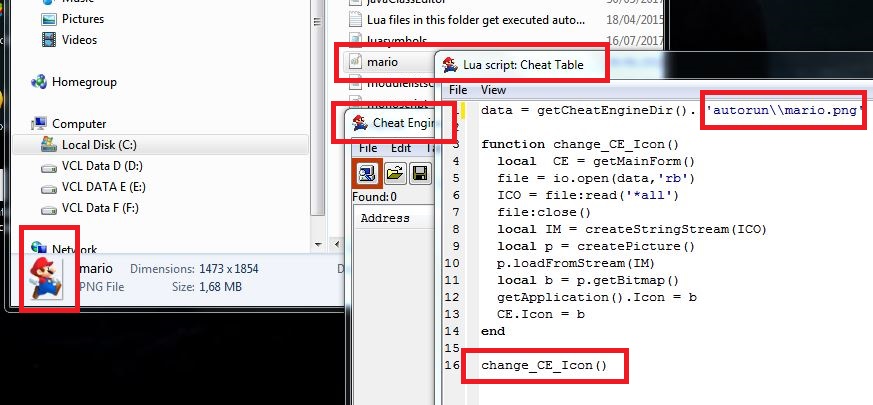
Of course not work, because you change the function and 'iconame' on the function is never called.
If must follow what you do then just simple, use this:
| Code: | data = getCheatEngineDir()..'autorun\\aylin1.png'
function change_CE_Icon()
local CE = getMainForm()
file = io.open(data,'rb')
ICO = file:read('*all')
file:close()
local IM = createStringStream(ICO)
local p = createPicture()
p.loadFromStream(IM)
local b = p.getBitmap()
getApplication().Icon = b
CE.Icon = b
end
change_CE_Icon()
|
Done!
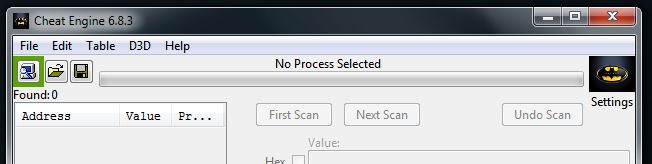
| Description: |
|
| Filesize: |
107.1 KB |
| Viewed: |
7640 Time(s) |
|
_________________
Stealing Code From Stolen Code...
And Admit It.. Hmmm....Typically LOL |
|
| Back to top |
|
|
|
|
You cannot post new topics in this forum
You cannot reply to topics in this forum
You cannot edit your posts in this forum
You cannot delete your posts in this forum
You cannot vote in polls in this forum
You cannot attach files in this forum
You can download files in this forum
|
|
 FAQ
FAQ Search
 Memberlist
 Usergroups
 Register
 Profile
 Log in to check your private messages
 Log in