| View previous topic :: View next topic |
| Author |
Message |
Zanzer
I post too much
![]() Reputation: 126 Reputation: 126
Joined: 09 Jun 2013
Posts: 3278
|
 Posted: Fri Aug 05, 2016 8:14 am Post subject: Posted: Fri Aug 05, 2016 8:14 am Post subject: |
 |
|
In my script, when the game executes the code in question, it will populate the "myvar" address with the base address you need.
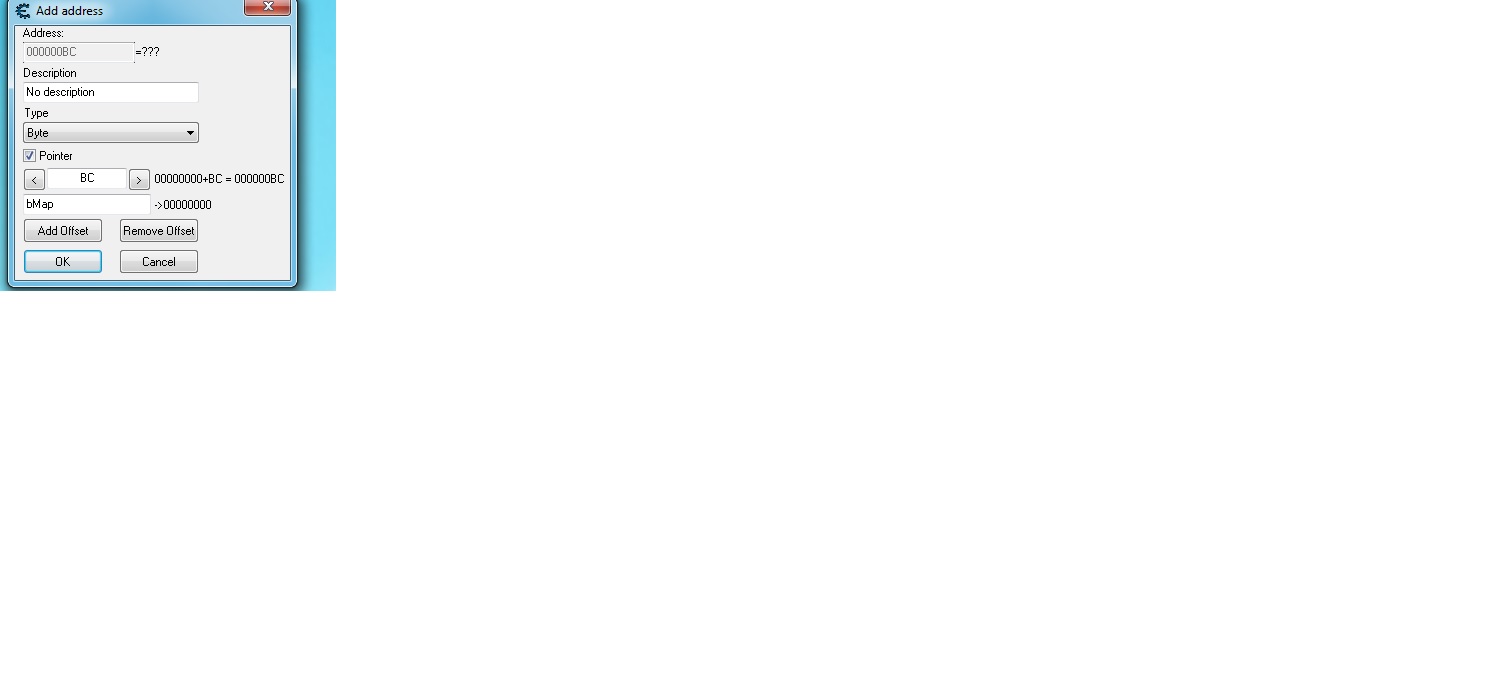
You can then add a pointer to your table with the base as "myvar" and the first offset as "BC".
That should give you the exact address accessed by: cmp dword ptr [rcx+000000BC],00
|
|
| Back to top |
|
 |
taco1
Newbie cheater
![]() Reputation: 0 Reputation: 0
Joined: 04 Aug 2016
Posts: 16
|
| Posted: Fri Aug 05, 2016 9:41 am Post subject: |
|
|
| cooleko wrote: | Ok, Zanzer and I are looking at this problem differently. So I wanted to clarify what it is you are actually trying to do before I assisted you further.
I think you have a value in game 0 for map, 1 for no map, that you want to know the address of without searching every time you reopen the game.
You want to be able to access this value using a pointer.
If that understanding is correct, then Zanzer's example will not provide that result (unless there is something i missed).
If my assumptions are true, you need to right click the address you found in the table and select "See what accesses this address."
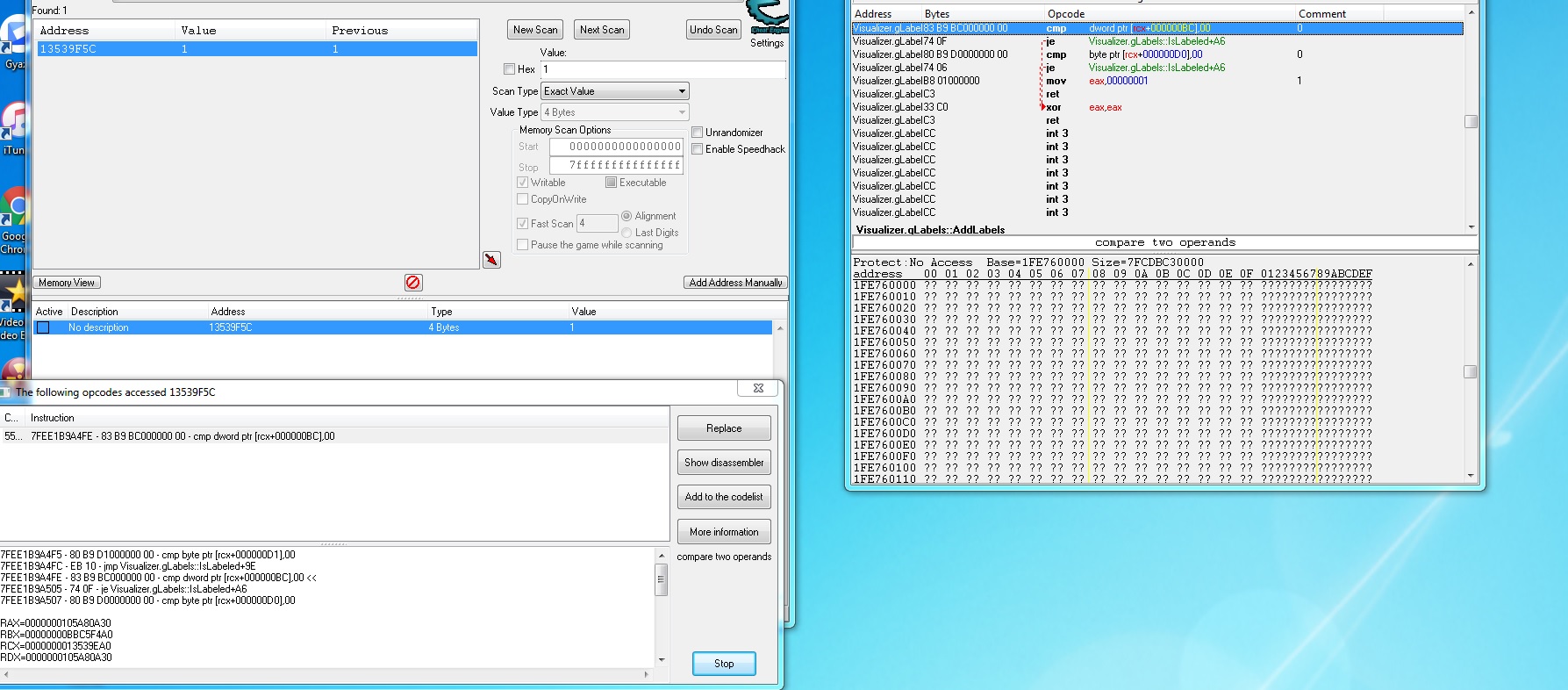
I'm fairly certain that you successfully accomplished this when you identified "cmp dword ptr [rcx+000000BC],00"
You then select that address and either right click "Show in dissassembler" or select it from the button on the right of the window with the instruction highlighted.
In memory view (the dissassembler), while the instruction is highlighted, you scroll up to tolls and select auto assemble.
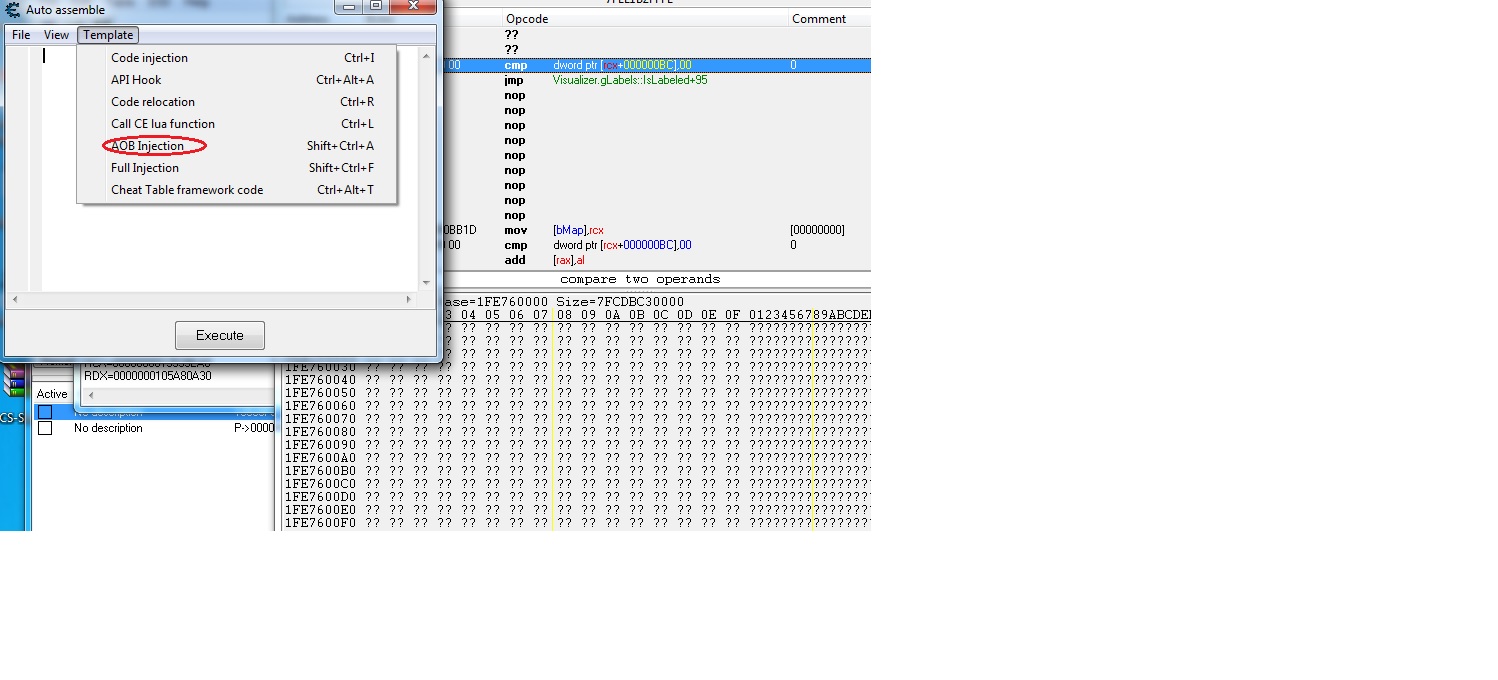
I'm fairly certain you accomplished this as well, because you posted the code injection template. However, I would prefer you select AOB Template as I'm not confident in the reliability of the code injection template working after a restart. This is mostly due to my preference for AOB and the advantages i perceive to be associated with it.
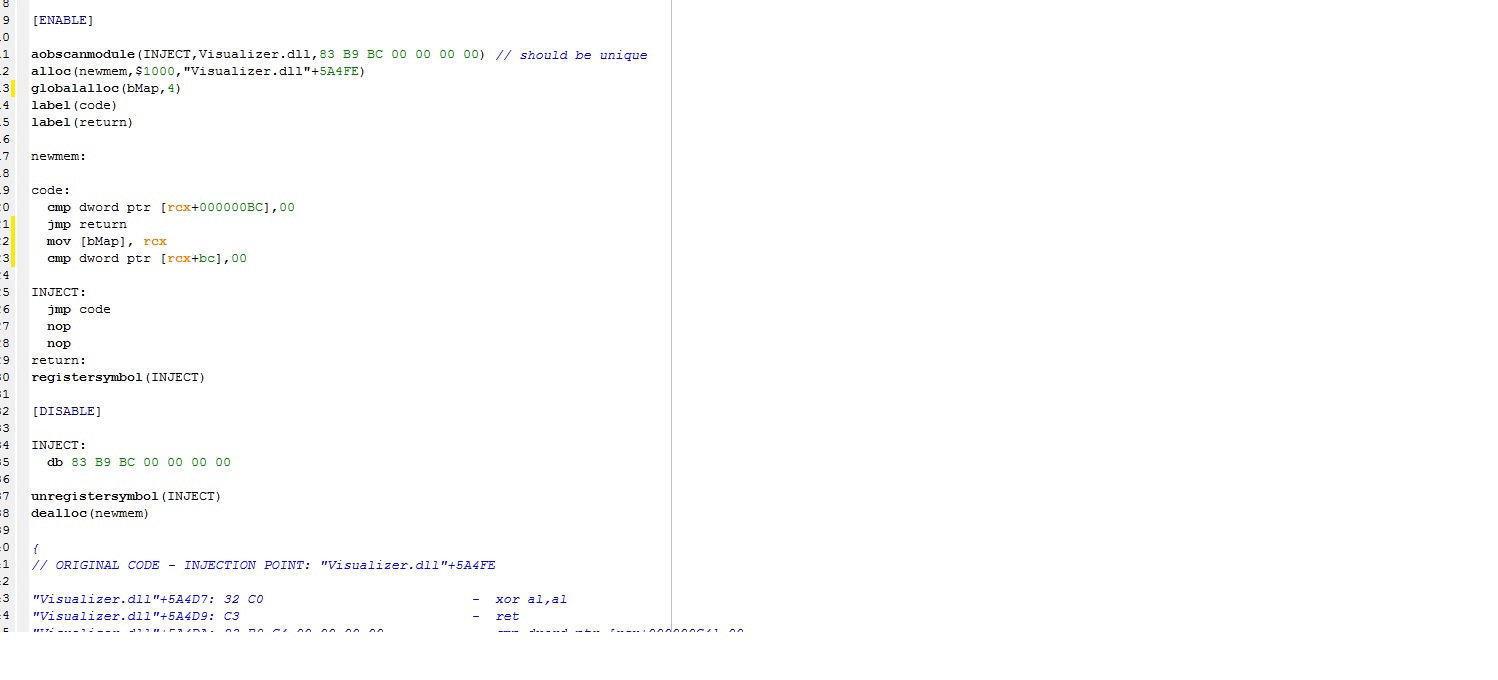
In the AOB template, simply add the lines of code i mention in my previous post. "globalalloc(bMap,4)" at the top with the other alloc and label instructions and "mov [bMap], rcx" and "cmp dword ptr [rcx+bc],00"
as the code.
You then go to file, assign to cheat table. |
I think I got this part. Check my pics.
| cooleko wrote: |
In the cheat table, you simply add a pointer "manually add address", select pointer type. In the bottom slot, put bMap, in the offset slot put BC, in type select byte |
Cheat table you mean CE gui where it says add address manually? I did that.
Also what you guessed was right at what I am trying to do. Im acutally starting with labels and not the map. Im trying to get labels on even when mission says no to them. I am getting the address by going in game and turning the labels on then off multiple times until I narrow it down to correct address.
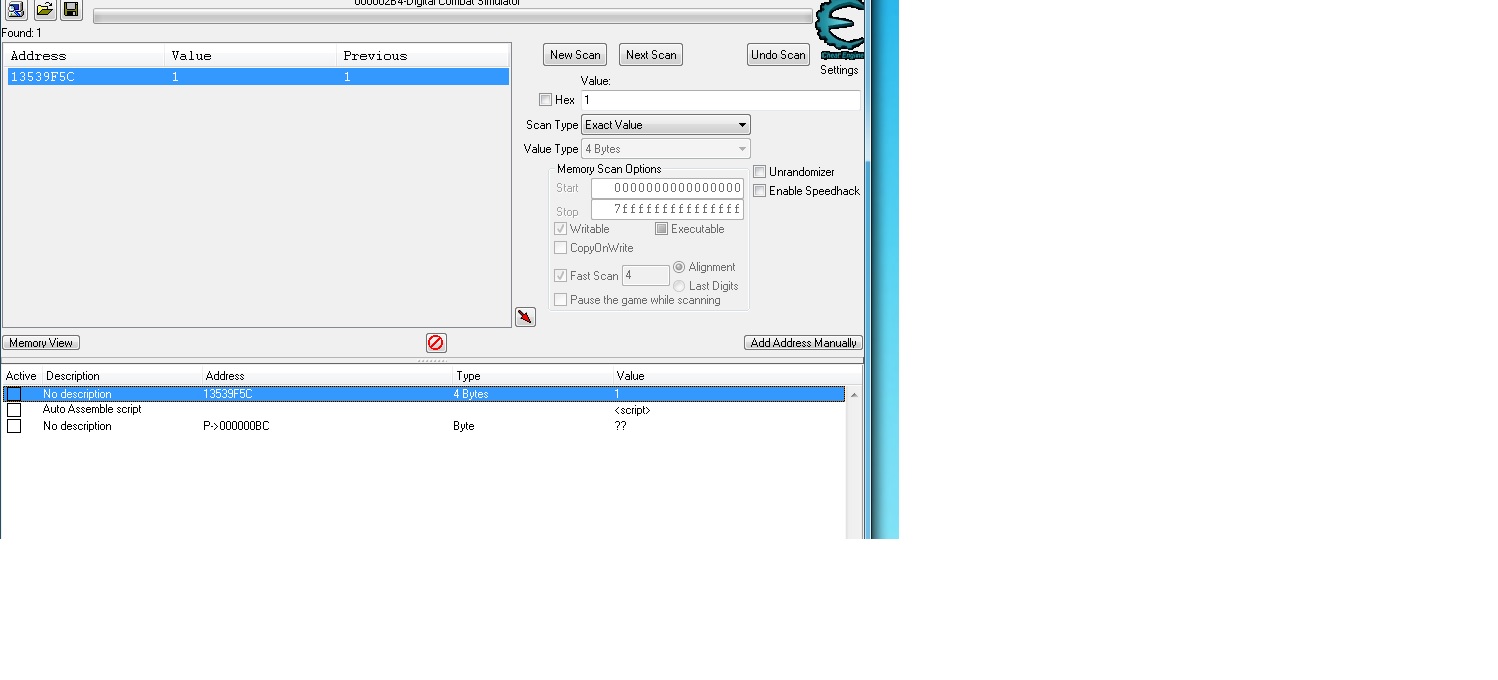
I think I am doing something wrong or comprehended wrong. The script that is in my "cheat table" as you see in the picture doesn't do anything? How am I suppose to execute it?
Also when you say AOB template is that the one I have highlighted below?
| Description: |
|
| Filesize: |
43.43 KB |
| Viewed: |
8980 Time(s) |
|
| Description: |
|
| Filesize: |
200.04 KB |
| Viewed: |
8990 Time(s) |
|
| Description: |
|
| Filesize: |
101.21 KB |
| Viewed: |
8993 Time(s) |
|
| Description: |
|
| Filesize: |
91.61 KB |
| Viewed: |
8993 Time(s) |
|
| Description: |
|
| Filesize: |
380.99 KB |
| Viewed: |
8993 Time(s) |
|
|
|
| Back to top |
|
|
cooleko
Grandmaster Cheater
![]() Reputation: 11 Reputation: 11
Joined: 04 May 2016
Posts: 717
|
| Posted: Fri Aug 05, 2016 3:14 pm Post subject: |
|
|
Three problems:
1) delete line ?3 of your script "cmp dword ptr [rcx+bc],00"
--This is because you left ?0 in the script which does the exact same thing.
2) mov line ?2 to be in between "code:" and line ?0
--a return terminates the script and returns to the original code, so your instruction is never being run
3) activate the script! just click the freeze box next to the script when it is fixed.
Everything else looks fine, you should be able fix the script, activate it, and then your pointer will work.
Try to crop your pictures better before uploading them.
|
|
| Back to top |
|
|
taco1
Newbie cheater
![]() Reputation: 0 Reputation: 0
Joined: 04 Aug 2016
Posts: 16
|
| Posted: Fri Aug 05, 2016 6:22 pm Post subject: |
|
|
You are a genius my friend! Worked perfect!!!!
I know you didn't have to study my photos and help but you took the time to do so and I appreciate it very much!
|
|
| Back to top |
|
|
taco1
Newbie cheater
![]() Reputation: 0 Reputation: 0
Joined: 04 Aug 2016
Posts: 16
|
| Posted: Sun Jul 30, 2017 6:31 pm Post subject: |
|
|
Not sure if I should start a new thread or not but here goes.
My game updated and now this does not work anymore. I am having problems finding the addresses now. I use to just turn map on and off and search 1 and 0 until it left me with one address. This method is not working any more. Any tips on how I could find the address now?
I also tried the "unknown initial value" type first then "changed value" but had no luck finding it.
|
|
| Back to top |
|
|
cooleko
Grandmaster Cheater
![]() Reputation: 11 Reputation: 11
Joined: 04 May 2016
Posts: 717
|
| Posted: Mon Jul 31, 2017 3:34 am Post subject: |
|
|
Why don't you search for Visualizer.gLabel and just find the line of code nearest to where the previous cmp dword ptr [rcx+BC],00 was. You will likely find that the only change was rcx to (for example) rbx, or BC to CC. For those examples, the new line would appear as cmp dword ptr [rbx+BC],00 or cmp dword ptr [rcx+CC],00.
Alternatively, there is nothing wrong with your previous attempts at finding the value using unknown initial value, changed value, same as first value, etc until you have limited the results to w/e the smallest search result you can get. Then just change the values in batches (maybe freeze the first half of the values, try to change the map status in game, see if it doesnt change, then freeze second half of the values and test them). This has a tendency to crash the game, so just make the portions you are testing smaller and smaller until you have figured it out. (instead of half, do 25%, or just 50 values at a time).
|
|
| Back to top |
|
|
taco1
Newbie cheater
![]() Reputation: 0 Reputation: 0
Joined: 04 Aug 2016
Posts: 16
|
|
| Back to top |
|
|
Prehistoricman
Advanced Cheater
![]() Reputation: 0 Reputation: 0
Joined: 02 Aug 2016
Posts: 80
|
| Posted: Mon Jul 31, 2017 7:52 pm Post subject: |
|
|
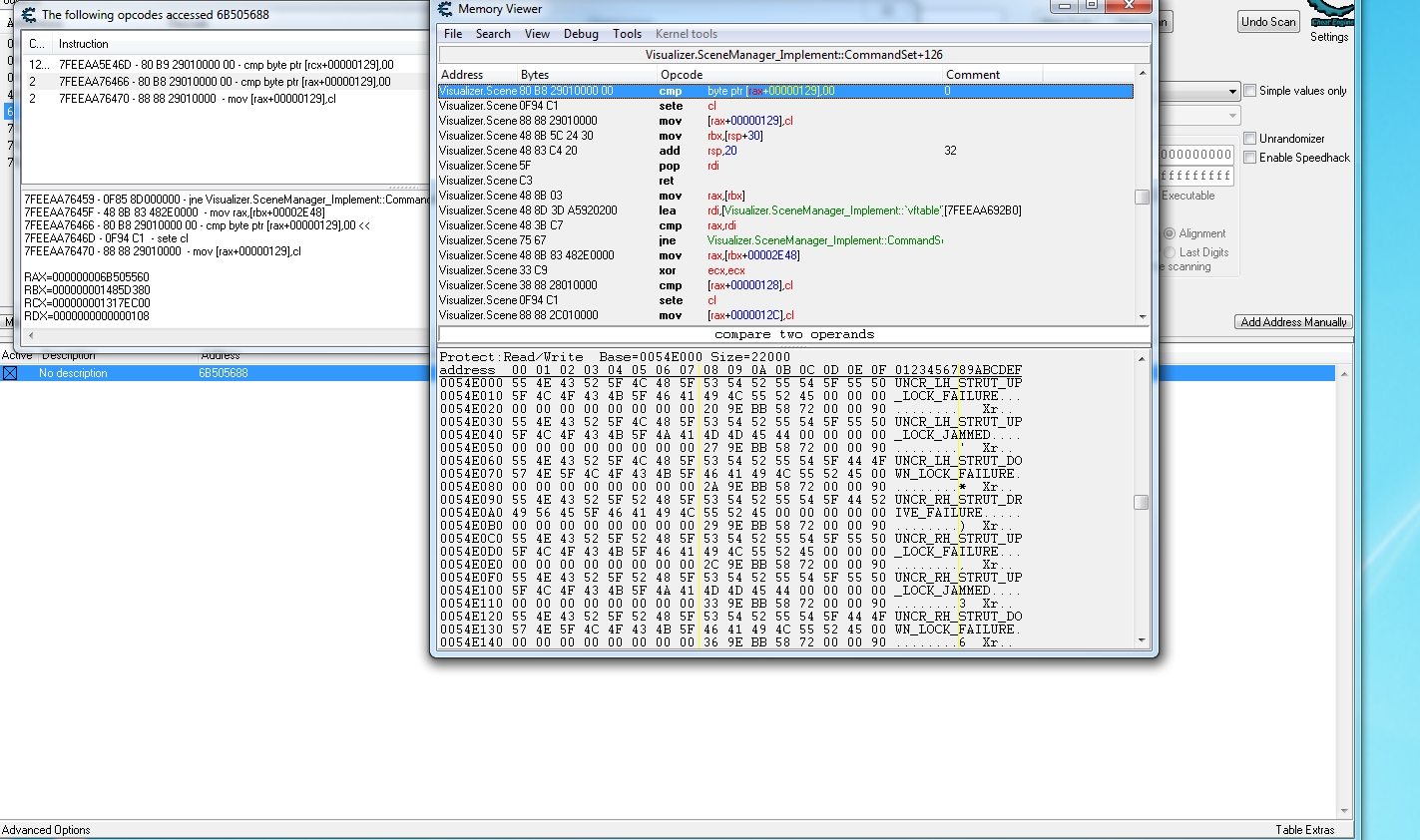
Do you see the next instruction? It's sete. Set if equal. I believe you want this value to appear equal to 0 so you want to simply put NOPs in the place of the cmp instruction
Right click on the cmp instruction and press "replace with code that does nothing"
If you want a script to do this, simply follow the AOB process you used before and then make sure your edited code does not have the cmp instruction. This means the set will happen regardless of if the two values are actually equal
_________________
Er, hi |
|
| Back to top |
|
|
taco1
Newbie cheater
![]() Reputation: 0 Reputation: 0
Joined: 04 Aug 2016
Posts: 16
|
| Posted: Mon Jul 31, 2017 9:07 pm Post subject: |
|
|
| Can you give me an example of the new script?
|
|
| Back to top |
|
|
Prehistoricman
Advanced Cheater
![]() Reputation: 0 Reputation: 0
Joined: 02 Aug 2016
Posts: 80
|
| Posted: Tue Aug 01, 2017 6:30 am Post subject: |
|
|
Have you tried the replace with code that does nothing yet? There's no point making a script yet if it won't work anyway
Edit:
I made a mistake actually! You want a way to set the Z flag (that will allow the sete to run as you wish)
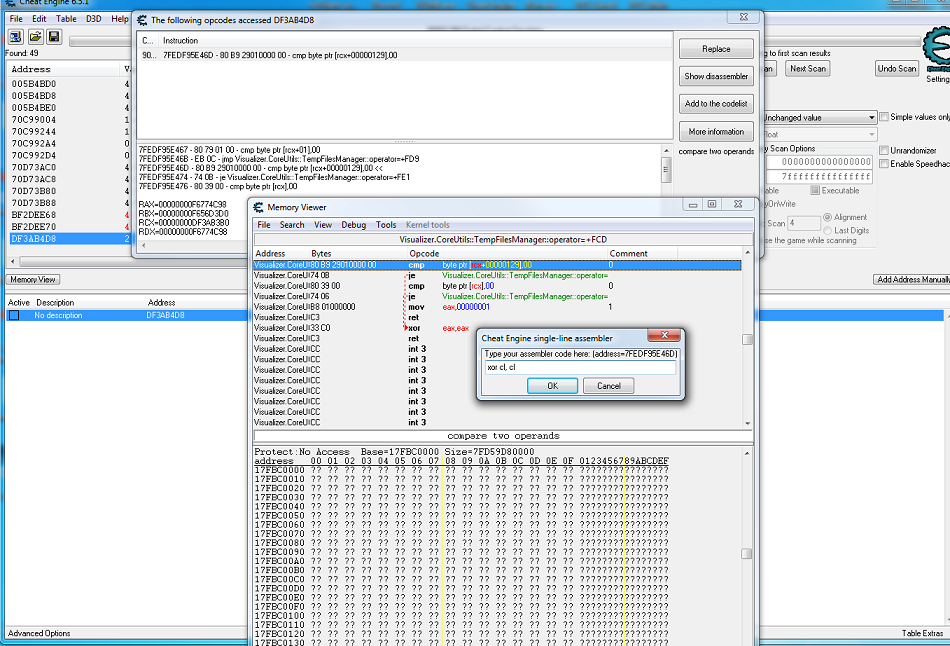
So to test out the hack, double click on the cmp, and write in
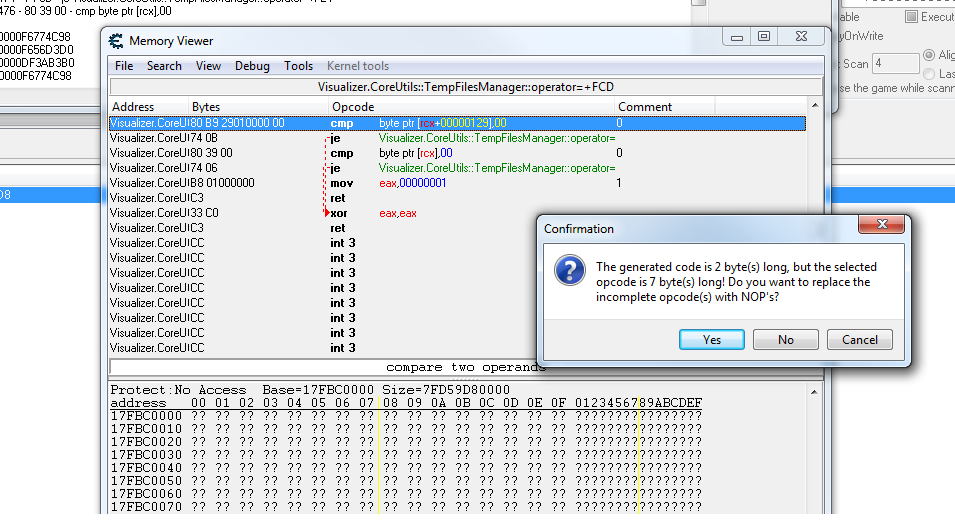
xor cl, cl
This will set cl to zero, as xoring anything with itself will output zero. When the result of an operation is zero, the zero flag is set. This is the same flag that it used to say "two values were equal", such as in the cmp (compare) instruction.
_________________
Er, hi |
|
| Back to top |
|
|
taco1
Newbie cheater
![]() Reputation: 0 Reputation: 0
Joined: 04 Aug 2016
Posts: 16
|
| Posted: Tue Aug 01, 2017 4:32 pm Post subject: |
|
|
I tried what you had suggested. It made it so I couldn't open my map at all. I want it to be visible at all times.
| Description: |
|
| Filesize: |
276.48 KB |
| Viewed: |
7620 Time(s) |
|
| Description: |
|
| Filesize: |
65.99 KB |
| Viewed: |
7620 Time(s) |
|
|
|
| Back to top |
|
|
cooleko
Grandmaster Cheater
![]() Reputation: 11 Reputation: 11
Joined: 04 May 2016
Posts: 717
|
| Posted: Tue Aug 01, 2017 9:22 pm Post subject: |
|
|
What is wrong with doing exactly what you did before?
simply type "mov [bMap],rcx"
before "cmp byte ptr [rcx+129],00"
then update the pointer for in the address list to 129 instead of BC
it is the exact script you had working before with the new AOB, so just use the AOB template on the new instruction and add in the globalalloc(bMap,$4) as well as the mov instruction in the same places as the previous script.
|
|
| Back to top |
|
|
taco1
Newbie cheater
![]() Reputation: 0 Reputation: 0
Joined: 04 Aug 2016
Posts: 16
|
| Posted: Tue Aug 01, 2017 10:26 pm Post subject: |
|
|
I tried making the previous script work but failed. I will try again with your instructions and report back.
That worked perfect Cooleko! I think I messed up the pointer the first time. Thanks again for you help.
|
|
| Back to top |
|
|
|

 FAQ
FAQ Search
 Memberlist
 Usergroups
 Register
 Profile
 Log in to check your private messages
 Log in


 . I tried to modify script but I was unsuccessful. I attached some pictures. Can you help me with a new script?