| View previous topic :: View next topic |
| Author |
Message |
++METHOS
I post too much
![]() Reputation: 92 Reputation: 92
Joined: 29 Oct 2010
Posts: 4196
|
 Posted: Sun Mar 13, 2016 8:23 pm Post subject: Posted: Sun Mar 13, 2016 8:23 pm Post subject: |
 |
|
You have a timer address (which you want to nop or manipulate in some way, I assume?). You found that address by searching or some other way. If that timer address is in your cheat table, just right-click on it to see which instructions access it. When you do that, a new window will pop up, showing you which opcodes are accessing that address.
In the new window, right-click on an empty, white space and select the option that lets you see whether or not the selected opcodes access other addresses. When you do that, you should see new numbers populate, that will be inside brackets, in the 'count' column. The new numbers, if shown, will be between 1 and 8. If any of the opcodes show a (1) in the count column, and it doesn't increase (even when you return to the game and play around - if possible), then any of those opcodes (if any) can be used for your filter. If all of the opcodes show a number greater than (1), then you will have to find a workable filter by some other means, as already described above.
|
|
| Back to top |
|
 |
bknight2602
Grandmaster Cheater
![]() Reputation: 0 Reputation: 0
Joined: 08 Oct 2012
Posts: 606
|
| Posted: Sun Mar 13, 2016 9:11 pm Post subject: |
|
|
| Quote: | | You have a timer address (which you want to nop or manipulate in some way, I assume?). You found that address by searching or some other way. If that timer address is in your cheat table, just right-click on it to see which instructions access it. When you do that, a new window will pop up, showing you which opcodes are accessing that address. |
The first image I posted was the results of this step.
| Quote: | | In the new window, right-click on an empty, white space and select the option that lets you see whether or not the selected opcodes access other addresses. When you do that, you should see new numbers populate, that will be inside brackets, in the 'count' column. The new numbers, if shown, will be between 1 and 8. |
Check out images Write and Write2, I believe that they are what you asked.
| Quote: | | If any of the opcodes show a (1) in the count column, and it doesn't increase (even when you return to the game and play around - if possible), then any of those opcodes (if any) can be used for your filter. If all of the opcodes show a number greater than (1), then you will have to find a workable filter by some other means, as already described above. |
The count was 18 so what steps to find a filter.
BTW, thanks or your time and effort to a noob.

|
|
| Back to top |
|
|
++METHOS
I post too much
![]() Reputation: 92 Reputation: 92
Joined: 29 Oct 2010
Posts: 4196
|
| Posted: Sun Mar 13, 2016 9:18 pm Post subject: |
|
|
I know you've already taken some of these steps...and I know what the images were in your previous posts...no need to point that out.
The count in (brackets) can not be ( 18 ).
Regarding your previous pictures...those pertain to instructions that are 'writing' to your timer address...not 'accessing'. You need to check which instructions are 'accessing'.
|
|
| Back to top |
|
|
bknight2602
Grandmaster Cheater
![]() Reputation: 0 Reputation: 0
Joined: 08 Oct 2012
Posts: 606
|
| Posted: Sun Mar 13, 2016 9:36 pm Post subject: |
|
|
| ++METHOS wrote: | I know you've already taken some of these steps...and I know what the images were in your previous posts...no need to point that out.
The count in (brackets) can not be ( 18 ).
Regarding your previous pictures...those pertain to instructions that are 'writing' to your timer address...not 'accessing'. You need to check which instructions are 'accessing'. |
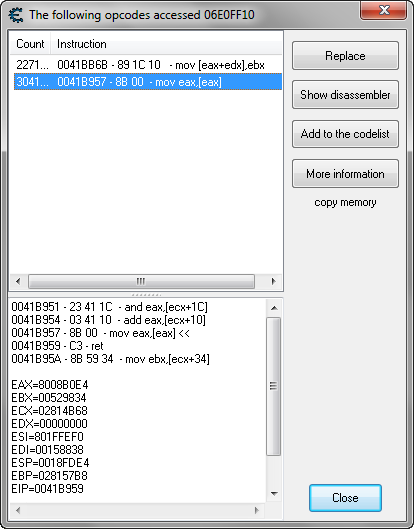
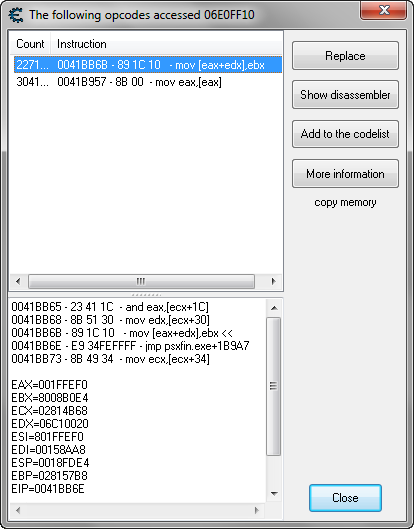
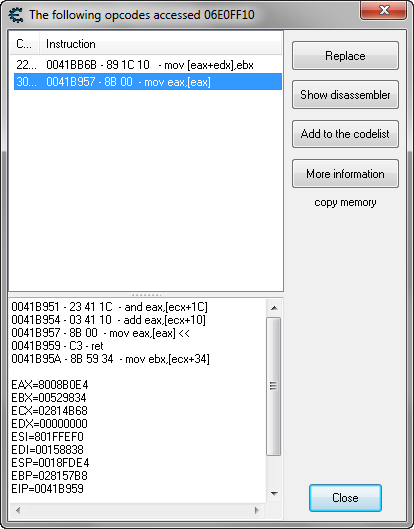
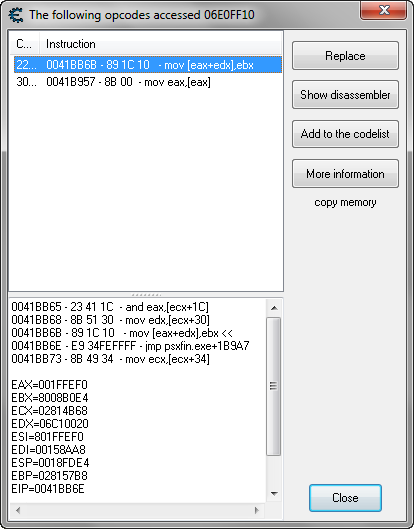
You are correct my bad, here is the accessing ones. I right clicked on the white space and imaged the results
| Description: |
|
| Filesize: |
23.52 KB |
| Viewed: |
5723 Time(s) |
|
| Description: |
|
| Filesize: |
23.79 KB |
| Viewed: |
5723 Time(s) |
|
| Description: |
|
| Filesize: |
22.58 KB |
| Viewed: |
5723 Time(s) |
|
| Description: |
|
| Filesize: |
22.87 KB |
| Viewed: |
5723 Time(s) |
|
|
|
| Back to top |
|
|
++METHOS
I post too much
![]() Reputation: 92 Reputation: 92
Joined: 29 Oct 2010
Posts: 4196
|
| Posted: Sun Mar 13, 2016 9:44 pm Post subject: |
|
|
| Only one image is needed. You must adjust your 'count' column so that all data is visible.
|
|
| Back to top |
|
|
bknight2602
Grandmaster Cheater
![]() Reputation: 0 Reputation: 0
Joined: 08 Oct 2012
Posts: 606
|
| Posted: Sun Mar 13, 2016 10:06 pm Post subject: |
|
|
| I don't know why the image doesn't show the count, but the top one is 2271 and the bottom is 3041
|
|
| Back to top |
|
|
++METHOS
I post too much
![]() Reputation: 92 Reputation: 92
Joined: 29 Oct 2010
Posts: 4196
|
| Posted: Sun Mar 13, 2016 10:14 pm Post subject: |
|
|
Are you messing with me?

|
|
| Back to top |
|
|
bknight2602
Grandmaster Cheater
![]() Reputation: 0 Reputation: 0
Joined: 08 Oct 2012
Posts: 606
|
| Posted: Mon Mar 14, 2016 9:12 am Post subject: |
|
|
No, I wouldn't think of that; asking for help as I am.
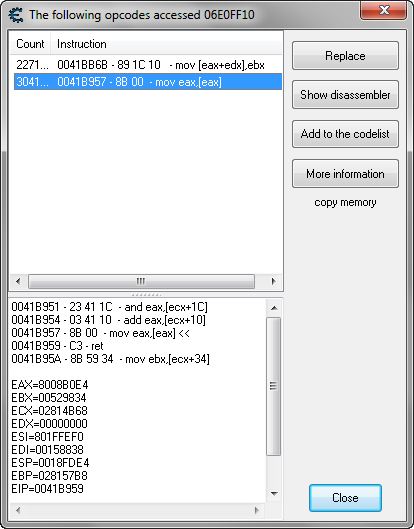
If you look at the address being accessed, it is wrong. The address of the timer is 0x06E0FF10, with that game opening, which will change the next time the game is started.
| Description: |
|
| Filesize: |
23.52 KB |
| Viewed: |
5637 Time(s) |
|
Last edited by bknight2602 on Mon Mar 14, 2016 9:48 am; edited 1 time in total |
|
| Back to top |
|
|
Cake-san
Grandmaster Cheater
 Reputation: 8 Reputation: 8
Joined: 18 Dec 2014
Posts: 541
Location: Semenanjung
|
| Posted: Mon Mar 14, 2016 9:30 am Post subject: |
|
|
psxfin is an emulator.From my experienced creating ct for emulator, many of the address are shared code which means that an instruction processing many address. It would be hard to create the table using script only because changing an instruction for an address will change all address that being accesed by that instruction. You have to either isolate the address by comparing the unique value for that address or trace that variable until you found the instruction that only accesed that address.
Judging from that image that you had posted,06E0FF10 is the address,8008B0E4 is the value for the address, 1FFEF0 and 06C10020 can be both offset or base. Well, if I'm you ,I'm just going to trace that address manually.
_________________
...
Last edited by Cake-san on Mon Mar 14, 2016 10:15 am; edited 1 time in total |
|
| Back to top |
|
|
bknight2602
Grandmaster Cheater
![]() Reputation: 0 Reputation: 0
Joined: 08 Oct 2012
Posts: 606
|
| Posted: Mon Mar 14, 2016 9:38 am Post subject: |
|
|
The objective is to freeze the address, wherever the software places it in memory. There is a recalculation code that adjusts all the addresses after the game is started.
| Quote: | Judging from that image that you had posted,06E0FF10 is the address,8008B0E4 is the value for the address, 1FFEF0 and 06C10020 can be both offset or base. Well, if I'm you ,I'm just going to trace that address manually.
|
I'm not sure what you are indicating here?
|
|
| Back to top |
|
|
Cake-san
Grandmaster Cheater
Reputation: 8
Joined: 18 Dec 2014
Posts: 541
Location: Semenanjung
|
| Posted: Mon Mar 14, 2016 10:11 am Post subject: |
|
|
| bknight2602 wrote: |
I'm not sure what you are indicating here? |
The address that you want to freeze is timer not health because if it's, it's a different thing as Timer can be freeze easily by checking the box next to the address.The problem is pinnning the address. This can be a little hard if you're not that experienced with tracing the pointer manually. I don't know how to guide you but my advise is for you to learn understanding the instruction. What's the instruction doing ? and by doing that you should have the basic knowledge of tracing the address.
_________________
... |
|
| Back to top |
|
|
++METHOS
I post too much
![]() Reputation: 92 Reputation: 92
Joined: 29 Oct 2010
Posts: 4196
|
| Posted: Mon Mar 14, 2016 12:28 pm Post subject: |
|
|
bknight2602-
The image that I posted was just an example. The address shown is not related to your target. Please read over the thread again so that we do not have to keep doing this back-and-forth and never getting anywhere.
As a side note, I agree with Cake-san regarding ps2 emulators...they can be a pain to work with for obvious reasons.
|
|
| Back to top |
|
|
bknight2602
Grandmaster Cheater
![]() Reputation: 0 Reputation: 0
Joined: 08 Oct 2012
Posts: 606
|
| Posted: Mon Mar 14, 2016 12:33 pm Post subject: |
|
|
| I see no back and forth, we were looking at the opcodes address the specific address, now what?
|
|
| Back to top |
|
|
++METHOS
I post too much
![]() Reputation: 92 Reputation: 92
Joined: 29 Oct 2010
Posts: 4196
|
| Posted: Mon Mar 14, 2016 12:39 pm Post subject: |
|
|
| You are not following my instructions. Even still, you have not checked to see if the opcodes that the debugger generates are accessing other addresses. I see the count number in your pictures, but I need to see the number of addresses being accessed (the numbers inside of the parenthesis). As I said, you have to right-click on an empty, white space inside of that window and select the option that will show you if the selected opcodes are accessing other addresses. If you do that, but still do not see everything, as depicted in the image that I posted, then you need to manually adjust the 'count' column so that all of the data is visible.
|
|
| Back to top |
|
|
bknight2602
Grandmaster Cheater
![]() Reputation: 0 Reputation: 0
Joined: 08 Oct 2012
Posts: 606
|
| Posted: Mon Mar 14, 2016 12:54 pm Post subject: |
|
|
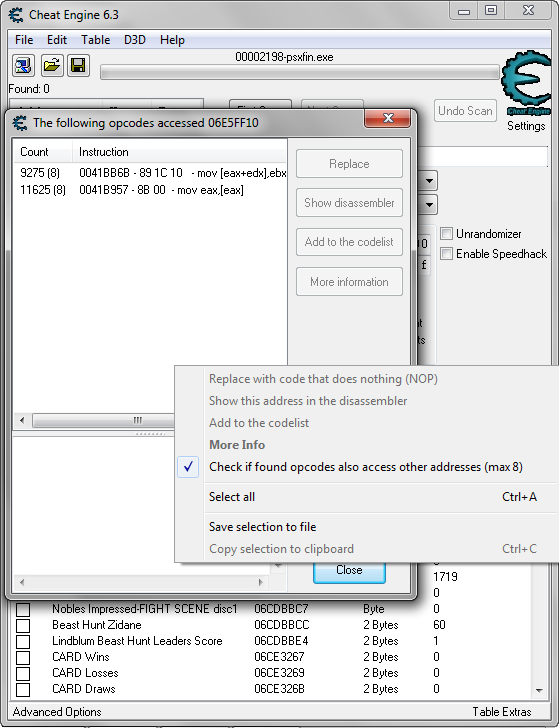
I did exactly as you asked and posted a image of a right mouse clicked(Max of 8 ), although I can't show you but here is todays version, there is a check mark on Check if found opcodes access...) There are no parentheses to check numbers inside.
ETA: Found a way to add image.
ETD 2: after expanding the column there are numbers in parentheses ( 8 )
to both of them.
Sorry for my not being familiar with the window. See new image
| Description: |
|
| Filesize: |
56.85 KB |
| Viewed: |
5551 Time(s) |
|
|
|
| Back to top |
|
|
|

 FAQ
FAQ Search
 Memberlist
 Usergroups
 Register
 Profile
 Log in to check your private messages
 Log in


