| View previous topic :: View next topic |
| Author |
Message |
Penlord
Newbie cheater
![]() Reputation: 0 Reputation: 0
Joined: 13 Feb 2010
Posts: 15
|
 Posted: Mon May 04, 2015 6:50 am Post subject: Moving hundreds of codes into the trainer generator Posted: Mon May 04, 2015 6:50 am Post subject: Moving hundreds of codes into the trainer generator |
 |
|
I have 330 codes that I wish to set the value for and freeze.
I want to set them into 3 sets of 110.
They will be toggled with f1, f2, f3.
I'm under the impression that I have to move them into the trainer generator one-by-one. Easier method?
|
|
| Back to top |
|
 |
Xathan
Advanced Cheater
![]() Reputation: 1 Reputation: 1
Joined: 19 Jun 2014
Posts: 72
|
| Posted: Mon May 04, 2015 8:37 am Post subject: |
|
|
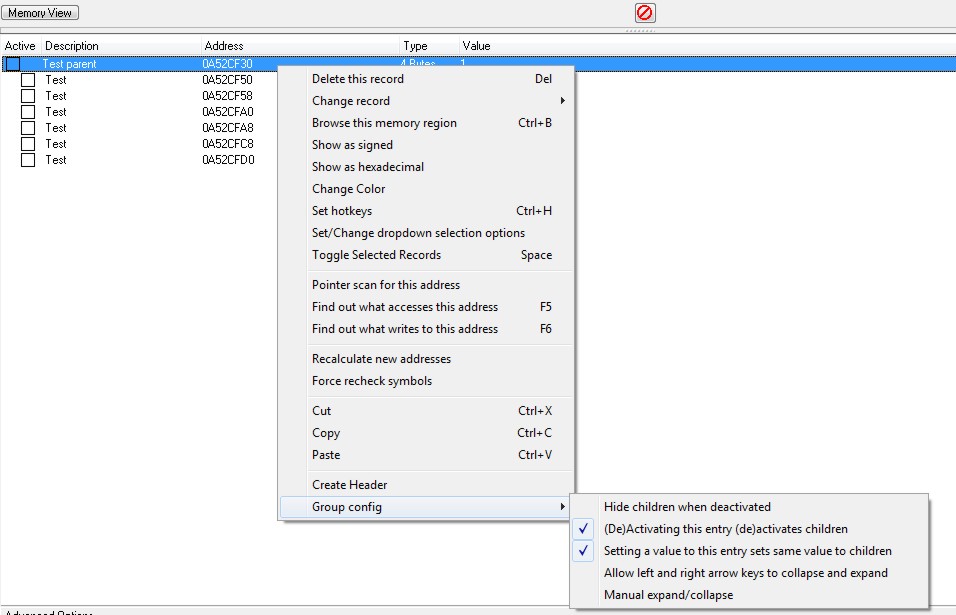
You can make three entries in CE and every subset of 110 entries as subentries. Then you rightclick the parent and select group config. There you can set the options:
- (de)activating this entry (de)activates children
- setting a value to this entry sets same value to children
And to put more than one entry into the address list just select each subset in the upper window and add them to the address list.
Hope that helps.
|
|
| Back to top |
|
|
atom0s
Moderator
 Reputation: 205 Reputation: 205
Joined: 25 Jan 2006
Posts: 8588
Location: 127.0.0.1
|
| Posted: Mon May 04, 2015 3:01 pm Post subject: |
|
|
Moved to Cheat Engine forum, nothing to do with Lua.
_________________
- Retired. |
|
| Back to top |
|
|
Penlord
Newbie cheater
![]() Reputation: 0 Reputation: 0
Joined: 13 Feb 2010
Posts: 15
|
| Posted: Wed May 06, 2015 7:18 am Post subject: |
|
|
| Xathan wrote: | You can make three entries in CE and every subset of 110 entries as subentries. Then you rightclick the parent and select group config. There you can set the options:
- (de)activating this entry (de)activates children
- setting a value to this entry sets same value to children
And to put more than one entry into the address list just select each subset in the upper window and add them to the address list.
Hope that helps. |
No idea how to do any of that. I appreciate you telling me that it's possible, though.
I went into cheatengine and tinkered, couldn't find "entry" or "subentry."
I assumed that meant I just drag a bunch of codes to be listed under another code in the list. Then I went into the trainer generator to see if anything changed. I guess my guess was wrong because nothing did.
I dunno where groupconfig is.
Wait, found it. I guess I did it right.
Now I just pop open trainer generator and enter 3 hotkeys and they will turn on/off 110 codes, right? Excited to see that.
|
|
| Back to top |
|
|
Xathan
Advanced Cheater
![]() Reputation: 1 Reputation: 1
Joined: 19 Jun 2014
Posts: 72
|
| Posted: Wed May 06, 2015 7:46 am Post subject: |
|
|
When you set the group config right each of the three sets should work in your trainer too. Glad you found it.
I gave it another try and noticed that when you create a header for a group you can set a value to this header and the value can be set to all child entries (below the header). Problem with that is that you can't create a hotkey. You can also choose one entry of 110 to be the parent and move all other entries below the parent. So you just need to create three hotkeys.
After testing just tell if it works fine for you or if we need to find another solution.
|
|
| Back to top |
|
|
Penlord
Newbie cheater
![]() Reputation: 0 Reputation: 0
Joined: 13 Feb 2010
Posts: 15
|
| Posted: Wed May 06, 2015 11:17 am Post subject: |
|
|
Works fine. For getting a code to set the value and then freeze, what do I do?
Do I add two separate entries into the "Add Hotkey" section?
one for set value, one for freeze, for the same value and with the same hotkey?
I thought they used to be combined in older versions.
I tried freeze, didn't work. I tried toggle freeze, didn't work.
My codes just aren't working.
|
|
| Back to top |
|
|
Xathan
Advanced Cheater
![]() Reputation: 1 Reputation: 1
Joined: 19 Jun 2014
Posts: 72
|
| Posted: Wed May 06, 2015 2:11 pm Post subject: |
|
|
You can upload your table here and I see what I can do.
Toggle freeze and set a value shouldn't be set to the same hotkey because you would set the value again for deactivating which can propably cause side effects.
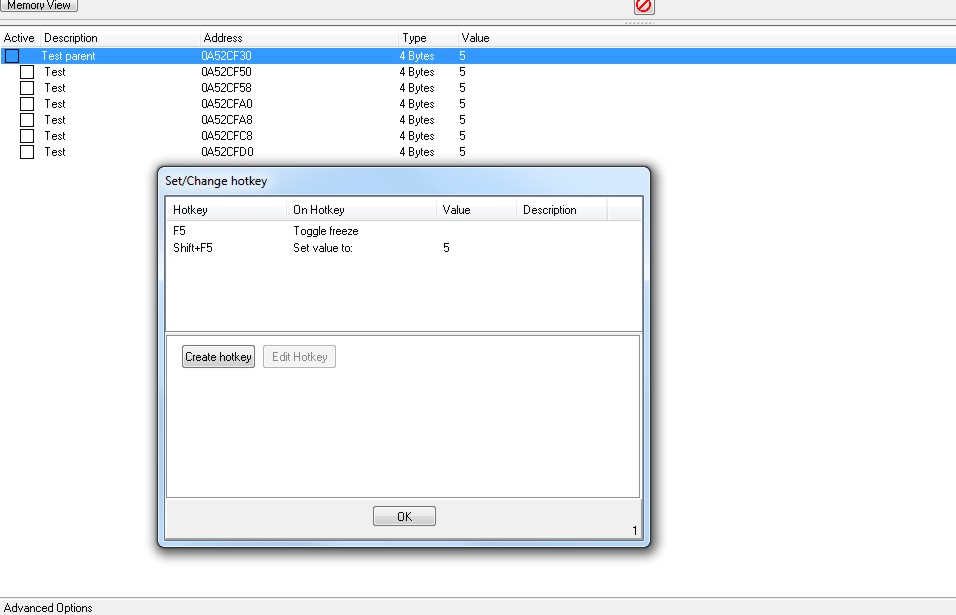
You can e.g. use F1 for toggle freeze of the first set and shift+F1 to set the value. This you need to set to your parent entry (see screenshots "Test parent"). I also show the settings I meant in my earlier posts.
| Description: |
|
| Filesize: |
60.63 KB |
| Viewed: |
7971 Time(s) |
|
| Description: |
|
| Filesize: |
89.52 KB |
| Viewed: |
7971 Time(s) |
|
|
|
| Back to top |
|
|
Penlord
Newbie cheater
![]() Reputation: 0 Reputation: 0
Joined: 13 Feb 2010
Posts: 15
|
| Posted: Sat May 09, 2015 4:54 am Post subject: |
|
|
Thanks, you're really helpful.
All I want to do is set the value to a value that the trainer-user cannot edit, and freeze it. I want to do it with the press of one button.
No different than specifying the value in your cheat list and then clicking the Active box. Except, without the trainer-user being able to enter a value.
Which option do I use? It seems like none of them work when I produce the trainer.
I feel like if I can't do it, that's a huge downgrade from earlier versions of cheat engine because I once made a trainer that did exactly what I wanted. I noticed the interface has changed since then but I'd be surprised if you couldn't do what I want to do anymore without bugs or problems.
|
|
| Back to top |
|
|
Dark Byte
Site Admin
 Reputation: 475 Reputation: 475
Joined: 09 May 2003
Posts: 25980
Location: The netherlands
|
| Posted: Sat May 09, 2015 5:14 am Post subject: |
|
|
Add the same address twice
One you give a hotkey for freeze, the other one for set value. Both the same key combination
and when generating the trainer, just remove the duplicate entries from the gui using the designer mode
or:
set the generic trainer generator set the output to script only
generate the trainer
now in the script go to "function onhotkey#" of the record you're interested in
and in there add the line "memrec#.Active=true"
now just save the table as an .exe or .cetrainer
_________________
Tools give you results. Knowledge gives you control.
Like my help? Join me on Patreon so i can keep helping |
|
| Back to top |
|
|
STN
I post too much
 Reputation: 43 Reputation: 43
Joined: 09 Nov 2005
Posts: 2673
|
| Posted: Sat May 09, 2015 12:10 pm Post subject: |
|
|
Why not just write an AA script and modify all the values inside that then simply activate it and deactivate the script with a hotkey.
Not sure what you are trying to do though
_________________
|
|
| Back to top |
|
|
|

 FAQ
FAQ Search
 Memberlist
 Usergroups
 Register
 Profile
 Log in to check your private messages
 Log in


