 |
Cheat Engine
The Official Site of Cheat Engine
|
| View previous topic :: View next topic |
| Author |
Message |
mouser
Advanced Cheater
![]() Reputation: 0 Reputation: 0
Joined: 08 Mar 2015
Posts: 50
|
 Posted: Tue Mar 31, 2015 3:11 pm Post subject: Posted: Tue Mar 31, 2015 3:11 pm Post subject: |
 |
|
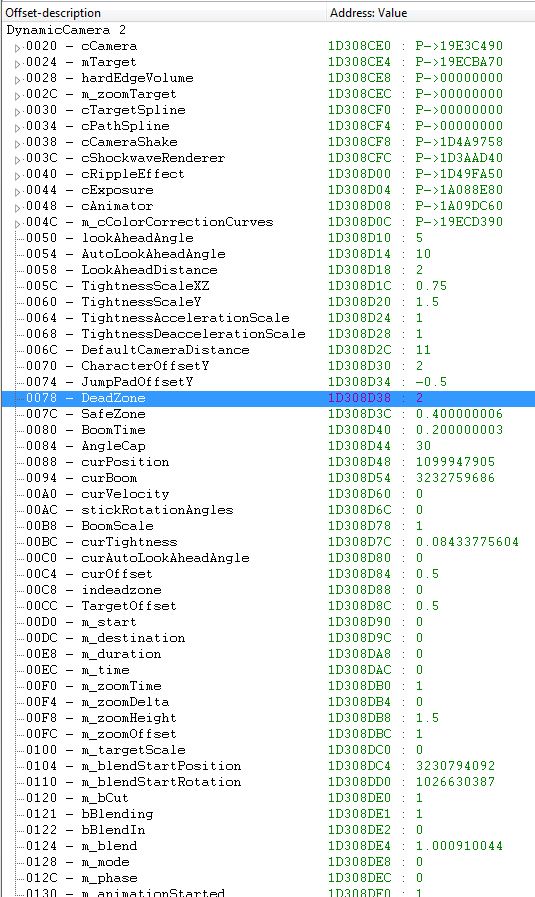
I'm a fool... I never looked at a dissected memory region with mono support enabled until now (attachment).
It shows everything in detail, black magic if you ask me  ...how does that even work? ...how does that even work?
From there I've tried changing some new values to see if I can change the camera position (Z) without using the address with the value 11 (turns out it is declared as "DefaultCameraDistance".
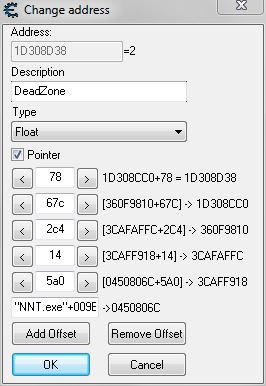
So I have increased the numbers on "Deadzone" as that sounds like something that would restrict the camera in it's freedom and it does. The standard value at the beginning of the game (and presumably the rest of the game) is set to "2", I manually ramped it up to 50 and can move the camera around nearly as much as when disabling certain functions that I've mentioned in previous posts.
@justa_dude:
I did change the value "11" (DefaultCameraDistance) also manually.
The problem I have now with the "Deadzone" address is the same as with the "DefaultCameraDistance", nothing writes to it.
@Zanzer:
You may already have provided a resolution in form of that Lua script, I plan to look further into that but Lua seems to be another big chunk to wrap my head around and this takes me a lot of time so I want to ask if there is another way to store/restore these values?
I don't want to change these values manually because I want to create a script where you press "F1", then move the camera around and press "F1" again and the camera returns to it's former state in every aspect. It already does that for XYZ panning/rotating motion, the script provided by alanze (thanks btw) is doing that.
For these distance/deadzone settings it seems that the values wont return to their former state when I change them manually and I can't use the same code I've used for XYZ camera panning /rotation movement. I don't know why the value at these addresses change at all when I just nop the instruction (if it is an instruction!) and restore it the same way it was, to be honest.
Deadzone
| Code: | originalcode:
add [eax],al
add [eax-33],al |
@justa_dude:
I maybe can't follow your explaination of static value/instance types (the noob is strong in me) but if there is a value at this address that is always the same, how is it set in the first place? My lack of knowledge is probably showing here.
Did the game developers programmed their game/camera to always use this static value for different tasks and this value is always stored at that address?
In that case, I'd have to set the value change and the restoring of the original value as set parameters into a script and it wouldn't be possible to ensure that possible dynamic changes at that address can still happen, right? (maybe they would overwrite my changes anyway?)
Also, in the dissected memory window. What is declared with specific names e.g "Deadzone" is not the address, right? It is different from the declarations in the memory viewer one layer above the dissect window, right?
I cant refer to these names in a script as CE will not find them, correct?
Phew, so many questions.
I have to say you guys are a great help, I would still fumble around with offsets and trying to find out how to get my XYZ pointers without you!
| Description: |
|
| Filesize: |
33.25 KB |
| Viewed: |
6417 Time(s) |
|
| Description: |
|
| Filesize: |
154.37 KB |
| Viewed: |
6428 Time(s) |
|
|
|
| Back to top |
|
 |
justa_dude
Grandmaster Cheater
 Reputation: 23 Reputation: 23
Joined: 29 Jun 2010
Posts: 893
|
| Posted: Wed Apr 01, 2015 4:01 am Post subject: |
|
|
Long post... I don't know where to start.
| mouser wrote: | | I never looked at a dissected memory region with mono support enabled until now (attachment). |
Ah, yeah. That's nice, isn't it?
| mouser wrote: | | The problem I have now with the "Deadzone" address is the same as with the "DefaultCameraDistance", nothing writes to it. |
Why is this a problem?
| Quote: | | is another way to store/restore these values? |
Just restore them the same way you change them...
| Quote: | I don't want to change these values manually because I want to create a script where you press "F1", then move the camera around and press "F1" again and the camera returns to it's former state in every aspect.
...
I cant refer to these names in a script as CE will not find them, correct?
|
Then just hook the code at some point that references the camera object and use the offsets in the chart you posted to access the relevant members. IIRC, you can use the member name instead of the numeric offset relative to the base of the object - eg, eax+defaultCamera or whatever.
| Quote: |
Deadzone
| Code: | originalcode:
add [eax],al
add [eax-33],al |
|
Stop doing this, lol! For data, you should be using the lower half of the window - the data viewer - instead of the top half - the disassembler. Some numbers translate into executable code, but most are just numbers.
| Quote: |
static values, blah blah
|
My mistake - if they appear in the listing you posted, you're all set.
_________________
A nagy kapu mellett, mindig van egy kis kapu.
----------------------
Come on... |
|
| Back to top |
|
|
Dark Byte
Site Admin
 Reputation: 474 Reputation: 474
Joined: 09 May 2003
Posts: 25953
Location: The netherlands
|
| Posted: Wed Apr 01, 2015 4:20 am Post subject: |
|
|
| Quote: |
I cant refer to these names in a script as CE will not find them, correct?
|
http://forum.cheatengine.org/viewtopic.php?t=575692
_________________
Tools give you results. Knowledge gives you control.
Like my help? Join me on Patreon so i can keep helping |
|
| Back to top |
|
|
mouser
Advanced Cheater
![]() Reputation: 0 Reputation: 0
Joined: 08 Mar 2015
Posts: 50
|
| Posted: Fri Apr 10, 2015 4:35 pm Post subject: |
|
|
Hi again, was a longer pause, sorry for not answering in time.
@justa_dude
I didn't want to cause confusion, I'll try to stay on problem at a time.
When you say "Just restore them the same way you change them...", refering to values and addresses here, I think I just still have problems changing them the right way.
Let me try this with another example, I'm trying to change Air/breath in a Tomb Raider game.
I have found the adress where the value is stored, but when I just freeze the value I will still run out of air when diving around and die eventually. As I understand it (having read that somewhere here) CE is not updating the value fast enough so I have to change the instruction that is setting the value in the first place.
I searched what is writing to that address where the value is stored and got one address, the instruction is:
| Code: | | fstp dword ptr [esi*8+tra.exe+265268] |
When I try to decipher that (using google, doesn't mean I fully understand everything):
fstp is the floating point register stack, a 32 bit floating point number (dword) is written and the stack (ptr) is popped.
Now for ... I have no idea what that means?
I don't really understand the entire instruction to be honest.
This is the rest of the displayed information for that instruction:
| Code: |
004551B9 - D9 44 24 10 - fld dword ptr [esp+10]
004551BD - 83 C4 04 - add esp,04
004551C0 - D9 1C F5 68526600 - fstp dword ptr [esi*8+tra.exe+265268] <<
004551C7 - 5E - pop esi
004551C8 - C3 - ret
EAX=42C80000
EBX=00000000
ECX=008181D0
EDX=08A94540
ESI=00000041
EDI=0018F1EC
ESP=0018F1A4
EBP=00000014
EIP=004551C7 |
Can you tell me how to describe what the instruction is doing?
The information in between the memory and the bytes viewer just says
@Dark Byte
If I understand this correctly I can tell cheat engine to look into a saved data structure (that I renamed) and find the instructions/my descriptions for them in there, but it's only possibly using Lua script?
|
|
| Back to top |
|
|
Zanzer
I post too much
![]() Reputation: 126 Reputation: 126
Joined: 09 Jun 2013
Posts: 3278
|
| Posted: Fri Apr 10, 2015 5:37 pm Post subject: |
|
|
fld dword ptr [esp+10] is loading a floating point value onto the stack
fstp dword ptr [esi*8+tra.exe+265268] is popping that value off the stack into the address
That address is calculated as follows:
Take the value in ESI (0x41) and multiply it by 8
Add that total to the address tra.exe+265268
So: tra.exe+265268+208
It almost sounds like you found the wrong address if freezing it did not stop you from drowning.
I can't imagine the game kills you that fast.
Anyway, you would need to replace that instruction with fstp st(0) to stop it from updating.
This pops the value from the stack into nothing in order to prevent a stack overflow crash.
However, since that instruction has a static "tra.exe+265268" it may make your script better survive patches to hack the "fld" instruction above instead.
For example, if the value starts at 0 and counts up until dead, you might replace the instruction with "fldz" to load 0.0 onto the stack.
|
|
| Back to top |
|
|
mouser
Advanced Cheater
![]() Reputation: 0 Reputation: 0
Joined: 08 Mar 2015
Posts: 50
|
| Posted: Fri Apr 10, 2015 6:06 pm Post subject: |
|
|
Hi Zanzer, you were correct, I did find the wrong adress. What I have found was probably the display/graphic for the Air-meter because when I replaced the code | Code: | | fld dword ptr [esp+10] |
with that part of the hud display vanished but I still drowned.
I'm going to find the real adress now, thanks.
|
|
| Back to top |
|
|
|
|
You cannot post new topics in this forum
You cannot reply to topics in this forum
You cannot edit your posts in this forum
You cannot delete your posts in this forum
You cannot vote in polls in this forum
You cannot attach files in this forum
You can download files in this forum
|
|
 FAQ
FAQ Search
 Memberlist
 Usergroups
 Register
 Profile
 Log in to check your private messages
 Log in


