 |
Cheat Engine
The Official Site of Cheat Engine
|
| View previous topic :: View next topic |
| Author |
Message |
mgr.inz.Player
I post too much
 Reputation: 222 Reputation: 222
Joined: 07 Nov 2008
Posts: 4438
Location: W kraju nad Wisla. UTC+01:00
|
 Posted: Mon Jul 15, 2013 12:36 pm Post subject: Posted: Mon Jul 15, 2013 12:36 pm Post subject: |
 |
|
| Quote: | Hope this is what you requested, I followed your instructions.
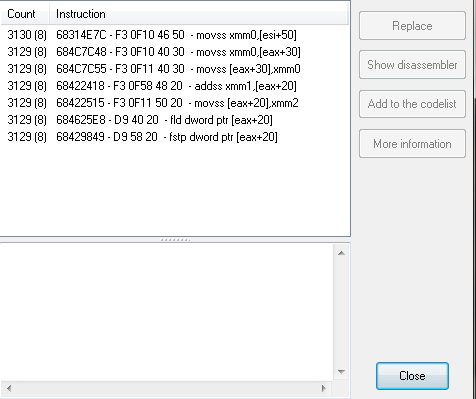 |
Yes, it's exactly this. It is unfortunate that you have not given this yesterday.
Finding ID (pointer, or structure check, or stack check, or register check) is a must.
Better start reading CE subforum "Cheat Engine Tutorials". Look for "structure dissect" and about comparing one structure with another structure.
_________________
Last edited by mgr.inz.Player on Mon Jul 15, 2013 12:41 pm; edited 1 time in total |
|
| Back to top |
|
 |
shadowpt
Advanced Cheater
![]() Reputation: 0 Reputation: 0
Joined: 04 Jun 2011
Posts: 82
|
| Posted: Mon Jul 15, 2013 12:40 pm Post subject: |
|
|
| mgr.inz.Player wrote: | | Quote: | Hope this is what you requested, I followed your instructions.
|
Yes, it's exactly this. It is unfortunate that you have not given this yesterday.
Finding ID (pointer, or structure check, or stack check, or register check) is a must. |
I did the same thing yesterday but the "Count" column was too small and I never noticed the (8), I was also expeting a completely different thing to appear, like a new window or something. I apologize, as you can see my knowledge doesn't go too far.
|
|
| Back to top |
|
|
mgr.inz.Player
I post too much
Reputation: 222
Joined: 07 Nov 2008
Posts: 4438
Location: W kraju nad Wisla. UTC+01:00
|
| Posted: Mon Jul 15, 2013 12:42 pm Post subject: |
|
|
This is why I wrote:
| Quote: | | 6. make screenshots of whole window. Resize that window. And be sure that count column is wide enough. So we can see all entries. (you can shrink bottom list) |
PS: do not quote whole post if you are still at the same page. (I edited my previous post by the way).
_________________
|
|
| Back to top |
|
|
shadowpt
Advanced Cheater
![]() Reputation: 0 Reputation: 0
Joined: 04 Jun 2011
Posts: 82
|
| Posted: Mon Jul 15, 2013 12:49 pm Post subject: |
|
|
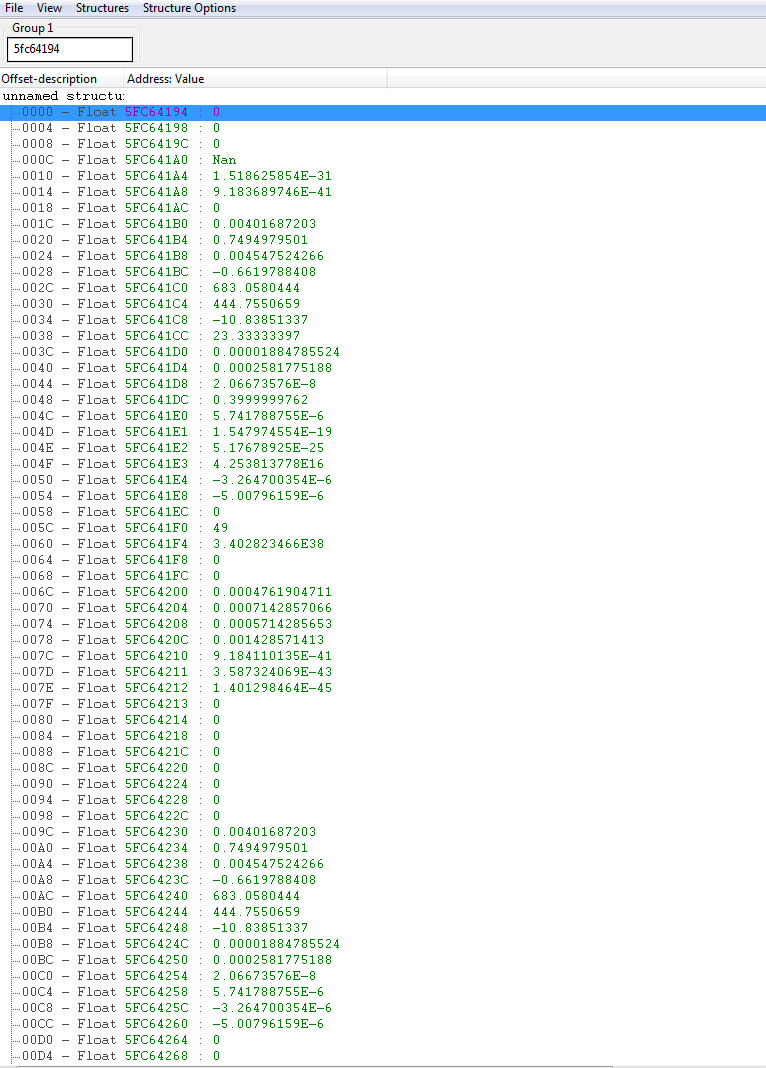
I have used structure dissect, that is how I found all these values and addresses and eventually build all the pointers.
I will now look at structure comparing although I don't understand the point of doing it.
|
|
| Back to top |
|
|
mgr.inz.Player
I post too much
Reputation: 222
Joined: 07 Nov 2008
Posts: 4438
Location: W kraju nad Wisla. UTC+01:00
|
|
| Back to top |
|
|
shadowpt
Advanced Cheater
![]() Reputation: 0 Reputation: 0
Joined: 04 Jun 2011
Posts: 82
|
| Posted: Mon Jul 15, 2013 1:34 pm Post subject: |
|
|
Well I just read the tutorial for the second time and I did what could be done. I can't find the addresses for the other vehicles that are not mine because I can't control them, I certainly cannot ask people to do certain things so I can find the addresses.
I really don't understand why we can't use the other way around with the opcode modification.
I can only own 1 vehicle from a selection of 8 different vehicles (air and ground vehicles) and these are the addresses for each parameter of speed position and rotation:
B0 B4 B8 - Angles for Forward inclination, Side inclination and surface inclination (XY, XZ and YZ plane angles)
C0 C4 C8 - Map position/Player coordinates (North-South, West-East and Up-Down)
CC - Have no idea, I can change but don't notice any effect in the game
D0 D4 D8 - Axis velocity (NS, WE, UD)
DC - Same with CC, can change but no effect can be noticed
E0 E4 E8 - Vehicle tilts, exactly the same as B0 B4 B8 but these are for movement while the B0 B4 B8 are for angle position (same difference as player position vs player movement)
And the rest is unknow, changing the other addresses makes no effect or causes the game to crash.
| Description: |
|
| Filesize: |
42.8 KB |
| Viewed: |
12416 Time(s) |
|
Last edited by shadowpt on Thu Jul 18, 2013 9:29 am; edited 1 time in total |
|
| Back to top |
|
|
++METHOS
I post too much
![]() Reputation: 92 Reputation: 92
Joined: 29 Oct 2010
Posts: 4197
|
| Posted: Mon Jul 15, 2013 1:54 pm Post subject: |
|
|
| You already have the addresses for the other vehicles. But really, you do not need to filter anything if you use pointer method.
|
|
| Back to top |
|
|
shadowpt
Advanced Cheater
![]() Reputation: 0 Reputation: 0
Joined: 04 Jun 2011
Posts: 82
|
| Posted: Tue Jul 16, 2013 2:11 pm Post subject: |
|
|
@mgr.inz.Player
I have been studying your scripts and I am trying to understand what you call by "deltas", here for example
| Code: | // change deltas for [eax+30] [eax+34] and [eax+38]
movups xmm0,[esi+00000094] // get current delta
mulps xmm0,xmm1 // multiply delta by user factor |
Which seem to be related to
| Code: | movss xmm0,[eax+30]
addss xmm0,[esi+00000094] <-- This Opcode
movss [eax+30],xmm0
|
Is that line adding the increment value to the current vehicle speed?
By the way, those scripts don't make all the vehicles spazz out anymore, something happened before to the game and after restarting it the vehicles didn't spazz again but my vehicle is affected by it, feels like the movement opcodes are getting noped because I can hardly move when I enable it even after setting huge float values or very low ones.
I also noticed that you made the script to affect all the movement opcodes as mentioned as before but can it be done just for the first one? I think changing all them like that is causing the problem.
For example:
| Code: |
movss xmm0,[eax+30] <-- This one is before esi+ and eax+
addss xmm0,[esi+00000094]
movss [eax+30],xmm0
movss xmm0,[esi+00000098]
addss xmm0,[eax+34] <-- While this one is AFTER esi+ but before eax+
movss [eax+34],xmm0
movss xmm0,[esi+0000009C]
addss xmm0,[eax+38] <-- This one is also after esi+ and before eax+
movss [eax+38],xmm0
|
And it seems that your code is generic, not taking into account the order of the opcodes, leading me to believe that the script is replacing wrong opcodes or changing them in the wrong order causing the vehicle to hardly move at all (same effect as I observed when replacing movss [eax+30],xmm0 with addss xmm0,xmm0)
PS: I have been almost all night figuring out what you guys mentioned, vehicle id and stuff like that and those really are the only ones for my vehicle.
|
|
| Back to top |
|
|
shadowpt
Advanced Cheater
![]() Reputation: 0 Reputation: 0
Joined: 04 Jun 2011
Posts: 82
|
| Posted: Wed Jul 17, 2013 12:19 pm Post subject: |
|
|
Does anyone know what I should change so it only affects one opcode line instead of multiple at the same time? I think changing all of them at the same time is causing the problems and making it not work as it should since the original opcode lines are not all in the same order.
Should I just delete the lines
| Code: | movhlps xmm0,xmm0
movss [esi+0000009C],xmm0
|
So it only changes 1 opcode? in this case
| Code: | [ENABLE]
alloc(hack,1024)
label(retHere)
label(multiplyBy)
hack:
sub esp,10 // prepare space
movdqu [esp],xmm1 // store xmm1
movss xmm1,[multiplyBy] // get multiply factor
shufps xmm1,xmm1,00
// change deltas for [eax+30] [eax+34] and [eax+38]
movups xmm0,[esi+00000094] // get current delta
mulps xmm0,xmm1 // multiply delta by user factor
movq [esi+00000094],xmm0 // store new delta
movhlps xmm0,xmm0 <-- This line
movss [esi+0000009C],xmm0 <-- and this line
movdqu xmm1,[esp] // restore xmm1
add esp,10
movss xmm0,[eax+30] //original code
jmp retHere
hack+100:
multiplyBy:
dd (float)1.001 // CHANGE THIS
Phys_x86.dll+1D7C48:
jmp hack
retHere:
[DISABLE]
Phys_x86.dll+1D7C48:
db F3 0F 10 40 30
dealloc(hack) |
|
|
| Back to top |
|
|
mgr.inz.Player
I post too much
Reputation: 222
Joined: 07 Nov 2008
Posts: 4438
Location: W kraju nad Wisla. UTC+01:00
|
| Posted: Wed Jul 17, 2013 12:28 pm Post subject: |
|
|
You still don't get it. You must filter out addresses, not opcodes.
As GNIREENIGNE mentioned before, you have those addresses already.
Just compare two or more structures:
Find few addresses that movss xmm0,[eax+30] accesses. Add them to dissect structure tool. Address of currently used vehicle must be in group1, other addresses (other vehicles and etc) must be in group2.
_________________
|
|
| Back to top |
|
|
shadowpt
Advanced Cheater
![]() Reputation: 0 Reputation: 0
Joined: 04 Jun 2011
Posts: 82
|
| Posted: Wed Jul 17, 2013 12:32 pm Post subject: |
|
|
| mgr.inz.Player wrote: | You still don't get it. You must filter out addresses, not opcodes.
As GNIREENIGNE mentioned before, you have those addresses already.
Just compare two or more structures:
Find few addresses that movss xmm0,[eax+30] accesses. Add them to dissect structure tool. Address of currently used vehicle must be in group1, other addresses (other vehicles and etc) must be in group2. |
There aren't any other addresses for the vehicles that aren't mine, those opcodes are related only to my vehicle and all the addresses they access are connected to my vehicle, no other one.
The opcodes related to other vehicles have nothing in common with those and they do not share any of the addresses, the only thing they have are specific coordinates, nothing else, not even velocity.
I have studied this almost all night and verified it by changing the values and observing the effects.
Edit: And I have the addresses for the velocity but depending on which vehicle I use they can be either 3 or 6 and changing the 6 when a vehicle holds only 3 crashes the game while modifying the opcodes does not and it works way better.
All I am trying to do is to change that one line instead of all the "deltas" at once because they might be causing problems since not all opcodes are in the same order.
Last edited by shadowpt on Wed Jul 17, 2013 12:40 pm; edited 1 time in total |
|
| Back to top |
|
|
mgr.inz.Player
I post too much
Reputation: 222
Joined: 07 Nov 2008
Posts: 4438
Location: W kraju nad Wisla. UTC+01:00
|
| Posted: Wed Jul 17, 2013 12:39 pm Post subject: |
|
|
really?
| shadowpt wrote: | |
this proves something opposite 
You found address of your vehicle, then you followed steps I gave you. And then you posted above screenshot.
Those eights, yes 8 inside (), prove that every opcode is used for other addresses (other vehicles, + maybe other objects).
It's pretty the same case as "hero health shared codes". You must filter out other addresses. If you don't, your "god mode" script will work for you, enemies, destructible objects, etc.
_________________
Last edited by mgr.inz.Player on Wed Jul 17, 2013 12:46 pm; edited 1 time in total |
|
| Back to top |
|
|
shadowpt
Advanced Cheater
![]() Reputation: 0 Reputation: 0
Joined: 04 Jun 2011
Posts: 82
|
| Posted: Wed Jul 17, 2013 12:45 pm Post subject: |
|
|
@mgr.inz.Player
I don't understand what that means? As far as I can tell the other opcodes are related to the turning speed and/or yaw speed (if I am not mistaken) of the current vehicle that I own, at least that's what I found when changing the addresses that gave me those opcodes.
I understand that this is really making you upset, I can only imagine the frustration that is trying to explain a child something when the child insists on the other but please remember that at first you thought this couldn't be done because physics are usually server-side.
All that I am asking is what should I change the code so it just modifies one opcode line instead of multiple opcodes.
EDIT: Quoted by mistake, remembered that you asked me not to quote like this.
Another addition:
This game is not like the others, the vehicles are not laying around like they can be mine or modified to be mine, a vehicle to be mine I need ownership (which is gained by spawning the vehicle), all the other vehicles are not mine and cannot be controlled by me, not even if I change their values in the addresses (the coordinates), they will just warp and return to the original position.
Last edited by shadowpt on Wed Jul 17, 2013 12:49 pm; edited 1 time in total |
|
| Back to top |
|
|
mgr.inz.Player
I post too much
Reputation: 222
Joined: 07 Nov 2008
Posts: 4438
Location: W kraju nad Wisla. UTC+01:00
|
| Posted: Wed Jul 17, 2013 12:48 pm Post subject: |
|
|
Take your time, you eventually get a clue. Read about "shared code", you should find it in CE forum.
_________________
Last edited by mgr.inz.Player on Wed Jul 17, 2013 12:53 pm; edited 1 time in total |
|
| Back to top |
|
|
shadowpt
Advanced Cheater
![]() Reputation: 0 Reputation: 0
Joined: 04 Jun 2011
Posts: 82
|
| Posted: Wed Jul 17, 2013 12:52 pm Post subject: |
|
|
| mgr.inz.Player wrote: | | Take your time, you eventually get a clue. |
So you won't help me on how can I change your code so it just affects one opcode instead of multiple opcodes?
The first suggestion you gave me worked practically well (the one in the first page) and it only affected my vehicle, so isn't it worth at least to try what I am asking?
|
|
| Back to top |
|
|
|
|
You cannot post new topics in this forum
You cannot reply to topics in this forum
You cannot edit your posts in this forum
You cannot delete your posts in this forum
You cannot vote in polls in this forum
You cannot attach files in this forum
You can download files in this forum
|
|
 FAQ
FAQ Search
 Memberlist
 Usergroups
 Register
 Profile
 Log in to check your private messages
 Log in


