| View previous topic :: View next topic |
| Author |
Message |
mgr.inz.Player
I post too much
 Reputation: 222 Reputation: 222
Joined: 07 Nov 2008
Posts: 4438
Location: W kraju nad Wisla. UTC+01:00
|
 Posted: Mon Jul 15, 2013 9:07 am Post subject: Posted: Mon Jul 15, 2013 9:07 am Post subject: |
 |
|
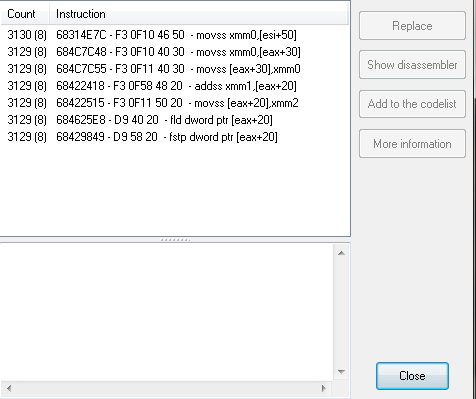
| shadowpt wrote: | | mgr.inz.Player wrote: | So, when I asked for address for
movss xmm0,[eax+30]
you gave me address for movss [eax+30],xmm0
This is why my latest alterspeeddelta.CT doesn't work |
Oh I'm so sorry! Dislexic moment :/ |
Does it work? (restart game, do not use other scripts)
(try other factors: 1.01 , 1.1 , 1.5 , 2.0)
| Description: |
| It uses multiply factor: 1.001 |
|

Download |
| Filename: |
alterspeeddelta.CT |
| Filesize: |
1.19 KB |
| Downloaded: |
1698 Time(s) |
_________________
|
|
| Back to top |
|
 |
shadowpt
Advanced Cheater
![]() Reputation: 0 Reputation: 0
Joined: 04 Jun 2011
Posts: 82
|
| Posted: Mon Jul 15, 2013 9:36 am Post subject: |
|
|
| mgr.inz.Player wrote: | | shadowpt wrote: | | mgr.inz.Player wrote: | So, when I asked for address for
movss xmm0,[eax+30]
you gave me address for movss [eax+30],xmm0
This is why my latest alterspeeddelta.CT doesn't work |
Oh I'm so sorry! Dislexic moment :/ |
Does it work? (restart game, do not use other scripts)
(try other factors: 1.01 , 1.1 , 1.5 , 2.0) |
If I set it to something above 1 the vehicle starts rising up up up until I turn off the script.
Forgot to say, it is not affecting the other 2 axis, just the vertical one.
|
|
| Back to top |
|
|
mgr.inz.Player
I post too much
Reputation: 222
Joined: 07 Nov 2008
Posts: 4438
Location: W kraju nad Wisla. UTC+01:00
|
| Posted: Mon Jul 15, 2013 9:42 am Post subject: |
|
|
Comment out those
movhlps xmm0,xmm0
movss [esi+0000009C],xmm0
(just add // at the beginning of line, line 20 and 21)
_________________
|
|
| Back to top |
|
|
shadowpt
Advanced Cheater
![]() Reputation: 0 Reputation: 0
Joined: 04 Jun 2011
Posts: 82
|
| Posted: Mon Jul 15, 2013 9:45 am Post subject: |
|
|
| mgr.inz.Player wrote: | Comment out those
movhlps xmm0,xmm0
movss [esi+0000009C],xmm0
(just add // at the beginning of line, line 20 and 21) |
Same exact thing occurs after commenting out those 2 lines.
| Code: | movss xmm0,[esi+0000009C]
addss xmm0,[eax+38]
movss [eax+38],xmm0
|
Are all related to vertical movement, dont understand why it is still afecting it after disabling those lines.
|
|
| Back to top |
|
|
mgr.inz.Player
I post too much
Reputation: 222
Joined: 07 Nov 2008
Posts: 4438
Location: W kraju nad Wisla. UTC+01:00
|
| Posted: Mon Jul 15, 2013 9:57 am Post subject: |
|
|
| Quote: | | Same exact thing occurs after commenting out those 2 lines. |
You meant "after NOP'ing" those three lines?
_________________
|
|
| Back to top |
|
|
shadowpt
Advanced Cheater
![]() Reputation: 0 Reputation: 0
Joined: 04 Jun 2011
Posts: 82
|
| Posted: Mon Jul 15, 2013 10:00 am Post subject: |
|
|
| mgr.inz.Player wrote: | | Quote: | | Same exact thing occurs after commenting out those 2 lines. |
You meant "after NOP'ing" those three lines? |
No, I mean the 2 lines you mentioned I commented out.
I was just pointing out that it is strange that after turning them off it still affects vertical movement and I just posted the opcodes related to the vertical movement, I didn't nop them.
|
|
| Back to top |
|
|
mgr.inz.Player
I post too much
Reputation: 222
Joined: 07 Nov 2008
Posts: 4438
Location: W kraju nad Wisla. UTC+01:00
|
| Posted: Mon Jul 15, 2013 10:07 am Post subject: |
|
|
Hmm, maybe this game uses two vectors as you wrote it before. Previous script multiplied delta values for [eax+30] [eax+34] [eax+38]
I will add multiplied deltas for [eax+40] [eax+44] [eax+48] too.
Edit:
| Description: |
|
Download |
| Filename: |
alterspeeddelta.CT |
| Filesize: |
1.45 KB |
| Downloaded: |
1623 Time(s) |
_________________
|
|
| Back to top |
|
|
shadowpt
Advanced Cheater
![]() Reputation: 0 Reputation: 0
Joined: 04 Jun 2011
Posts: 82
|
| Posted: Mon Jul 15, 2013 11:37 am Post subject: |
|
|
| mgr.inz.Player wrote: | Hmm, maybe this game uses two vectors as you wrote it before. Previous script multiplied delta values for [eax+30] [eax+34] [eax+38]
I will add multiplied deltas for [eax+40] [eax+44] [eax+48] too.
Edit: |
That script made all the vehicles spazz out and drag the game pretty hard.
|
|
| Back to top |
|
|
mgr.inz.Player
I post too much
Reputation: 222
Joined: 07 Nov 2008
Posts: 4438
Location: W kraju nad Wisla. UTC+01:00
|
| Posted: Mon Jul 15, 2013 11:41 am Post subject: |
|
|
wow 
Looks like you have to find a way to filter out other addresses accessed by
movss [eax+30],xmm0
_________________
|
|
| Back to top |
|
|
shadowpt
Advanced Cheater
![]() Reputation: 0 Reputation: 0
Joined: 04 Jun 2011
Posts: 82
|
| Posted: Mon Jul 15, 2013 12:01 pm Post subject: |
|
|
| mgr.inz.Player wrote: | wow
Looks like you have to find a way to filter out other addresses accessed by
movss [eax+30],xmm0 |
Why if your first code works well (at least better than what I achieved before but still problematic) and doesn't affect the other vehicles? Trying to understand here, I mean I even have the addresses for the angles of my vehicle, can't they be used to calculate the vector limit?
|
|
| Back to top |
|
|
mgr.inz.Player
I post too much
Reputation: 222
Joined: 07 Nov 2008
Posts: 4438
Location: W kraju nad Wisla. UTC+01:00
|
| Posted: Mon Jul 15, 2013 12:08 pm Post subject: |
|
|
Open memory viewer, right click this opcode:
movss xmm0,[eax+30]
or this (it doesn't matter which opcode, because EAX is the same)
movss [eax+30],xmm0
and choose "find out what addresses this .... "
Go to game, play for 1 minute, then tell me how many addresses were accessed.
_________________
|
|
| Back to top |
|
|
++METHOS
I post too much
![]() Reputation: 92 Reputation: 92
Joined: 29 Oct 2010
Posts: 4197
|
| Posted: Mon Jul 15, 2013 12:11 pm Post subject: |
|
|
| You knew those instructions were accessing many other addresses. You will need to find an ID to compare.
|
|
| Back to top |
|
|
shadowpt
Advanced Cheater
![]() Reputation: 0 Reputation: 0
Joined: 04 Jun 2011
Posts: 82
|
| Posted: Mon Jul 15, 2013 12:22 pm Post subject: |
|
|
| mgr.inz.Player wrote: | Open memory viewer, right click this opcode:
movss xmm0,[eax+30]
or this (it doesn't matter which opcode, because EAX is the same)
movss [eax+30],xmm0
and choose "find out what addresses this .... "
Go to game, play for 1 minute, then tell me how many addresses were accessed. |
81
@GNIREENIGNE
That is the first time I am hearing about "ID" in CE, I have no idea how to loook for one let alone compare.
|
|
| Back to top |
|
|
mgr.inz.Player
I post too much
Reputation: 222
Joined: 07 Nov 2008
Posts: 4438
Location: W kraju nad Wisla. UTC+01:00
|
| Posted: Mon Jul 15, 2013 12:26 pm Post subject: |
|
|
yes, you have to use something that is unique in currently used vehicle. Something that we can use to filter out other addresses (vehicles).
it can be ID, it can be pointer which always points to currently used vehicle and nothing else.
Or do those steps (I wrote them yesterday):
1. find address with your current vehicle speed.
2. do "find out what access ...".
3. just below "instruction" column, in that empty space, right click and choose "check if found opcodes ...."
4. go to game drive for a while
5. window "the following opcodes ...." should fill with data
6. make screenshots of whole window. Resize that window. And be sure that count column is wide enough. So we can see all entries. (you can shrink bottom list)
Maybe there is other opcode which access only your vehicle.
You should have something like this:
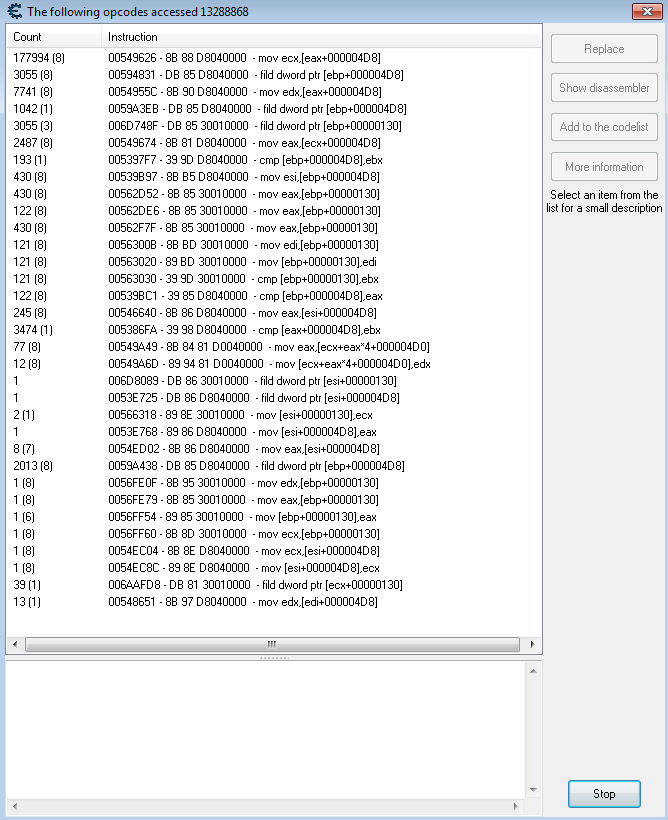
(this is from other game: Sacred)
opcodes with (1) are accessing only one address.
_________________
|
|
| Back to top |
|
|
shadowpt
Advanced Cheater
![]() Reputation: 0 Reputation: 0
Joined: 04 Jun 2011
Posts: 82
|
|
| Back to top |
|
|
|

 FAQ
FAQ Search
 Memberlist
 Usergroups
 Register
 Profile
 Log in to check your private messages
 Log in