| View previous topic :: View next topic |
| Author |
Message |
Alice0725
Expert Cheater
 Reputation: 11 Reputation: 11
Joined: 24 Jul 2012
Posts: 145
|
 Posted: Sun Aug 12, 2012 5:44 pm Post subject: Is there a chance that CE will have no UAC prompt ? Posted: Sun Aug 12, 2012 5:44 pm Post subject: Is there a chance that CE will have no UAC prompt ? |
 |
|
It's very annoying the UAC Prompt. Is there a chance that CE will have no UAC Prompt? Just when execute a trainer, not debug. 
|
|
| Back to top |
|
 |
Dark Byte
Site Admin
 Reputation: 475 Reputation: 475
Joined: 09 May 2003
Posts: 25994
Location: The netherlands
|
| Posted: Sun Aug 12, 2012 6:10 pm Post subject: |
|
|
Yes, go to your windows settings and disable the option for uac requirement.
That way ce will always run as admin without showing that prompt
But if you mean you wish to run ce without admin you have to recompile ce or edit the manifest resource and take out the manifest that states it requires Admin rights.
You will of course have trouble debugging programs(no seDebugPrivilege), scanning will most likely not work (file access to the temp folder), and writing to other processes memory might not always work (also due to no SeDebugPrivilege)
_________________
Tools give you results. Knowledge gives you control.
Like my help? Join me on Patreon so i can keep helping |
|
| Back to top |
|
|
Alice0725
Expert Cheater
Reputation: 11
Joined: 24 Jul 2012
Posts: 145
|
| Posted: Tue Sep 18, 2012 12:49 am Post subject: |
|
|
I've edit the manifest resource and set the execution level to | Quote: | | <requestedExecutionLevel level="asInvoker"/> |
Then, I tested many games, and every game works fine. I think there's no need to run as adminitrator all the time, just give a prompt when needed like the debugger. As I'm using a standard user account, so I pay a lot of attention to this.
|
|
| Back to top |
|
|
Dark Byte
Site Admin
Reputation: 475
Joined: 09 May 2003
Posts: 25994
Location: The netherlands
|
| Posted: Tue Sep 18, 2012 4:04 am Post subject: |
|
|
Then you're lucky or your system's standard user is configured to give more access than the default.
CE opens processes with the PROCESS_ALL flag and a lot of processes will refuse to open then
But I'll see if I can add something that can override this
_________________
Tools give you results. Knowledge gives you control.
Like my help? Join me on Patreon so i can keep helping |
|
| Back to top |
|
|
Csimbi
I post too much
 Reputation: 98 Reputation: 98
Joined: 14 Jul 2007
Posts: 3425
|
| Posted: Tue Sep 18, 2012 9:37 am Post subject: |
|
|
Would help corporate gaming 
|
|
| Back to top |
|
|
Alice0725
Expert Cheater
Reputation: 11
Joined: 24 Jul 2012
Posts: 145
|
| Posted: Tue Sep 18, 2012 10:50 pm Post subject: |
|
|
| I have a suggetion about the process list. What about adding an option to Show/Hide Microsoft System Entries?
|
|
| Back to top |
|
|
Csimbi
I post too much
Reputation: 98
Joined: 14 Jul 2007
Posts: 3425
|
| Posted: Wed Sep 19, 2012 9:32 am Post subject: |
|
|
| Alice0725 wrote: | | I have a suggetion about the process list. What about adding an option to Show/Hide Microsoft System Entries? |
What is a "Microsoft System Entry"?
|
|
| Back to top |
|
|
Alice0725
Expert Cheater
Reputation: 11
Joined: 24 Jul 2012
Posts: 145
|
| Posted: Wed Sep 19, 2012 9:47 am Post subject: |
|
|
| Csimbi wrote: | | Alice0725 wrote: | | I have a suggetion about the process list. What about adding an option to Show/Hide Microsoft System Entries? |
What is a "Microsoft System Entry"? |
Hide Microsoft System Processes like winlogo.exe, exporer.exe, rundll32.exe etc. in the process list. Then, we can pick out the game process quickly.
|
|
| Back to top |
|
|
Csimbi
I post too much
Reputation: 98
Joined: 14 Jul 2007
Posts: 3425
|
| Posted: Wed Sep 19, 2012 12:01 pm Post subject: |
|
|
Those are individual processes.
Who'd judge what is considered to be a "Microsoft System Entry"?
Perhaps an "always-hide-these-processes-list" is what you need.
|
|
| Back to top |
|
|
Dark Byte
Site Admin
Reputation: 475
Joined: 09 May 2003
Posts: 25994
Location: The netherlands
|
| Posted: Wed Sep 19, 2012 1:32 pm Post subject: |
|
|
Probably when the path is inside the windows folder
_________________
Tools give you results. Knowledge gives you control.
Like my help? Join me on Patreon so i can keep helping |
|
| Back to top |
|
|
Csimbi
I post too much
Reputation: 98
Joined: 14 Jul 2007
Posts: 3425
|
| Posted: Wed Sep 19, 2012 1:47 pm Post subject: |
|
|
By that, I guess you mean %SystemRoot% and beyond.
That could work, but since one can put any sort of app into that hierarchy, I would not call it "Microsoft System Entry".
I'm sure you'll find a better name.
|
|
| Back to top |
|
|
Alice0725
Expert Cheater
Reputation: 11
Joined: 24 Jul 2012
Posts: 145
|
| Posted: Wed Sep 19, 2012 7:52 pm Post subject: |
|
|
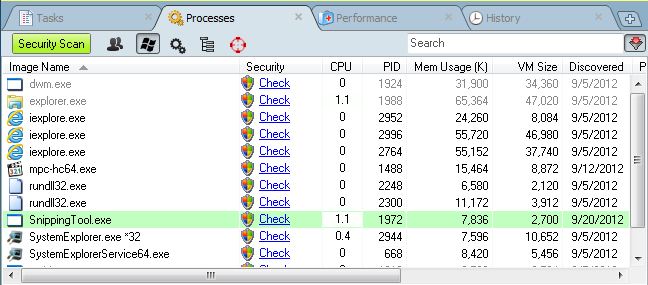
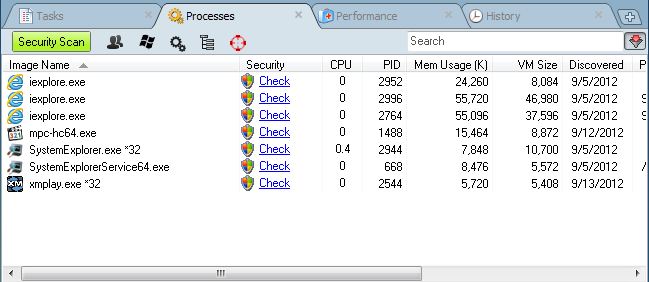
Maybe "Hide all Microsoft System Processes".
A little like this:
| Description: |
|
| Filesize: |
59.88 KB |
| Viewed: |
12607 Time(s) |
|
| Description: |
|
| Filesize: |
47.43 KB |
| Viewed: |
12607 Time(s) |
|
|
|
| Back to top |
|
|
Gniarf
Grandmaster Cheater Supreme
![]() Reputation: 43 Reputation: 43
Joined: 12 Mar 2012
Posts: 1285
|
| Posted: Fri Sep 21, 2012 10:58 pm Post subject: |
|
|
| Dark Byte wrote: | | Probably when the path is inside the windows folder |
And then comes the windows games issue. On win xp, solitaire/minesweeper/etc are in %SystemRoot%\system32.
Artmoney has 3 ways for listing processes:
-All, like CE.
-With window (self explanatory)
-Visible. I haven't understood how it differs from "with window" yet. Perhaps they also check if the window is displayed for the currently logged user (session ID).
|
|
| Back to top |
|
|
Csimbi
I post too much
Reputation: 98
Joined: 14 Jul 2007
Posts: 3425
|
| Posted: Fri Sep 21, 2012 11:14 pm Post subject: |
|
|
| Gniarf wrote: | | Dark Byte wrote: | | Probably when the path is inside the windows folder |
And then comes the windows games issue. On win xp, solitaire/minesweeper/etc are in %SystemRoot%\system32.
Artmoney has 3 ways for listing processes:
-All, like CE.
-With window (self explanatory)
-Visible. I haven't understood how it differs from "with window" yet. Perhaps they also check if the window is displayed for the currently logged user (session ID). |
I'd think the last one means that it did initialize the windowing system so it has a main form (which might be hidden or visible). I.e. it could display a window/canvas if it wanted to. Command line programs and most services can't do that because they did not initialize a canvas.
|
|
| Back to top |
|
|
jgoemat
Master Cheater
![]() Reputation: 23 Reputation: 23
Joined: 25 Sep 2011
Posts: 266
|
| Posted: Sat Sep 22, 2012 11:33 am Post subject: |
|
|
| I think a blacklist of processes to ignore would be awesome. You could set it the first time with a button that would ignore all processes not selected. That way it would ignore all the pcoesses that I don't want CE to use, i.e. chrome, git bash, command prompt, sublime text, CE itself, steam, visual studio, services and "system processes". Another button could clear the blacklist
|
|
| Back to top |
|
|
|

 FAQ
FAQ Search
 Memberlist
 Usergroups
 Register
 Profile
 Log in to check your private messages
 Log in


