| View previous topic :: View next topic |
| Author |
Message |
the the the
Master Cheater
![]() Reputation: 46 Reputation: 46
Joined: 15 Jun 2008
Posts: 429
|
 Posted: Wed Apr 11, 2012 10:22 pm Post subject: post your set up Posted: Wed Apr 11, 2012 10:22 pm Post subject: post your set up |
 |
|
heres mine

|
|
| Back to top |
|
 |
Lyfa
The Lonely Man
 Reputation: 12 Reputation: 12
Joined: 02 Nov 2008
Posts: 743
|
| Posted: Wed Apr 11, 2012 10:25 pm Post subject: |
|
|
Macbook Pro 13"
2.7 GHz dual-core Intel Core i7
8GB RAM
500GB HDD
Intel HD Graphics 3000
OS X 10.7 Lion (Soon 10.8 Mountain Lion)
I don't see why you would have an MP3 player in there.
_________________
|
|
| Back to top |
|
|
Channel GannoK
pffrt
 Reputation: 130 Reputation: 130
Joined: 12 Apr 2008
Posts: 608
|
| Posted: Wed Apr 11, 2012 10:26 pm Post subject: |
|
|
I'm jealous of those monitors. I want some so bad
_________________
|
|
| Back to top |
|
|
the the the
Master Cheater
![]() Reputation: 46 Reputation: 46
Joined: 15 Jun 2008
Posts: 429
|
| Posted: Wed Apr 11, 2012 10:30 pm Post subject: |
|
|
| F3ar wrote: | Macbook Pro 13"
2.7 GHz dual-core Intel Core i7
8GB RAM
500GB HDD
Intel HD Graphics 3000
OS X 10.7 Lion (Soon 10.8 Mountain Lion)
I don't see why you would have an MP3 player in there. |
Because it was on a template from /g/
| GannoK wrote: | | I'm jealous of those monitors. I want some so bad |
They're my dads. (So are the speakers and keyboard).
|
|
| Back to top |
|
|
br0l0ck
Cheater
![]() Reputation: 63 Reputation: 63
Joined: 15 Aug 2007
Posts: 36
|
| Posted: Wed Apr 11, 2012 10:39 pm Post subject: |
|
|
Mouse: $10 Logitech wired (OVERCLOCKED TO 1000HZ)

Keyboard:

NO SPEAKERS
Headphones: Creative Fatal1ty Gaming Headset

Display: Dynex TV HDMI 19"
Case:COOLER MASTER RC-692-KKN2 CM690 II Black Steel ATX Mid Tower Computer Case (DIDNT PLUG IN THE LED LIGHTS, IM NO RICER)
MP3 Player: Foobar, Sansa 4GB
OS: W7
|
|
| Back to top |
|
|
Channel GannoK
pffrt
Reputation: 130
Joined: 12 Apr 2008
Posts: 608
|
| Posted: Wed Apr 11, 2012 10:49 pm Post subject: |
|
|
how do you oc a mouse?
_________________
|
|
| Back to top |
|
|
br0l0ck
Cheater
![]() Reputation: 63 Reputation: 63
Joined: 15 Aug 2007
Posts: 36
|
| Posted: Wed Apr 11, 2012 10:52 pm Post subject: |
|
|
| GannoK wrote: | | how do you oc a mouse? |
"1. Download Driver Signature Enforcement Overrider from this link.
2. Download HIDUSBF (attached below as hidusbf.zip).
3. Run Driver Signature Enforcement Overrider and choose Enable Test Mode.
4. Extract HIDUSBF to some folder, right click on HIDUSBF.inf and choose Install.
5. Run Setup.exe from HIDUSBF’s folder, check the Filter on Device box and select your desired sample rate.
6. Run Driver Signature Enforcement Overrider again, choose Sign a System file and insert full path to the installed HIDUSBF.sys file (For example: C:\Windows\System32\Drivers\HIDUSBF.sys).
7. Restart your computer and enjoy.
8. Verify by using Mouse Rate or DirectInput Mouse Rate (attached below as mouserate.exe and dimr.exe)
9. If you would like to remove the test mode watermark, run Driver Signature Enforcement Overrider and choose Watermark removal."
|
|
| Back to top |
|
|
Channel GannoK
pffrt
Reputation: 130
Joined: 12 Apr 2008
Posts: 608
|
| Posted: Wed Apr 11, 2012 10:55 pm Post subject: |
|
|
wat link
not spoonfed enough
_________________
|
|
| Back to top |
|
|
br0l0ck
Cheater
![]() Reputation: 63 Reputation: 63
Joined: 15 Aug 2007
Posts: 36
|
| Posted: Wed Apr 11, 2012 10:56 pm Post subject: |
|
|
| GannoK wrote: | wat link
not spoonfed enough |
http://www.ngohq.com/news/15043-how-to-increase-usb-sample-rate-in-windows-vista-7-a.html
|
|
| Back to top |
|
|
the the the
Master Cheater
![]() Reputation: 46 Reputation: 46
Joined: 15 Jun 2008
Posts: 429
|
| Posted: Wed Apr 11, 2012 11:04 pm Post subject: |
|
|
| What does increasing the sample rate achieve?
|
|
| Back to top |
|
|
br0l0ck
Cheater
![]() Reputation: 63 Reputation: 63
Joined: 15 Aug 2007
Posts: 36
|
| Posted: Wed Apr 11, 2012 11:08 pm Post subject: |
|
|
| asciicat wrote: | | What does increasing the sample rate achieve? |
makes you cooler when posting in these threads
and makes your mouse a bit smoother (like a few ms)
|
|
| Back to top |
|
|
Cryoma
Member of the Year
![]() Reputation: 198 Reputation: 198
Joined: 14 Jan 2009
Posts: 1819
|
| Posted: Wed Apr 11, 2012 11:33 pm Post subject: |
|
|
| htc droid incredible
|
|
| Back to top |
|
|
Up2Admin
I'm a spammer
 Reputation: 126 Reputation: 126
Joined: 17 Oct 2007
Posts: 6549
Location: Texas
|
| Posted: Wed Apr 11, 2012 11:48 pm Post subject: |
|
|
mouse

keyboard

speakers

headphones

computer

_________________
Last edited by Up2Admin on Thu Apr 12, 2012 12:08 am; edited 1 time in total |
|
| Back to top |
|
|
1929394839292057839194958
Grandmaster Cheater Supreme
![]() Reputation: 130 Reputation: 130
Joined: 22 Dec 2006
Posts: 1509
|
| Posted: Wed Apr 11, 2012 11:53 pm Post subject: |
|
|
Logitech G400
Razer Goliathus Speed Edition Large
i5-2500k 3.5GHz
4GB DDR3 Corsair
ATI Radeon HD 4870
Compaq keyboard (Getting a Steelseries 6GV2 soon)
An acer monitor on the left and a Dell one on the right. Gonna get a sick benQ one at some point.
|
|
| Back to top |
|
|
Garavito
Master Cheater
 Reputation: 0 Reputation: 0
Joined: 21 Jun 2009
Posts: 387
|
| Posted: Thu Apr 12, 2012 12:09 am Post subject: |
|
|
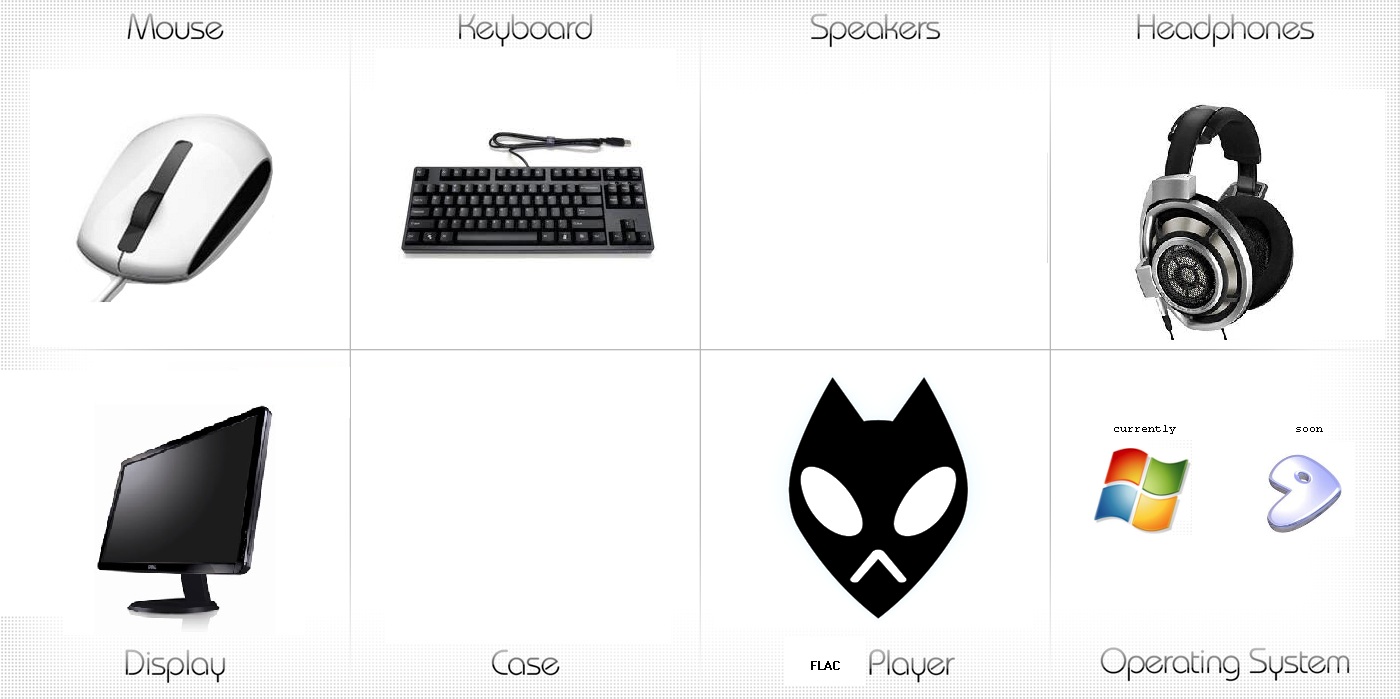
Keyboard: Filco Majestouch 2 Tenkeyless Cherry MX Browns
Headphones: Sennheiser HD800s
Monitor: Dell ST2220L
Mouse: generic dellshit
Music Player: Foobar2000
Video Player: MPC-HC
Browser: Aurora
Torrent Client: uTorrent 2.2.1
IRC Client: XChat
Archive Manager: WinRAR
Processor: Intel i7 870 @ 3.1 GHz
| Description: |
|
| Filesize: |
164.41 KB |
| Viewed: |
5395 Time(s) |
|
|
|
| Back to top |
|
|
|

 FAQ
FAQ Search
 Memberlist
 Usergroups
 Register
 Profile
 Log in to check your private messages
 Log in


