 |
Cheat Engine
The Official Site of Cheat Engine
|
| View previous topic :: View next topic |
| Author |
Message |
deMorph
Advanced Cheater
![]() Reputation: -1 Reputation: -1
Joined: 17 Apr 2010
Posts: 64
|
 Posted: Thu Feb 24, 2011 12:04 am Post subject: DVD-R not working? +REP to you Posted: Thu Feb 24, 2011 12:04 am Post subject: DVD-R not working? +REP to you |
 |
|
So short story is that I'm trying to install Windows 7 onto my Vista, my friend downloaded and put it on a disc for me to download, I got it working the first time, but had to restart because of some programs interfering, but now the computer won't even recognize the DVD, any solutions?
Also, ask for computer specs if needed.
I notice that when discs are put into the computer, it makes a LOT of noise to process it, and it does, but then it stops? I can see my D: drive fine in My Computer, it just doesn't change when the disc is put in.
|
|
| Back to top |
|
 |
SF
I'm a spammer
 Reputation: 119 Reputation: 119
Joined: 19 Mar 2007
Posts: 6028
|
| Posted: Thu Feb 24, 2011 3:15 am Post subject: |
|
|
Check it with another disc. Eg an audio CD or a DVD movie. If the problem is still there with them, let us know.
_________________
|
|
| Back to top |
|
|
deMorph
Advanced Cheater
![]() Reputation: -1 Reputation: -1
Joined: 17 Apr 2010
Posts: 64
|
| Posted: Thu Feb 24, 2011 8:30 pm Post subject: |
|
|
Just tried with my Desktop PC disc, it does work.
My friend just tried the disc in several computers at school, and it worked.
It was just working moments ago before restart. :\
My friend just told me to boot it from BIOS, is that another method? I wouldn't mind losing my data as I need a reformat as well.
|
|
| Back to top |
|
|
Choycolate
Master Cheater
 Reputation: -1 Reputation: -1
Joined: 18 Oct 2008
Posts: 284
|
| Posted: Thu Feb 24, 2011 8:33 pm Post subject: |
|
|
Is this sata or ide drive? try checking if your bios says the sata or ide that u connected it to. If its off turn it ON
_________________
|
|
| Back to top |
|
|
deMorph
Advanced Cheater
![]() Reputation: -1 Reputation: -1
Joined: 17 Apr 2010
Posts: 64
|
| Posted: Thu Feb 24, 2011 9:05 pm Post subject: |
|
|
| rockista80 wrote: | | Is this sata or ide drive? try checking if your bios says the sata or ide that u connected it to. If its off turn it ON |
There is 3 sata, and 1 IDE, all enabled, except in IDE there's something about Copying Protecting that is disabled?
And in the priority sequence, is it normal to have HDD first, and CD, 2nd?
Shouldn't clicking the D: say 'Insert a disk' or something?
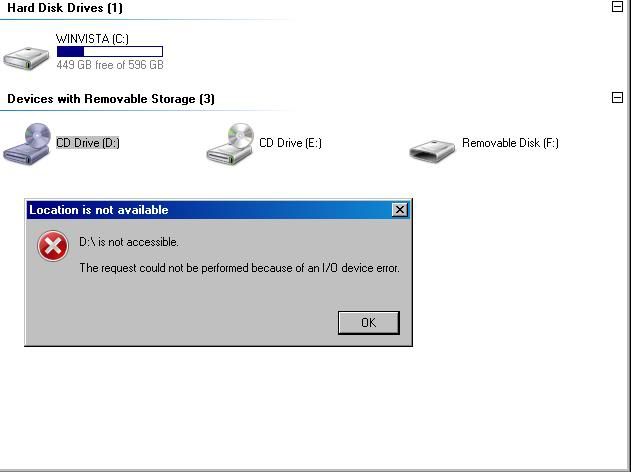
|
|
| Back to top |
|
|
AhMunRa
Grandmaster Cheater Supreme
![]() Reputation: 27 Reputation: 27
Joined: 06 Aug 2010
Posts: 1117
|
| Posted: Fri Feb 25, 2011 10:08 pm Post subject: |
|
|
It isn't uncommon for disks from certain manufacturers not work. I have had several cases where a burn disk worked in one computer but not on another. It usually was due to the disk brand.
Are you using an off brand disk?
If not, crack the case open. Unplug the DVD, boot Windows. Under Device Manager if it's still there remove the DVD drive. Shut Windows down cleanly. Plug DVD back in, boot up. Windows should find it fresh, and it should clear out any remnant of something left from the failed install.
Are you running any disk emulators? Daemon Tools, Alcohol?
_________________
<Wiccaan> Bah that was supposed to say 'not saying its dead' lol. Fixing >.> |
|
| Back to top |
|
|
Radiation
Grandmaster Cheater
 Reputation: 14 Reputation: 14
Joined: 17 Jun 2009
Posts: 842
Location: Chernobyl
|
| Posted: Sat Feb 26, 2011 1:56 am Post subject: |
|
|
you might have some filters, check your registry:
1. Click Start, type regedit in the Start Search box, and then click regedit in the Programs list.
If you are prompted for an administrator password or confirmation, type your password, or click Continue.
2. Locate, and then click the following registry subkey:
HKEY_LOCAL_MACHINE\SYSTEM\CurrentControlSet\Control\Class\{4D36E965-E325-11CE-BFC1-08002BE10318}
Caution There can be many instances of the registry subkey that is mentioned in step 2. You must make sure that you are in the appropriate registry subkey before modifying the UpperFilters and the LowerFilters values. To verify that you are in the appropriate registry subkey, make sure that the Default data value is DVD/CD-ROM and the Class data value is CDROM.
3. In the right pane, if you have UpperFilters, right-click UpperFilters, and then click Delete.
4. Click Yes to confirm the removal of the UpperFilters registry entry.
5. In the right pane, if you have LowerFilters, right-click LowerFilters, and then click Delete.
6. Click Yes to confirm the removal of the LowerFilters registry entry.
7. Exit Registry Editor, and then restart the computer.
_________________
|
|
| Back to top |
|
|
deMorph
Advanced Cheater
![]() Reputation: -1 Reputation: -1
Joined: 17 Apr 2010
Posts: 64
|
| Posted: Sat Feb 26, 2011 11:54 pm Post subject: |
|
|
| itapa wrote: | you might have some filters, check your registry:
1. Click Start, type regedit in the Start Search box, and then click regedit in the Programs list.
If you are prompted for an administrator password or confirmation, type your password, or click Continue.
2. Locate, and then click the following registry subkey:
HKEY_LOCAL_MACHINE\SYSTEM\CurrentControlSet\Control\Class\{4D36E965-E325-11CE-BFC1-08002BE10318}
Caution There can be many instances of the registry subkey that is mentioned in step 2. You must make sure that you are in the appropriate registry subkey before modifying the UpperFilters and the LowerFilters values. To verify that you are in the appropriate registry subkey, make sure that the Default data value is DVD/CD-ROM and the Class data value is CDROM.
3. In the right pane, if you have UpperFilters, right-click UpperFilters, and then click Delete.
4. Click Yes to confirm the removal of the UpperFilters registry entry.
5. In the right pane, if you have LowerFilters, right-click LowerFilters, and then click Delete.
6. Click Yes to confirm the removal of the LowerFilters registry entry.
7. Exit Registry Editor, and then restart the computer. |
Did that, and I only have an Upper Filter, so I deleted that.
I just noticed that it changed to DVD D:\, so something must've happened, but nothing happens when I try to open it or anything, I even checked the properties but it's 0 bytes.
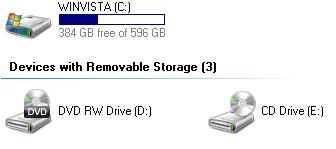
I realized the region was not set, so I set it to US, but still no progress.
|
|
| Back to top |
|
|
satanrules666
Advanced Cheater
![]() Reputation: 0 Reputation: 0
Joined: 31 Oct 2010
Posts: 70
Location: New Zealand
|
| Posted: Tue Mar 08, 2011 9:56 am Post subject: |
|
|
Hi there
Is your drive IDE
does your drive have a jumper on the back its a tiny wee black connector and according to the brand may have 1 or 2 max ive seen is 2
from what i understand your computer is detecting the drive as it shows in my computer on the picture above this has happened to me and it was the jumper/jumpers
open ya case unplug the drive unscrew the drive slide it out of ya case now on the top of the drive there will be a picture that says jumper setup as you have two drives the best option is to change the jumper to the same as cable select on the diagram or the more advanced option one on master one on slave
If the drive is sata then check your sata cable luckily sata dont have jumpers unless you have a sata hard drive and the jumper on sata hard drives have something to do with transfer speed
and if thats not it then ild say you have a dead lazer or insanely dirty you can fix a dirty laser with some isoprobe/rubbing alcohol on one of those air cleaning cotton bud stick things
whatever there called anyways i hope that solves the problem if its a dead laser ya really best to just replace the drive because finding another laser assembly for a drive is hard as you need to find one that matches your model number
I hope its a Ide Drive with the jumpers configured wrong because thats the most annoying yet easiest problem to solve annoying because you may have to take the drive in and out due to getting the jumper wrong again and again
|
|
| Back to top |
|
|
|
|
You cannot post new topics in this forum
You cannot reply to topics in this forum
You cannot edit your posts in this forum
You cannot delete your posts in this forum
You cannot vote in polls in this forum
You cannot attach files in this forum
You cannot download files in this forum
|
|
 FAQ
FAQ Search
 Memberlist
 Usergroups
 Register
 Profile
 Log in to check your private messages
 Log in


