 |
Cheat Engine
The Official Site of Cheat Engine
|
| View previous topic :: View next topic |
| Author |
Message |
NothingToShow
Grandmaster Cheater Supreme
 Reputation: 0 Reputation: 0
Joined: 11 Jul 2007
Posts: 1579
|
 Posted: Fri Apr 09, 2010 8:31 am Post subject: [C++ SDL] SDLK_Æ, Ø and Å? Posted: Fri Apr 09, 2010 8:31 am Post subject: [C++ SDL] SDLK_Æ, Ø and Å? |
 |
|
Heya.
I've recently got me a N900 and loving it.
I made up my mind to make a little snake game for it, but I have a little problem:
The controls has to be period (.) as left, left button (<-) as down, right button (->) as right and Æ as up.
Reason for that, is because of the design of the keyboard on the n900.
EDIT:
Screenshot of the european one, and US.
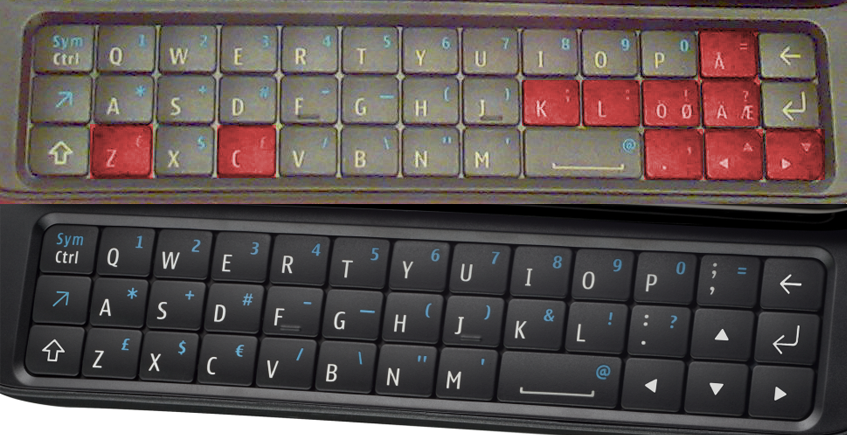
So here is my keyboard event handling:
| Code: | case SDLK_UP:
if (direction != Down)
direction = Up;
break;
case SDLK_DOWN:
if (direction != Up)
direction = Down;
break;
case SDLK_RIGHT:
if (direction != Left)
direction = Right;
break;
case SDLK_ae: //Doesn't work
if (direction != Right)
direction = Left;
break; |
Any idea what to do?
|
|
| Back to top |
|
 |
Dark Byte
Site Admin
 Reputation: 475 Reputation: 475
Joined: 09 May 2003
Posts: 26006
Location: The netherlands
|
| Posted: Fri Apr 09, 2010 9:06 am Post subject: |
|
|
you could try going with the wasd controls instead like many other games....
_________________
Tools give you results. Knowledge gives you control.
Like my help? Join me on Patreon so i can keep helping |
|
| Back to top |
|
|
NothingToShow
Grandmaster Cheater Supreme
Reputation: 0
Joined: 11 Jul 2007
Posts: 1579
|
| Posted: Fri Apr 09, 2010 9:11 am Post subject: |
|
|
| Dark Byte wrote: | | you could try going with the wasd controls instead like many other games.... |
I just used that for testing on the device, but imo, it doesn't feel right.
But of course that would be the best way until I add a way to remap the keys.
|
|
| Back to top |
|
|
Slugsnack
Grandmaster Cheater Supreme
![]() Reputation: 71 Reputation: 71
Joined: 24 Jan 2007
Posts: 1857
|
| Posted: Fri Apr 09, 2010 9:18 am Post subject: |
|
|
| to remap the keys, simply add a handler for the key you are interested in. when processing that event, emulate another event that is for the key you are trying to map it to. i'm not sure what api you're using but to make it relevant, if you were doing windows programming, you'd do a sendmessage at that point
|
|
| Back to top |
|
|
Deltron Z
Expert Cheater
![]() Reputation: 1 Reputation: 1
Joined: 14 Jun 2009
Posts: 164
|
| Posted: Fri Apr 09, 2010 10:22 am Post subject: |
|
|
I had the same problem on my laptop, appreantly Fn was locked.
| Quote: | 2. Secondary keys (Symbols/Numbers Row)
To access the alternative keys, e.g. on “D “we have “#” press
Alt and the symbol, e.g “Alt” and “D” we get #
or
Alt twice
you should see “Fn is locked” |
So try to press Alt key twice to toggle the lock and then try to use the arrow keys. (or maybe another lock-key, check in here)
|
|
| Back to top |
|
|
NothingToShow
Grandmaster Cheater Supreme
Reputation: 0
Joined: 11 Jul 2007
Posts: 1579
|
| Posted: Fri Apr 09, 2010 3:11 pm Post subject: |
|
|
Deltron Z:
That isn't really my problem: My problem is I dunno how to make SDL check for the "æ" button to be pressed (:
|
|
| Back to top |
|
|
Dark Byte
Site Admin
Reputation: 475
Joined: 09 May 2003
Posts: 26006
Location: The netherlands
|
| Posted: Fri Apr 09, 2010 5:17 pm Post subject: |
|
|
Follow the sdk for SDLK_RIGHT and look around there. Perhaps you can find a definition that fits.
Alternatively, try coding a keypress to value app, and then get the key value to look for
_________________
Tools give you results. Knowledge gives you control.
Like my help? Join me on Patreon so i can keep helping |
|
| Back to top |
|
|
NothingToShow
Grandmaster Cheater Supreme
Reputation: 0
Joined: 11 Jul 2007
Posts: 1579
|
| Posted: Sun Apr 11, 2010 2:07 pm Post subject: |
|
|
While developing a little more on the game, I've managed to make myself another problem:
Segmentantion Fault
Could anyone point out what is causing that?
Source Code:
| Code: | #include <stdlib.h>
#include <SDL/SDL.h>
#include <SDL/SDL_image.h>
#include <time.h>
#define N 500 /*snake length*/
#define W 1000
#define NODESIZE 10 /*node height & width*/
#define WINSIZE 400 /*window height & width*/ //NOT USED! LOOK AT THE 2 BELOW
#define WINSIZEW 800
#define WINSIZEH 480
typedef enum {Up, Down, Right, Left}TDirection; //Possible directions
SDL_Surface* screen = NULL;
SDL_Surface* Table[N] = {NULL};
SDL_Surface* blank;
SDL_Surface* puce; //Snake puce
SDL_Rect Tabpos[N], ppuce, Wallpos[W];
bool running = true;
int NodeCounter;
TDirection direction;
SDL_TimerID timer;
Uint32 Anime_it (Uint32, void *);
int snakeColl(void);
void Quitter(void); //will be executed when exiting
void SetPos(void);
void MoveSnake(void);
void Show(void);
void PurgeScreen(void);
void SetPuce(void);
void Lose(void);
void freeNodes(void);
void AddNode(void);
int main (int argc, char** argv)
{
Uint32 speed; //game speed
SDL_Event event;
int done;
int i;
srand (time(NULL));
//INITIALIZE
i = SDL_Init(SDL_INIT_VIDEO|SDL_DOUBLEBUF|SDL_INIT_TIMER);
if (i < 0){
exit(EXIT_FAILURE);
}
atexit (Quitter);
screen = SDL_SetVideoMode(WINSIZEW, WINSIZEH, 16, SDL_HWSURFACE);
if (screen == NULL){
exit(EXIT_FAILURE);
}
SDL_WM_SetCaption("SimpleSnake", NULL);
//Initialisations
speed = 60;
//done = 1;
NodeCounter = 10;
direction = Right;
Table[0] = SDL_CreateRGBSurface(SDL_HWSURFACE, NODESIZE, NODESIZE, 16, 0, 0, 0, 0);
SDL_FillRect(Table[0], NULL, SDL_MapRGB(Table[0]->format, 0, 255, 0));
Tabpos[0].x = screen->w/2;
Tabpos[0].y = screen->h/2;
for (i = 1; i < NodeCounter; i++){
Table[i] = SDL_CreateRGBSurface(SDL_HWSURFACE, NODESIZE, NODESIZE, 16, 0, 0, 0, 0);
SDL_FillRect (Table[i], NULL, SDL_MapRGB (Table[i]->format, 0, 0, 0));
Tabpos[i].x = Tabpos[i-1].x - NODESIZE;
Tabpos[i].y = screen->h/2;
}
SDL_ShowCursor(0);
Show();
SDL_Flip(screen);
timer = SDL_AddTimer(1, Anime_it, &speed);
SetPuce();
while (running){
SDL_WaitEvent(&event);
switch (event.type){
case SDL_QUIT:
running = false;
break;
case SDL_KEYDOWN:
switch (event.key.keysym.sym){
case SDLK_w:
if (direction != Down)
direction = Up;
break;
case SDLK_s:
if (direction != Up)
direction = Down;
break;
case SDLK_d:
if (direction != Left)
direction = Right;
break;
case SDLK_a:
if (direction != Right)
direction = Left;
break;
case SDLK_u: //INCREASE SPEED
if ((speed-5)>0)
speed -= 5;
break;
case SDLK_l: //DECREASE SPEED
if ((speed+5)<100)
speed += 5;
break;
case SDLK_q:
Quitter();
break;
}
break;
}//SWITCH
} //WHILE
return 0;
}
void MoveSnake()
{
switch (direction){
case Up:
if ((Tabpos[0].y - NODESIZE) >= 10)
Tabpos[0].y -= NODESIZE;
else
Lose();
//Tabpos[0].y -= NODESIZE;
break;
case Down:
if ((Tabpos[0].y + NODESIZE) < (screen->h - 10))
Tabpos[0].y += NODESIZE;
else
Lose();
//Tabpos[0].y += NODESIZE;
break;
case Right:
if ((Tabpos[0].x + NODESIZE) < (screen->w - 10))
Tabpos[0].x += NODESIZE;
else
Lose();
//Tabpos[0].x += NODESIZE;
break;
case Left:
if ((Tabpos[0].x - NODESIZE) >= 10)
Tabpos[0].x -= NODESIZE;
else
Lose();
//Tabpos[0].x -= NODESIZE;
break;
}
/*if ((Tabpos[0].x == WINSIZEW ))
Tabpos[0].x = 0;
else if ((Tabpos[0].x == 0))
Tabpos[0].x = WINSIZEW;
else if ((Tabpos[0].y == WINSIZEH))
Tabpos[0].y = 0;
else if ((Tabpos[0].y == 0))
Tabpos[0].y = WINSIZEH;*/
if ((Tabpos[0].x == ppuce.x) && (Tabpos[0].y == ppuce.y))
AddNode();
if (snakeColl())
Lose();
}
void SetPos(void)
{
int i;
for (i = (NodeCounter-1); i>0; i--)
{
Tabpos[i].x = Tabpos[i-1].x;
Tabpos[i].y = Tabpos[i-1].y;
}
}
void Show(void)
{
int i;
int y;
SDL_Rect left, right, top, bot;
for (i=0; i < NodeCounter; i++)
SDL_BlitSurface(Table[i], NULL, screen, &Tabpos[i]);
SDL_BlitSurface(puce, NULL, screen, &ppuce);
left.x = 0;
left.y = 0;
left.w = 10;
left.h = WINSIZEH;
right.x = (WINSIZEW - 10);
right.y = 0;
right.w = 10;
right.h = WINSIZEH;
top.x = 10;
top.y = 0;
top.w = (WINSIZEW - 20);
top.h = 10;
bot.x = 10;
bot.y = (WINSIZEH - 10);
bot.w = (WINSIZEW - 20);
bot.h = 10;
SDL_FillRect(screen, &left, SDL_MapRGB(screen->format, 0, 0, 0));
SDL_FillRect(screen, &right, SDL_MapRGB(screen->format, 0, 0, 0));
SDL_FillRect(screen, &top, SDL_MapRGB(screen->format, 0, 0, 0));
SDL_FillRect(screen, &bot, SDL_MapRGB(screen->format, 0, 0, 0));
/*for (y=WINSIZEH; y > 0; y--)
//Give offset to rectangle
offset.x = 0;
offset.y = y;
SDL_BlitSurface(puce, NULL, screen, &offset);*/
}
void Quitter(void)
{
freeNodes();
SDL_FreeSurface(puce);
SDL_FreeSurface(screen);
SDL_Quit();
}
void PurgeScreen(void)
{
SDL_Rect p;
p.x = 0;
p.y = 0;
blank = SDL_CreateRGBSurface(SDL_HWSURFACE, screen->w, screen->h, 16, 0, 0, 0, 0);
SDL_FillRect(blank, NULL, SDL_MapRGB(blank->format, 189, 220, 144));
SDL_BlitSurface(blank, NULL, screen, &p);
SDL_FreeSurface(blank);
}
void SetPuce()
{
int genx, geny, flag = 1, cpt;
while (flag)
{
flag = 0;
genx = (rand() % ((WINSIZEW - 10)/10))*NODESIZE;
for (cpt=0; cpt < NodeCounter; cpt++)
if (genx == Tabpos[cpt].x)
{
flag = 1;
break;
}
}
flag = 1;
while (flag)
{
flag = 0;
geny = (rand() % ((WINSIZEH - 10)/10))*NODESIZE;
for (cpt=0; cpt < NodeCounter; cpt ++)
if (geny == Tabpos[cpt].y)
{
flag = 1;
break;
}
}
puce = SDL_CreateRGBSurface(SDL_HWSURFACE, NODESIZE, NODESIZE, 16, 0, 0, 0, 0);
SDL_FillRect (puce, NULL, SDL_MapRGB (puce->format, 255, 0, 0));
ppuce.x = genx;
ppuce.y = geny;
SDL_BlitSurface(puce, NULL, screen, &ppuce);
}
Uint32 Anime_it(Uint32 interval, void *param)
{
Uint32 *t = (Uint32*)param;
SDL_Delay (*t);
MoveSnake();
SetPos();
PurgeScreen();
Show();
SDL_Flip(screen);
return interval;
}
void Lose(void)
{
SDL_RemoveTimer(timer);
running = false;
Quitter();
}
void freeNodes(void)
{
int i;
for (i = 0; i < NodeCounter; i++)
SDL_FreeSurface(Table[i]);
}
void AddNode(void)
{
NodeCounter++;
Table[NodeCounter-1] = SDL_CreateRGBSurface(SDL_HWSURFACE, NODESIZE, NODESIZE, 16, 0, 0, 0, 0);
SDL_FillRect (Table[NodeCounter-1], NULL, SDL_MapRGB (Table[NodeCounter-1]->format, 0, 0, 0));
SetPuce();
}
int snakeColl(void)
{
int i, cl = 0;
for (i = 3; i < NodeCounter; i++)
if ((Tabpos[0].x == Tabpos[i].x) && (Tabpos[0].y == Tabpos[i].y))
{
cl = 1;
break;
}
return cl;
} |
In case you want to compile it, use: g++ -o main main.cpp -lSDL -lSDL_image
|
|
| Back to top |
|
|
hcavolsdsadgadsg
I'm a spammer
![]() Reputation: 26 Reputation: 26
Joined: 11 Jun 2007
Posts: 5801
|
| Posted: Sun Apr 11, 2010 3:32 pm Post subject: |
|
|
| just step through in the debugger or comment out chunks until you cure it.
|
|
| Back to top |
|
|
|
|
You cannot post new topics in this forum
You cannot reply to topics in this forum
You cannot edit your posts in this forum
You cannot delete your posts in this forum
You cannot vote in polls in this forum
You cannot attach files in this forum
You can download files in this forum
|
|
 FAQ
FAQ Search
 Memberlist
 Usergroups
 Register
 Profile
 Log in to check your private messages
 Log in


