| View previous topic :: View next topic |
| Author |
Message |
Womanizer
Grandmaster Cheater
 Reputation: 2 Reputation: 2
Joined: 30 May 2009
Posts: 958
|
 Posted: Sat Feb 27, 2010 11:00 am Post subject: VB 2008/.net How to load a picture from exciting item? Posted: Sat Feb 27, 2010 11:00 am Post subject: VB 2008/.net How to load a picture from exciting item? |
 |
|
Read title. help please and hurry.
|
|
| Back to top |
|
 |
Odecey
Master Cheater
 Reputation: 1 Reputation: 1
Joined: 19 Apr 2007
Posts: 259
Location: Scandinavia
|
| Posted: Sat Feb 27, 2010 1:34 pm Post subject: |
|
|
This can't be said often enough it seems: When you are asking for help with a problem you're having, make sure that you are as precise and detailed as possible. This shows not only that you are literate, but also that you are actually interested enough in getting the problem fixed to give an accurate description of your issue. As it is, we're left guessing as to what you want to accomplish, something that will detract most people who would actually be willing to help.
What I'm saying is: Take the time to write your question out properly.
_________________
Never confuse activity with productivity. You can be busy without a purpose, but what's the point?- Rick Warren |
|
| Back to top |
|
|
Womanizer
Grandmaster Cheater
Reputation: 2
Joined: 30 May 2009
Posts: 958
|
| Posted: Sat Feb 27, 2010 3:03 pm Post subject: |
|
|
I need a code, when pressing into a button that in the picture box it shows the picture that i want thats in the solution explorer. So i want to load that (character1) into the picturebox. But i can't get it to work. Any code?
| Description: |
|
| Filesize: |
133.4 KB |
| Viewed: |
14423 Time(s) |

|
|
|
| Back to top |
|
|
TROLOLOLOLOLOLOLOLOLOLOLO
Expert Cheater
 Reputation: -1 Reputation: -1
Joined: 27 Dec 2009
Posts: 100
|
| Posted: Sat Feb 27, 2010 5:14 pm Post subject: |
|
|
Something like this maybe?
| Code: | | PictureBox1.Image = Image.FromFile(PICTURE PATH HERE) |
Make sure to have a PictureBox component on your form!
|
|
| Back to top |
|
|
Womanizer
Grandmaster Cheater
Reputation: 2
Joined: 30 May 2009
Posts: 958
|
| Posted: Sun Feb 28, 2010 3:15 am Post subject: |
|
|
| CometJack wrote: | Something like this maybe?
| Code: | | PictureBox1.Image = Image.FromFile(PICTURE PATH HERE) |
Make sure to have a PictureBox component on your form! |
Tryed that already but it still does not work. I did like these ways:
| Code: | | Button1.Image = Image.FromFile("character1.bmp") |
| Code: | | Button1.Image = Image.FromFile("character1") |
AND its still not working.
|
|
| Back to top |
|
|
Odecey
Master Cheater
Reputation: 1
Joined: 19 Apr 2007
Posts: 259
Location: Scandinavia
|
| Posted: Sun Feb 28, 2010 4:06 am Post subject: |
|
|
One way to do this is to add the picture as an embedded resource.
Follow these steps, and you won't have to worry about the path of the file:
1. In the solution explorer, select the image you want to use, go down to "Build Action" in the properties window, and select "Embedded resource".
2. Add references to the namespaces System.Reflection and System.IO.
3. Declare an Assembly object and a Stream object within your form class.
4. Add a Form load event, and assign the objects like this: | Code: | someAssemblyObject = Assembly.GetExecutingAssembly();
someStreamObject = someAssemblyObject.GetManifestResourceStream("YourNameSpace.ImageFileName.FileNameExtension"); |
5. Add this line of code where you want the file to be assigned: | Code: | | PictureBox1.Image = new Bitmap(someStreamObject); |
_________________
Never confuse activity with productivity. You can be busy without a purpose, but what's the point?- Rick Warren |
|
| Back to top |
|
|
NINTENDO
Grandmaster Cheater Supreme
![]() Reputation: 0 Reputation: 0
Joined: 02 Nov 2007
Posts: 1371
|
| Posted: Sun Feb 28, 2010 6:13 am Post subject: |
|
|
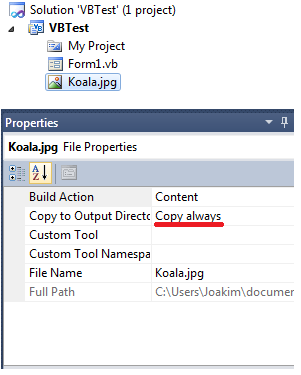
If you use this code Image.FromFile the way you do then the image must be in the same folder as the program is executed from.
There is a property on the image "Copy to output directory"
| Description: |
|
| Filesize: |
15.87 KB |
| Viewed: |
14364 Time(s) |
|
_________________
Intel over amd yes. |
|
| Back to top |
|
|
Womanizer
Grandmaster Cheater
Reputation: 2
Joined: 30 May 2009
Posts: 958
|
| Posted: Sun Feb 28, 2010 8:18 am Post subject: |
|
|
| JesusLovesQlimax wrote: | If you use this code Image.FromFile the way you do then the image must be in the same folder as the program is executed from.
There is a property on the image "Copy to output directory" |
Did that but still not working. I want to put it into a button.
| Odecey wrote: | One way to do this is to add the picture as an embedded resource.
Follow these steps, and you won't have to worry about the path of the file:
1. In the solution explorer, select the image you want to use, go down to "Build Action" in the properties window, and select "Embedded resource".
2. Add references to the namespaces System.Reflection and System.IO.
3. Declare an Assembly object and a Stream object within your form class.
4. Add a Form load event, and assign the objects like this: | Code: | someAssemblyObject = Assembly.GetExecutingAssembly();
someStreamObject = someAssemblyObject.GetManifestResourceStream("YourNameSpace.ImageFileName.FileNameExtension"); |
5. Add this line of code where you want the file to be assigned: | Code: | | PictureBox1.Image = new Bitmap(someStreamObject); |
|
Can you just put a code that you are trying to explane something at part 2 and 3?
|
|
| Back to top |
|
|
Odecey
Master Cheater
Reputation: 1
Joined: 19 Apr 2007
Posts: 259
Location: Scandinavia
|
| Posted: Mon Mar 01, 2010 1:45 pm Post subject: |
|
|
For step 2:
| Code: | Imports System.Reflection
Imports System.IO |
In step 3:
| Code: | Dim someStreamObject as Stream
Dim someAssemblyObject as Assembly |
I think that's how you do it anyway, but I'm not sure as I don't code in VB.
_________________
Never confuse activity with productivity. You can be busy without a purpose, but what's the point?- Rick Warren |
|
| Back to top |
|
|
Womanizer
Grandmaster Cheater
Reputation: 2
Joined: 30 May 2009
Posts: 958
|
| Posted: Sun Mar 07, 2010 3:16 am Post subject: |
|
|
bump, i still didn't get it to work. help!
|
|
| Back to top |
|
|
NINTENDO
Grandmaster Cheater Supreme
![]() Reputation: 0 Reputation: 0
Joined: 02 Nov 2007
Posts: 1371
|
| Posted: Sun Mar 07, 2010 7:23 am Post subject: |
|
|
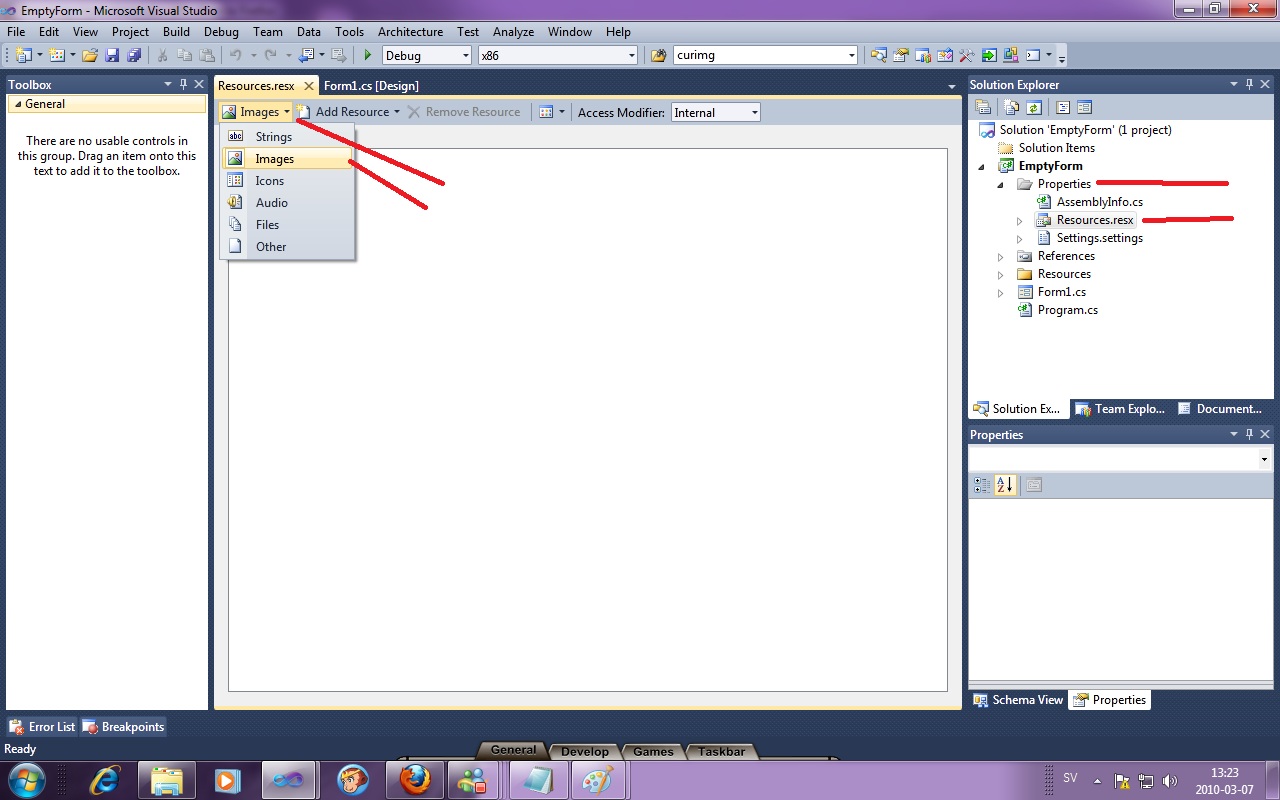
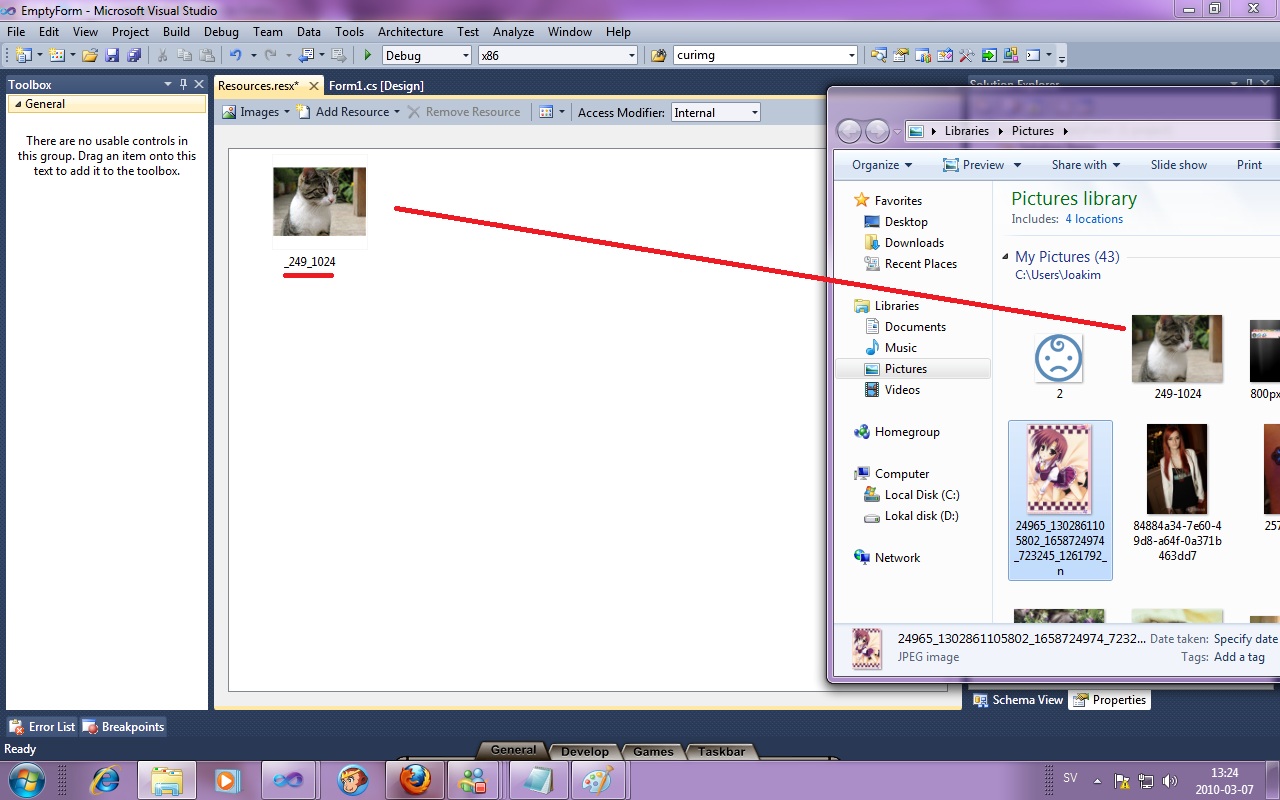
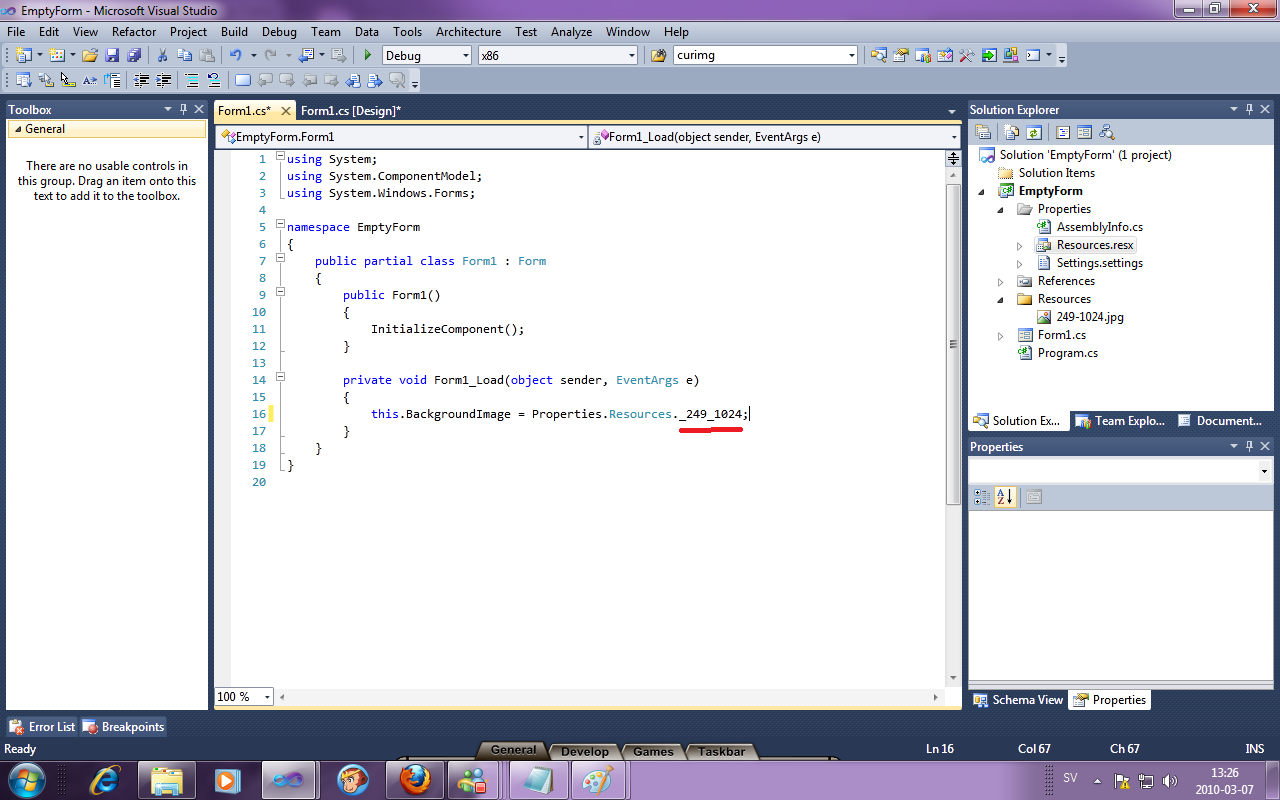
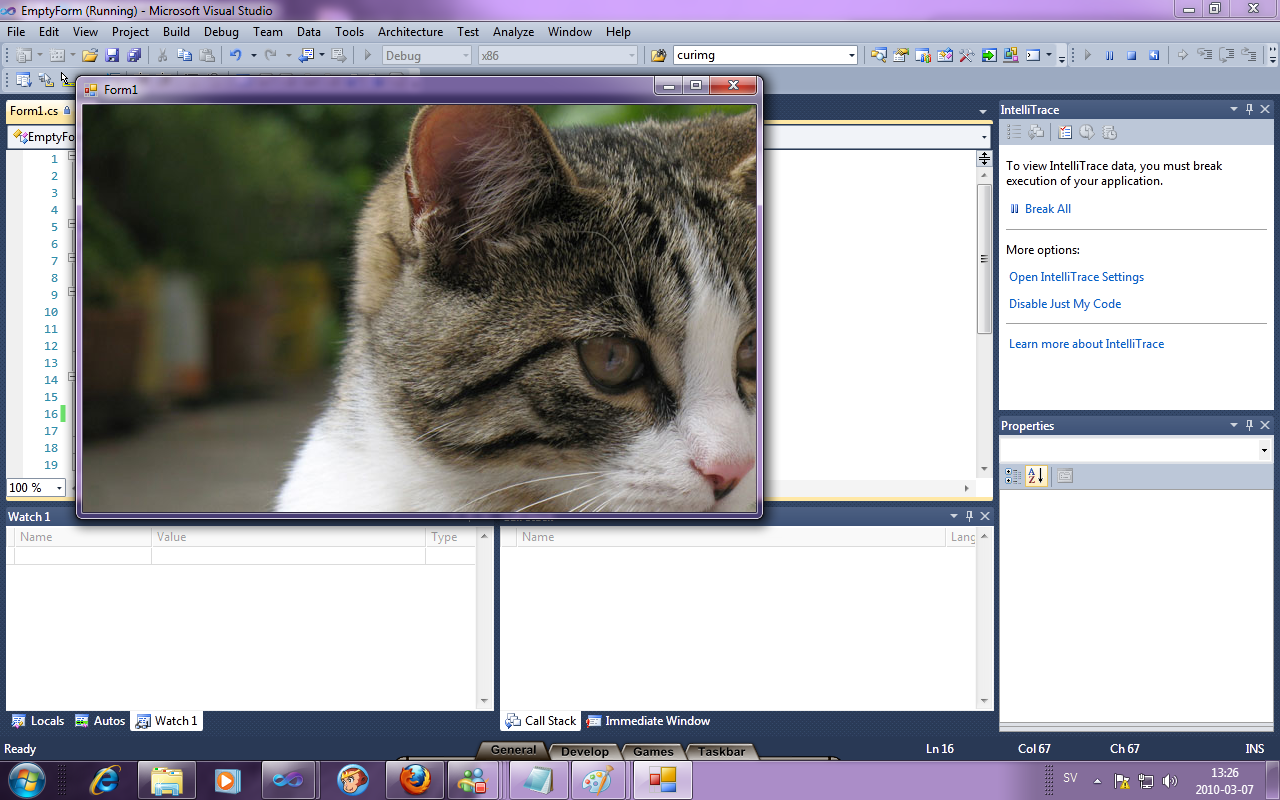
This is a picture guide. It is made for/using VS10.
| Description: |
|
| Filesize: |
185.39 KB |
| Viewed: |
14236 Time(s) |
|
| Description: |
|
| Filesize: |
232.81 KB |
| Viewed: |
14236 Time(s) |
|
| Description: |
|
| Filesize: |
172.45 KB |
| Viewed: |
14236 Time(s) |
|
| Description: |
|
| Filesize: |
571.88 KB |
| Viewed: |
14236 Time(s) |
|
_________________
Intel over amd yes. |
|
| Back to top |
|
|
Womanizer
Grandmaster Cheater
Reputation: 2
Joined: 30 May 2009
Posts: 958
|
| Posted: Sun Mar 07, 2010 8:24 am Post subject: |
|
|
| Cryoma wrote: | | This is a picture guide. It is made for/using VS10. |
It isn't same. I need tutorial for vb 2008.
|
|
| Back to top |
|
|
AtheistCrusader
Grandmaster Cheater
![]() Reputation: 6 Reputation: 6
Joined: 23 Sep 2006
Posts: 681
|
| Posted: Sun Mar 07, 2010 10:33 am Post subject: |
|
|
| Womanizer wrote: | | Cryoma wrote: | | This is a picture guide. It is made for/using VS10. |
It isn't same. I need tutorial for vb 2008. |
It's the same, did you even fucking try it? Go read a fucking tutorial for once and stop expecting people to spoon feed you.
|
|
| Back to top |
|
|
Womanizer
Grandmaster Cheater
Reputation: 2
Joined: 30 May 2009
Posts: 958
|
| Posted: Sun Mar 07, 2010 11:09 am Post subject: |
|
|
| _visiON_ wrote: | | Womanizer wrote: | | Cryoma wrote: | | This is a picture guide. It is made for/using VS10. |
It isn't same. I need tutorial for vb 2008. |
It's the same, did you even fucking try it? Go read a fucking tutorial for once and stop expecting people to spoon feed you. |
I fucking tryed three times.
|
|
| Back to top |
|
|
hcavolsdsadgadsg
I'm a spammer
![]() Reputation: 26 Reputation: 26
Joined: 11 Jun 2007
Posts: 5801
|
|
| Back to top |
|
|
|

 FAQ
FAQ Search
 Memberlist
 Usergroups
 Register
 Profile
 Log in to check your private messages
 Log in


