| View previous topic :: View next topic |
| Author |
Message |
Dillonz
Grandmaster Cheater
 Reputation: 4 Reputation: 4
Joined: 20 Jan 2008
Posts: 758
Location: Under your bed
|
 Posted: Sat Oct 10, 2009 9:27 am Post subject: Similar to my custom skin form question Posted: Sat Oct 10, 2009 9:27 am Post subject: Similar to my custom skin form question |
 |
|
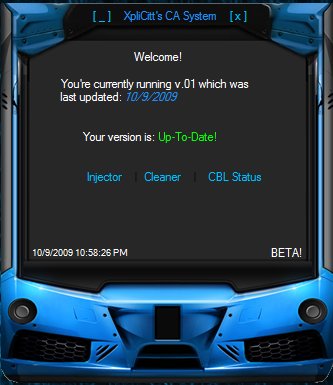
How can you use a picture as the form? This is what I mean.
| Description: |
|
| Filesize: |
115.24 KB |
| Viewed: |
6126 Time(s) |
|
|
|
| Back to top |
|
 |
Odecey
Master Cheater
 Reputation: 1 Reputation: 1
Joined: 19 Apr 2007
Posts: 259
Location: Scandinavia
|
| Posted: Sat Oct 10, 2009 10:20 am Post subject: |
|
|
Set the FormBorderStyle property to None, and BackgroundImage to the desired image.
_________________
Never confuse activity with productivity. You can be busy without a purpose, but what's the point?- Rick Warren |
|
| Back to top |
|
|
Dillonz
Grandmaster Cheater
Reputation: 4
Joined: 20 Jan 2008
Posts: 758
Location: Under your bed
|
| Posted: Sat Oct 10, 2009 11:17 pm Post subject: |
|
|
| Odecey wrote: | | Set the FormBorderStyle property to None, and BackgroundImage to the desired image. |
The form is still a rectangular shape.
|
|
| Back to top |
|
|
Flyte
Peanuts!!!!
 Reputation: 6 Reputation: 6
Joined: 19 Apr 2006
Posts: 1887
Location: Canada
|
| Posted: Sat Oct 10, 2009 11:53 pm Post subject: |
|
|
| Dillonz wrote: | | Odecey wrote: | | Set the FormBorderStyle property to None, and BackgroundImage to the desired image. |
The form is still a rectangular shape. |
Set the transparency key to a color and change the form background color to the same color. I usually pick fuchsia.
|
|
| Back to top |
|
|
XiO
Newbie cheater
![]() Reputation: 0 Reputation: 0
Joined: 27 Sep 2009
Posts: 22
|
| Posted: Mon Oct 12, 2009 10:23 am Post subject: |
|
|
| Odecey wrote: | | Set the FormBorderStyle property to None, and BackgroundImage to the desired image. |
Yeah but when I told him that before, he refused to listen.
|
|
| Back to top |
|
|
Dillonz
Grandmaster Cheater
Reputation: 4
Joined: 20 Jan 2008
Posts: 758
Location: Under your bed
|
| Posted: Mon Oct 12, 2009 12:49 pm Post subject: |
|
|
| XiO wrote: | | Odecey wrote: | | Set the FormBorderStyle property to None, and BackgroundImage to the desired image. |
Yeah but when I told him that before, he refused to listen. |
Don't be an ass please. I clearly asked you what you meant and then you didn't answer.
|
|
| Back to top |
|
|
XiO
Newbie cheater
![]() Reputation: 0 Reputation: 0
Joined: 27 Sep 2009
Posts: 22
|
| Posted: Mon Oct 12, 2009 6:44 pm Post subject: |
|
|
| I'm sorry for being busy then.
|
|
| Back to top |
|
|
hacksign23
Master Cheater
![]() Reputation: 0 Reputation: 0
Joined: 26 Nov 2006
Posts: 404
|
| Posted: Tue Oct 13, 2009 5:07 am Post subject: |
|
|
alright. FormBorderStyle is like the Style of the form. I haven't used this recently but it's usually in that windowed minimizeable or something. ToolBox is when it only has the x and nothing else
so if you set it to none, there's pretty much no border. and setting the backgroundimage is literally the damn name. you set your background image to that image.
_________________
|
|
| Back to top |
|
|
|

 FAQ
FAQ Search
 Memberlist
 Usergroups
 Register
 Profile
 Log in to check your private messages
 Log in