|
Cheat Engine
The Official Site of Cheat Engine
|
| View previous topic :: View next topic |
| Author |
Message |
namek303
Grandmaster Cheater
 Reputation: 0 Reputation: 0
Joined: 05 Jun 2006
Posts: 709
|
 Posted: Wed Oct 07, 2009 8:52 pm Post subject: d3d question Posted: Wed Oct 07, 2009 8:52 pm Post subject: d3d question |
 |
|
I didnt know what section to post this in soooo here goes.
I am having a issue with hans211 d3d based menu. with it shadows are actually rendered from the game menu itself.
Also if i turn on the ingame bloom affect the seccond screen shot shows what happens. Any idea why?
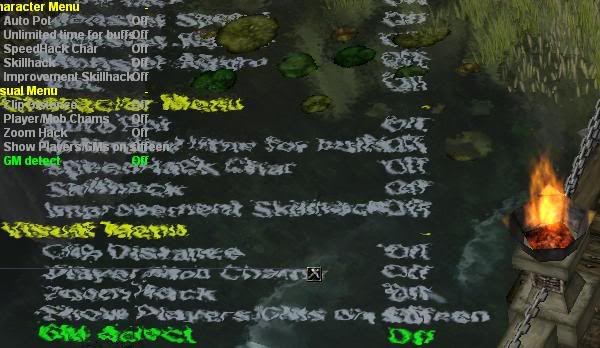
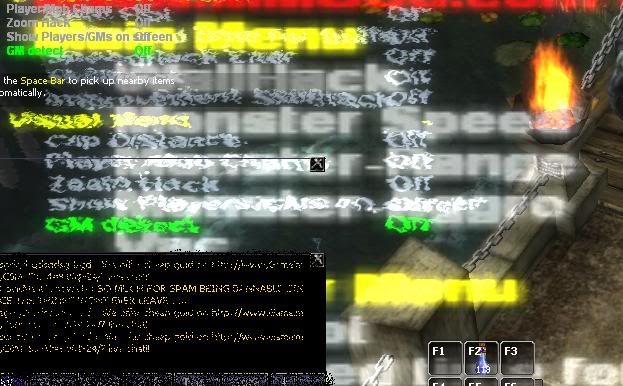
Here is the 2 parts of the source code that handle it
First is d3dmenu.cpp
| Code: | // Project : Basic D3D Menu v1.2
// Author : Hans211
// Date : 4 April 2008
//
// Credits : Game-Deception for their info and support
//
// Tools used:
// Microsoft Visual Studio c++ 6.0
// DirectX9 SDK Update (summer 2004)
// D3Dfont.cpp
//
// Features:
// Use Insert key to show/hide menu
// Use up and down arrow keys to manouvre through the menuitems
// Use left and right arrow keys to toggle menuitems
// Items can have multiple custom states like: "Off" "On" or "Head" "Neck" "Spine"
// Support for textonly items
// Support for folder style items
//
// Changes:
// 1.2 Thx to DXT-Wieter20 for pointing this out
// Check for left and right key first and then if value is within range
//
#include "d3dmenu.h"
char Mtitle[81]=""; // Some room for a title
int Mpos=0; // current highlighted menuitem
int Mmax=0; // number of menu items
int Mxofs =160; // offset for option text
int Mysize=14; // heigh of a menuline
int Mvisible=1;
// predifine some basic options
char *Moptfolder[] = { "+" , "-" };
char *Moptonoff[] = { "Off", "On"};
bool menulock = false;
RECT rect;
RECT rect2;
RECT rect3;
struct {
int typ; // type of menuline, folder, item
char *txt; // text to show
char **opt; // array of options
int *var; // variable containing current status
int maxvalue; // maximumvalue, normally 1 gives 0=off 1=on
} MENU[MENUMAXITEMS];
void MenuAddItem(char *txt, char **opt, int *var, int maxvalue, int typ)
{
MENU[Mmax].typ=typ;
MENU[Mmax].txt=txt;
MENU[Mmax].opt=opt;
MENU[Mmax].var=var;
MENU[Mmax].maxvalue=maxvalue;
Mmax++;
}
void MenuShow(int x, int y, ID3DXFont *pFont)
{
int i, val;
DWORD color;
SetRect( &rect, x+Mxofs/2, y, x+Mxofs /2 , y );
if (!Mvisible) return;
if (Mtitle[0]) {
pFont->DrawText(NULL,Mtitle,-1,&rect,DT_NOCLIP | DT_CENTER, MCOLOR_TITLE);
y+=Mysize;
}
for (i=0; i<Mmax; i++) {
val=(MENU[i].var)?(*MENU[i].var):0;
// determine color
if (i==Mpos)
color=MCOLOR_CURRENT;
else if (MENU[i].typ==MENUFOLDER)
color=MCOLOR_FOLDER;
else if (MENU[i].typ==MENUTEXT)
color=MCOLOR_TEXT;
else
color=(val)?MCOLOR_ACTIVE:MCOLOR_INACTIVE;
SetRect( &rect3, x, y, x , y );
SetRect( &rect2, x+Mxofs, y, x+Mxofs , y );
pFont->DrawText(NULL,MENU[i].txt,-1,&rect3, DT_NOCLIP,color);
if (MENU[i].opt) {
if (MENU[i].typ==MENUTEXT)
pFont->DrawText(NULL,(char *)MENU[i].opt,-1,&rect2, DT_NOCLIP | DT_RIGHT, color);
else
pFont->DrawText(NULL,(char *)MENU[i].opt[val],-1,&rect2, DT_NOCLIP | DT_RIGHT, color);
}
y+=Mysize;
}
}
void MenuNav(void)
{
if (GetAsyncKeyState(VK_INSERT)&1) Mvisible=(!Mvisible);
if (!Mvisible) return;
if ((GetAsyncKeyState(VK_END)&1)){
if(menulock == false){
menulock = true;}else{
menulock = false; }
}
if ((GetAsyncKeyState(VK_UP)&1) && (menulock == false)) {
do {
Mpos--;
if (Mpos<0) Mpos=Mmax-1;
} while (MENU[Mpos].typ==MENUTEXT); // skip textitems
} else if ((GetAsyncKeyState(VK_DOWN)&1) && (menulock == false)) {
do {
Mpos++;
if (Mpos==Mmax) Mpos=0;
} while (MENU[Mpos].typ==MENUTEXT); // skip textitems
} else if (MENU[Mpos].var) {
int dir=0;
// bugfix: thx to Dxt-Wieter20
if ((GetAsyncKeyState(VK_LEFT )&1) && (*MENU[Mpos].var > 0) && (menulock == false)) dir=-1;
if ((GetAsyncKeyState(VK_RIGHT)&1) && (*MENU[Mpos].var < (MENU[Mpos].maxvalue-1)) && (menulock == false)) dir=1;
if (dir) {
*MENU[Mpos].var += dir;
if (MENU[Mpos].typ==MENUFOLDER) Mmax=0; // change on menufolder, force a rebuild
}
}
}
|
Seccond part is d3dmenu.h
| Code: |
// Project : Basic D3D Menu v1.1
// Author : Hans211
// Date : 4 April 2008
#ifndef _D3DMENU_H
#define _D3DMENU_H
#define WIN32_LEAN_AND_MEAN
#include <windows.h>
#include <d3d9.h>
#include <d3dx9.h>
#ifndef D3DFONT_RIGHT
#define D3DFONT_RIGHT 0x0008
#endif
#define MENUMAXITEMS 100
#define MENUFOLDER 1
#define MENUTEXT 2
#define MENUITEM 3
// Colors are here in ARGB in hex Alpha Red Green Blue so : 0xff00ff00 is green :)
#define MCOLOR_TITLE 0xffcc0000
#define MCOLOR_CURRENT 0xff00ff00
#define MCOLOR_FOLDER 0xffffff00
#define MCOLOR_TEXT 0xffe0e0e0
#define MCOLOR_INACTIVE 0xffa0a0a0
#define MCOLOR_ACTIVE 0xffffffff
extern int Mpos; // current highlighted menuitem
extern int Mmax; // number of menu items
extern int Mxofs; // offset for option text
extern int Mysize; // heigh of a menuline
extern char Mtitle[81]; // some menu title
extern int Mvisible;
extern char *Moptfolder[]; // "+" , "-"
extern char *Moptonoff[]; // "Off", "On"
void MenuAddItem(char *txt, char **opt, int *var, int maxvalue, int typ);
void MenuShow(int x, int y, ID3DXFont* pFont);
void MenuNav(void);
#endif
|
I'm scratching my head on why it shows up in shadow and reflections in water and also if i enable bloom. ANY help is this issue is welcome and thanks
_________________
|
|
| Back to top |
|
 |
hcavolsdsadgadsg
I'm a spammer
![]() Reputation: 26 Reputation: 26
Joined: 11 Jun 2007
Posts: 5801
|
| Posted: Wed Oct 07, 2009 9:26 pm Post subject: |
|
|
This is the effect the d3d hook has?
Looks like it's ending up in the water and is being refracted.
I'd guess some kind of weird render-to-texture problem
|
|
| Back to top |
|
|
namek303
Grandmaster Cheater
Reputation: 0
Joined: 05 Jun 2006
Posts: 709
|
| Posted: Wed Oct 07, 2009 9:42 pm Post subject: |
|
|
Right i thought same thing.. TIL i did this
| Code: | D3DCOLOR fontColor = D3DCOLOR_ARGB(255,0,0,255);
// Create a rectangle to indicate where on the screen it should be drawn
RECT rct;
rct.left=((dwWidth/2)-300);
rct.right=(rct.left+600);
rct.top=30;
rct.bottom=rct.top+20;
ostringstream ss,jj;
currenthp=75;
maxhp= 100;
ss << currenthp;
hpdata = ss.str();
jj << maxhp;
hpdata = hpdata + " / " + jj.str();
hpdata = hpdata + " HP";
// Draw some text
m_pFont ->DrawText(NULL, hpdata.c_str(), -1, &rct, DT_CENTER|DT_NOCLIP, fontColor ); |
This is my place holder function for where im going to hold hp
the vars
dwWidth is screen width
currenthp the current hp of object
maxhp the highest amount of hp it can have at any point
ss and jj are just vars used to convert ints to string
hpdata is the final string that gets outputted
I have no clue WHY this wont give me the same shadow or bloom effect as the menu. I looked over the code a few times and i dont know what im missing.
_________________
|
|
| Back to top |
|
|
tombana
Master Cheater
![]() Reputation: 2 Reputation: 2
Joined: 14 Jun 2007
Posts: 456
Location: The Netherlands
|
| Posted: Thu Oct 08, 2009 5:08 am Post subject: |
|
|
| I also have such a problem with my Flyff d3dhook: my menu sometimes appears on tree-shadows or when a notice is shown (text in the middle of screen) it displays under the notice. (so it appears at the normal position where it should be and ALSO on those other positions)
|
|
| Back to top |
|
|
namek303
Grandmaster Cheater
Reputation: 0
Joined: 05 Jun 2006
Posts: 709
|
| Posted: Thu Oct 08, 2009 8:09 am Post subject: |
|
|
| tombana wrote: | | I also have such a problem with my Flyff d3dhook: my menu sometimes appears on tree-shadows or when a notice is shown (text in the middle of screen) it displays under the notice. (so it appears at the normal position where it should be and ALSO on those other positions) |
Were you ever able to figure out why its doing that?
_________________
|
|
| Back to top |
|
|
tombana
Master Cheater
![]() Reputation: 2 Reputation: 2
Joined: 14 Jun 2007
Posts: 456
Location: The Netherlands
|
| Posted: Thu Oct 08, 2009 9:26 am Post subject: |
|
|
| namek303 wrote: | | tombana wrote: | | I also have such a problem with my Flyff d3dhook: my menu sometimes appears on tree-shadows or when a notice is shown (text in the middle of screen) it displays under the notice. (so it appears at the normal position where it should be and ALSO on those other positions) |
Were you ever able to figure out why its doing that? |
No, it still does that. I just turned off shadows.
I do my drawing in the EndScene() hook.
So maybe, after the game called EndScene it does some more drawing (which it shouldn't) and then maybe the menu graphic data is still stored in some buffer and the stuff that's drawn after EndScene gets mixed/blended into that buffer?
Or, maybe there are multiple render-targets set or something? Like the menu is rendered to two surfaces at the same time. So maybe just reset all those things before drawing the menu, calling functions like SetRenderTarget() and SetTexture() with the default parameters.
SetRenderTarget. It says that it can support multiple render targets (depends on video card). So get the number of supported render targets, and call SetRenderTargets(i, NULL) in a loop, on each of them. I'm just guessing here, I have no idea how the 'render target' thing works....
|
|
| Back to top |
|
|
hcavolsdsadgadsg
I'm a spammer
![]() Reputation: 26 Reputation: 26
Joined: 11 Jun 2007
Posts: 5801
|
| Posted: Thu Oct 08, 2009 9:39 am Post subject: |
|
|
A typical bloom effect uses the render to texture feature, as well as stuff like water reflections, so I'd guess what you draw is getting included. For the most part, it works exactly like you'd expect.
I guess you could save them before you do your drawing and put them back to whatever. Trashing them sounds like it may be a bad idea.
|
|
| Back to top |
|
|
tombana
Master Cheater
![]() Reputation: 2 Reputation: 2
Joined: 14 Jun 2007
Posts: 456
Location: The Netherlands
|
| Posted: Thu Oct 08, 2009 12:11 pm Post subject: |
|
|
| slovach wrote: | A typical bloom effect uses the render to texture feature, as well as stuff like water reflections, so I'd guess what you draw is getting included. For the most part, it works exactly like you'd expect.
I guess you could save them before you do your drawing and put them back to whatever. Trashing them sounds like it may be a bad idea. |
So this render-to-texture thing, how to turn it off? SetTexture? or SetRenderTarget?
(Yes I meant first saving them with GetTexture/GetRenderTarget before 'trashing' them. However, the game will probably set them again in their next loop so it depends on the game if you can 'trash' them or not.)
|
|
| Back to top |
|
|
|
|
You cannot post new topics in this forum
You cannot reply to topics in this forum
You cannot edit your posts in this forum
You cannot delete your posts in this forum
You cannot vote in polls in this forum
You cannot attach files in this forum
You can download files in this forum
|
|
 FAQ
FAQ Search
 Memberlist
 Usergroups
 Register
 Profile
 Log in to check your private messages
 Log in