| View previous topic :: View next topic |
| Author |
Message |
Reuben
Grandmaster Cheater
 Reputation: 0 Reputation: 0
Joined: 08 Sep 2007
Posts: 655
Location: Unknown
|
 Posted: Mon Mar 31, 2008 8:26 pm Post subject: [Help] No-disk error Posted: Mon Mar 31, 2008 8:26 pm Post subject: [Help] No-disk error |
 |
|
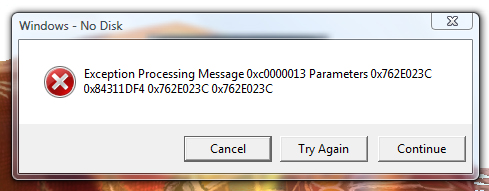
I know that this has been posted before. I know. But I found no working solution. When I open some trainers or attach CE to Intenet Explorer, I get a windows error message that says no disk (screeny attached). I have restarted and reinstalled. The problem happens with specific applications, and trainers generated with CE also have the error. I also had this error with a no-cd fix for Oblivion, so there is the possiblility that it has to do with editing non-extistent memory.
EDIT: I just found that if I do not click a button, the hack will not work.
Any help?
| Description: |
|
| Filesize: |
70.81 KB |
| Viewed: |
8285 Time(s) |
|
Last edited by Reuben on Sat Apr 05, 2008 6:15 pm; edited 1 time in total |
|
| Back to top |
|
 |
Labyrnth
Moderator
![]() Reputation: 10 Reputation: 10
Joined: 28 Nov 2006
Posts: 6300
|
| Posted: Mon Mar 31, 2008 10:51 pm Post subject: |
|
|
| Just click continue and ignore it.
|
|
| Back to top |
|
|
Reuben
Grandmaster Cheater
Reputation: 0
Joined: 08 Sep 2007
Posts: 655
Location: Unknown
|
| Posted: Tue Apr 01, 2008 7:40 pm Post subject: |
|
|
| Still, isn't there any solution? Continue works, but the messages come up soo often...
|
|
| Back to top |
|
|
Dark Byte
Site Admin
 Reputation: 475 Reputation: 475
Joined: 09 May 2003
Posts: 26012
Location: The netherlands
|
| Posted: Tue Apr 01, 2008 7:41 pm Post subject: |
|
|
try going to settings and disable "use hyperscan when possible"
_________________
Tools give you results. Knowledge gives you control.
Like my help? Join me on Patreon so i can keep helping |
|
| Back to top |
|
|
Reuben
Grandmaster Cheater
Reputation: 0
Joined: 08 Sep 2007
Posts: 655
Location: Unknown
|
| Posted: Tue Apr 01, 2008 7:54 pm Post subject: |
|
|
| Dark Byte wrote: | | try going to settings and disable "use hyperscan when possible" |
Already was disabled.
|
|
| Back to top |
|
|
Labyrnth
Moderator
![]() Reputation: 10 Reputation: 10
Joined: 28 Nov 2006
Posts: 6300
|
| Posted: Wed Apr 02, 2008 12:02 pm Post subject: |
|
|
| Ignore it , doesnt happen all the time.
|
|
| Back to top |
|
|
Psy
Grandmaster Cheater Supreme
![]() Reputation: 1 Reputation: 1
Joined: 27 Mar 2008
Posts: 1366
|
| Posted: Wed Apr 02, 2008 12:10 pm Post subject: |
|
|
Try like errr getting rid of vista 
Nah only kidding...that message is way to generic... could be hundreds of things causing it.
Google around, you'll see what I mean 
|
|
| Back to top |
|
|
Cryoma
Member of the Year
![]() Reputation: 198 Reputation: 198
Joined: 14 Jan 2009
Posts: 1819
|
| Posted: Wed Apr 02, 2008 12:23 pm Post subject: |
|
|
| Basically there's nothing you can do.
|
|
| Back to top |
|
|
Psy
Grandmaster Cheater Supreme
![]() Reputation: 1 Reputation: 1
Joined: 27 Mar 2008
Posts: 1366
|
| Posted: Wed Apr 02, 2008 12:35 pm Post subject: |
|
|
| I doubt it, not without re-installing or trying just generic fixing tools such as registry cleaners and checking your startup items to see if everything is as it should be to an extent.
|
|
| Back to top |
|
|
Reuben
Grandmaster Cheater
Reputation: 0
Joined: 08 Sep 2007
Posts: 655
Location: Unknown
|
| Posted: Wed Apr 02, 2008 5:48 pm Post subject: |
|
|
| Well, does anyone atleast know either a way to block Windows errors or freeze focus on a certain window?
|
|
| Back to top |
|
|
buzzah
Grandmaster Cheater
 Reputation: 0 Reputation: 0
Joined: 21 Nov 2007
Posts: 787
Location: MSN
|
| Posted: Thu Apr 03, 2008 1:55 am Post subject: |
|
|
I would go on google and look at updates for your specific drive.
Maybe there is an update that can get rid of it....?
_________________
PM me if you want an AQ/MQ/DF upgrade card! |
|
| Back to top |
|
|
Labyrnth
Moderator
![]() Reputation: 10 Reputation: 10
Joined: 28 Nov 2006
Posts: 6300
|
| Posted: Thu Apr 03, 2008 1:05 pm Post subject: |
|
|
| Reuben wrote: | | Well, does anyone atleast know either a way to block Windows errors or freeze focus on a certain window? |
Huh?
You mean error reporting? Or error in general.
As for freeze not sure what your talking about.
|
|
| Back to top |
|
|
Cryoma
Member of the Year
![]() Reputation: 198 Reputation: 198
Joined: 14 Jan 2009
Posts: 1819
|
| Posted: Thu Apr 03, 2008 1:11 pm Post subject: |
|
|
| And it's turning into a computer help thread.
|
|
| Back to top |
|
|
Psy
Grandmaster Cheater Supreme
![]() Reputation: 1 Reputation: 1
Joined: 27 Mar 2008
Posts: 1366
|
| Posted: Thu Apr 03, 2008 1:20 pm Post subject: |
|
|
Tis a dodgy game fix. Happens with a few i've used myself.
Just have to ignore it like Lab said.
|
|
| Back to top |
|
|
Reuben
Grandmaster Cheater
Reputation: 0
Joined: 08 Sep 2007
Posts: 655
Location: Unknown
|
| Posted: Thu Apr 03, 2008 6:39 pm Post subject: |
|
|
| Labyrnth wrote: | | Reuben wrote: | | Well, does anyone atleast know either a way to block Windows errors or freeze focus on a certain window? |
Huh?
You mean error reporting? Or error in general.
As for freeze not sure what your talking about. |
Block Windows error messages so that they will not appear. By freeze I mean focus a specific window every, say, 250 millseconds.
I just found that if I do not click a button, the hack will not work.
|
|
| Back to top |
|
|
|

 FAQ
FAQ Search
 Memberlist
 Usergroups
 Register
 Profile
 Log in to check your private messages
 Log in


