| View previous topic :: View next topic |
| Author |
Message |
AndrewMan
Grandmaster Cheater Supreme
![]() Reputation: 0 Reputation: 0
Joined: 01 Aug 2007
Posts: 1257
|
 Posted: Sat Mar 15, 2008 10:39 pm Post subject: [Pre-Release] Easy Launch v.1.8 Posted: Sat Mar 15, 2008 10:39 pm Post subject: [Pre-Release] Easy Launch v.1.8 |
 |
|
I just have a screenie for now, just fixing some bugs up than I will release...
How does it look so far?

_________________
|
|
| Back to top |
|
 |
Pseudo Xero
I post too much
![]() Reputation: 0 Reputation: 0
Joined: 16 Feb 2007
Posts: 2607
|
| Posted: Sat Mar 15, 2008 10:43 pm Post subject: Re: [Pre-Release] Easy Launch v.1.8 |
|
|
| AndrewMan wrote: | I just have a screenie for now, just fixing some bugs up than I will release...
How does it look so far?
|
You should just use a listbox.
_________________
| haxory' wrote: | can't VB do anything??
windows is programmed using VB right? correct me if im wrong.
so all things in windows you have like the start menu is a windows form too. |
|
|
| Back to top |
|
|
hcavolsdsadgadsg
I'm a spammer
![]() Reputation: 26 Reputation: 26
Joined: 11 Jun 2007
Posts: 5801
|
| Posted: Sat Mar 15, 2008 10:46 pm Post subject: |
|
|
1. Need to work on the GUI, needless wasted space, unaligned stuff, etc. Hell, you could do it in a much smarter way than 208213 buttons.
2a. What are the check boxes for?
2b. What's the who knows how the hell to make that symbol bullet thing button for? (guessing to pick a program?)
3. Why would I want to open this to kill a process when I could just X it out?
Some stuff is pointless and isn't immediately obvious.
It's still a flawed idea in my mind. Opening something to click a button to start the task manager instead of hitting CTRL-ALT-DEL? Complicating the process, if anything.
|
|
| Back to top |
|
|
Blank
I post too much
 Reputation: 1 Reputation: 1
Joined: 20 Jun 2006
Posts: 3044
|
| Posted: Sat Mar 15, 2008 10:51 pm Post subject: |
|
|
| slovach wrote: | 1. Need to work on the GUI, needless wasted space, unaligned stuff, etc. Hell, you could do it in a much smarter way than 208213 buttons.
2a. What are the check boxes for?
2b. What's the who knows how the hell to make that symbol bullet thing button for? (guessing to pick a program?)
3. Why would I want to open this to kill a process when I could just X it out?
Some stuff is pointless and isn't immediately obvious.
It's still a flawed idea in my mind. Opening something to click a button to start the task manager instead of hitting CTRL-ALT-DEL? Complicating the process, if anything. |
Agreed for the most part.
_________________
|
|
| Back to top |
|
|
AndrewMan
Grandmaster Cheater Supreme
![]() Reputation: 0 Reputation: 0
Joined: 01 Aug 2007
Posts: 1257
|
| Posted: Sat Mar 15, 2008 10:55 pm Post subject: |
|
|
| slovach wrote: | 1. Need to work on the GUI, needless wasted space, unaligned stuff, etc. Hell, you could do it in a much smarter way than 208213 buttons.
2a. What are the check boxes for?
2b. What's the who knows how the hell to make that symbol bullet thing button for? (guessing to pick a program?)
3. Why would I want to open this to kill a process when I could just X it out?
Some stuff is pointless and isn't immediately obvious.
It's still a flawed idea in my mind. Opening something to click a button to start the task manager instead of hitting CTRL-ALT-DEL? Complicating the process, if anything. |
1. Yeah I will eventually get to the GUI.
2a. Tells if that program is running or not.
2b. Click it and it will edit the button (you name it what you want, and set the width of the button to what you want).
3. Because just incase you had many things open, you could just go back and just end the process right away instead of opening it up, closing it out, than opening the Easy Launcher back up.
I am trying to figure out how to do hotkeys. Like pressing 1 would open Firefox.
Pressing 2 would open Google Mail.
Stuff like that...
_________________
|
|
| Back to top |
|
|
Flyte
Peanuts!!!!
 Reputation: 6 Reputation: 6
Joined: 19 Apr 2006
Posts: 1887
Location: Canada
|
| Posted: Sat Mar 15, 2008 11:31 pm Post subject: |
|
|
WinKey + R rules all.
Also:
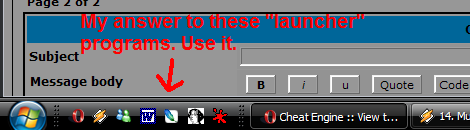
|
|
| Back to top |
|
|
SF
I'm a spammer
 Reputation: 119 Reputation: 119
Joined: 19 Mar 2007
Posts: 6028
|
| Posted: Sun Mar 16, 2008 12:09 am Post subject: |
|
|
@ slovach, Kill process could also be helpful for when the program has stopped responding. I'd use it instead of task manager, since I often lag when opening task manager, since I don't open it very often.
_________________
|
|
| Back to top |
|
|
hcavolsdsadgadsg
I'm a spammer
![]() Reputation: 26 Reputation: 26
Joined: 11 Jun 2007
Posts: 5801
|
| Posted: Sun Mar 16, 2008 12:35 am Post subject: |
|
|
| SaviourFamily wrote: | | @ slovach, Kill process could also be helpful for when the program has stopped responding. I'd use it instead of task manager, since I often lag when opening task manager, since I don't open it very often. |
Are you on an SNES or some shit?
It takes all but a second to open for me, even in situations gone horribly wrong where both cores are raped.
|
|
| Back to top |
|
|
SF
I'm a spammer
Reputation: 119
Joined: 19 Mar 2007
Posts: 6028
|
| Posted: Sun Mar 16, 2008 12:47 am Post subject: |
|
|
| slovach wrote: | | SaviourFamily wrote: | | @ slovach, Kill process could also be helpful for when the program has stopped responding. I'd use it instead of task manager, since I often lag when opening task manager, since I don't open it very often. |
Are you on an SNES or some shit?
It takes all but a second to open for me, even in situations gone horribly wrong where both cores are raped. |
E-Machines with 512 DDR RAM, AMD Sempron 3100+ 1.8GHz. 
_________________
|
|
| Back to top |
|
|
jason744
Grandmaster Cheater
 Reputation: 0 Reputation: 0
Joined: 25 Nov 2007
Posts: 638
|
| Posted: Sun Mar 16, 2008 1:38 am Post subject: |
|
|
I've made one with easier to use, but I'll just work with AndrewMan for now.
If anyone want it it's here.
Edit:
AIM completely slipped my mind, I'll add soon.
|
|
| Back to top |
|
|
Mobsy
Master Cheater
 Reputation: -1 Reputation: -1
Joined: 05 Feb 2008
Posts: 288
Location: root
|
| Posted: Sun Mar 16, 2008 1:22 pm Post subject: |
|
|
| slovach wrote: | 1. Need to work on the GUI, needless wasted space, unaligned stuff, etc. Hell, you could do it in a much smarter way than 208213 buttons.
2a. What are the check boxes for?
2b. What's the who knows how the hell to make that symbol bullet thing button for? (guessing to pick a program?)
3. Why would I want to open this to kill a process when I could just X it out?
Some stuff is pointless and isn't immediately obvious.
It's still a flawed idea in my mind. Opening something to click a button to start the task manager instead of hitting CTRL-ALT-DEL? Complicating the process, if anything. |
I also agree for the most part. You should probably concentrate on things which are not so easy to get to as Task Manager...
_________________

Hitler, where's my car? |
|
| Back to top |
|
|
GG
Grandmaster Cheater Supreme
 Reputation: 4 Reputation: 4
Joined: 20 Jan 2008
Posts: 1589
Location: Australia
|
| Posted: Mon Mar 17, 2008 11:14 pm Post subject: |
|
|
great design
and very handy cause sometimes ALT+CTRL+DEL doesnt open up task manager cause your pc is being a fag
so i like it
9/10
_________________
|
|
| Back to top |
|
|
lolwut94
Expert Cheater
![]() Reputation: 0 Reputation: 0
Joined: 22 Dec 2007
Posts: 197
|
|
| Back to top |
|
|
GG
Grandmaster Cheater Supreme
Reputation: 4
Joined: 20 Jan 2008
Posts: 1589
Location: Australia
|
| Posted: Tue Mar 18, 2008 5:57 am Post subject: |
|
|
| lolwut94 wrote: | | Flyte wrote: | WinKey + R rules all.
Also:
|
What if we don't "feel" like slowing down our computers with Vista? |
true....
_________________
|
|
| Back to top |
|
|
Cryoma
Member of the Year
![]() Reputation: 198 Reputation: 198
Joined: 14 Jan 2009
Posts: 1819
|
| Posted: Tue Mar 18, 2008 10:30 am Post subject: |
|
|
Retards, XP has one too.
And Macs.
And linux, probably, never used one.
Native doesn't need one, but it could have one if I wanted to put it on.
|
|
| Back to top |
|
|
|

 FAQ
FAQ Search
 Memberlist
 Usergroups
 Register
 Profile
 Log in to check your private messages
 Log in