| View previous topic :: View next topic |
| Author |
Message |
lolium
Expert Cheater
 Reputation: 0 Reputation: 0
Joined: 16 Jun 2007
Posts: 209
Location: AREA 51!!!!!!!!!!!!!!!!!!!!
|
 Posted: Mon Dec 31, 2007 1:56 pm Post subject: [question vb6]easy question been bothering me Posted: Mon Dec 31, 2007 1:56 pm Post subject: [question vb6]easy question been bothering me |
 |
|
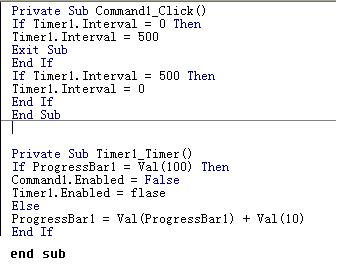
how do i make it so when a progressbar reaches 50% then a pop up will appear this is my current code
| Description: |
|
| Filesize: |
20.23 KB |
| Viewed: |
6885 Time(s) |
|
|
|
| Back to top |
|
 |
torpin005
Master Cheater
 Reputation: 0 Reputation: 0
Joined: 19 Nov 2007
Posts: 255
|
| Posted: Mon Dec 31, 2007 2:52 pm Post subject: |
|
|
You could use the
command
_________________

Go check it out. Good Hacks |
|
| Back to top |
|
|
Meeman
Advanced Cheater
![]() Reputation: 0 Reputation: 0
Joined: 15 Nov 2007
Posts: 54
|
| Posted: Mon Dec 31, 2007 4:54 pm Post subject: |
|
|
this code should work.
| Code: |
Private Sub Command1_click()
if timer1.interval = 0 Then
timer1.interval = 500
exit sub
end if
if timer1.interval = 500 then
timer1.interval = 0
End if
End sub
|
And then in the timer put
| Code: |
Private Sub timer1_timer
if progressbar1 = val(50) then
Msgbox "enter your message here"
if progressbar1 = val(100) then
command1.enabled = false
timer1.enabled = false
else
progressbar1 = val(progressbar1) + val(10)
End sub
|
this code should work for you. If not tell me and i will fix it and make it better.
+rep if you like
-MEEMAN666[/code]
_________________
I AM MEEMAN666!!!!!!!!!!
PPT277


programming languages i use: VB6, Delphi 7 , C# 2008, Python
You want to +Rep me!!!!!!! |
|
| Back to top |
|
|
lolium
Expert Cheater
Reputation: 0
Joined: 16 Jun 2007
Posts: 209
Location: AREA 51!!!!!!!!!!!!!!!!!!!!
|
| Posted: Mon Dec 31, 2007 5:21 pm Post subject: |
|
|
yeah works but is there a way to make it stop at 50% when the msgbox appears
and + rep for helping
|
|
| Back to top |
|
|
atom0s
Moderator
 Reputation: 205 Reputation: 205
Joined: 25 Jan 2006
Posts: 8588
Location: 127.0.0.1
|
| Posted: Mon Dec 31, 2007 7:23 pm Post subject: |
|
|
Disable the timer after it hits 50% such as:
| Code: | Option Explicit
Private Sub Form_Load()
'// Setup Progress Bar
ProgressBar1.Min = 0
ProgressBar1.Max = 100
ProgressBar1.Value = 0
'// Setup Timer
Timer1.Interval = 1000 ' 1 second tick
Timer1.Enabled = True
End Sub
Private Sub Timer1_Timer()
'// Tick The Progress Bar
With ProgressBar1
.Value = .Value + 1
End With
'// Check For 50%
If ProgressBar1.Value = 50 Then
'// If 50% Disable And Display Message
Timer1.Enabled = False
MsgBox "Insert your message here.", vbExclamation, "Message Title"
End If
End Sub |
_________________
- Retired. |
|
| Back to top |
|
|
lolium
Expert Cheater
Reputation: 0
Joined: 16 Jun 2007
Posts: 209
Location: AREA 51!!!!!!!!!!!!!!!!!!!!
|
| Posted: Tue Jan 01, 2008 3:28 pm Post subject: |
|
|
if i wanted it to close the form after the msgbox appeared then would it be
| Code: |
Option Explicit
Private Sub Form_Load()
'// Setup Progress Bar
ProgressBar1.Min = 0
ProgressBar1.Max = 100
ProgressBar1.Value = 0
'// Setup Timer
Timer1.Interval = 1000 ' 1 second tick
Timer1.Enabled = True
End Sub
Private Sub Timer1_Timer()
'// Tick The Progress Bar
With ProgressBar1
.Value = .Value + 1
End With
'// Check For 50%
If ProgressBar1.Value = 50 Then
'// If 50% Disable And Display Message
Timer1.Enabled = False
MsgBox "Insert your message here.", vbExclamation, "Message Title"
form2.hide
End If
End Sub
|
|
|
| Back to top |
|
|
Blader
I post too much
 Reputation: 2 Reputation: 2
Joined: 19 Jan 2007
Posts: 2049
|
| Posted: Tue Jan 01, 2008 4:08 pm Post subject: |
|
|
Using the hide function only hides the form, but it's still in the memory. If you wish to close it entirely, use:
_________________
|
|
| Back to top |
|
|
Pseudo Xero
I post too much
![]() Reputation: 0 Reputation: 0
Joined: 16 Feb 2007
Posts: 2607
|
| Posted: Tue Jan 01, 2008 6:28 pm Post subject: |
|
|
| Blader wrote: | Using the hide function only hides the form, but it's still in the memory. If you wish to close it entirely, use:
|
Unload Me does the same thing.
|
|
| Back to top |
|
|
Blader
I post too much
Reputation: 2
Joined: 19 Jan 2007
Posts: 2049
|
| Posted: Tue Jan 01, 2008 6:31 pm Post subject: |
|
|
| Xenophobe wrote: | | Blader wrote: | Using the hide function only hides the form, but it's still in the memory. If you wish to close it entirely, use:
|
Unload Me does the same thing. |
Are you sure?
I tried it before and it wasn't a process anymore
Well, you can always use
_________________
|
|
| Back to top |
|
|
atom0s
Moderator
Reputation: 205
Joined: 25 Jan 2006
Posts: 8588
Location: 127.0.0.1
|
| Posted: Wed Jan 02, 2008 1:34 am Post subject: |
|
|
End is bad practice. You should always unload your objects before ending the main program no matter what. Using end can lead to memory leaks.
| Xenophobe wrote: | | Unload Me does the same thing. |
Not true, Blader was correct here. Unload removes the object from memory, Hide simply 'hides' it from being seen. It does not unload the object from memory. If you want to test how hide works do this:
Create second form with a text box on it. On the first text box, create two buttons, have the first load the second form. Then the second to hide it. Run the program, click the first button. Edit the text box on the second form to anything, then click the second button to hide that form. Click the first again and you will see your same value as before.
The object is not unloaded when you use hide.
_________________
- Retired. |
|
| Back to top |
|
|
Pseudo Xero
I post too much
![]() Reputation: 0 Reputation: 0
Joined: 16 Feb 2007
Posts: 2607
|
| Posted: Wed Jan 02, 2008 5:00 am Post subject: |
|
|
| Well, I haven't tried VB6 in a while, but in VB.NET when I used the equivalent of Unload Me (Me.Close) it kept everything on the form, just like using the Visible property.
|
|
| Back to top |
|
|
|

 FAQ
FAQ Search
 Memberlist
 Usergroups
 Register
 Profile
 Log in to check your private messages
 Log in


