 |
Cheat Engine
The Official Site of Cheat Engine
|
| View previous topic :: View next topic |
| Author |
Message |
MUSTARD
Advanced Cheater
![]() Reputation: 0 Reputation: 0
Joined: 26 Oct 2007
Posts: 56
Location: SPAM SECTION
|
 Posted: Wed Jan 23, 2008 6:54 pm Post subject: Easy DLL Maker? Posted: Wed Jan 23, 2008 6:54 pm Post subject: Easy DLL Maker? |
 |
|
No one will answer in the Two sections i need them to. VERY UNPOPULAR.
(GunZ and GB) So, i will ask you guys, where can i find an Easy DLL Maker?
Everyone is just saying VB6 and C++. i have Both, I know both, but i fail. anything easier?
_________________
|
|
| Back to top |
|
 |
lurc
Grandmaster Cheater Supreme
 Reputation: 2 Reputation: 2
Joined: 13 Nov 2006
Posts: 1900
|
| Posted: Wed Jan 23, 2008 6:57 pm Post subject: |
|
|
C/C++ and ASM are probably your best bet to make a dll, nothing is easy, unless you work to learn it. from there it gets easier.
what do u need help with in C++?
_________________
|
|
| Back to top |
|
|
MUSTARD
Advanced Cheater
![]() Reputation: 0 Reputation: 0
Joined: 26 Oct 2007
Posts: 56
Location: SPAM SECTION
|
| Posted: Wed Jan 23, 2008 7:10 pm Post subject: |
|
|
| lurc wrote: | C/C++ and ASM are probably your best bet to make a dll, nothing is easy, unless you work to learn it. from there it gets easier.
what do u need help with in C++? |
pretty much everything. i have some books. they no help. what do you know? PM me of list of what you know 
_________________
|
|
| Back to top |
|
|
wunder312355
Grandmaster Cheater
![]() Reputation: -1 Reputation: -1
Joined: 14 May 2007
Posts: 568
|
| Posted: Wed Jan 23, 2008 7:19 pm Post subject: |
|
|
| Look for a post in the maplestory section for C++. Its great, and thats where I learned most of my C++. Its probably not too deep in there.
|
|
| Back to top |
|
|
hcavolsdsadgadsg
I'm a spammer
![]() Reputation: 26 Reputation: 26
Joined: 11 Jun 2007
Posts: 5801
|
|
| Back to top |
|
|
lurc
Grandmaster Cheater Supreme
Reputation: 2
Joined: 13 Nov 2006
Posts: 1900
|
| Posted: Thu Jan 24, 2008 10:52 am Post subject: |
|
|
lol i was gonna post that last night, but CEF died again, and i had to study for my science exam... so i just gave up on trying to get back into CEF 
_________________
|
|
| Back to top |
|
|
atom0s
Moderator
 Reputation: 205 Reputation: 205
Joined: 25 Jan 2006
Posts: 8585
Location: 127.0.0.1
|
|
| Back to top |
|
|
FerrisBuellerYourMyHero
Master Cheater
 Reputation: 0 Reputation: 0
Joined: 14 Feb 2007
Posts: 401
Location: Inside your <kernel>
|
| Posted: Fri Jan 25, 2008 2:42 pm Post subject: Re: Easy DLL Maker? |
|
|
| MUSTARD wrote: | No one will answer in the Two sections i need them to. VERY UNPOPULAR.
(GunZ and GB) So, i will ask you guys, where can i find an Easy DLL Maker?
Everyone is just saying VB6 and C++. i have Both, I know both, but i fail. anything easier? |
EDIT: ok now it can return a value either true or false, 1 or 0... but Like I was trying to get at, "EasyDLL()" Is not meant to be used like a function, It is just the main thread, meant to be running 100% of the time, its purpose is to be an infinite loop! not to return values... It will never get to the "return TRUE;" 's because I will never let it break out of the infinite loop... Because If I wanted to terminate the thread I would also want to FreeLibrary on the DLL as well, so instead of making the END key "break;" I make it free library and exit thread... We just have different programming styles that's all, both ways are correct, you just have no way of unloading the DLL from within it...
lol EASY DLL MAKER? wow I never thought I'd hear the term! If your looking for a program that you can just click here and click there and have a working trainer DLL your mistaken! nothing exists like that and I don't think there ever will be ! because its much easier to just code a DLL, then to code a program that can make DLL's like that!(plus it wouldn't be very customizable like you can code a DLL to be)
think of a DLL as like a mini-EXE it cannot run on its own, it requires an executable to call LoadLibrary on it!
its very simple to create a DLL in C++!(I find it harder in delphi and MASM)
Ill show you just how EASY it is to make a DLL! but you must put some effort into it! This will put you off to a great start if you realize it! no one ever did this for me! I had to scour the interwebs for hours to figure this out!
Create an empty Win32 DLL project called "EasyDLL" create a new .cpp file called "EasyDLL.cpp" and add it to the project.
start off with your basic DLL skeleton:
| Code: |
// EasyDLL.cpp : Defines the entry point for the DLL application.
#include "windows.h"
#include <iostream>
#define JMP(frm, to) (int)(((int)to - (int)frm) - 5);
using namespace std;
bool EasyDLL(void)
{
MessageBoxA(0,"Welcome to my Very EasyDLL trainer!", "Mini-Trainer", 0);
for(;;)
{
Sleep(10);
if(GetAsyncKeyState(VK_END))
{
MessageBoxA(0, "Ejecting...", ".:::1337:::.", 0);
Sleep(100);
HINSTANCE hMod = GetModuleHandleA("EasyDLL.dll");
FreeLibraryAndExitThread(hMod, 0);
}
}
return TRUE;
}
BOOL APIENTRY DllMain(HMODULE hModule,DWORD ul_reason_for_call,LPVOID lpReserved)
{
if (ul_reason_for_call == DLL_PROCESS_ATTACH)
{
CreateThread(0, 0, (LPTHREAD_START_ROUTINE)&EasyDLL, 0, 0, 0);
}
return true;
}
|
Now at this point, all it will do when injected into a process is create your MainThread(its important) then the main thread will popup a messagebox alerting the user of its presence... then will end up in an infinite loop which waits for the END key to be pressed! if its pressed the DLL will be unloaded from the process and the thread terminated! I do this so I can test my dll over and over again without having to end the whole process! I can just press END and then inject it again!(of course you can remove it once you get it working good with no bugs)
Next we will add in 1 hack and show how to toggle it on/off! Im not sure if your familiar with maple but it doesn't matter you can do it like this to change the memory of any process which its injected into...
| Code: |
// EasyDLL.cpp : Defines the entry point for the DLL application.
#include "windows.h"
#include <iostream>
#define JMP(frm, to) (int)(((int)to - (int)frm) - 5); // this will come in handy for script hacks
BYTE OrginalBytes[2];
bool SuperTubi = 0;
using namespace std;
bool EasyDLL(void)
{
MessageBoxA(0,"Welcome to my Very EasyDLL trainer!", "Mini-Trainer", 0);
memcpy((void*)OriginalBytes, (void*)0x004AA29B, 2);
for(;;)
{
Sleep(10); // DONT REMOVE! REQUIRED FOR ANTI-LAG AKA NON 100% CPU usage
if(GetAsyncKeyState(VK_F12)) // OUR FIRST HACK! a simple byte change hack!
{
if(SuperTubi == 0)
{
*(WORD*)0x004AA29B = 0x9090; // MapleStory Super Tubi Address V49
SuperTubi = 1;
}
else if(SuperTubi == 1)
{
memcpy((void*)0x004AA29B, (void*)OriginalBytes, 2);
SuperTubi = 0;
}
Sleep(200); // So it doesn't get pressed twice or more in 1 press
// we make it wait 200ms before it can be pressed again...
}
if(GetAsyncKeyState(VK_END))
{
MessageBoxA(0, "Ejecting...", ".:::1337:::.", 0);
Sleep(100);
HINSTANCE hMod = GetModuleHandleA("EasyDLL.dll");
FreeLibraryAndExitThread(hMod, 0);
}
}
return TRUE;
}
BOOL APIENTRY DllMain(HMODULE hModule,DWORD ul_reason_for_call,LPVOID lpReserved)
{
if (ul_reason_for_call == DLL_PROCESS_ATTACH)
{
CreateThread(0, 0, (LPTHREAD_START_ROUTINE)&EasyDLL, 0, 0, 0);
}
return true;
}
|
for extra fun you could code the memory altering in inline ASM!
instead of
*(WORD*)0x004AA29B = 0x9090;
you could do:
| Code: |
_asm
{
push eax
mov eax, 0x004AA29B
mov word ptr [eax], 0x9090
pop eax
}
|
which will have exactly the same effect!
and to undo it instead of this:
memcpy((void*)0x004AA29B, (void*)OriginalBytes, 2);
you would do:
| Code: |
_asm
{
push eax
push ecx
mov eax, 0x004AA29B
mov ecx, word ptr [OriginalBytes]
mov [eax], ecx
pop ecx
pop eax
}
|
more code but, more fun right?
well anyway this brings me to my last example! THE SCRIPT HACK!!!
its not as complicated as you may think! see how we did that inline asm for the simple two byte change? we will use that for script hacks too!
heres how you would do the player stat hook in maplestory v49(the address you hook to read the player hp/mp/exp values from the stack)
| Code: |
// EasyDLL.cpp : Defines the entry point for the DLL application.
#include "windows.h"
#define JMP(frm, to) (int)(((int)to - (int)frm) - 5); // this will come in handy for script hacks
BYTE OrginalBytes[2];
bool SuperTubi = 0;
int currenthp, maxhp, currentmp, maxmp, currentexp, maxexp;
unsigned long StatCALL = 0x006838BA, HookAddress = 0x00683621;
using namespace std;
void __declspec(naked) StatHook() // you need the __declspec(naked) so keep it! this is a hack you don't turn off..
{
__asm {
mov eax, [esp+4]
mov [currenthp],eax
mov eax, [esp+8]
mov [maxhp],eax
mov eax, [esp+0x0C]
mov [currentmp],eax
mov eax,[esp+0x10]
mov [maxmp],eax
mov eax, [esp+0x14]
mov [currentexp],eax
mov eax,[esp+0x18]
mov [maxexp],eax
jmp dword ptr [StatCALL]
}
}
bool EasyDLL(void)
{
MessageBoxA(0,"Welcome to my Very EasyDLL trainer!", "Mini-Trainer", 0);
memcpy((void*)OriginalBytes, (void*)0x004AA29B, 2);
*(BYTE*)HookAddress = 0xE9;
*(DWORD*)((unsigned long)HookAddress + 1) = JMP(HookAddress, StatHook);
//OR ->
_asm
{
push eax
push ecx
mov eax, dword ptr [HookAddress] // from
mov ecx, dword ptr [StatHook] // to
sub ecx, eax // to - from
sub ecx, 5 // MINUS 5 = DISTANCE TO JUMP!
mov byte ptr [eax], 0xE8 // E8 = CALL
mov dword ptr [eax+1], ecx // Finish off rest of hook
pop ecx
pop eax
}
for(;;)
{
Sleep(10); // DONT REMOVE! REQUIRED FOR ANTI-LAG AKA NON 100% CPU usage
if(GetAsyncKeyState(VK_F12)) // OUR FIRST HACK! a simple byte change hack!
{
if(SuperTubi == 0)
{
*(WORD*)0x004AA29B = 0x9090; // MapleStory Super Tubi Address V49
SuperTubi = 1;
}
else if(SuperTubi == 1)
{
memcpy((void*)0x004AA29B, (void*)OriginalBytes, 2);
SuperTubi = 0;
}
Sleep(200); // So it doesn't get pressed twice or more in 1 press
// we make it wait 200ms before it can be pressed again...
}
if(GetAsyncKeyState(VK_END))
{
MessageBoxA(0, "Ejecting...", ".:::1337:::.", 0);
Sleep(100);
HINSTANCE hMod = GetModuleHandleA("EasyDLL.dll");
FreeLibraryAndExitThread(hMod, 0);
}
}
return TRUE;
}
BOOL APIENTRY DllMain(HMODULE hModule,DWORD ul_reason_for_call,LPVOID lpReserved)
{
if (ul_reason_for_call == DLL_PROCESS_ATTACH)
{
CreateThread(0, 0, (LPTHREAD_START_ROUTINE)&EasyDLL, 0, 0, 0);
}
return true;
}
|
So you see it is actually VERY simple to create a dll you just have to THINK! jeez is it really that hard to use your brain for more than just clicking the mouse?
THINK PEOPLE THINK! if everyone used their brain the world would be a more intelligent place! I hope I didn't waste my time and you actually learned something.
_________________
You know, life moves pretty fast. If you don't stop and look around once in a while, You could miss it!
Last edited by FerrisBuellerYourMyHero on Tue Feb 19, 2008 3:49 pm; edited 5 times in total |
|
| Back to top |
|
|
atom0s
Moderator
Reputation: 205
Joined: 25 Jan 2006
Posts: 8585
Location: 127.0.0.1
|
|
| Back to top |
|
|
FerrisBuellerYourMyHero
Master Cheater
Reputation: 0
Joined: 14 Feb 2007
Posts: 401
Location: Inside your <kernel>
|
| Posted: Tue Jan 29, 2008 12:30 pm Post subject: |
|
|
| Wiccaan wrote: | @FerrisBuellerYourMyHero: Lol you basically typed out what my tut explained. And a few suggestions on your code:
Don't use for(;  , give the thread the ability to exit if the DLL wants to unload. Such as: , give the thread the ability to exit if the DLL wants to unload. Such as:
| Code: | while( !bWantsExit )
{
// Code Here...
} |
And in the DLL_PROCESS_DETACH set bWantsExit to true allowing the thread to cleanup and exit.
Also, you should let your thread return a value to signify things went correctly or not. Using void for something isn't always the best way to do things, but usually is the easy way out. Instead using something such as:
| Code: | DWORD KeyMonitorThread()
{
while( !bWantsExit )
{
// Other code here...
Sleep( 10 );
}
return 0;
} |
You also had an eject hotkey, any specific reason anyone would ever need that? Don't think I have ever seen anyone do that.
Also adding MessageBoxes inside threads is evil >.> |
First of all I use a FOR loop because it is FASTER, using a while loop or something similar breaks down into a cmp and a conditional jump in assembler while a FOR loop without any conditions converts into an unconditional JMP! I do it for performance!
Second of all What do you think FREELIBRARYANDEXITTHREAD does? you think its just called that and has no function? lol
it does exactly what it says! It calls free library on the DLL decreasing its reference count, and also EXITS the THREAD, completely removing the dll from existence in that process... So you can make the thread exit and dll unload without needing to slow down performance using a while loop...
3rdly, Whats the point of returning a value if it is not checked or used in anyway? VOID is not the easy way out, comon its not any more difficult to write int instead of void... or bool, or unsigned long, or any other type... I make a basic trainer VOID because it doesn't need to return a value, and it doesn't need any parameters, it will be just 1 running thread the whole time until the user quits the game...
void means either, takes no parameters, or doesn't return a value
case 1: -> [takes no parameters VOID]
| Code: |
int Add(void)
{
int *p, a = 5, b = 10, c = 0;
p = &c;
*p = a + b;
return c;
}
// for example here is a function it would NOT make sense to make a void
// since then you can't control its output its always the same...
int returnVALUE = 0;
returnVALUE = Add();
// in this case returnVALUE is equal to 15 and always will be unless you change the code in "Add()"
|
case 2: -> [Doesn't return a value VOID]
| Code: |
void PostMsg(UINT Msg, WPARAM wParam, LPARAM lParam)
{
HWND MS = FindWindowA(0, "MapleStory");
BypassedPostMessage(MS, Msg, wParam, lParam);
}
|
This example above I would make it a void because I don't care about the return value of BypassedPostMessage As I already know its going to work and send the keystroke/ or other message
for people that are picky! you could make it return a value 1 is if it was successful which is always, or 0 if it failed!
it would be like this
| Code: |
bool PostMsg(UINT Msg, WPARAM wParam, LPARAM lParam)
{
HWND MS = FindWindowA(0, "MapleStory");
bool Success = BypassedPostMessage(MS, Msg, wParam, lParam);
return Success;
}
// then doing
bool SendSuccess = 0;
SendSuccess = PostMsg(WM_QUIT, 0, 0);
// SendSuccess will be 1 if the message succeeds at sending which it will...
// maplestory will then quit
|
So you see void is not an "EASY" way out, it is simply When you don't care about getting a return value, or you don't want the function to have parameters that can be changed...
| Wiccaan wrote: | You also had an eject hotkey, any specific reason anyone would ever need that? Don't think I have ever seen anyone do that.
Also adding MessageBoxes inside threads is evil >.> |
The Eject hotkey is so that I can TEST, and RE-TEST my dll without having to quit the process to try again... example... Say I compile version 1 of my dll, then inject into process 1, now the dll is in there, if I make a change to my dll and recompile, now the old dll will not overwrite because it is in use, and if I inject dll 2 into the process, then there will be two dlls injected, dll 1 and 2... so by EJECTING the first dll I can inject the second one for testing without the other one messing it up... THATS WHY!
And also so that I can make the dll EXIT THREAD if I want it to quit, without needing to lose speed with a while loop(which is completely unessary)
I use functions that aren't voids all the time, I just make my main thread void since its just the main running thread not designed to return...
_________________
You know, life moves pretty fast. If you don't stop and look around once in a while, You could miss it!
|
|
| Back to top |
|
|
atom0s
Moderator
Reputation: 205
Joined: 25 Jan 2006
Posts: 8585
Location: 127.0.0.1
|
| Posted: Tue Jan 29, 2008 2:15 pm Post subject: |
|
|
| FerrisBuellerYourMyHero wrote: |
First of all I use a FOR loop because it is FASTER, using a while loop or something similar breaks down into a cmp and a conditional jump in assembler while a FOR loop without any conditions converts into an unconditional JMP! I do it for performance! |
Umm no? A while is basically the same and where does this compare come in? A basic loop:
| Code: | while( !bWantsExit )
{
// other code
Sleep( 10 );
} |
| Code: | 00401000 $ 56 PUSH ESI
00401001 . 8B35 00204000 MOV ESI,DWORD PTR DS:[<&KERNEL32.Sleep>] ; kernel32.Sleep
00401007 > 6A 0A PUSH 0A
00401009 . FFD6 CALL ESI
0040100B .^ EB FA JMP SHORT asdf.00401007 |
I see no compare.
Then your suggestion:
| Code: | for(; ;)
{
Sleep( 10 );
} |
| Code: | 00401000 $ 56 PUSH ESI
00401001 . 8B35 00204000 MOV ESI,DWORD PTR DS:[<&KERNEL32.Sleep>] ; kernel32.Sleep
00401007 > 6A 0A PUSH 0A
00401009 . FFD6 CALL ESI
0040100B .^ EB FA JMP SHORT asdf.00401007 |
Compiler converts the code to the same thing. So there is no performance gain or loss doing it either way, other then "better practice" and suggested methods of doing a loop.
As for FreeLibraryAndExitThread, yes I know what it does, but it's in a hotkey. Which you just said now is for testing meaning your actual code, finished, wouldn't have that leaving you with no exit case. Which is what I was referring to.
And for returning a value, yes your code might not show it being checked but thats why you would recode things a little different. Returning a value allows you to have better error handling as well as "debugging" to understand whats going wrong with your program. Just because you don't think it's a good method of doing something doesn't mean it isn't or that others might not find it useful.
Anything that calls an API that has a return value should also return a value to allow you to see if the API succeeded or not. As well as if any other functions performed before and after finished successfully too.
I know what void means as well.
| FerrisBuellerYourMyHero wrote: | | This example above I would make it a void because I don't care about the return value of BypassedPostMessage As I already know its going to work and send the keystroke/ or other message |
See this is just ignorance in your own manner. You expect something to work just because it did once when testing. That doesn't mean it doesn't have the ability to fail later on, or for anyone else that might use the code.
| FerrisBuellerYourMyHero wrote: | | So you see void is not an "EASY" way out, it is simply When you don't care about getting a return value, or you don't want the function to have parameters that can be changed... |
When you simply don't care? Meaning you want to make something quick and easy, aka the easy way out. You are trying to argue this point with me when it's basically clear as day that there is no reason for you to not code it to return a value other then being lazy and taking the easy way out.
(Typing in caps and using bold doesn't make you look smarter just so you know. )
The first part of my post simply said suggestions, no reason for you to get butt-hurt over someone elses opinion.
_________________
- Retired. |
|
| Back to top |
|
|
FerrisBuellerYourMyHero
Master Cheater
Reputation: 0
Joined: 14 Feb 2007
Posts: 401
Location: Inside your <kernel>
|
| Posted: Tue Jan 29, 2008 5:14 pm Post subject: |
|
|
whoa ho hoe!!!
YOU ARE WRONG!
Sorry but you are! appalsap said this a long time ago! And I Trust Her! And Ive even double checked my self! you thought I wouldn't check eh? Those Two are the same EXE without anything changed!! what do you think checks to see if that variable == 1?
your pretty much saying (WHILE bWantsExit == 0) Loop forever! but you NEVER unload the dll ever so bWantsExit is always zero! MIGHT AS WELL MAKE IT A FOR LOOP! since its infinite anyway ( because even infinite loops can be broken you should know that)
Its Proper Coding for an infinite loop...
So what do you think checks if bWantsExit == 1? You really think its not checked? then how does it know when bWantsExit == 1!! oh it's checking alright, its checking every 10 miliseconds if it equals 1, which is a waste... since it never equals 1...
I'll Prove It!
take a look at this code for a simple console app...
| Code: |
#include "windows.h"
#include <iostream>
#include <stdio.h>
#define WIN32_LEAN_AND_MEAN
#pragma comment(linker, "/ENTRY:main")
using namespace std;
bool bWantsExit = 0;
int main(void)
{
DWORD var = 0;
DWORD *pt = &var;
__asm
{
call EIPget
EIPget:
pop eax
add eax, 0x3D //offset to get to while loop
mov dword ptr [var], eax
}
LPVOID hex = (DWORD*)*pt;
cout<<"GOTO ADDRESS: "<< hex<<"\n";
while(!bWantsExit)
{
Sleep(10);
}
return 1;
}
|
It gives you the address of the while loop which wastes time checking if bWantsExit == 1, then sleeps then jumps back the first address again to continue! don't believe it run the program and use CE, or look at my pictures...
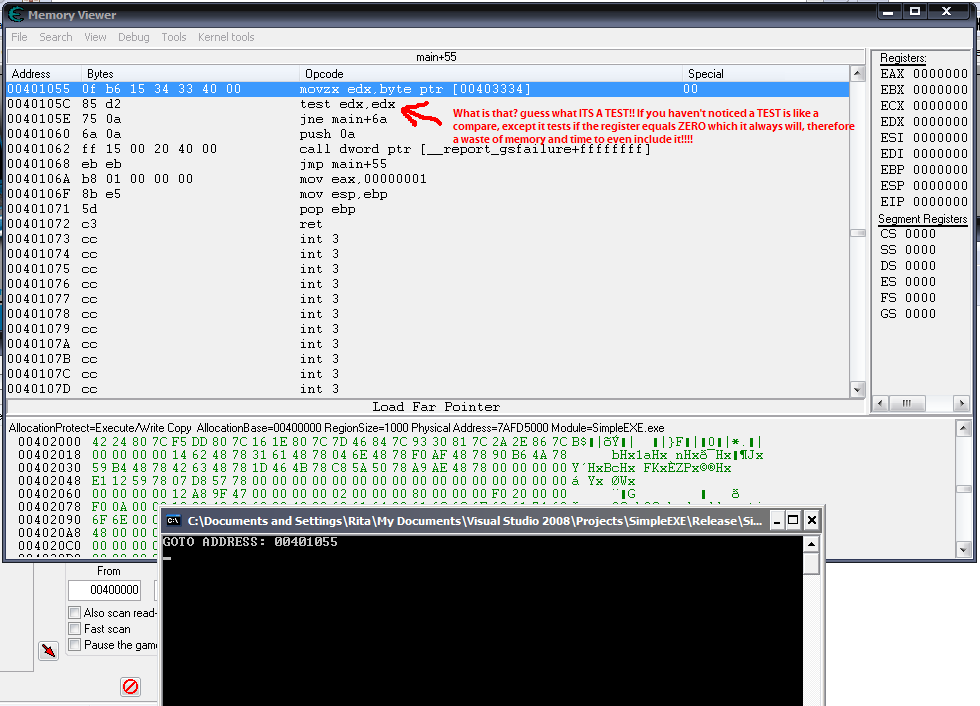
and olly->

Now change it like this:
| Code: |
#include "windows.h"
#include <iostream>
#include <stdio.h>
#define WIN32_LEAN_AND_MEAN
#pragma comment(linker, "/ENTRY:main")
using namespace std;
int main(void)
{
DWORD var = 0;
DWORD *pt = &var;
__asm
{
call EIPget
EIPget:
pop eax
add eax, 0x3D // offset to get to for loop
mov dword ptr [var], eax
}
LPVOID hex = (DWORD*)*pt;
cout<<"GOTO ADDRESS: "<< hex<<"\n";
for(;;)
{
Sleep(10);
}
return 1;
}
|
NO MORE TEST EDX,EDX HAHA
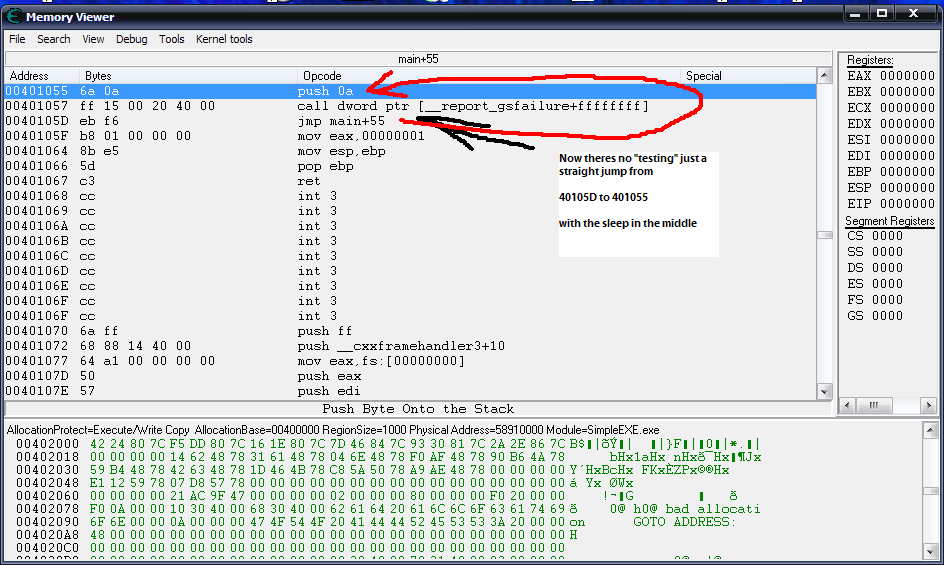
olly too->

Ok so you were wrong! just admit it!
And it your tutorial you neglected to mention anything of Intel Inline Assembler! which is very important! I use it combined with c++ code to make everything FAST!
You talk of making things fast! and removing unneeded code, but yet you do things to slow it down! pretty ironic eh?
Its not a matter of short cutting or laziness, its a matter of not adding in junk code thats unnecessary!!
| Wiccaan wrote: |
FerrisBuellerYourMyHero wrote:
This example above I would make it a void because I don't care about the return value of BypassedPostMessage As I already know its going to work and send the keystroke/ or other message
See this is just ignorance in your own manner. You expect something to work just because it did once when testing. That doesn't mean it doesn't have the ability to fail later on, or for anyone else that might use the code.
|
It isn't ignorance! Its a matter of performance! My bot works okay! it posts the fucken messages! It will post the message its a proven fact! when I press auto-attack on, it auto-attacks! why slow it down checking if the message didn't send when it did?
| Wiccaan wrote: |
FerrisBuellerYourMyHero wrote:
So you see void is not an "EASY" way out, it is simply When you don't care about getting a return value, or you don't want the function to have parameters that can be changed...
When you simply don't care? Meaning you want to make something quick and easy, aka the easy way out. You are trying to argue this point with me when it's basically clear as day that there is no reason for you to not code it to return a value other then being lazy and taking the easy way out.
(Typing in caps and using bold doesn't make you look smarter just so you know. Wink)
|
Again its not any quicker to write void! there is no "easy" way out! just face it! Its basically clear as day that you don't know what performance means! A main thread doesn't need a return value because it never returns! Its just more unnecessary code!
I KNOW, I TYPE IN BOLD AND CAPS FOR EMPHASIS! because you obviously don't read it otherwise...
bottom line
bWantsQuit is unnecessary! DEAL WIT IT!
_________________
You know, life moves pretty fast. If you don't stop and look around once in a while, You could miss it!
|
|
| Back to top |
|
|
samuri25404
Grandmaster Cheater
 Reputation: 7 Reputation: 7
Joined: 04 May 2007
Posts: 955
Location: Why do you care?
|
| Posted: Sun Feb 03, 2008 10:11 am Post subject: |
|
|
How about this scenario:
Say someone's using your dll for Maplestory.
Let's say that they're playing an Ice/Lightning mage; they just finished repotting, and they've got their teleport skill on the "End" key. They're warping along into the area, when they realize that they're taking damage, and godmode isn't working. Why is that? You have "END" as the eject key.
~~~
As for the while/for argument:
| Code: |
while (1==1)
0041137E mov eax,1
00411383 test eax,eax
00411385 je wmain+29h (411389h)
{
}
00411387 jmp wmain+1Eh (41137Eh)
for (;;)
{
}
00411389 jmp wmain+29h (411389h)
|
That's from VS 2005's disassembly of the following C++ code:
| Code: |
int _tmain(int argc, _TCHAR* argv[])
{
while (1==1)
{
}
for (;;)
{
}
return 0;
}
|
I stuck a breakpoint on the while loop and got the output.
Hate to say it, Wicc, but he is right.
I'm not quite sure how you got that disassembly, but whatever.
_________________
|
|
| Back to top |
|
|
|
|
You cannot post new topics in this forum
You cannot reply to topics in this forum
You cannot edit your posts in this forum
You cannot delete your posts in this forum
You cannot vote in polls in this forum
You cannot attach files in this forum
You can download files in this forum
|
|
 FAQ
FAQ Search
 Memberlist
 Usergroups
 Register
 Profile
 Log in to check your private messages
 Log in




