 |
Cheat Engine
The Official Site of Cheat Engine
|
| View previous topic :: View next topic |
| Author |
Message |
UsxTen
How do I cheat?
![]() Reputation: 0 Reputation: 0
Joined: 12 Aug 2026
Posts: 3
|
 Posted: Wed Aug 12, 2026 3:49 am Post subject: Help to unlock cheat menu on PPSSPP game (should be easy) Posted: Wed Aug 12, 2026 3:49 am Post subject: Help to unlock cheat menu on PPSSPP game (should be easy) |
 |
|
I'm trying to unlock a cheat menu in a game named Skate Park City
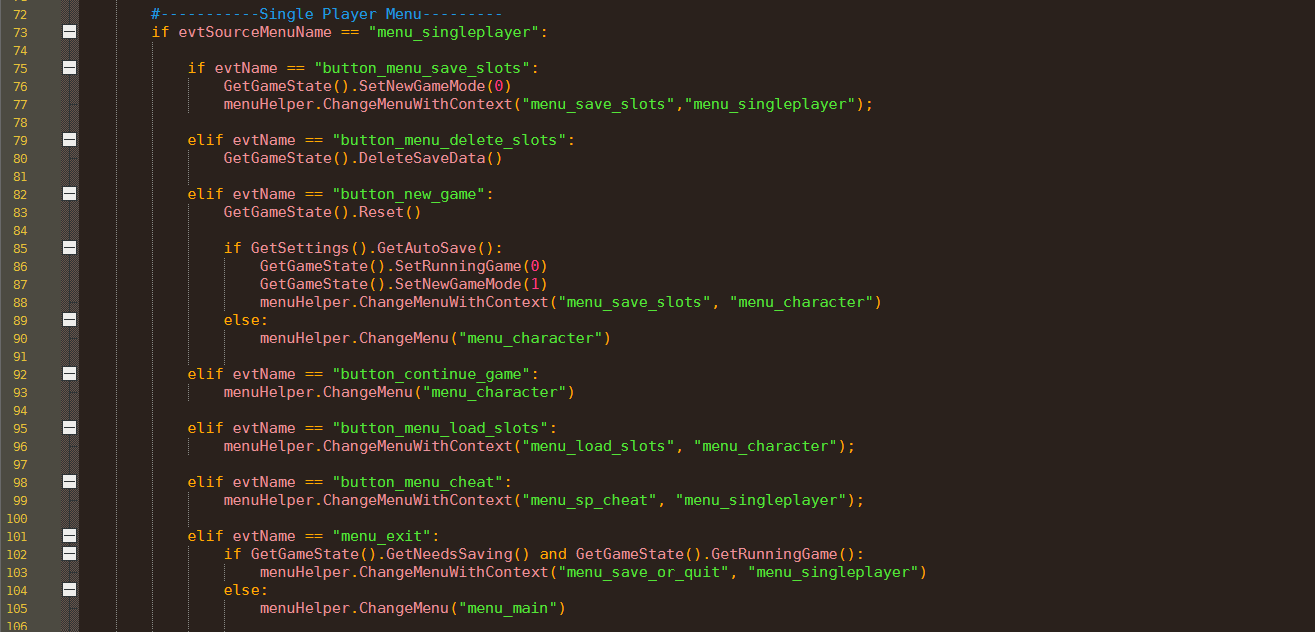
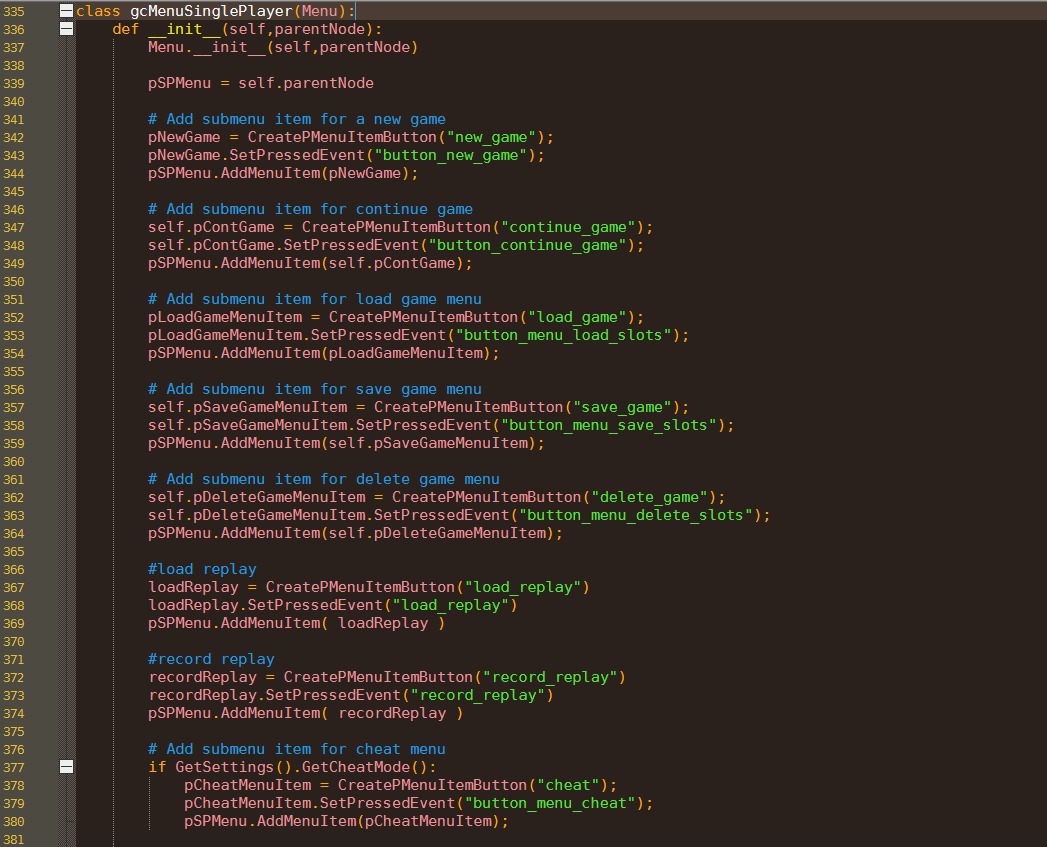
I'm gonna attach a couple of screenshots of the python scripts inside the iso of the game (modifying the scripts directly does not affect the game, the game uses a compiled version of these files)
(screenshot 1 line 377)
As you can see it should be as easy as making the following condition return true
| Code: |
if GetSettings().GetCheatMode():
pCheatMenuItem = CreatePMenuItemButton("cheat");
pCheatMenuItem.SetPressedEvent("button_menu_cheat");
pSPMenu.AddMenuItem(pCheatMenuItem);
|
This instruction is ran when creating the singleplayer menu as can be seen in the first screenshot
(screenshot 2 line 98)
Or even making the following comparison matching a the following string
| Code: |
elif evtName == "button_menu_cheat":
menuHelper.ChangeMenuWithContext("menu_sp_cheat", "menu_singleplayer");
|
This instruction is ran when clicking a button in the singleplayer menu, every button has a string naming its event
The problem with the first approach is that i can't seem to find when exactly the function is ran to make it return true
The problem with second one is the string lenght, since the other events strings have a different lenght I can't make it matching this one in particular. Instead by changing strings with another one of the same lenght it works for example by changing the following string:
| Code: | | button_menu_load_slots |
with the following one and viceversa:
| Code: |
button_menu_save_slots
|
It works since they are the same lenght, making the load game button save the game and viceversa
Resources:
PPSSPP, the emulator:
https[:]//www[.]ppsspp[.]org/download/
Skate Park City:
https[:]//www[.]emuparadise[.]me/PSP_ISOs/Skate_Park_City_(Europe)/158055
The plaintext scripts are found inside an archive inside the ISO of the game together with the compiled version of said scripts along with other files like textures /psp_game/usrdir/data.bin. It's a simple archive that can be extracted normally, i know the files inside this archive are used because by swapping the textures of the characters inside this archive they get swapped in the game too, and by patching some plaintext strings inside the compiled scripts they get changed in the game too
| Description: |
|
| Filesize: |
95.83 KB |
| Viewed: |
3309 Time(s) |
|
| Description: |
|
| Filesize: |
133.13 KB |
| Viewed: |
3309 Time(s) |
|
|
|
| Back to top |
|
 |
AylinCE
Grandmaster Cheater Supreme
 Reputation: 39 Reputation: 39
Joined: 16 Feb 2017
Posts: 1596
|
| Posted: Wed Aug 12, 2026 5:08 am Post subject: |
|
|
There are three main approaches to activating the cheat menu in Skate Park City (PSP). When working with Python's compiled bytecode (`.pyc` or C++ embedded/marshaled opcode), direct string modifications using a text editor will encounter character length limitations.
Here are some methods to overcome this obstacle and reach a solution:
Method 1:
Patching the Python Bytecode Opcode (The Most Correct and Permanent Way)
You can directly bypass the `if GetSettings().GetCheatMode():` check on line 377 in Figure 1.
1. Bytecode Logic:
At the Python bytecode level, the `if` block is usually controlled by a `POP_JUMP_IF_FALSE` or `JUMP_IF_FALSE` opcode.
2. Hex Patch:
The compiled file (`.pyc` or whichever `.bin`/`.dat` it's embedded in) is opened with a hex editor (HxD, etc.). The conditional jump instruction where the `GetCheatMode` check is performed is filled with `NOP` (0x09) bytes to always run, or replaced with `POP_JUMP_IF_TRUE` / unconditional `JUMP_FORWARD`.
3. Alternative Decompilation/Recompilation:
If the compiled script is in `.pyc` format, you can reverse engineer the file using uncompyle6 or decompyle++ (pycdc), delete the `if GetSettings().GetCheatMode():` line in the text document, correct the indentations to make the block work directly, and then recompile it as `.pyc` with the relevant Python version (PSP games generally use Python 2.2 - 2.4) and embed it into the ISO.
Method 2:
Event Redirection by String Replacement (String Length Hack)
If you want to replace a string instead of directly editing the opcode, you can trigger the menu by sacrificing another event string of equal length.
Looking at Figure 2 (line 9 : :
* Find the event string of a button that is not used or can be discarded in the interface.
* For example, `button_menu_delete_slots` (25 characters). * The targeted action is: `menuHelper.ChangeMenuWithContext("menu_sp_cheat", "menu_singleplayer")`
If you want to reverse the logic:
1. Search for `button_menu_delete_slots` in a hex editor.
2. Instead of triggering the redirection that runs when the "Delete Game" button in the game menu is clicked, you can modify the event associated with the deletion operation in the hex editor by padding it as `button_menu_cheat\x00...` (filling the remaining bytes with the null byte `0x00`).
Note: If Python uses `strcmp` or `\x00` as a character terminator in string matching, a match can still be achieved even if the string length is reduced to 17 characters.
Method 3:
Memory Hacking / Cheat Engine (The Fastest Way)
While the game is running, you can change the value returned by the `GetCheatMode()` function in RAM or set the internal `CheatMode` flag to `1`.
1. Memory Pointer/Flag Search:**
Use PPSSPP's internal RAM lookup tool or Cheat Engine to find the memory address holding the `CheatMode` value.
Before the menu loads, change the address from `0` to `1` and reload the menu (re-enter the Singleplayer menu).
2. MIPS Assembly Patching (PPSSPP CWCheat):
The address of the `GetCheatMode()` C++ bindings function is found via MIPS disassembly. * The `GetCheatMode()` function directly loads `1` into its return register (`v0`) in response to the MIPS:
// assembly
You can open the cheat menu with a single click by adding this to the PPSSPP `.ini` cheat file.
Summary Recommendation:
The cleanest solution is to decompile the compiled Python files with uncompyle6 / pycdc, completely removing the `if GetSettings().GetCheatMode():` condition, and then recompile with the same Python version, or to clean the conditional jump opcode with a Hex Editor.
_________________
|
|
| Back to top |
|
|
UsxTen
How do I cheat?
![]() Reputation: 0 Reputation: 0
Joined: 12 Aug 2026
Posts: 3
|
| Posted: Wed Aug 12, 2026 6:02 am Post subject: |
|
|
| Your post kinda looks like Ai, I say it because it's pretty much what ai said to try when I asked it for help. Anyway, the first method it's a problem because the scripts are not compiled normally, usually PSP developers use custom tooling, so patching instructions on file or decompilation do not seem viable options. The second one, patching a string of same length doesn't work here because there isn't a string of same lenght as the one I need to patch, and padding it with x00 just does nothing. The third approach is the one I'd like to go for but I can't find exactly the function in memory to patch its return value. Anyway, if someone would actually give it a shot I'd be really grateful. It's something that should be easy but I'm having troubles *facepalm*
|
|
| Back to top |
|
|
AylinCE
Grandmaster Cheater Supreme
Reputation: 39
Joined: 16 Feb 2017
Posts: 1596
|
| Posted: Wed Aug 12, 2026 6:43 am Post subject: |
|
|
Ah, you might also assume that the person answering the question (in this case, me) is an "AI Plugin" of CEF. 
On the other hand, having someone who uses the games and tools you mentioned help could provide solutions beyond superficial, technical information.
Outside of this context, just to review some solutions that might be overlooked:
Custom Python bytecode structure makes static patching tough, fair point. If you want to go with Method 3 (Memory Patching via MIPS), here is how to locate GetCheatMode() in PPSSPP memory without symbol dumps:
Open PPSSPP Disassembler (Ctrl+D) and Memory View (Ctrl+M).
Search ASCII string for "button_menu_cheat" or "GetCheatMode" in RAM.
Find where that string memory address is referenced in the MIPS code (la or lui/addiu instructions).
Set an Execution Breakpoint on that function and open the Single Player menu.
Once hit, check the return register (v0). NOP out the conditional branch (beq/bne) or force v0 = 1 right before jr ra (li v0, 1).
If you can dump the RAM or share the game ID / ELF executable, someone can pinpoint the exact offset for a CWCheat line.
_________________
|
|
| Back to top |
|
|
UsxTen
How do I cheat?
![]() Reputation: 0 Reputation: 0
Joined: 12 Aug 2026
Posts: 3
|
| Posted: Fri Aug 14, 2026 12:35 pm Post subject: |
|
|
Solved. I complicated my life way too much, i was able to find a plaintext script named game.prg. I just added the line
| Code: | | GetSettings().SetCheatMode(1) |
then removed 29 characters from a commented line to make the file size remain the same.
Then repacked everything with UMDGen.exe and just like that the cheat menu was unlocked
|
|
| Back to top |
|
|
|
|
You cannot post new topics in this forum
You cannot reply to topics in this forum
You cannot edit your posts in this forum
You cannot delete your posts in this forum
You cannot vote in polls in this forum
You cannot attach files in this forum
You can download files in this forum
|
|
 FAQ
FAQ Search
 Memberlist
 Usergroups
 Register
 Profile
 Log in to check your private messages
 Log in


