 |
Cheat Engine
The Official Site of Cheat Engine
|
| View previous topic :: View next topic |
| Author |
Message |
AylinCE
Grandmaster Cheater Supreme
 Reputation: 39 Reputation: 39
Joined: 16 Feb 2017
Posts: 1590
|
 Posted: Fri Jul 17, 2026 2:56 pm Post subject: Posted: Fri Jul 17, 2026 2:56 pm Post subject: |
 |
|
It's great to see you at CEF again! It reminds me of your crazy projects from the past.
I reviewed your code and got stuck on the idea that there might be too many panels for multiple trackbars.
Just to expand on the ideas a bit, I wrote a module that combines a ProgressBar and a TrackBar.
Note: Gradient colors might slow down manual movement. But single colors won't cause lag.
Here's my module idea that could serve the same purpose:
-- MODULE:
| Code: | -- =============================================================================
-- GLOBAL CUSTOM SLIDER LIBRARY (ByAylinCE Graphic Buffer Sync & DPI Aware)
-- =============================================================================
local scaleFactor = getScreenDPI() / 96
local function interpolateColor(color1, color2, fraction)
local r1, g1, b1 = color1 % 256, math.floor(color1 / 256) % 256, math.floor(color1 / 65536)
local r2, g2, b2 = color2 % 256, math.floor(color2 / 256) % 256, math.floor(color2 / 65536)
local r = math.floor(r1 + (r2 - r1) * fraction)
local g = math.floor(g1 + (g2 - g1) * fraction)
local b = math.floor(b1 + (b2 - b1) * fraction)
return r + (g * 256) + (b * 65536)
end
local function getGradientColor(percent, colorTable)
if #colorTable == 0 then return 0xFFFFFF end
if #colorTable == 1 then return colorTable[1].color end
if percent <= colorTable[1].pos then return colorTable[1].color end
if percent >= colorTable[#colorTable].pos then return colorTable[#colorTable].color end
for i = 1, #colorTable - 1 do
local left = colorTable[i]
local right = colorTable[i+1]
if percent >= left.pos and percent <= right.pos then
local localFraction = (percent - left.pos) / (right.pos - left.pos)
return interpolateColor(left.color, right.color, localFraction)
end
end
return colorTable[#colorTable].color
end
function createCustomSlider(parentForm)
local canvasControl = createImage(parentForm)
canvasControl.Cursor = crHandPoint
local internal = {
Left = math.floor(10 * scaleFactor),
Top = math.floor(10 * scaleFactor),
Width = math.floor(150 * scaleFactor),
Height = math.floor(20 * scaleFactor),
Min = 0,
Max = 100,
Position = 50,
Step = nil,
WheelEnabled = true,
Enabled = true,
Visible = true,
BgColor = 0x282828,
ThumbColor = 0xFFFFFF,
Color = {
{ pos = 0.0, color = 0x33FF33 },
{ pos = 0.5, color = 0x00D7FF },
{ pos = 1.0, color = 0x3333FF }
},
OnChange = nil
}
canvasControl.setPosition(internal.Left, internal.Top)
canvasControl.setSize(internal.Width, internal.Height)
local isDragging = false
local currentColor = 0xFFFFFF
local thumbWidth = math.floor(4 * scaleFactor)
if thumbWidth < 2 then thumbWidth = 2 end
-- =============================================================================
-- STATIC GRADIENT RENDER ENGINE
-- =============================================================================
local function render()
if not internal.Visible then return end
if canvasControl.Picture and canvasControl.Picture.Bitmap then
canvasControl.Picture.Bitmap.Width = internal.Width
canvasControl.Picture.Bitmap.Height = internal.Height
end
local canvas = canvasControl.Canvas
canvas.clear()
-- Draw Background Track
canvas.Brush.Color = internal.BgColor
canvas.fillRect(0, 0, internal.Width, internal.Height)
-- Slider Ratio Calculations
local range = internal.Max - internal.Min
if range <= 0 then range = 1 end
local ratio = (internal.Position - internal.Min) / range
local usableWidth = internal.Width - thumbWidth
local fillWidth = math.floor(ratio * usableWidth)
-- Track Fill Drawing
if type(internal.Color) == 'number' then
canvas.Brush.Color = internal.Color
canvas.fillRect(0, 2, fillWidth, internal.Height - 3)
currentColor = internal.Color
elseif type(internal.Color) == 'table' then
for x = 0, fillWidth do
-- FIX: Divide by total 'usableWidth' instead of dynamic 'fillWidth'.
-- This ensures the color gradient map stays static across the entire slider track,
-- allowing the thumb to smoothly glide "over" it like a window.
local percent = x / (usableWidth > 0 and usableWidth or 1)
currentColor = getGradientColor(percent, internal.Color)
canvas.Pen.Color = currentColor
canvas.line(x, 2, x, internal.Height - 3)
end
end
-- Draw Slider Handle Thumb
canvas.Brush.Color = internal.ThumbColor
canvas.fillRect(fillWidth, 0, fillWidth + thumbWidth, internal.Height)
end
-- =============================================================================
-- METATABLE MANAGEMENT
-- =============================================================================
local slider = {}
local mt = {
__index = function(t, key)
return internal[key]
end,
__newindex = function(t, key, value)
if key == "Left" or key == "Top" then
internal[key] = math.floor(value * scaleFactor)
canvasControl.setPosition(internal.Left, internal.Top)
elseif key == "Width" or key == "Height" then
internal[key] = math.floor(value * scaleFactor)
canvasControl.setSize(internal.Width, internal.Height)
render()
elseif key == "Visible" then
internal[key] = value
canvasControl.Visible = internal.Visible
if internal.Visible then render() end
elseif key == "Position" then
local targetPos = value
if targetPos < internal.Min then targetPos = internal.Min end
if targetPos > internal.Max then targetPos = internal.Max end
if targetPos ~= internal.Position then
internal.Position = targetPos
render()
if type(internal.OnChange) == 'function' then
internal.OnChange(slider, currentColor)
end
end
elseif key == "Color" then
internal[key] = value
if type(value) == 'table' then
table.sort(internal.Color, function(a, b) return a.pos < b.pos end)
end
render()
elseif key == "BgColor" or key == "ThumbColor" or key == "Min" or key == "Max" or key == "Step" then
internal[key] = value
render()
else
internal[key] = value
end
end
}
setmetatable(slider, mt)
slider.Control = canvasControl
-- =============================================================================
-- INTERACTIONS & SCROLLS
-- =============================================================================
local function updatePositionFromX(x)
if not internal.Enabled then return end
local usableWidth = internal.Width - thumbWidth
local percent = x / usableWidth
if percent < 0 then percent = 0 end
if percent > 1 then percent = 1 end
local rawValue = internal.Min + (percent * (internal.Max - internal.Min))
local finalPosition = math.floor(rawValue + 0.5)
slider.Position = finalPosition
end
canvasControl.OnMouseDown = function(sender, button, x, y)
if button == mbLeft and internal.Enabled then
isDragging = true
updatePositionFromX(x)
end
end
canvasControl.OnMouseMove = function(sender, x, y)
if isDragging and internal.Enabled then
updatePositionFromX(x)
end
end
canvasControl.OnMouseUp = function(sender, button, x, y)
if button == mbLeft then
isDragging = false
end
end
local function getActiveStep()
if internal.Step and internal.Step > 0 then
return internal.Step
else
local calculated = math.floor((internal.Max - internal.Min) * 0.02)
return calculated < 1 and 1 or calculated
end
end
canvasControl.OnMouseWheelDown = function(sender, x, y)
if not internal.WheelEnabled or not internal.Enabled then return end
slider.Position = internal.Position - getActiveStep()
end
canvasControl.OnMouseWheelUp = function(sender, x, y)
if not internal.WheelEnabled or not internal.Enabled then return end
slider.Position = internal.Position + getActiveStep()
end
render()
return slider
end |
-- GUI:
| Code: | -- Global scaling factor macro for external design values
local sf = getScreenDPI() / 96
if customSliderForm then customSliderForm.destroy() end
customSliderForm = createForm()
customSliderForm.setSize(math.floor(450 * sf), math.floor(260 * sf))
customSliderForm.Position = 'poScreenCenter'
customSliderForm.Caption = 'DPI-Aware & Graphic Buffer Sync Verified'
customSliderForm.Color = 0x141414
local labelTitle1 = createLabel(customSliderForm)
labelTitle1.setPosition(math.floor(30 * sf), math.floor(30 * sf))
labelTitle1.Font.Color = 0xFFFFFF
labelTitle1.Font.Size = math.floor(10 * sf) -- Scale font size seamlessly
labelTitle1.Font.Name = 'Segoe UI'
-- Instantiate the custom slider control
local mySlider1 = createCustomSlider(customSliderForm)
-- Assign raw design values (metatable internally multiples them by the DPI scaleFactor)
mySlider1.Left = 30
mySlider1.Top = 70
mySlider1.Width = 390
mySlider1.Height = 24
mySlider1.Min = 0
mySlider1.Max = 1000
mySlider1.Position = 500
mySlider1.Step = 15
mySlider1.Color = {
{ pos = 0.0, color = 0x00FF00 },
{ pos = 0.5, color = 0x00D1FF },
{ pos = 1.0, color = 0x0000FF }
}
mySlider1.OnChange = function(sender, activeColor)
labelTitle1.Caption = "VALUE: " .. sender.Position .. " / " .. sender.Max .. " | Line - Step: " .. sender.Step
labelTitle1.Font.Color = activeColor
end
if mySlider1.OnChange then mySlider1.OnChange(mySlider1, 0x00FF00) end
--============================================================================--
local labelTitle2 = createLabel(customSliderForm)
labelTitle2.setPosition(math.floor(30 * sf), math.floor(110 * sf))
labelTitle2.Font.Color = 0xFFFFFF
labelTitle2.Font.Size = math.floor(10 * sf) -- Scale font size seamlessly
labelTitle2.Font.Name = 'Segoe UI'
-- Instantiate the custom slider control
local mySlider2 = createCustomSlider(customSliderForm)
-- Assign raw design values (metatable internally multiples them by the DPI scaleFactor)
mySlider2.Left = 30
mySlider2.Top = 150
mySlider2.Width = 390
mySlider2.Height = 24
mySlider2.Min = 0
mySlider2.Max = 100
mySlider2.Position = 50
mySlider2.Step = 1
mySlider2.Color = 0x00FFFF
mySlider2.OnChange = function(sender, activeColor)
labelTitle2.Caption = "VALUE: " .. sender.Position .. " / " .. sender.Max .. " | Line - Step: " .. sender.Step
labelTitle2.Font.Color = activeColor
end
if mySlider2.OnChange then mySlider2.OnChange(mySlider2, 0x00FFFF) end
--============================================================================--
customSliderForm.show() |
Please continue your articles in CEF with new ideas and solutions.
I know you've written some great code in the past and that it hasn't been appreciated enough.
As you always say; Cheers! 
_________________
|
|
| Back to top |
|
 |
AylinCE
Grandmaster Cheater Supreme
Reputation: 39
Joined: 16 Feb 2017
Posts: 1590
|
| Posted: Mon Jul 20, 2026 4:22 am Post subject: |
|
|
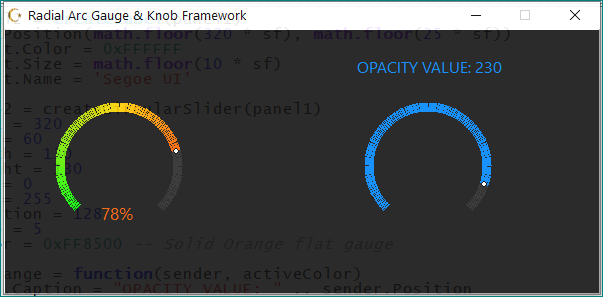
Here is the radial version (RADIAL GRADIENT DISCOVERY)
| Code: | -- =============================================================================
-- GLOBAL CIRCULAR SLIDER LIBRARY (ByAylinCE DPI Aware & Static Radial Gradient)
-- =============================================================================
local scaleFactor = getScreenDPI() / 96
local function interpolateColor(color1, color2, fraction)
local r1, g1, b1 = color1 % 256, math.floor(color1 / 256) % 256, math.floor(color1 / 65536)
local r2, g2, b2 = color2 % 256, math.floor(color2 / 256) % 256, math.floor(color2 / 65536)
local r = math.floor(r1 + (r2 - r1) * fraction)
local g = math.floor(g1 + (g2 - g1) * fraction)
local b = math.floor(b1 + (b2 - b1) * fraction)
return r + (g * 256) + (b * 65536)
end
local function getGradientColor(percent, colorTable)
if #colorTable == 0 then return 0xFFFFFF end
if #colorTable == 1 then return colorTable[1].color end
if percent <= colorTable[1].pos then return colorTable[1].color end
if percent >= colorTable[#colorTable].pos then return colorTable[#colorTable].color end
for i = 1, #colorTable - 1 do
local left = colorTable[i]
local right = colorTable[i+1]
if percent >= left.pos and percent <= right.pos then
local localFraction = (percent - left.pos) / (right.pos - left.pos)
return interpolateColor(left.color, right.color, localFraction)
end
end
return colorTable[#colorTable].color
end
function createCircularSlider(parentForm)
local canvasControl = createImage(parentForm)
canvasControl.Cursor = crHandPoint
local internal = {
Left = math.floor(10 * scaleFactor),
Top = math.floor(10 * scaleFactor),
-- Circular controls look best when Width == Height (Square buffer)
Width = math.floor(100 * scaleFactor),
Height = math.floor(100 * scaleFactor),
Min = 0,
Max = 100,
Position = 0,
Step = nil,
WheelEnabled = true,
Enabled = true,
Visible = true,
BgColor = 0x141414, -- Container matching color
TrackBgColor = 0x282828, -- Inside arc empty background
Color = {
{ pos = 0.0, color = 0x33FF33 },
{ pos = 0.5, color = 0x00D7FF },
{ pos = 1.0, color = 0x3333FF }
},
OnChange = nil
}
canvasControl.setPosition(internal.Left, internal.Top)
canvasControl.setSize(internal.Width, internal.Height)
local isDragging = false
local currentColor = 0xFFFFFF
-- Design constants for the gauge arc (Leaving a gap at the bottom)
local startAngle = 135 -- Bottom-left start (in degrees)
local endAngle = 405 -- Bottom-right end (total 270 degrees arc travel)
local totalSweep = endAngle - startAngle
-- =============================================================================
-- RADIAL RENDER ENGINE
-- =============================================================================
local function render()
if not internal.Visible then return end
if canvasControl.Picture and canvasControl.Picture.Bitmap then
canvasControl.Picture.Bitmap.Width = internal.Width
canvasControl.Picture.Bitmap.Height = internal.Height
end
local canvas = canvasControl.Canvas
canvas.clear()
-- Fill control background rectangle
canvas.Brush.Color = internal.BgColor
canvas.fillRect(0, 0, internal.Width, internal.Height)
-- Calculate geometric dimensions dynamically
local centerX = math.floor(internal.Width / 2)
local centerY = math.floor(internal.Height / 2)
-- Scaling radiuses based on dimensions to stay responsive
local outerRadius = math.floor((internal.Width / 2) - (6 * scaleFactor))
local innerRadius = math.floor(outerRadius - (8 * scaleFactor)) -- Arc thickness
local range = internal.Max - internal.Min
if range <= 0 then range = 1 end
local targetRatio = (internal.Position - internal.Min) / range
local currentActiveAngle = startAngle + (targetRatio * totalSweep)
-- Draw the Full Base Track (Background Arc)
canvas.Pen.Color = internal.TrackBgColor
for deg = startAngle, endAngle do
local rad = math.rad(deg)
local cosVal = math.cos(rad)
local sinVal = math.sin(rad)
local x1 = centerX + math.floor(innerRadius * cosVal)
local y1 = centerY + math.floor(innerRadius * sinVal)
local x2 = centerX + math.floor(outerRadius * cosVal)
local y2 = centerY + math.floor(outerRadius * sinVal)
canvas.line(x1, y1, x2, y2)
end
-- Draw the Active Value Arc (Static Map - No Compression Mode)
if type(internal.Color) == 'number' then
canvas.Pen.Color = internal.Color
currentColor = internal.Color
for deg = startAngle, currentActiveAngle do
local rad = math.rad(deg)
local cosVal = math.cos(rad)
local sinVal = math.sin(rad)
local x1 = centerX + math.floor(innerRadius * cosVal)
local y1 = centerY + math.floor(innerRadius * sinVal)
local x2 = centerX + math.floor(outerRadius * cosVal)
local y2 = centerY + math.floor(outerRadius * sinVal)
canvas.line(x1, y1, x2, y2)
end
elseif type(internal.Color) == 'table' then
for deg = startAngle, math.floor(currentActiveAngle) do
-- Normalize factor against total sweepable track space to lock gradient map in place
local percent = (deg - startAngle) / totalSweep
currentColor = getGradientColor(percent, internal.Color)
canvas.Pen.Color = currentColor
local rad = math.rad(deg)
local cosVal = math.cos(rad)
local sinVal = math.sin(rad)
local x1 = centerX + math.floor(innerRadius * cosVal)
local y1 = centerY + math.floor(innerRadius * sinVal)
local x2 = centerX + math.floor(outerRadius * cosVal)
local y2 = centerY + math.floor(outerRadius * sinVal)
canvas.line(x1, y1, x2, y2)
end
end
-- Draw Center Value Dot/Indicator Thumb
local thumbRad = math.rad(currentActiveAngle)
local thumbX = centerX + math.floor(((innerRadius + outerRadius) / 2) * math.cos(thumbRad))
local thumbY = centerY + math.floor(((innerRadius + outerRadius) / 2) * math.sin(thumbRad))
canvas.Brush.Color = 0xFFFFFF
canvas.Pen.Color = 0x000000
local tSize = math.floor(3 * scaleFactor)
if tSize < 2 then tSize = 2 end
canvas.ellipse(thumbX - tSize, thumbY - tSize, thumbX + tSize, thumbY + tSize)
end
-- =============================================================================
-- METATABLE MANAGEMENT
-- =============================================================================
local slider = {}
local mt = {
__index = function(t, key)
return internal[key]
end,
__newindex = function(t, key, value)
if key == "Left" or key == "Top" then
internal[key] = math.floor(value * scaleFactor)
canvasControl.setPosition(internal.Left, internal.Top)
elseif key == "Width" or key == "Height" then
internal[key] = math.floor(value * scaleFactor)
canvasControl.setSize(internal.Width, internal.Height)
render()
elseif key == "Visible" then
internal[key] = value
canvasControl.Visible = internal.Visible
if internal.Visible then render() end
elseif key == "Position" then
local targetPos = value
if targetPos < internal.Min then targetPos = internal.Min end
if targetPos > internal.Max then targetPos = internal.Max end
if targetPos ~= internal.Position then
internal.Position = targetPos
render()
if type(internal.OnChange) == 'function' then
-- Safe multi-return passing color back to callback hooks
internal.OnChange(slider, currentColor)
end
end
elseif key == "Color" then
internal[key] = value
if type(value) == 'table' then
table.sort(internal.Color, function(a, b) return a.pos < b.pos end)
end
render()
elseif key == "BgColor" or key == "TrackBgColor" or key == "Min" or key == "Max" or key == "Step" then
internal[key] = value
render()
else
internal[key] = value
end
end
}
setmetatable(slider, mt)
slider.Control = canvasControl
-- =============================================================================
-- TRIGONOMETRIC INTERACTION MATH (Polar Coordinates -> Angular Range)
-- =============================================================================
local function updatePositionFromCoordinates(mouseX, mouseY)
if not internal.Enabled then return end
local centerX = internal.Width / 2
local centerY = internal.Height / 2
-- Compute angle using atan2 relative to the graphical center point
local dy = mouseY - centerY
local dx = mouseX - centerX
local angleDeg = math.deg(math.atan2(dy, dx))
-- Normalize angular outputs to fit inside a raw positive 0-360 range
if angleDeg < 0 then angleDeg = angleDeg + 360 end
-- Map values crossing over the bottom 0-degree threshold safely
if angleDeg < startAngle then
angleDeg = angleDeg + 360
end
-- Clamp boundaries tightly to avoid wrap-around flips
if angleDeg < startAngle then angleDeg = startAngle end
if angleDeg > endAngle then angleDeg = endAngle end
local percent = (angleDeg - startAngle) / totalSweep
local rawValue = internal.Min + (percent * (internal.Max - internal.Min))
slider.Position = math.floor(rawValue + 0.5)
end
canvasControl.OnMouseDown = function(sender, button, x, y)
if button == mbLeft and internal.Enabled then
isDragging = true
updatePositionFromCoordinates(x, y)
end
end
canvasControl.OnMouseMove = function(sender, x, y)
if isDragging and internal.Enabled then
updatePositionFromCoordinates(x, y)
end
end
canvasControl.OnMouseUp = function(sender, button, x, y)
if button == mbLeft then
isDragging = false
end
end
local function getActiveStep()
if internal.Step and internal.Step > 0 then
return internal.Step
else
local calculated = math.floor((internal.Max - internal.Min) * 0.02)
return calculated < 1 and 1 or calculated
end
end
canvasControl.OnMouseWheelDown = function(sender, x, y)
if not internal.WheelEnabled or not internal.Enabled then return end
slider.Position = internal.Position - getActiveStep()
end
canvasControl.OnMouseWheelUp = function(sender, x, y)
if not internal.WheelEnabled or not internal.Enabled then return end
slider.Position = internal.Position + getActiveStep()
end
render()
return slider
end |
GUI:
| Code: | local sf = getScreenDPI() / 96
if circularForm then circularForm.destroy() end
circularForm = createForm()
circularForm.setSize(math.floor(540 * sf), math.floor(240 * sf))
circularForm.Position = 'poScreenCenter'
circularForm.Caption = 'Radial Arc Gauge & Knob Framework'
circularForm.setLayeredAttributes(0xffd0ff, 155, LWA_COLORKEY | LWA_ALPHA )
circularForm.Color = 0xffd0ff
-- =============================================================================
-- GAUGE 1: RADIAL GRADIENT DISCOVERY
-- =============================================================================
local panel1 = createPanel(circularForm)
panel1.setSize(math.floor(540 * sf), math.floor(240 * sf))
panel1.Left, panel1.Top = 0, 0
panel1.Color = 0x141414
local knob1 = createCircularSlider(panel1)
knob1.Left = 40
knob1.Top = 60
knob1.Width = 130
knob1.Height = 130
knob1.Min = 0
knob1.Max = 100
knob1.Position = 40
knob1.Step = 2
local label1 = createLabel(panel1)
label1.AutoSize = false
label1.Alignment = "taCenter"
label1.Width = 40 * sf
label1.Height = 22 * sf
label1.Font.Color = 0xFFFFFF
label1.Font.Size = math.floor(10 * sf)
label1.Font.Name = 'Segoe UI'
local l1, l2 = knob1.Width / 2, label1.Width / 2
label1.Left = knob1.Left + l1 - l2 * sf
label1.OptimalFill = true
label1.Top = knob1.Top + knob1.Height - label1.Height - 10 * sf
knob1.Color = {
{ pos = 0.0, color = 0x00FF00 }, -- Green starting arc
{ pos = 0.5, color = 0x00D1FF }, -- Cyan middle arc
{ pos = 1.0, color = 0x0000FF } -- Red ceiling arc
}
knob1.OnChange = function(sender, activeColor)
label1.Caption = sender.Position .. "%"
label1.Font.Color = activeColor
end
if knob1.OnChange then knob1.OnChange(knob1, 0x00FF00) end
-- =============================================================================
-- GAUGE 2: MONOCHROME FLAT DESIGN
-- =============================================================================
local label2 = createLabel(panel1)
label2.setPosition(math.floor(320 * sf), math.floor(25 * sf))
label2.Font.Color = 0xFFFFFF
label2.Font.Size = math.floor(10 * sf)
label2.Font.Name = 'Segoe UI'
local knob2 = createCircularSlider(panel1)
knob2.Left = 320
knob2.Top = 60
knob2.Width = 130
knob2.Height = 130
knob2.Min = 0
knob2.Max = 255
knob2.Position = 128
knob2.Step = 5
knob2.Color = 0xFF8500 -- Solid Orange flat gauge
knob2.OnChange = function(sender, activeColor)
label2.Caption = "OPACITY VALUE: " .. sender.Position
label2.Font.Color = activeColor
circularForm.setLayeredAttributes(0xffd0ff, sender.Position, LWA_COLORKEY | LWA_ALPHA )
end
if knob2.OnChange then knob2.OnChange(knob2, 0xFF8500) end
circularForm.show() |
| Description: |
|
| Filesize: |
22.94 KB |
| Viewed: |
4082 Time(s) |
|
_________________
|
|
| Back to top |
|
|
|
|
You cannot post new topics in this forum
You cannot reply to topics in this forum
You cannot edit your posts in this forum
You cannot delete your posts in this forum
You cannot vote in polls in this forum
You cannot attach files in this forum
You can download files in this forum
|
|
 FAQ
FAQ Search
 Memberlist
 Usergroups
 Register
 Profile
 Log in to check your private messages
 Log in


