 |
Cheat Engine
The Official Site of Cheat Engine
|
| View previous topic :: View next topic |
| Author |
Message |
icp
Cheater
 Reputation: 0 Reputation: 0
Joined: 09 Dec 2021
Posts: 35
|
 Posted: Mon Jan 26, 2026 3:48 am Post subject: This is not a valid address (mono) Posted: Mon Jan 26, 2026 3:48 am Post subject: This is not a valid address (mono) |
 |
|
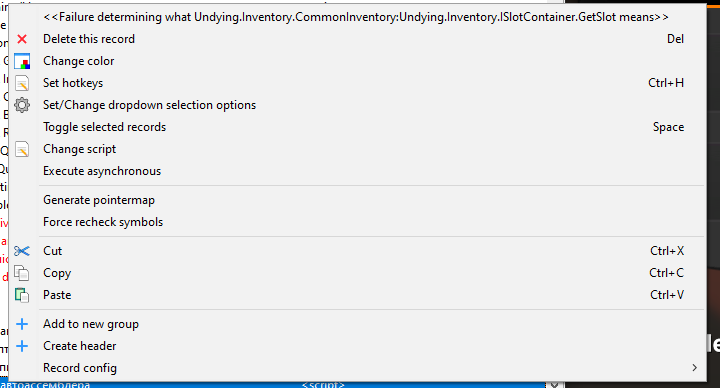
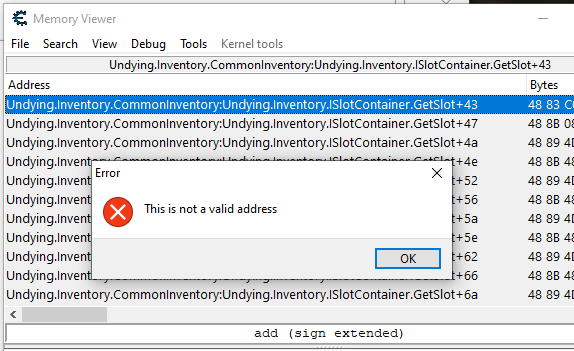
I use a mono collector. I find the function I need. I can't use the region name to navigate to or search for it. It looks like the name is entered incorrectly. How do I determine the correct name for aobscanregion or direct jump? Why is the region name specified in the disassembler considered incorrect?
[ru]
Использую моно-коллектор, нахожу нужную функцию. Не могу использовать имя региона для перехода к нему или поиска. Похоже имя указывается неверно. Как мне определить нужное имя для aobscanregion или прямого перехода? Почему вообще указанное в дизассемблере имя региона считается неправильным?
| Description: |
|
| Filesize: |
15.54 KB |
| Viewed: |
15334 Time(s) |
|
| Description: |
|
| Filesize: |
19.92 KB |
| Viewed: |
15334 Time(s) |
|
|
|
| Back to top |
|
 |
icp
Cheater
Reputation: 0
Joined: 09 Dec 2021
Posts: 35
|
| Posted: Tue Jan 27, 2026 1:45 am Post subject: |
|
|
Searching without mono by generated code like -- "AOBScanUnique(...,'+X+W-C')" works perfectly. The only drawback is that it only finds the code if it's already generated. If the function hasn't been used by the game yet, it returns no results. Using the region tag, I can enable the function at any time.
[ru]
Поиск без моно по сгенерированному коду "AOBScanUnique(...,'+X+W-C')" прекрасно работает. Есть только один минус, находит код только если он уже сгенерирован. Если функция игрой ещё не использовалась, то возвращается отсутcвие результата. Используя же метку региона я могу включить функцию в любое время.
|
|
| Back to top |
|
|
Csimbi
I post too much
 Reputation: 99 Reputation: 99
Joined: 14 Jul 2007
Posts: 3432
|
| Posted: Tue Jan 27, 2026 2:11 pm Post subject: |
|
|
Right click on the gray bar on the top and click copy; that will be the correct address.
In mono games, byte code is generated in runtime, when the code is needed.
|
|
| Back to top |
|
|
ParkourPenguin
I post too much
 Reputation: 155 Reputation: 155
Joined: 06 Jul 2014
Posts: 4777
|
| Posted: Tue Jan 27, 2026 3:19 pm Post subject: |
|
|
| icp wrote: | | The only drawback is that it only finds the code if it's already generated. |
That's normal. CE can try to generate the code itself with Lua. Look in the file "autorun\monoscript.lua" in the main CE directory.
That file also defines a custom AA command `findmonomethod` you can use. I often use it with the "Full Injection" template:
| Code: | findmonomethod(my_mono_method,namespace:classname:methodname)
define(address,my_mono_method+5A)
define(bytes,48 C3 25 14 1B)
[ENABLE]
assert(address, bytes)
...
[DISABLE]
address:
db bytes
... |
I don't know if it will work with the AOBScan template.
The namespace is often empty, so the mono method specifier might look like ":classname:methodname". Looking at those images, I would guess "Undying.Inventory.CommonInventory" is the namespace, "Undying.Inventory.ISlotContainer" is the class name, and "GetSlot" is the method name.
_________________
I don't know where I'm going, but I'll figure it out when I get there. |
|
| Back to top |
|
|
icp
Cheater
Reputation: 0
Joined: 09 Dec 2021
Posts: 35
|
| Posted: Wed Jan 28, 2026 12:10 am Post subject: |
|
|
| Csimbi wrote: | Right click on the gray bar on the top and click copy; that will be the correct address.
In mono games, byte code is generated in runtime, when the code is needed. |
That's the problem. Usually, copied region names work just fine. But! This isn't the first time. It's the copied name that's showing up as an not valid address. At the same time, other regions copied in the same game work both for transition and for searching.
| ParkourPenguin wrote: | | icp wrote: | | The only drawback is that it only finds the code if it's already generated. |
That's normal. CE can try to generate the code itself with Lua. Look in the file "autorun\monoscript.lua" in the main CE directory.
That file also defines a custom AA command `findmonomethod` you can use. I often use it with the "Full Injection" template:
| Code: | findmonomethod(my_mono_method,namespace:classname:methodname)
define(address,my_mono_method+5A)
define(bytes,48 C3 25 14 1B)
[ENABLE]
assert(address, bytes)
...
[DISABLE]
address:
db bytes
... |
I don't know if it will work with the AOBScan template.
The namespace is often empty, so the mono method specifier might look like ":classname:methodname". Looking at those images, I would guess "Undying.Inventory.CommonInventory" is the namespace, "Undying.Inventory.ISlotContainer" is the class name, and "GetSlot" is the method name. |
I couldn't get it to work. The findmonomethod() function returns an invalid value. The search returns the error "Failure determining what address_1 means". I assume it returns a zero value. I tried the following:
| Code: | findmonomethod(Method_1,Undying.Inventory.CommonInventory:Undying.Inventory.ISlotContainer:GetSlot)
define(address_1,Method_1)
and
findmonomethod(Method_1,:Undying.Inventory.CommonInventory:Undying.Inventory.ISlotContainer.GetSlot)
define(address_1,Method_1)
and
findmonomethod(Method_1,Undying.Inventory.CommonInventory:Undying.Inventory.ISlotContainer.GetSlot)
define(address_1,Method_1) |
What am I doing wrong? How can I accurately determine the full region name by address or some other means?
|
|
| Back to top |
|
|
ParkourPenguin
I post too much
Reputation: 155
Joined: 06 Jul 2014
Posts: 4777
|
| Posted: Wed Jan 28, 2026 4:38 am Post subject: |
|
|
I think `findmonomethod` worked fine. If it failed, it should've generated some other error like "Undying.Inventory.CommonInventory:Undying.Inventory.ISlotContainer:GetSlot could not be found". It could be something else in the script.
| Code: | | define(address_1,Method_1) |
This isn't necessary. If you're injecting at the start of the method (offset of +0), then use the symbol defined by `findmonomethod`.
_________________
I don't know where I'm going, but I'll figure it out when I get there. |
|
| Back to top |
|
|
icp
Cheater
Reputation: 0
Joined: 09 Dec 2021
Posts: 35
|
| Posted: Wed Jan 28, 2026 6:35 am Post subject: |
|
|
| ParkourPenguin wrote: | I think `findmonomethod` worked fine. If it failed, it should've generated some other error like "Undying.Inventory.CommonInventory:Undying.Inventory.ISlotContainer:GetSlot could not be found". It could be something else in the script.
|
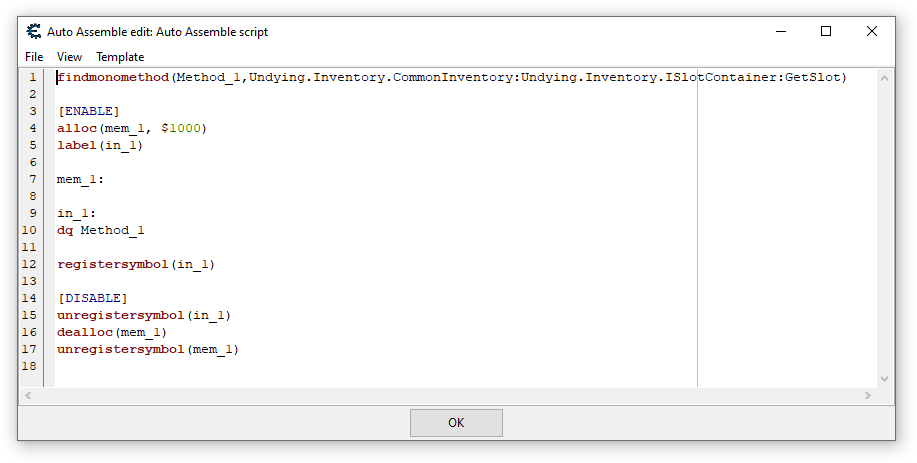
It doesn't work. I created a separate script whose only function is to get and save the address. I'm providing a screenshot of script and error.
p.s. It looks like something came in before this, either from LUA or another script. The error was different.
| Description: |
|
| Filesize: |
8.85 KB |
| Viewed: |
15135 Time(s) |

|
| Description: |
|
| Filesize: |
16.87 KB |
| Viewed: |
15135 Time(s) |
|
|
|
| Back to top |
|
|
ParkourPenguin
I post too much
Reputation: 155
Joined: 06 Jul 2014
Posts: 4777
|
| Posted: Wed Jan 28, 2026 1:49 pm Post subject: |
|
|
Figure out what the namespace, class, and method names are for the method you want to find.
In the top menu of the main CE window, click on "Mono -> Dissect Mono" and try to find the class.
_________________
I don't know where I'm going, but I'll figure it out when I get there. |
|
| Back to top |
|
|
Dark Byte
Site Admin
 Reputation: 475 Reputation: 475
Joined: 09 May 2003
Posts: 26012
Location: The netherlands
|
| Posted: Wed Jan 28, 2026 2:13 pm Post subject: |
 |
|
try going to Undying.Inventory.ISlotContainer.GetSlot
_________________
Tools give you results. Knowledge gives you control.
Like my help? Join me on Patreon so i can keep helping |
|
| Back to top |
|
|
icp
Cheater
Reputation: 0
Joined: 09 Dec 2021
Posts: 35
|
| Posted: Wed Jan 28, 2026 2:32 pm Post subject: |
|
|
| Dark Byte wrote: | | try going to Undying.Inventory.ISlotContainer.GetSlot |
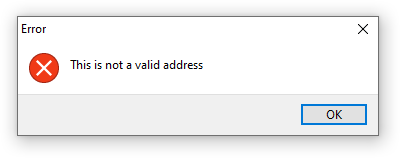
I tried it. "This is not a valid address".
| ParkourPenguin wrote: | Figure out what the namespace, class, and method names are for the method you want to find.
In the top menu of the main CE window, click on "Mono -> Dissect Mono" and try to find the class. |
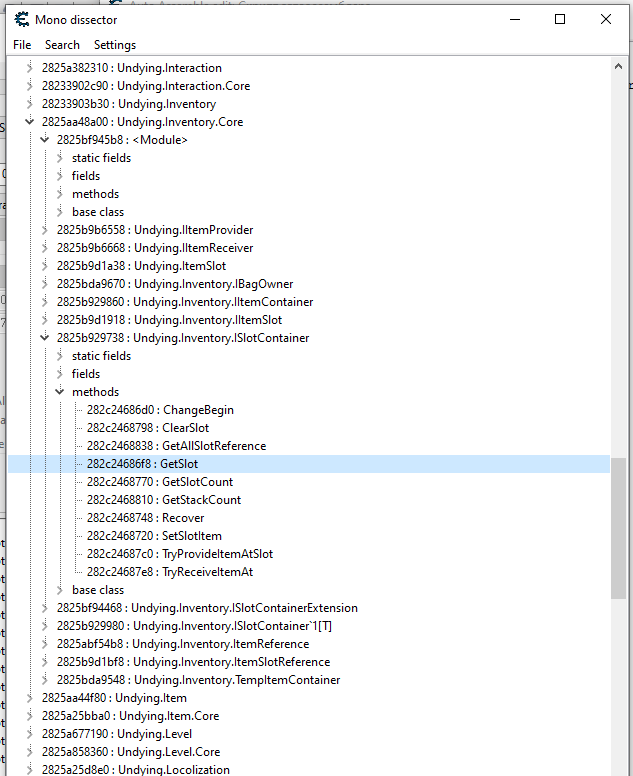
The closest thing I found (screenshot). But the address doesn't match.
| Description: |
|
| Filesize: |
3.77 KB |
| Viewed: |
15081 Time(s) |
|
| Description: |
|
| Filesize: |
33.25 KB |
| Viewed: |
15081 Time(s) |
|
|
|
| Back to top |
|
|
ParkourPenguin
I post too much
Reputation: 155
Joined: 06 Jul 2014
Posts: 4777
|
| Posted: Wed Jan 28, 2026 6:00 pm Post subject: |
|
|
Open a new AA script window (Memory View -> Tools -> Auto Assemble), copy & paste this in, and click "Execute" at the bottom:
| Code: | | findmonomethod(Method_1,:Undying.Inventory.ISlotContainer:GetSlot) |
If it executes successfully, use this specifier.
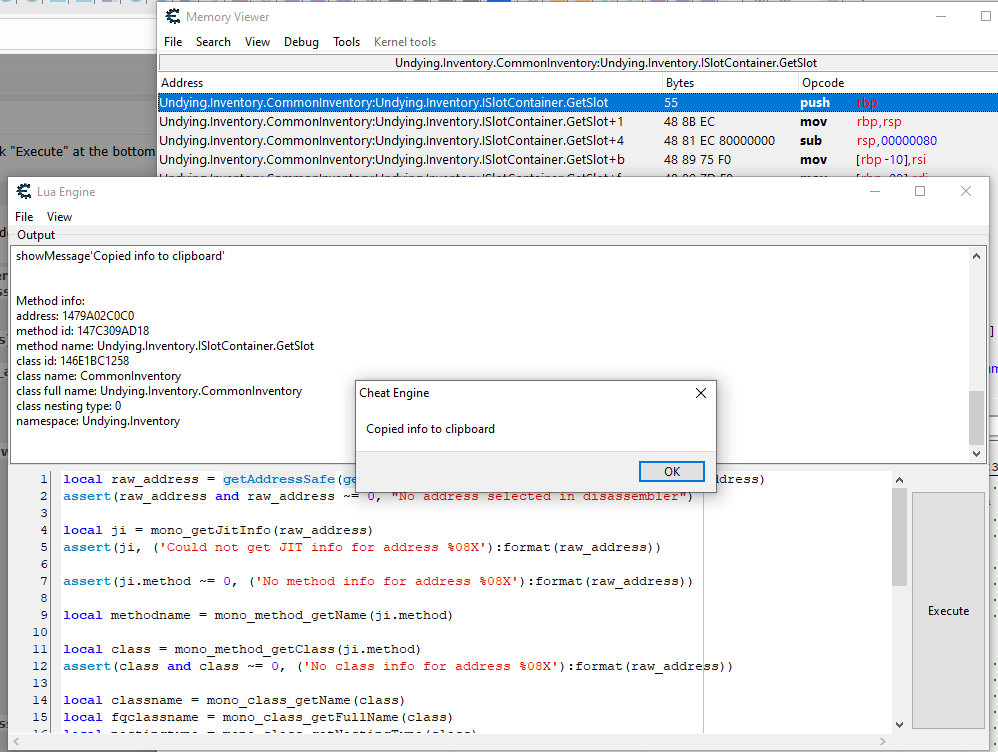
If the error "... could not be found" comes up, do something in-game to generate that code, find that address in the disassembler, click on one of the lines in that method to select it (blue line in 2026-01-26_13-47-15.png), and execute this Lua code:
| Code: | local raw_address = getAddressSafe(getMemoryViewForm().DisassemblerView.SelectedAddress)
assert(raw_address and raw_address ~= 0, "No address selected in disassembler")
local ji = mono_getJitInfo(raw_address)
assert(ji, ('Could not get JIT info for address %08X'):format(raw_address))
assert(ji.method ~= 0, ('No method info for address %08X'):format(raw_address))
local methodname = mono_method_getName(ji.method)
local class = mono_method_getClass(ji.method)
assert(class and class ~= 0, ('No class info for address %08X'):format(raw_address))
local classname = mono_class_getName(class)
local fqclassname = mono_class_getFullName(class)
local nestingtype = mono_class_getNestingType(class)
local namespace = mono_class_getNamespace(class)
local s = ([[
Method info:
address: %08X
method id: %X
method name: %s
class id: %X
class name: %s
class full name: %s
class nesting type: %d
namespace: %s
]]):format(raw_address, ji.method, methodname, class, classname, fqclassname, nestingtype,
namespace == '' and '(empty)' or namespace)
print(s)
writeToClipboard(s)
showMessage'Copied info to clipboard'
|
Lua code can be executed in the Lua engine window (Memory View -> Tools) or the main lua script (main window -> Table -> Show Cheat Table Lua Script)
Share the results here
_________________
I don't know where I'm going, but I'll figure it out when I get there. |
|
| Back to top |
|
|
icp
Cheater
Reputation: 0
Joined: 09 Dec 2021
Posts: 35
|
| Posted: Thu Jan 29, 2026 2:44 am Post subject: |
|
|
| ParkourPenguin wrote: | Open a new AA script window (Memory View -> Tools -> Auto Assemble), copy & paste this in, and click "Execute" at the bottom:
| Code: | | findmonomethod(Method_1,:Undying.Inventory.ISlotContainer:GetSlot) |
If it executes successfully, use this specifier.
If the error "... could not be found" comes up, do something in-game to generate that code, find that address in the disassembler, click on one of the lines in that method to select it (blue line in 2026-01-26_13-47-15.png), and execute this Lua code:
| Code: | | local raw_address... |
|
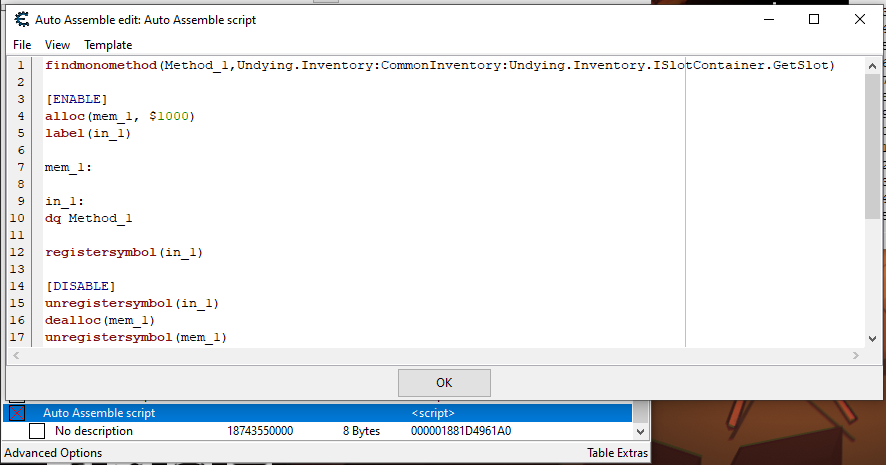
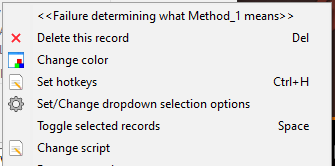
The first one didn't work. I ran the script and even saved it, just in case. I didn't realize Lua had access to the disassembler window. And the information was very helpful. I was able to create a search name using findmonomethod. It works; it displays the address even before using/generating the code. That is, it activates the mono-collector and forcibly generates the required section of code. Now there's only one problem left: using it for aobscanregion. Right now, if I try to use the found Method_1 directly, I get a "Failure determining what Method_1 means" error. Of course, I could initialize all the methods first, and then work from there in the child script. But that's an unnecessary complication. I'd like to make it generate, find, and enable everything right away.
p.s.I tried to give you a reputation boost, but it didn't work. It says I should rate someone else first. So I'll give you a well-deserved boost in 12 hours, when it's possible again.
| Description: |
|
| Filesize: |
49.38 KB |
| Viewed: |
14590 Time(s) |
|
| Description: |
|
| Filesize: |
41.44 KB |
| Viewed: |
14590 Time(s) |
|
| Description: |
|
| Filesize: |
5.66 KB |
| Viewed: |
14590 Time(s) |
|
|
|
| Back to top |
|
|
ParkourPenguin
I post too much
Reputation: 155
Joined: 06 Jul 2014
Posts: 4777
|
| Posted: Thu Jan 29, 2026 3:44 pm Post subject: |
|
|
This is a known problem and probably won't be fixed any time soon.
https://forum.cheatengine.org/viewtopic.php?t=618782
Sadly, `mono_splitSymbol` fails to parse the specifier correctly, so you can't use the specifier directly in `aobscanregion`.
I guess Lua is the only way. Copy & paste this into the main Lua script window (main window -> Table -> Show Cheat Table Lua Script) and execute it:
| Code: | if aobscanMonoMethodCommandID then
unregisterAutoAssemblerCommand(aobscanMonoMethodCommandID)
aobscanMonoMethodCommandID = nil
end
-- aobScanMonoMethod(symbol, namespace:class:method, aob_pattern)
aobscanMonoMethodCommandID = registerAutoAssemblerCommand('AOBSCANMONOMETHOD', function(params, syntaxcheck)
local symbol, monospec, aobpattern = params:match'^%s*([^,%s]+)%s*,(.*),%s*([^,]-)%s*$'
if not symbol then
return nil, 'Bad arguments to aobScanMonoMethod'
end
local namespace, classname, methodname = monospec:match'^%s*(.*):([^:]*):([^:]-)%s*$'
if not namespace then
return nil, ('Bad mono method specifier: %s'):format(monospec)
end
if syntaxcheck then
return ('define(%s,0)'):format(symbol)
end
local method = mono_findMethod(namespace, classname, methodname)
if not method or method == 0 then
return nil, 'Could not find Undying.Inventory:CommonInventory:Undying.Inventory.ISlotContainer.GetSlot'
end
local address = mono_compile_method(method)
if not address or address == 0 then
return nil, 'Could not compile method Undying.Inventory:CommonInventory:Undying.Inventory.ISlotContainer.GetSlot'
end
local jit_info = mono_getJitInfo(address)
if not jit_info then
return nil, ('Could not get JIT info for address %08X'):format(address)
end
local code_start = jit_info.code_start
local code_end = code_start + jit_info.code_size
-- aobscanregion
local ms = createMemScan()
ms.OnlyOneResult = true
ms.firstScan(soExactValue, vtByteArray, rtRounded, aobpattern, '', code_start, code_end, '*X*C*W', fsmNotAligned, '', true, true, false, false)
ms.waitTillDone()
local result = ms.Result
ms.destroy()
if not result or result == 0 then
return nil, ('Could not find AOB pattern "%s" in address range %08X - %08X'):format(aob_pattern, code_start, code_end)
end
return ('define(%s,%X)'):format(symbol, result)
end)
|
I haven't tested this much, so let me know if anything is wrong.
Then in the AA script, use the AOB Scan template and modify it like this:
| Code: | [ENABLE]
aobScanMonoMethod(my_injection_point,Undying.Inventory:CommonInventory:Undying.Inventory.ISlotContainer.GetSlot,12 34 AB CD)
...
registersymbol(my_injection_point)
[DISABLE]
my_injection_point:
...
unregistersymbol(my_injection_point) |
_________________
I don't know where I'm going, but I'll figure it out when I get there. |
|
| Back to top |
|
|
icp
Cheater
Reputation: 0
Joined: 09 Dec 2021
Posts: 35
|
| Posted: Fri Jan 30, 2026 3:12 am Post subject: |
|
|
| ParkourPenguin wrote: | This is a known problem and probably won't be fixed any time soon.
https://forum.cheatengine.org/viewtopic.php?t=618782
Sadly, `mono_splitSymbol` fails to parse the specifier correctly, so you can't use the specifier directly in `aobscanregion`.
I guess Lua is the only way. Copy & paste this into ... |
Yes, it works. There are a few caveats, though. This function requires the table to be signed to avoid execution requests. It requires the mono-collector to be enabled beforehand. It doesn't work with other region names, simply copied from the disassembler window. A name must be crafted for each region. And most importantly, the table ends up loaded with code that's quite complex for the user to understand. My current solution is this: The first script activates and finds the function.
| Code: | findmonomethod(Method_1,Undying.Inventory:CommonInventory:Undying.Inventory.ISlotContainer.GetSlot)
[ENABLE]
alloc(Mt_1, $1000)
Mt_1:
dq Method_1
registersymbol(Mt_1)
[DISABLE]
dealloc(Mt_1)
unregistersymbol(Mt_1) |
The second script searches in the found symbol.
| Code: | [ENABLE]
aobscanregion(fnd_1, [Mt_1], [Mt_1]+200, 48 83 C0 20 48 8B 08 48 89 4D A8 48 8B 48 08)
... |
Yes, this is a bit of a hassle; it would be better to be able to use the results in a single script, but I haven't figured out how yet.
p.s. I've already given you a reputation boost today. Thanks again for your help!
|
|
| Back to top |
|
|
|
|
You cannot post new topics in this forum
You cannot reply to topics in this forum
You cannot edit your posts in this forum
You cannot delete your posts in this forum
You cannot vote in polls in this forum
You cannot attach files in this forum
You can download files in this forum
|
|
 FAQ
FAQ Search
 Memberlist
 Usergroups
 Register
 Profile
 Log in to check your private messages
 Log in


