| View previous topic :: View next topic |
| Author |
Message |
Retroboy85
How do I cheat?
![]() Reputation: 0 Reputation: 0
Joined: 13 May 2022
Posts: 7
|
 Posted: Fri May 13, 2022 7:58 am Post subject: Can I add two addresses into one cheat description Posted: Fri May 13, 2022 7:58 am Post subject: Can I add two addresses into one cheat description |
 |
|
Hi,
Is it possible to create a cheat that requires two addresses but as one cheat rather than two cheats.
The code I am making
0165F708 : 46 B9 AE 05 04 01 00 00 06 01 - This is the Chapter/Stage
0165F730 : 5A D6 20 C6 00 00 F0 3A BC 89 B0 45 04 D3 6B 3F - This is the player location (so they don't load outside of the map or in strange locations)
This is static address not dynamic, but is it possible to have this as one cheat and also have CE remember the values so it doesnt change when your playing the game because I want to make a drop menu so the user can toggle what part of the game they want to jump to, but if the address value is changing during game play to where they currently are, it wont work.
Id like the list to keep the values I set so the user can select
Chapter 1 - 2
Chapter 1 - 3
Chapter 1 - 4
as an example.
Thanks
|
|
| Back to top |
|
 |
AylinCE
Grandmaster Cheater Supreme
 Reputation: 39 Reputation: 39
Joined: 16 Feb 2017
Posts: 1587
|
| Posted: Fri May 13, 2022 8:32 am Post subject: |
|
|
I think there is an inconsistency.
Why are the codes of the user's current location and the section to be installed (the section to skip) different?
| Code: | | 0165F708 : 46 B9 AE 05 04 01 00 00 06 01 |
If there was an example like
Current location (section) code;
| Code: | | 0165F708 : 46 B9 AE 05 04 01 00 00 02 01 |
The section code that the player will jump to;
| Code: | | 0165F708 : 46 B9 AE 05 04 01 00 00 06 01 |
If that were the case I could create code that lets you toggle it from a dropdown box.
But the codes in your current description are different.
I don't understand which value you want to replace with which other value. 
_________________
|
|
| Back to top |
|
|
Retroboy85
How do I cheat?
![]() Reputation: 0 Reputation: 0
Joined: 13 May 2022
Posts: 7
|
| Posted: Fri May 13, 2022 11:46 am Post subject: |
|
|
The first line will load to what ever chapter you want to jump to.
The second line is so the player will be placed in the map and next to the first save point of that chapter.
without the 2nd line and if you only use the first line, the game will load that chapter, but the player will be outside of the map and in some cases you could just run into the map and it will be ok, but in some cases youll be underneath the map so unable to do anything.
I have it as a drop menu but ideally would like to see if CE can have one cheat description but with more than one address, as we know in many cases one cheat could consist of multiple addresses.
Also if your to have any chapter listed, how can you stop CE from changing the value and have it remember what each cheat codes value is supposed to be, because theyll use the same address but each value for each one will change depending on what chapter you want and where the location is so your at the first save point.
So here is to make the example make more sense, ive started a new game.
Chapter 1 - 1 (First Save Point)
0165F708 : 3F 42 0F 00 00 01 00 00 01 01
0165F730 : 63 20 54 C7 3A 86 BC C3 9D FC 65 C6 56 AB E3 3F
Chapter 1 - 1 (Second Save Point)
0165F708 : DA 5A 51 00 03 01 00 00 06 01
0165F730 : 36 65 24 C7 80 F2 95 41 E9 3D 36 C5 E6 55 BC BF
Chapter 1 - 1 (Third Save Point)
0165F708 : DA 5A 51 00 06 01 00 00 03 01
0165F730 : 57 63 09 48 02 60 10 C6 16 09 21 C7 1D 04 36 40
Chapter 1 - 2 (First Save Point)
0165F708 : 46 B9 AE 05 04 01 00 00 06 01
0165F730 : 5A D6 20 C6 00 00 F0 3A BC 89 B0 45 04 D3 6B 3F
So i dont know if its possible to have both addresses as one toggle code and have each one locked to its own value because the address is the same, when you play the value will change based on where you are in the game, so if your on chapter 1-1 thats the value CE will show, if that makes sense.
Kind of like having an action replay code, you could save the same address multiple times with different values, but they dont change if you play the game.
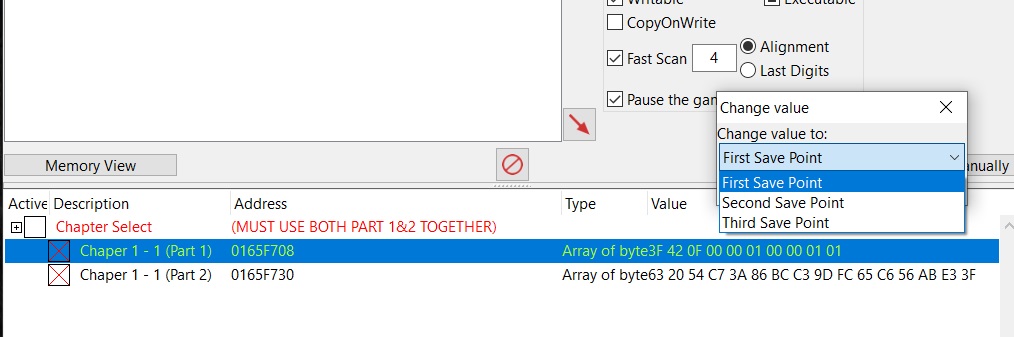
After some looking I can see now how to do a drop menu.
Just no idea how to combine both addresses as one cheat description or if it is even possible.
So for now I will do it in 2 parts and make a note that both part 1 and 2 must be used and match for the code to work properly.
| Description: |
|
| Filesize: |
78.72 KB |
| Viewed: |
2458 Time(s) |
|
|
|
| Back to top |
|
|
AylinCE
Grandmaster Cheater Supreme
Reputation: 39
Joined: 16 Feb 2017
Posts: 1587
|
| Posted: Fri May 13, 2022 3:49 pm Post subject: |
|
|
Sorry for the late reply.
This code may give you some ideas.
Edit it the way you want.
If there is a different situation, you can ask again.
| Code: | if form then form.destroy() form = nil end
form = createForm()
Cmbox1 = createComboBox(form)
Cmbox1.Height=23 Cmbox1.Left=85 Cmbox1.Top=30 Cmbox1.Width=140
Cmbox1.ReadOnly=true Cmbox1.Style='csDropDownList'
Cmbox1.clear()
Cmbox1.Items.Add("Select Chapter!")
Cmbox1.Items.Add("Chapter [1]")
Cmbox1.Items.Add("Chapter [2]")
Cmbox1.Items.Add("Chapter [3]")
Cmbox1.Items.Add("Chapter [4]")
Cmbox1.ItemIndex="0"
local PLocation=""
local addressList = getAddressList()
local getMemRecByDesc = addressList.getMemoryRecordByDescription
local CodeListTbl = {{"3F 42 0F 00 00 01 00 00 01 01","63 20 54 C7 3A 86 BC C3 9D FC 65 C6 56 AB E3 3F"},
{"DA 5A 51 00 03 01 00 00 06 01","36 65 24 C7 80 F2 95 41 E9 3D 36 C5 E6 55 BC BF"},
{"DA 5A 51 00 06 01 00 00 03 01","57 63 09 48 02 60 10 C6 16 09 21 C7 1D 04 36 40"},
{"46 B9 AE 05 04 01 00 00 06 01","5A D6 20 C6 00 00 F0 3A BC 89 B0 45 04 D3 6B 3F"}}
function CheckVal(ind)
onDescVal=getMemRecByDesc("Chaper 1 - (Part 1)").Value
if onDescVal==PLocation then
showMessage("You are already in this section.\nPlease select a different section!")
else
PLocation=onDescVal
getMemRecByDesc("Chaper 1 - (Part 1)").Value=CodeListTbl[tonumber(ind)][1]
getMemRecByDesc("Chaper 1 - (Part 2)").Value=CodeListTbl[tonumber(ind)][2]
showMessage(Cmbox1.Text.." section confirmed!")
end
end
Cmbox1.OnChange=function()
local index = Cmbox1.ItemIndex
if index==1 then
CheckVal(1)
end
if index==2 then
CheckVal(2)
end
if index==3 then
CheckVal(3)
end
if index==4 then
CheckVal(4)
end
end |
_________________
|
|
| Back to top |
|
|
Retroboy85
How do I cheat?
![]() Reputation: 0 Reputation: 0
Joined: 13 May 2022
Posts: 7
|
| Posted: Sat May 14, 2022 5:55 am Post subject: |
|
|
Thanks, I will give them a read/try.
New to CE as such, only used to tools where it reads off a txt file or you have a db editor to create the cheat file.
|
|
| Back to top |
|
|
|

 FAQ
FAQ Search
 Memberlist
 Usergroups
 Register
 Profile
 Log in to check your private messages
 Log in


