 |
Cheat Engine
The Official Site of Cheat Engine
|
| View previous topic :: View next topic |
| Author |
Message |
Doodle_2002
How do I cheat?
![]() Reputation: 0 Reputation: 0
Joined: 26 Apr 2020
Posts: 2
|
 Posted: Tue Apr 12, 2022 4:45 am Post subject: How to call a mono method which has a generic? Posted: Tue Apr 12, 2022 4:45 am Post subject: How to call a mono method which has a generic? |
 |
|
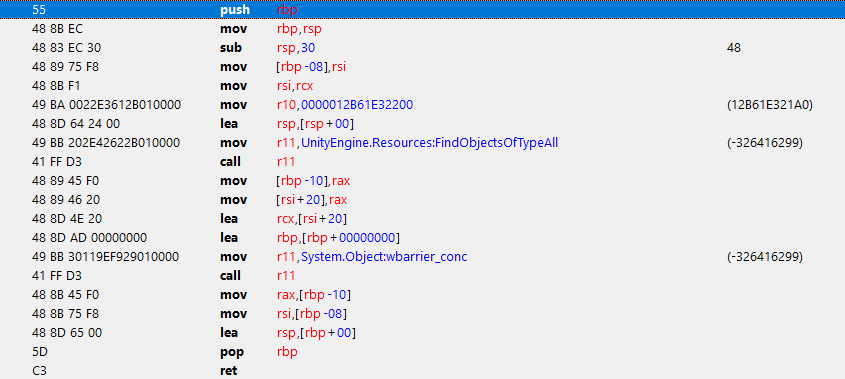
I'm currently creating a cheat table for the unity game GRIME, and I want to retrieve a list of all items. To do this (in Unity), you can simple use Resources.FindObjectsOfTypeAll<SomeItemType>()
I created a sample unity project to look at the assembly code (so I could figure out how that method is called), but I don't understand what's going on.
I think some sort of reference to the generic is being moved into the r10 register, but the value doesn't match any class ID used in my project (checked using the mono dissector). Does anyone know what kind of magic is going on here?
| Description: |
| Assembly of my method calling Resources.FindObjectsOfTypeAll |
|
| Filesize: |
29.65 KB |
| Viewed: |
2825 Time(s) |
|
|
|
| Back to top |
|
 |
Bloodybone
Newbie cheater
![]() Reputation: 0 Reputation: 0
Joined: 07 Dec 2016
Posts: 21
Location: Germany
|
| Posted: Wed Apr 13, 2022 3:25 pm Post subject: |
|
|
So I did some testing with another game.
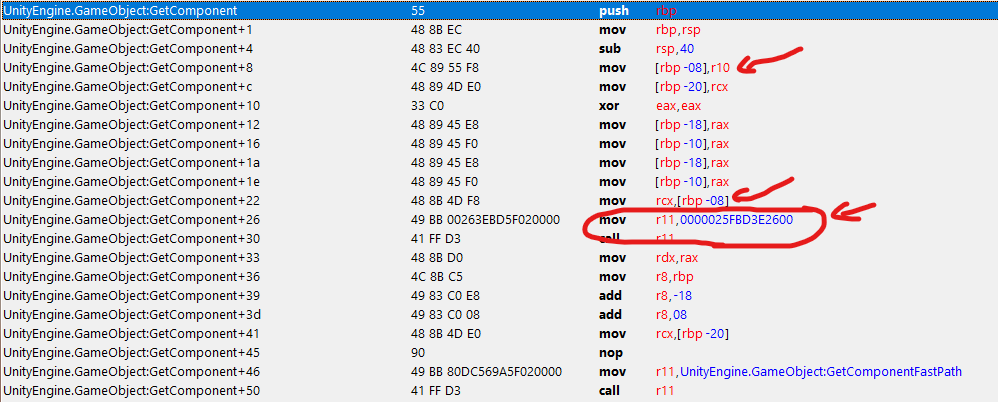
When calling a generic method Unity seems to actually pass a GameObject in r10. Though the only important thing is that the Pointer that is passed in r10 at offset 0x18 points to the System.RuntimeType that should be used.
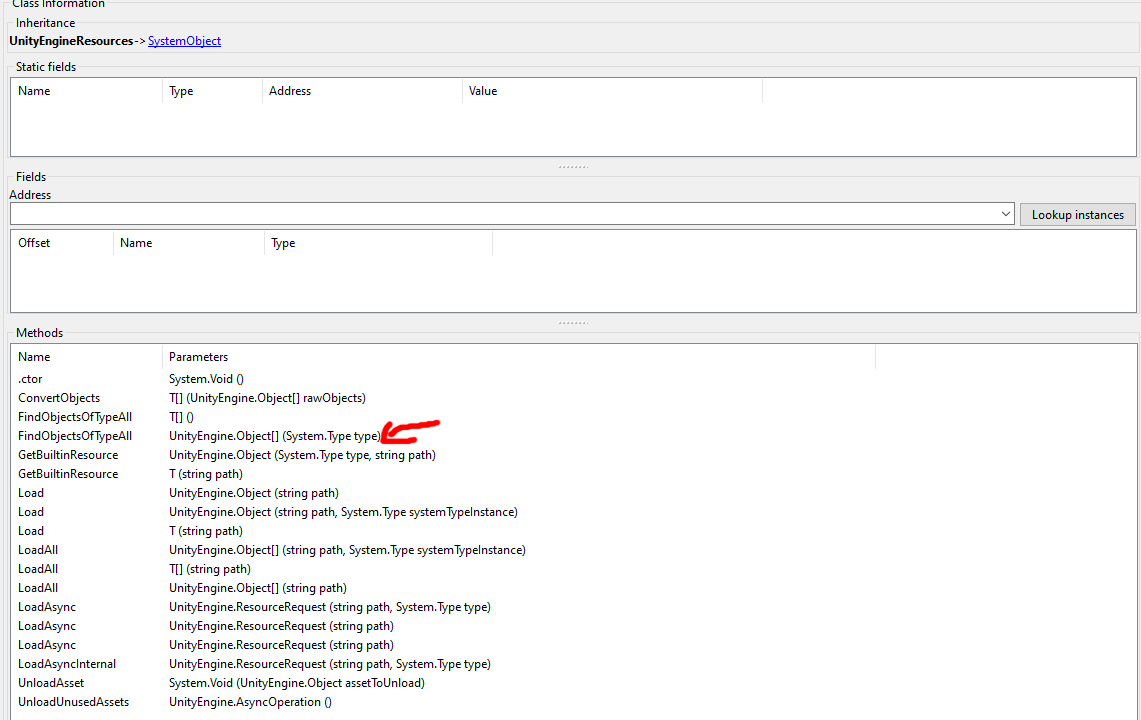
The second to fourth screenshots should show what I mean.
So if you want to actually call the Generic Method you could do something like this:
| Code: | // Assume that the Stack is aligned at this point...
sub rsp,30 // 0x20 Bytes reserved for callee and the rest is the Pointer and alignement.
mov [rsp+20],Address_Of_The_System.RuntimeType_You're_Interested in
lea r10,[rsp+8] // [r10+18] points to the Address (rsp+8+18 = rsp+20)
mov r11,"UnityEngine.Resources:FindObjectsOfTypeAll" // Make sure is the actual Generic Method
call r11
add rsp,30 // free allocated stack memory
|
Now getting the RuntimeType is also pretty easy using lua:
| Code: | local GameObjectClass = mono_findClass("UnityEngine","GameObject")
local MonoType = executeCodeEx(1,1000,getAddressSafe("mono_class_get_type"),{type=0,value=GameObjectClass})
local RuntimeType = executeCodeEx(1,1000,getAddressSafe("mono_type_get_object"),{type=0,value=mono_enumDomains()[1]},{type=0,value=MonoType})
return RuntimeType
|
The code above will get the RuntimeType for the UnityEngine.GameObject class.
Though instead of calling the Generic Method you could also just call the non Generic methiod shown in the first screenshot.
Example:
| Code: | // Assume that the Stack is aligned at this point...
sub rsp,20 // 0x20 Bytes reserved for callee
mov rcx,Address_Of_The_System.RuntimeType_You're_Interested in
mov r11,"UnityEngine.Resources:FindObjectsOfTypeAll" // Make sure is the actual non Generic Method
call r11
add rsp,20 // free allocated stack memory
|
| Description: |
| Generic Method vs non Generic Method |
|
| Filesize: |
47.53 KB |
| Viewed: |
2713 Time(s) |
|
| Description: |
| A Method calling some Generic Method |
|
| Filesize: |
19.17 KB |
| Viewed: |
2711 Time(s) |

|
| Description: |
| Generic Method moving r10 to rcx calling another Method which gets the RuntimeType and passes the return value to the function which takes a System.Type instead of a Generic |
|
| Filesize: |
78.36 KB |
| Viewed: |
2712 Time(s) |
|
| Description: |
| Method getting the RuntimeType from the GameObject |
|
| Filesize: |
13.68 KB |
| Viewed: |
2713 Time(s) |

|
|
|
| Back to top |
|
|
|
|
You cannot post new topics in this forum
You cannot reply to topics in this forum
You cannot edit your posts in this forum
You cannot delete your posts in this forum
You cannot vote in polls in this forum
You cannot attach files in this forum
You can download files in this forum
|
|
 FAQ
FAQ Search
 Memberlist
 Usergroups
 Register
 Profile
 Log in to check your private messages
 Log in


