| View previous topic :: View next topic |
| Author |
Message |
RPGAngel
How do I cheat?
![]() Reputation: 0 Reputation: 0
Joined: 04 Aug 2021
Posts: 5
|
 Posted: Wed Aug 04, 2021 1:51 pm Post subject: Help with getting CE to view properly Posted: Wed Aug 04, 2021 1:51 pm Post subject: Help with getting CE to view properly |
 |
|
| I am trying to use CE but can't because I can not see the whole program. I can see the whole box around it but the program inside the box goes down below the bottom line of the box. I have tried everything I can think of to get it to show correctly. If there was a scroll bar to scroll down to the bottom of the text I'd be fine. I am on Windows 8(laptop but set to look/work like 7) but have been able to use the CE just fine before without this issue. I have the same issue with some other programs(mainly the pokemon randomizer Poke Rando and Avast) as well(though changing some settings for display can get those to view right, just not CE) so I think something on my computer got changed but I can't figure out what or how to fix it. Would anyone have any ideas that could help?
|
|
| Back to top |
|
 |
LeFiXER
Grandmaster Cheater Supreme
![]() Reputation: 20 Reputation: 20
Joined: 02 Sep 2011
Posts: 1072
Location: 0x90
|
| Posted: Wed Aug 04, 2021 2:39 pm Post subject: |
|
|
Personally, I would try a number of things. Check graphics card driver is fully up to date, ensure that DPI settings aren't affecting anything. I would also verify the integrity of the OS installation by using this command in a command prompt with admin privileges
|
|
| Back to top |
|
|
RPGAngel
How do I cheat?
![]() Reputation: 0 Reputation: 0
Joined: 04 Aug 2021
Posts: 5
|
| Posted: Wed Aug 04, 2021 3:33 pm Post subject: |
|
|
| If DPI is that display settings box that changes the size of stuff, that is set to 100% and can't go any lower. I can't even adjust the individual sizes of stuff anymore even is I switch away from the let me choose one for all setting(I was able to before). I'm not sure about the GC or how to check but seeing this is Win 8 it probably as up to date as it's going to get. On the last thing, tried to run it but need to restart to finish something else from earlier. Will post the results when that's done and I run the scan again.
|
|
| Back to top |
|
|
TheyCallMeTim13
Wiki Contributor
 Reputation: 51 Reputation: 51
Joined: 24 Feb 2017
Posts: 976
Location: Pluto
|
| Posted: Wed Aug 04, 2021 4:03 pm Post subject: |
|
|
Make sure to check the screen resolution.
You can add this to the auto run folder in the CE directory as a lua file ".lua". And it will make a menu item for toggling compact mode. So at least you'll be able to see the address list when needed. Not ideal but it could at least get you by tell you figure this out.
| Code: |
function disableCompactMode()
if not inMainThread() then
synchronize(function(thread)
disableCompactMode()
end)
return
end
control_setVisible(wincontrol_getControl(MainForm, 0), true)
control_setVisible(wincontrol_getControl(MainForm, 3), true)
CompactModeEnabled = false
end
function enableCompactMode()
if not inMainThread() then
synchronize(function(thread)
enableCompactMode()
end)
return
end
control_setVisible(wincontrol_getControl(MainForm, 0), false)
control_setVisible(wincontrol_getControl(MainForm, 3), false)
CompactModeEnabled = true
end
function toggleCompactMode()
if not inMainThread() then
synchronize(function(thread)
toggleCompactMode()
end)
return
end
if CompactModeEnabled then
disableCompactMode()
else
enableCompactMode()
end
end
function addCompactModeMenu()
if not inMainThread() then
synchronize(function(thread)
addCompactModeMenu()
end)
return
end
local name = 'miCTCompactMode'
local miCompactMode = nil
for i = 1, MainForm.Menu.Items.Count - 1 do
if MainForm.Menu.Items[i].Name == name then
miCompactMode = MainForm.Menu.Items[i]
break
end
end
if miCompactMode == nil then
miCompactMode = createMenuItem(MainForm.Menu.Items)
miCompactMode.Name = name
miCompactMode.Caption = t('Toggle Compact Mode')
miCompactMode.OnClick = toggleCompactMode
MainForm.Menu.Items.add(miCompactMode)
end
end
addCompactModeMenu() |
_________________
|
|
| Back to top |
|
|
RPGAngel
How do I cheat?
![]() Reputation: 0 Reputation: 0
Joined: 04 Aug 2021
Posts: 5
|
| Posted: Wed Aug 04, 2021 5:05 pm Post subject: |
|
|
| Thank you all for the help. I think I got it working now though the rest of my computer is back to hard to read. Something I did when messing around with display settings and such much have kicked in after I did the restart I had to to to run that scan(which I didn't have to do since the restart worked). I also found I had to change the font size in CE itself to be smaller which in turn made the box smaller and showed stuff again.
|
|
| Back to top |
|
|
LeFiXER
Grandmaster Cheater Supreme
![]() Reputation: 20 Reputation: 20
Joined: 02 Sep 2011
Posts: 1072
Location: 0x90
|
| Posted: Wed Aug 04, 2021 5:32 pm Post subject: |
|
|
Glad you sorted it 
|
|
| Back to top |
|
|
RPGAngel
How do I cheat?
![]() Reputation: 0 Reputation: 0
Joined: 04 Aug 2021
Posts: 5
|
| Posted: Mon Aug 09, 2021 9:58 pm Post subject: |
|
|
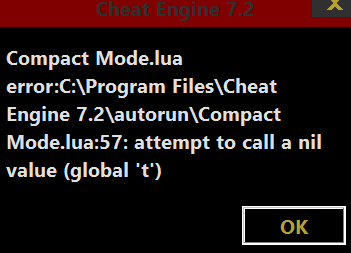
Having trouble again. I should not have closed the CE as now I can't get the compact mode back again. There is a error in the lua when I try to open the CE.
| Description: |
|
| Filesize: |
7.65 KB |
| Viewed: |
2469 Time(s) |
|
|
|
| Back to top |
|
|
TheyCallMeTim13
Wiki Contributor
Reputation: 51
Joined: 24 Feb 2017
Posts: 976
Location: Pluto
|
| Posted: Mon Aug 09, 2021 10:02 pm Post subject: |
|
|
Surprised it worked the first time.
Add this to the top of the file.
| Code: |
local t = translate |
_________________
|
|
| Back to top |
|
|
RPGAngel
How do I cheat?
![]() Reputation: 0 Reputation: 0
Joined: 04 Aug 2021
Posts: 5
|
| Posted: Mon Aug 09, 2021 10:10 pm Post subject: |
|
|
| Thank you! That worked!
|
|
| Back to top |
|
|
|

 FAQ
FAQ Search
 Memberlist
 Usergroups
 Register
 Profile
 Log in to check your private messages
 Log in


