| View previous topic :: View next topic |
| Author |
Message |
zune127
How do I cheat?
![]() Reputation: 0 Reputation: 0
Joined: 15 Apr 2021
Posts: 2
|
 Posted: Thu Apr 15, 2021 2:24 am Post subject: DBK Error, driver couldn't be opened Posted: Thu Apr 15, 2021 2:24 am Post subject: DBK Error, driver couldn't be opened |
 |
|
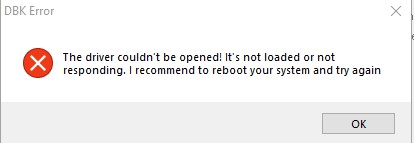
I am getting a DBK error every time I try to boot CE with query memory regions/read and write process memory on.
I have tried the following:
-Using kernelunloader, rebooting(restart not shutdown), using unloader again, uninstall CE, reinstalling
- Moving CE to a different drive
- Running cmd as admin and using the command "secedit /configure /cfg %windir%\inf\defltbase.inf /db defltbase.sdb /verbose" and rebooting
I'm running Windows 10 1909 update, I have not modified CE or DBK in any way, fresh install from official website, I have no antivirus and have manually disabled Windows defender and firewall.
Running DBK on drive with a clean install of windows works fine, and less than a month ago DBK was working fine on my main PC.
The only way to fix it for me is to disable driver signatures, but I have to continually disable it every bootup and most games won't function with driver verification disabled. Looking at the properties of dbk dlls and the drivers are signed, so I don't know what 's going on.
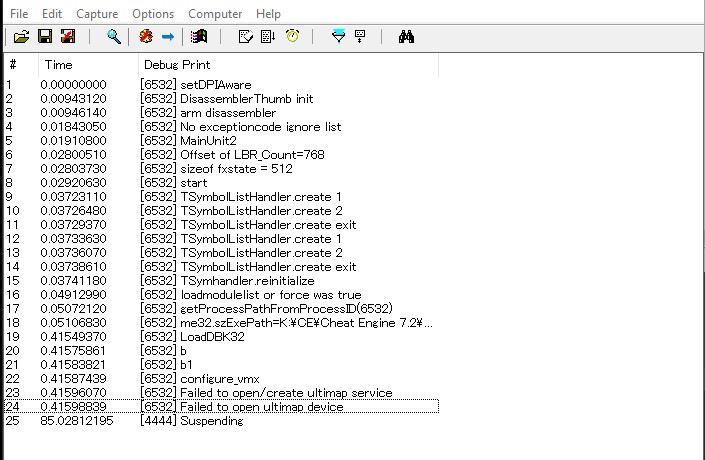
I have attached screenshot of the DBK error and debug log using DebugView
-
| Description: |
|
| Filesize: |
12.24 KB |
| Viewed: |
21044 Time(s) |
|
| Description: |
|
| Filesize: |
94.74 KB |
| Viewed: |
21045 Time(s) |
|
|
|
| Back to top |
|
 |
Dark Byte
Site Admin
 Reputation: 475 Reputation: 475
Joined: 09 May 2003
Posts: 26006
Location: The netherlands
|
| Posted: Thu Apr 15, 2021 4:12 am Post subject: |
|
|
set dbgview to record verbose and kernel messages that will show more useful info
besides that, uninstall any anti cheat drivers like vanguard and perhaps your anti virus
try copying all files to c:\ce72 , run the kernelmoduleunloader.exe and then try again
_________________
Tools give you results. Knowledge gives you control.
Like my help? Join me on Patreon so i can keep helping |
|
| Back to top |
|
|
im_jacqualine
How do I cheat?
![]() Reputation: 0 Reputation: 0
Joined: 09 Apr 2021
Posts: 2
|
| Posted: Thu Apr 15, 2021 6:10 am Post subject: |
|
|
| I'm sorry, I'm new to the CE kernel, can you guys tell me, how do I compile the dbk64 driver for our own CE version using the windows driver foundation kit?
|
|
| Back to top |
|
|
zune127
How do I cheat?
![]() Reputation: 0 Reputation: 0
Joined: 15 Apr 2021
Posts: 2
|
| Posted: Sun Apr 18, 2021 7:31 pm Post subject: |
|
|
| Dark Byte wrote: | set dbgview to record verbose and kernel messages that will show more useful info
besides that, uninstall any anti cheat drivers like vanguard and perhaps your anti virus
try copying all files to c:\ce72 , run the kernelmoduleunloader.exe and then try again |
Uninstalling Riot Vanguard worked for me. Many thanks for your help
|
|
| Back to top |
|
|
|

 FAQ
FAQ Search
 Memberlist
 Usergroups
 Register
 Profile
 Log in to check your private messages
 Log in


