 |
Cheat Engine
The Official Site of Cheat Engine
|
| View previous topic :: View next topic |
| Author |
Message |
Corroder
Grandmaster Cheater Supreme
 Reputation: 75 Reputation: 75
Joined: 10 Apr 2015
Posts: 1675
|
 Posted: Tue Sep 08, 2020 5:21 pm Post subject: Draw on canvas with opacity Posted: Tue Sep 08, 2020 5:21 pm Post subject: Draw on canvas with opacity |
 |
|
How to draw on component which have a canvas with opacity?
_________________
Stealing Code From Stolen Code...
And Admit It.. Hmmm....Typically LOL |
|
| Back to top |
|
 |
Corroder
Grandmaster Cheater Supreme
Reputation: 75
Joined: 10 Apr 2015
Posts: 1675
|
| Posted: Wed Sep 09, 2020 3:11 pm Post subject: |
|
|
Adapted from a Delphi script:
| Code: | function hex2rgb(hex)
local redColor,greenColor,blueColor=hex:match('(..)(..)(..)')
redColor, greenColor, blueColor = tonumber(redColor, 16)/255, tonumber(greenColor, 16)/255, tonumber(blueColor, 16)/255
redColor, greenColor, blueColor = math.floor(redColor*100)/100, math.floor(greenColor*100)/100, math.floor(blueColor*100)/100
return redColor, greenColor, blueColor
end
function GetRValue(rgbcol)
local r = 0
r = rgbcol & 0xff
return r
end
function GetGValue(rgbcol)
local g = 0
g = rgbcol >> 16 & 0xff
return g
end
function GetBValue(rgbcol)
local g = 0
g = rgbcol >> 24 & 0xff
return g
end
function DrawOpacityBrush(ACanvas, X, Y, AColor, Opacity)
local Bmp, I, J, Pixels, ColorRgb, ColorR, ColorG, ColorB
local rgbRed, rgbGreen, rgbBlue, rgbReserved
W = 350
H = 230
rgbRed = 0
rgbGreen = 0
rgbBlue = 0
rgbReserved = 0
Opacity = 10
Bmp = createBitmap(W, H)
Bmp.PixelFormat = pf32Bit
--Bmp.setSize(ASize, ASize)
Bmp.Canvas.Brush.Color = clFuschia
ColorRgb = hex2rgb('FF0080') --Bmp.Canvas.Brush.Color)
Bmp.Canvas.Brush.Color = ColorRgb
Bmp.Canvas.fillRect(0, 0, W, H)
Bmp.Canvas.Pen.Color = AColor
Bmp.Canvas.Pen.Style = psSolid
Bmp.Canvas.Pen.Width = 2
--Bmp.Canvas.MoveTo(W / 2, H / 2)
Bmp.Canvas.LineTo(W / 2, H / 2)
ColorR = GetRValue(ColorRgb)
ColorG = GetGValue(ColorRgb)
ColorB = GetBValue(ColorRgb)
for I = 0, Bmp.Height - 1 do
for J = 0, Bmp.Width - 1 do
Pixels = Bmp.Canvas.getPixel(I, J)
--for J = 0, Bmp.Width - 1 do
if (rgbRed == ColorR) and (rgbGreen == ColorG) and (rgbBlue == ColorB) then
rgbReserved = 0
else
rgbReserved = Opacity
rgbRed = (rgbRed * rgbReserved) / 0xFF
rgbGreen = (rgbGreen * rgbReserved) / 0xFF
rgbBlue = (rgbBlue * rgbReserved) / 0xFF
end
Pixels = Pixels + 1
end
end
ACanvas.Draw(X, Y, Bmp, 255)
end
function Image1MouseDown(sender, Button, X, Y)
DrawOpacityBrush(Image1.Picture.Bitmap.Canvas, X, Y, clRed, 50, 200, 10)
end
-- Usage example:
DrawOpacityBrush(Image1.Picture.Bitmap.Canvas, 0, 0, clRed, 10) |
I got a transparent small box on the image. I think because this line
--Bmp.Canvas.MoveTo(W / 2, H / 2) not implemented.
Why this 'MoveTo' produce error : " attempt to call a nil value (field 'MoveTo')" ?
_________________
Stealing Code From Stolen Code...
And Admit It.. Hmmm....Typically LOL |
|
| Back to top |
|
|
Dark Byte
Site Admin
 Reputation: 475 Reputation: 475
Joined: 09 May 2003
Posts: 25974
Location: The netherlands
|
| Posted: Wed Sep 09, 2020 3:39 pm Post subject: |
|
|
MoveTo isn't implemented in ce's lua, but you can replace it with
| Code: |
Canvas.setPenPosition(W / 2, H / 2)
|
Also, the 4th parameter of draw is ignored
_________________
Tools give you results. Knowledge gives you control.
Like my help? Join me on Patreon so i can keep helping |
|
| Back to top |
|
|
Corroder
Grandmaster Cheater Supreme
Reputation: 75
Joined: 10 Apr 2015
Posts: 1675
|
| Posted: Thu Sep 10, 2020 7:05 am Post subject: |
|
|
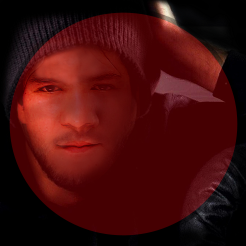
Thanks DB, it works but the opacity doesn't work properly. The given result is draw on the canvas with fully transparent.
I try adapted another Delphi script to draw an ellipse in front of an image with opacity. But I can't port some lines to CE Lua.
Original Delphi script:
| Code: | procedure TForm1.Button1Click(Sender: TObject);
var
bm1, bm2: TBitmap;
begin
bm1 := TBitmap.Create;
bm1.LoadFromFile('C:\Users\Andreas Rejbrand\Pictures\portrait.bmp');
bm2 := TBitmap.Create;
bm2.SetSize(bm1.Width, bm1.Height);
bm2.Canvas.Brush.Color := clRed;
bm2.Canvas.Pen.Style := psClear;
bm2.Canvas.Ellipse(0, 0, bm2.Width, bm2.Height);
Canvas.Draw(100, 100, bm1);
Canvas.Draw(100, 100, bm2, 127);
end;
|
Trying to port to CE Lua script:
| Code: | if f then f.destroy() end
f = createForm()
f.setSize(300,320)
f.Position = 'poScreenCenter'
f.Caption = 'Opacity'
btn = createButton(f)
btn.setPosition(115,10)
btn.Caption = 'Draw'
bm1 = createImage(f)
bm1.Width = 250
bm1.Height = 250
bm1.Top = 50
bm1.Left = 25
bm1.Picture.loadFromStream(findTableFile('VCLPhoto.png').Stream)
bm1.Stretch = true
bm1.PixelFormat = pf32bit
function btnClick(Sender)
local bm2 = createBitmap()
bm2.Width = bm1.Width
bm2.Height = bm1.Height
bm2.PixelFormat = pf32bit
bm2.Canvas.Brush.Color = 0xff --clRed
bm2.Canvas.Pen.Style = 1 --psClear
bm2.Canvas.ellipse(0, 0, bm2.Width, bm2.Height)
Canvas.draw(100, 100, bm1.Canvas) --- ???
Canvas.draw(100, 100, bm2.Canvas, 127) --- ???
....setShape(bm2) ---???
end
f.Show()
btn.OnClick = btnClick
|
What I want to do is to get the result as Delphi script result as show on attached image. Any chance to learn it by yours tutorial?
| Description: |
|
| Filesize: |
56.33 KB |
| Viewed: |
2297 Time(s) |
|
_________________
Stealing Code From Stolen Code...
And Admit It.. Hmmm....Typically LOL |
|
| Back to top |
|
|
AylinCE
Grandmaster Cheater Supreme
 Reputation: 39 Reputation: 39
Joined: 16 Feb 2017
Posts: 1582
|
| Posted: Thu Sep 10, 2020 8:04 am Post subject: |
|
|
I wonder the result.  
_________________
|
|
| Back to top |
|
|
Corroder
Grandmaster Cheater Supreme
Reputation: 75
Joined: 10 Apr 2015
Posts: 1675
|
| Posted: Thu Sep 10, 2020 6:44 pm Post subject: |
|
|
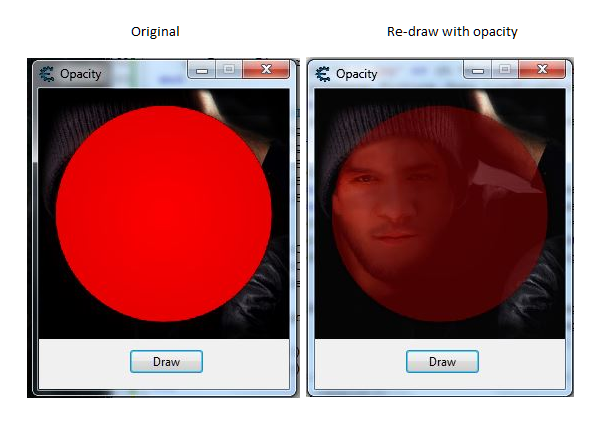
Since I can't draw canvas with opacity then just use little trick with set alpha blend with two images. Case close.
| Code: | if f then f.destroy() end
f = createForm()
f.setSize(250,300)
f.Position = 'poScreenCenter'
f.Caption = 'Opacity'
btn = createButton(f)
btn.setPosition(90,260)
btn.Caption = 'Draw'
bm1 = createImage(f)
bm1.Width = 250
bm1.Height = 250
bm1.Top = 0
bm1.Left = 0
bm1.Picture.loadFromStream(findTableFile('VCLPhoto.png').Stream)
bm1.Stretch = true
bm2 = createImage(f)
bm2.Width = 250
bm2.Height = 250
bm2.Top = 0
bm2.Left = 0
bm2.Picture.loadFromStream(findTableFile('circle.png').Stream)
bm2.Stretch = true
-------------------------------------------------------------------------------
function TBlendFunction(SourceConstantAlpha)
return byteTableToDword({0,0,SourceConstantAlpha,1})
end
function getCanvasHandle(canvas)
canvas.getPixel(0,0)
return readPointerLocal(userDataToInteger(canvas)+0xc8)
end
function setAlphaBlend(hdcDest, nXOriginDest, nYOriginDest, nWidthDest, nHeightDest,
hdcSrc, nXOriginSrc, nYOriginSrc, nWidthSrc, nHeightSrc, blendFunction)
return executeCodeLocalEx("msimg32.AlphaBlend",
hdcDest, nXOriginDest, nYOriginDest, nWidthDest, nHeightDest,
hdcSrc, nXOriginSrc, nYOriginSrc, nWidthSrc, nHeightSrc, blendFunction)
end
function setOpacity(src, alpha, tblfile)
if pngImage or tmpImage then
pngImage.destroy()
tmpImage.destroy()
end
pngImage = createImage(nil)
ch = string.sub(tblfile, -4)
if ch == '.jpg' or ch == '.JPG' or ch == '.Jpg' then
pngImage.Picture.Jpeg.loadFromStream(findTableFile(tblfile).Stream)
else
pngImage.Picture.PNG.loadFromStream(findTableFile(tblfile).Stream)
end
tmpImage = createImage(nil)
local width = pngImage.Picture.Bitmap.Width
local height = pngImage.Picture.Bitmap.Height
tmpImage.Picture.Bitmap.PixelFormat = pf32bit
tmpImage.Picture.Bitmap.Width = width
tmpImage.Picture.Bitmap.Height = height
setAlphaBlend(getCanvasHandle(tmpImage.Picture.Bitmap.Canvas), 0, 0, width, height,
getCanvasHandle(pngImage.Picture.Bitmap.Canvas), 0, 0, width, height,
TBlendFunction(alpha))
src.Picture.assign(tmpImage.Picture)
src.repaint()
pngImage.destroy()
tmpImage.destroy()
end
function drawOpacity()
setOpacity(bm2, 140, 'circle.png')
setOpacity(bm1, 250, 'VCLPhoto.png')
end
f.Show()
btn.OnClick = drawOpacity
|
Conclusion:
Try with another fit method if you can't solve your case yet while still looking for a solution.
| Description: |
|
| Filesize: |
209.99 KB |
| Viewed: |
2266 Time(s) |
|
_________________
Stealing Code From Stolen Code...
And Admit It.. Hmmm....Typically LOL |
|
| Back to top |
|
|
|
|
You cannot post new topics in this forum
You cannot reply to topics in this forum
You cannot edit your posts in this forum
You cannot delete your posts in this forum
You cannot vote in polls in this forum
You cannot attach files in this forum
You can download files in this forum
|
|
 FAQ
FAQ Search
 Memberlist
 Usergroups
 Register
 Profile
 Log in to check your private messages
 Log in


