 |
Cheat Engine
The Official Site of Cheat Engine
|
| View previous topic :: View next topic |
| Author |
Message |
Corroder
Grandmaster Cheater Supreme
 Reputation: 75 Reputation: 75
Joined: 10 Apr 2015
Posts: 1675
|
 Posted: Tue Sep 01, 2020 10:37 am Post subject: Point and PSet in CE Lua Posted: Tue Sep 01, 2020 10:37 am Post subject: Point and PSet in CE Lua |
 |
|
How to implementing "Point" and "PSet" for an image in CE Lua ?
_________________
Stealing Code From Stolen Code...
And Admit It.. Hmmm....Typically LOL |
|
| Back to top |
|
 |
Dark Byte
Site Admin
 Reputation: 474 Reputation: 474
Joined: 09 May 2003
Posts: 25968
Location: The netherlands
|
| Posted: Tue Sep 01, 2020 12:51 pm Post subject: |
|
|
not sure what point and pset are but if you mesn accessing pixels;
canvas.getPixel(x,y)
canvas.setPixel(x,y,color)
_________________
Tools give you results. Knowledge gives you control.
Like my help? Join me on Patreon so i can keep helping |
|
| Back to top |
|
|
Corroder
Grandmaster Cheater Supreme
Reputation: 75
Joined: 10 Apr 2015
Posts: 1675
|
| Posted: Tue Sep 01, 2020 1:39 pm Post subject: |
|
|
Yes, DB. I meant accessing image pixels.
| Code: | -- blur image
if f then f.destroy() end
f = createForm()
f.setSize(455,250)
f.BorderStyle = 'bsNone'
f.Position = 'poScreenCenter'
f.OnMouseDown = function() f.dragNow() end
img = createImage(f)
img.setSize(200,200)
img.setPosition(25,25)
img.stretch = true
img.Picture.loadFromStream(findTableFile('woman.jpg').stream)
img.OnMouseDown = function() f.dragNow() end
img2 = createImage(f)
img2.setSize(200,200)
img2.setPosition(230,25)
img2.stretch = true
img2.Picture.loadFromStream(findTableFile('woman.jpg').stream)
img2.OnMouseDown = function() f.dragNow() end
-------------------------------------------------------------
function Set(t)
local s = {}
for _,v in pairs(t) do s[v] = true end
return s
end
alt = [[
function RGB(r,g,b)
assert(color ~= 0xffffffff,'CLR_INVALID')
r,g,b = color & 0xff, color >> 8 & 0xff, color >> 16 & 0xff
end
]]
function RGB(r,g,b)
local colorBitShiftRed = 0
local colorBitShiftBlue = 16
local colorBitShiftGreen = 8
local function clamp(value, min, max) return math.min(math.max(value, min), max) end
r = clamp(r, 0, 255); g = clamp(g, 0, 255); b = clamp(b, 0, 255);
return (r << colorBitShiftRed) | (g << colorBitShiftGreen) | (b << colorBitShiftBlue)
end
function Command1_Click()
Picture1 = img.Picture.Bitmap.Canvas
Picture1.Width = img.Width
Picture1.Height = img.Height
X = {}
XX = {}
RedA = {}
GreenA = {}
BlueA = {}
X1 = 1
Y1 = 1
X2 = Picture1.Width - 1
Y2 = Picture1.Height - 1
Y = 0
L = 0
local MHB, AX, RedTemp, GreenTemp, BlueTemp
for I = Y1, Y2 do
for J = X1, X2 do
RedB = 0
GreenB = 0
BlueB = 0
X[0] = Picture1.getPixel(J, I)
X[1] = Picture1.getPixel(J - 1, I - 1)
X[2] = Picture1.getPixel(J - 1, I)
X[3] = Picture1.getPixel(J - 1, I + 1)
X[4] = Picture1.getPixel(J, I - 1)
X[5] = Picture1.getPixel(J, I + 1)
X[6] = Picture1.getPixel(J + 1, I - 1)
X[7] = Picture1.getPixel(J + 1, I)
X[8] = Picture1.getPixel(J + 1, I + 1)
for D = 0, 8 do
MHB = X[D] + 1
RedTemp = MHB % 256
AX = math.floor(MHB / 256)
GreenTemp = AX % 256
BlueTemp = math.floor(AX / 256)
RedA[D] = RedTemp - 1
if RedTemp == 0 then RedA[D] = 0 end
GreenA[D] = GreenTemp
BlueA[D] = BlueTemp
end
for D = 0,8 do
RedB = RedB + RedA[D]
GreenB = GreenB + GreenA[D]
BlueB = BlueB + BlueA[D]
end
RedC = math.floor(RedB / 9)
GreenC = math.floor(GreenB / 9)
BlueC = math.floor(BlueB / 9)
if RedC < 0 then RedC = 0 end
if GreenC < 0 then GreenC = 0 end
if BlueC < 0 then BlueC = 0 end
if RedC > 255 then RedC = 255 end
if GreenC > 255 then GreenC = 255 end
if BlueC > 255 then BlueC = 255 end
Picture1.setPixel(J,I, RGB(RedC, GreenC, BlueC))
img.repaint()
end
end
end
f.Show()
f.OnPaint = Command1_Click |
and then:
| Code: |
The script is ported from vb script.
Lines in VB :
...
X[0] = Picture1.Point(J, I)
--> I change to : Picture1.getPixel(J, I) ...and so on
...
Line in VB :
...
Picture1.PSet (J, I), RGB(RedC, GreenC, BlueC)
---> I change to Picture1.setPixel(J,I, RGB(RedC, GreenC, BlueC))
...
|
But when run the script, its make CE hang/crash
_________________
Stealing Code From Stolen Code...
And Admit It.. Hmmm....Typically LOL |
|
| Back to top |
|
|
Dark Byte
Site Admin
Reputation: 474
Joined: 09 May 2003
Posts: 25968
Location: The netherlands
|
| Posted: Tue Sep 01, 2020 2:12 pm Post subject: |
|
|
Are you sure it's not just extremely slow?
try replacing f.OnPaint with a button you click so it's not an infinite loop
and add processMessages() in the loop (e.g after img.repaint())
_________________
Tools give you results. Knowledge gives you control.
Like my help? Join me on Patreon so i can keep helping |
|
| Back to top |
|
|
Corroder
Grandmaster Cheater Supreme
Reputation: 75
Joined: 10 Apr 2015
Posts: 1675
|
|
| Back to top |
|
|
Dark Byte
Site Admin
Reputation: 474
Joined: 09 May 2003
Posts: 25968
Location: The netherlands
|
| Posted: Wed Sep 02, 2020 12:27 am Post subject: |
|
|
pixel by pixel is always slow and with lua's overhead even more
you'd have to write code that works directly on the raw data of the image, best in native cpu code
what may slightly speed things up though us use createButmap to create sn non visible image, then do a copy of the original picture to that one and apply the calculation on that. And when done copy the image back
(and don't repaint after every pixel update)
_________________
Tools give you results. Knowledge gives you control.
Like my help? Join me on Patreon so i can keep helping |
|
| Back to top |
|
|
Corroder
Grandmaster Cheater Supreme
Reputation: 75
Joined: 10 Apr 2015
Posts: 1675
|
| Posted: Wed Sep 02, 2020 4:32 pm Post subject: |
|
|
DB, I did what you suggested. It not reduces the process times so much.
So. I decide to 'bind' my VB/C# blurring app. To the CT file, call it to blurring an image and set the results as background or something else.
Thanks, for supports.
_________________
Stealing Code From Stolen Code...
And Admit It.. Hmmm....Typically LOL |
|
| Back to top |
|
|
Corroder
Grandmaster Cheater Supreme
Reputation: 75
Joined: 10 Apr 2015
Posts: 1675
|
| Posted: Thu Sep 03, 2020 2:28 pm Post subject: |
|
|
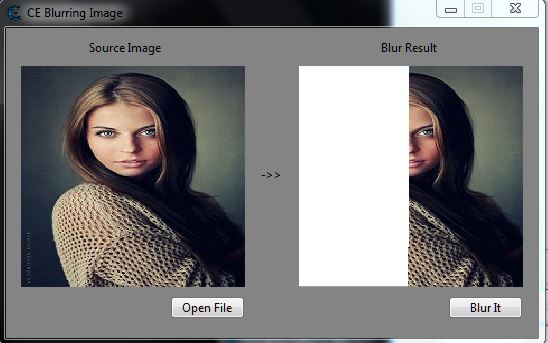
So, here is the script to blurring an image. I follow DB suggestion, and process time has reduced, even I change almost entire script.
But I think I made some wrongs in bitmap sources and image pixels color control. The result going to white image (LOL).
If someone able to fix the problem, that would be very helpful.
| Code: | if f then f.destroy() end
f = createForm()
f.setSize(532,310)
f.Position = 'poScreenCenter'
f.Color = 8684676
f.Caption = 'CE Blurring Image'
f.OnMouseDown = function() f.dragNow() end
lbl1 = createLabel(f)
lbl1.setPosition(83, 12)
lbl1.Caption = 'Source Image'
lbl2 = createLabel(f)
lbl2.setPosition(375, 12)
lbl2.Caption = 'Blur Result'
pnl1 = createPanel(f)
pnl1.setSize(224, 221)
pnl1.setPosition(15, 38)
pnl1.BorderStyle = 'bsNone'
pnl1.Color = 16777215
lbl3 = createLabel(f)
lbl3.setPosition(255, 139)
lbl3.Caption = '->>'
pnl2 = createPanel(f)
pnl2.setSize(224, 221)
pnl2.setPosition(293, 38)
pnl2.BorderStyle = 'bsNone'
pnl2.Color = 16777215
img1 = createImage(pnl1)
img1.setSize(224,221)
img1.setPosition(0,0)
img1.stretch = true
--img1.Picture.loadFromStream(findTableFile('woman.jpg').stream)
img1.OnMouseDown = function() f.dragNow() end
img2 = createImage(pnl2)
img2.setSize(224, 221)
img2.setPosition(0,0)
img2.stretch = true
--img2.Picture.loadFromStream(findTableFile('woman.jpg').stream)
img2.OnMouseDown = function() f.dragNow() end
btn1 = createButton(f)
btn1.setPosition(164, 268)
btn1.setSize(75, 23)
btn1.Caption = 'Open File'
btn2 = createButton(f)
btn2.setPosition(442, 268)
btn2.setSize(75, 23)
btn2.Caption = 'Blur It'
----------------------------------------------- Functions
function RGB(r,g,b)
local colorBitShiftRed = 0
local colorBitShiftBlue = 16
local colorBitShiftGreen = 8
local function clamp(value, min, max) return math.min(math.max(value, min), max) end
r = clamp(r, 0, 255); g = clamp(g, 0, 255); b = clamp(b, 0, 255);
return (r << colorBitShiftRed) | (g << colorBitShiftGreen) | (b << colorBitShiftBlue)
end
function HEXtoRGB(hexArg)
hexArg = hexArg:gsub('#','')
if(string.len(hexArg) == 3) then
return tonumber('0x'..hexArg:sub(1,1)) * 17, tonumber('0x'..hexArg:sub(2,2)) * 17, tonumber('0x'..hexArg:sub(3,3)) * 17
elseif(string.len(hexArg) == 6) then
return tonumber('0x'..hexArg:sub(1,2)), tonumber('0x'..hexArg:sub(3,4)), tonumber('0x'..hexArg:sub(5,6))
else
return 0, 0, 0
end
end
function RGBtoHEX(redArg, greenArg, blueArg)
return string.format('%.2x%.2x%.2x', redArg, greenArg, blueArg)
end
function correlation(px1, px2, px3, px4, px5, px6, px7, px8, px9)
return (px1 + px2 + px3 + px4 + px5 + px6 + px7 + px8 + px9) / 9
end
function LPF()
local _img = img1 --.Picture.Bitmap --.Canvas -- As Bitmap = img
local imgSource = createBitmap(img1.Width + 2, img1.Height + 2)
local imgLPF = img2.Picture.Bitmap --.Canvas -- As Bitmap = img
for i = 0, img1.Width - 1 do
for j = 0, img1.Height - 1 do
imgSource.Canvas.setPixel(i + 1, j + 1, _img.Picture.Bitmap.Canvas.getPixel(i, j))
end
end
for i = 0, img1.Width - 1 do
imgSource.Canvas.setPixel(i + 1, 0, _img.Picture.Bitmap.Canvas.getPixel(i, 0))
imgSource.Canvas.setPixel(i + 1, imgSource.Height - 1, _img.Picture.Bitmap.Canvas.getPixel(i, _img.Height - 1))
end
for i = 0, imgSource.Height - 1 do
imgSource.Canvas.setPixel(0, i, imgSource.Canvas.getPixel(1, i))
imgSource.Canvas.setPixel(imgSource.Width - 1, i, imgSource.Canvas.getPixel(imgSource.Width - 2, i))
end
for i = 0, imgSource.Width - 4 do
for j = 0, imgSource.Height - 4 do
local valPixelR = correlation(imgSource.Canvas.getPixel(i, j), imgSource.Canvas.getPixel(i, j + 1), imgSource.Canvas.getPixel(i, j + 2),
imgSource.Canvas.getPixel(i + 1, j), imgSource.Canvas.getPixel(i + 1, j + 1), imgSource.Canvas.getPixel(i + 1, j + 2),
imgSource.Canvas.getPixel(i + 2, j), imgSource.Canvas.getPixel(i + 2, j + 1), imgSource.Canvas.getPixel(i + 2, j + 2))
local valPixelG = correlation(imgSource.Canvas.getPixel(i, j), imgSource.Canvas.getPixel(i, j + 1), imgSource.Canvas.getPixel(i, j + 2),
imgSource.Canvas.getPixel(i + 1, j), imgSource.Canvas.getPixel(i + 1, j + 1), imgSource.Canvas.getPixel(i + 1, j + 2),
imgSource.Canvas.getPixel(i + 2, j), imgSource.Canvas.getPixel(i + 2, j + 1), imgSource.Canvas.getPixel(i + 2, j + 2))
local valPixelB = correlation(imgSource.Canvas.getPixel(i, j), imgSource.Canvas.getPixel(i, j + 1), imgSource.Canvas.getPixel(i, j + 2),
imgSource.Canvas.getPixel(i + 1, j), imgSource.Canvas.getPixel(i + 1, j + 1), imgSource.Canvas.getPixel(i + 1, j + 2),
imgSource.Canvas.getPixel(i + 2, j), imgSource.Canvas.getPixel(i + 2, j + 1), imgSource.Canvas.getPixel(i + 2, j + 2))
processMessages()
imgLPF.Canvas.setPixel(i, j, RGB(valPixelR, valPixelG, valPixelB))
end
end
return imgLPF
end
function GetFileName(fl)
local str = fl
local temp = ""
local result = ""
for i = str:len(), 1, -1 do
if str:sub(i,i) ~= "/" then
temp = temp..str:sub(i,i)
else
break
end
end
for j = temp:len(), 1, -1 do
result = result..temp:sub(j,j)
end
return result
end
function Open_File(sender)
load_dialog = createOpenDialog(self)
load_dialog.InitalDir = os.getenv('%USERPROFILE%')
load_dialog.Filter = 'Image File | *.JPG;*.PNG;*.BMP;*.jpg;*.png;*.bmp | All files (*.*)|*'
if load_dialog.execute() then
file = load_dialog.FileName
local imgfile = GetFileName(file)
if imgfile == nil then
return imgfile
else
img1.Picture.loadFromFile(imgfile)
img2.Picture.loadFromFile(imgfile)
end
else
return nil
end
end
function Blur_Image()
img2.Picture.Bitmap = LPF(img1.Picture.Bitmap)
img2.repaint()
end
f.Show()
btn1.OnClick = Open_File
btn2.OnClick = Blur_Image
|
| Description: |
| Blurring an image in progress |
|
| Filesize: |
36.96 KB |
| Viewed: |
2444 Time(s) |
|
_________________
Stealing Code From Stolen Code...
And Admit It.. Hmmm....Typically LOL |
|
| Back to top |
|
|
|
|
You cannot post new topics in this forum
You cannot reply to topics in this forum
You cannot edit your posts in this forum
You cannot delete your posts in this forum
You cannot vote in polls in this forum
You cannot attach files in this forum
You can download files in this forum
|
|
 FAQ
FAQ Search
 Memberlist
 Usergroups
 Register
 Profile
 Log in to check your private messages
 Log in


