 |
Cheat Engine
The Official Site of Cheat Engine
|
| View previous topic :: View next topic |
| Author |
Message |
Corroder
Grandmaster Cheater Supreme
 Reputation: 75 Reputation: 75
Joined: 10 Apr 2015
Posts: 1675
|
 Posted: Sun Jan 26, 2020 8:46 am Post subject: SetBounds Problem Posted: Sun Jan 26, 2020 8:46 am Post subject: SetBounds Problem |
 |
|
Since there is no way to have a TCEmage on top of a TCEmemo, then I try to get texts from a memo and place it in front of an image, adopt from Lazarus code.
| Code: | f = createForm()
f.setSize(500,500)
Memo1 = createMemo(f)
Memo1.setSize(300,200)
Image1 =createImage(f)
Image1.setSize(300,200)
Image1.setPosition(0,Memo1.Top+Memo1.Height+20)
Image1.Stretch = true
Image1.Picture.loadFromStream(findTableFile('bg1.jpg').Stream)
lbl = createLabel(f)
lbl.setPosition(Memo1.Left + Memo1.Width + 20,10)
btn1 = createButton(f)
btn1.setPosition(Image1.Left+Image1.Width + 20, 400)
btn1.Caption = 'Test'
test = [[
This is a test to copy
and paste text from memo
to the front of image
]]
Memo1.lines.add(test)
function Image1Paint(sender) -- Image1Paint() Not Work
local ts
ts = Image1.Canvas.TextStyle
ts.SingleLine = false
Image1.Canvas.Font.Color = clBlack;
Image1.Canvas.Font.Name = 'Arial';
Image1.Canvas.Font.Quality = fqAntialiased
Image1.Canvas.Font.Size = 20
Image1.Canvas.Font.Style = 'fsBold'
Image1.Canvas.TextStyle = ts
Image1.Canvas.TextRect(Image1.ClientRect, 7, 7, Memo1.Text, ts);
Image1.Canvas.Font.Color = clLime
Image1.Canvas.textOut(Image1.ClientRect, 5, 5, Memo1.Text, ts)
end
function TextOnPic() -- Not work facing SetBound() problem
lbl.Caption = test
lbl.Font.Color = clBlack
lbl.Font.Size = 12
lbl.Font.Quality = fqAntialiased
lbl.Font.Style = 'fsBold'
lbl.WordWrap = true;
lbl.SetBounds(Image1.Left, Image1.Top, Image1.Width, Image1.Height)
lbl.Parent = self
lbl.bringToFront()
end
function generate(sender)
TextOnPic(Image1, Memo1.Text, clWhite);
end
btn1.onClick = generate
|
What is the statement/command use in CE for SetBounds() ?.
And can someone expert fix the 2 functions above?.
_________________
Stealing Code From Stolen Code...
And Admit It.. Hmmm....Typically LOL |
|
| Back to top |
|
 |
.lua
Expert Cheater
 Reputation: 1 Reputation: 1
Joined: 13 Sep 2018
Posts: 203
|
| Posted: Sun Jan 26, 2020 11:43 am Post subject: |
|
|
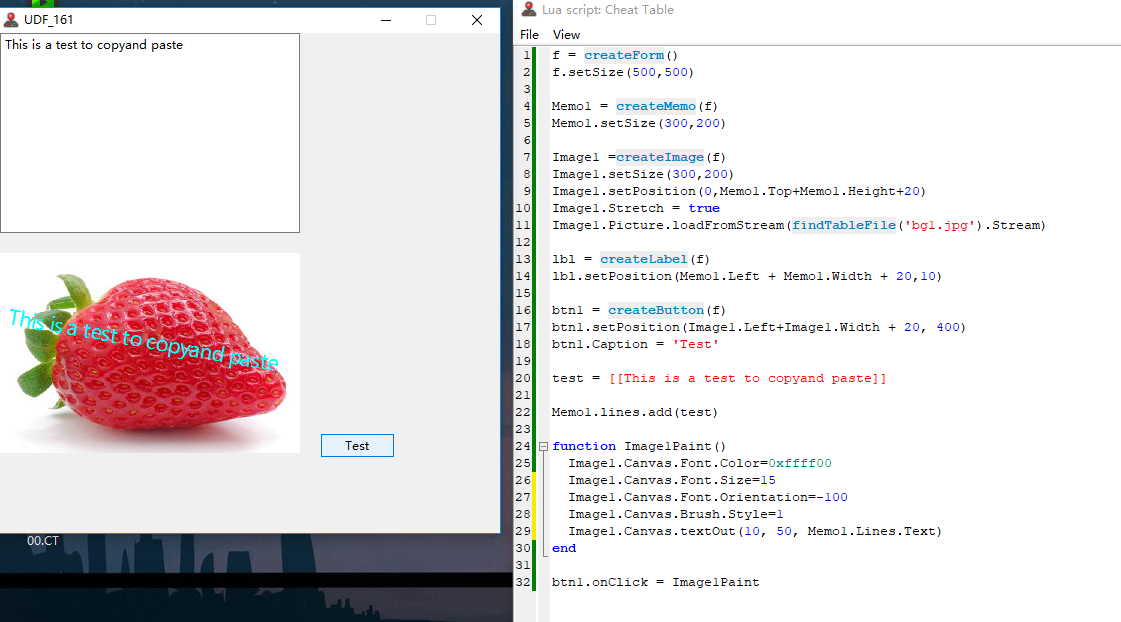
Do you want to watermark the image with text?
| Description: |
|
| Filesize: |
200.18 KB |
| Viewed: |
4691 Time(s) |
|
|
|
| Back to top |
|
|
Corroder
Grandmaster Cheater Supreme
Reputation: 75
Joined: 10 Apr 2015
Posts: 1675
|
| Posted: Sun Jan 26, 2020 10:04 pm Post subject: |
|
|
| .lua wrote: | | Do you want to watermark the image with text? |
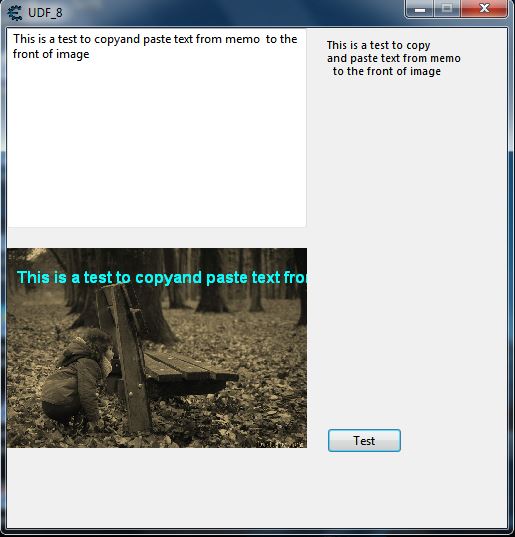
Yes, something like that. The problem is if the text more than one line, I can't text out the copy of text to the image with multi-lines. Although I use Label can't find the solution yet.
| Code: | function TextOnPic(lab, img, txt, col)
lab.Caption = txt
lab.WordWrap = true
img.Canvas.Font.Color = 0xffff00
img.Canvas.Font.Name = 'Arial'
img.Canvas.Font.Quality = 'fqAntialiased'
img.Canvas.Font.Size = 12
img.Canvas.Font.Style = 'fsBold'
img.Canvas.Brush.Style = 1
img.Canvas.textOut(10, 20, lab.Caption)
lab.Visible = true -- false
end
function generate()
TextOnPic(lbl, Image1, test, 0xffff00)
end
btn1.onClick = generate |
Other, also I want to put the copy of text to a drawn rectangle and text out the text inside the rectangle and the rectangle should be transparent or semi-transparent.
| Description: |
|
| Filesize: |
44.64 KB |
| Viewed: |
4657 Time(s) |
|
_________________
Stealing Code From Stolen Code...
And Admit It.. Hmmm....Typically LOL |
|
| Back to top |
|
|
Dark Byte
Site Admin
 Reputation: 475 Reputation: 475
Joined: 09 May 2003
Posts: 25983
Location: The netherlands
|
| Posted: Mon Jan 27, 2020 2:00 am Post subject: |
|
|
textRect instead of textOut might work better
_________________
Tools give you results. Knowledge gives you control.
Like my help? Join me on Patreon so i can keep helping |
|
| Back to top |
|
|
Corroder
Grandmaster Cheater Supreme
Reputation: 75
Joined: 10 Apr 2015
Posts: 1675
|
| Posted: Mon Jan 27, 2020 5:47 am Post subject: |
|
|
Yes DB, in Lazarus I use TextRect, not TextOut. I will try in CE Lua.
EDIT:
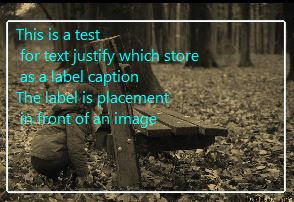
I use another solution by creating a group box and a label directly in front of the image and use concatenation to fit the label caption inside the group box.
| Code: | local test = 'This is a test\n for text justify which store\n as a label caption\nThe label is placement\n in front of an image'
local cap = test:gsub("\n","\r\n")
gb = createGroupBox(f)
gb.setPosition(Image1.Left+10,Image1.Top+10)
gb.setSize(280,180)
gb.Parent.Color = true
label2 = createLabel(f)
label2.setPosition(gb.Left+10,gb.Top+10)
label2.Font.Size = 12
label2.Font.Color = 0xffff00
label2.Caption = cap
label2.bringToFront() |
| Description: |
|
| Filesize: |
28.32 KB |
| Viewed: |
4635 Time(s) |
|
_________________
Stealing Code From Stolen Code...
And Admit It.. Hmmm....Typically LOL |
|
| Back to top |
|
|
daspamer
Grandmaster Cheater Supreme
 Reputation: 54 Reputation: 54
Joined: 13 Sep 2011
Posts: 1588
|
| Posted: Mon Jan 27, 2020 12:04 pm Post subject: |
|
|
You could also use the little wordWrapping function I wrote
and resize it according to image width/height
Edit:
updated code with example to add outline to the text to make it much readable;
this is an example
| Code: |
f = f and f.destroy() or createForm()
f.width,f.height = 600,600;
f.borderStyle = 'bsSizeable'
i = createImage(f);
i.align = 'alClient';
i.Picture.loadFromFile('d:\\img.jpg'); -- replace with your path/loadfromtable ...
i.stretch = true;
-- define the word_wrap upfront...
-- this is minified version
local word_wrap = function(a,b,c)if not(type(a)=='string'and type(b)=='function')then return end;local d,e,f={},table.insert,table.concat;for g in a:gmatch('([^%.\n]+%.?)')do local h={}for i in g:gmatch('([^%s]+)')do if#h==0 or b(f({i,unpack(h)},' '))then e(h,i)else e(d,f(h,' '))h={i}end end;if#h>0 then e(d,f(h,' '))end end;if not c then return f(d,'\n')end;local j=0;return function()j=j+1;return d[j]end end;
local yourtext = 'some text with long long lines\nthis is an attempt to show how it works and if it works just fine\nthough textRect might be better in some ways, but not to scale font size tho... \nso I like this method a bit much'
-- some function to subtract color with integer
-- subRGB('FFFFFF,12,24,36) -- must be 3 parameters;
-- subRGB(0xAAAAAA,'80')
-- subRGB(0xAAAAAA,'80AA')
-- subRGB(0xAAAAAA,'FF0000')
do local a,b,c=table,math,string;local c,e,f,g,h,i,j,k,l,m,n,o,p,q,r,s='string','number','..','%06X','%02X',16,0,pairs,type,tonumber,b.max,a.concat,a.insert,c.format,c.gmatch,unpack;local function t(u,v,w,x)if not(v and w and u and x)then return j end;local y={}if l(u)==c and m(u,i)or l(u)==e then if l(u)==e then u=q(g,u)end;for u in r(u,f)do p(y,q(h,n(j,m(u,i)-({v,w,x})[#y+1])))end;return m(o(y),i)end end;subRGB=function(v,w,...)if not(v and(l(v)==e or m(v,i)))then return j end;if l(w)==e then for z,A in k({...})do if l(A)~=e then return j end end;return t(v,w,...)elseif l(w)==c and m(w,i)then local u={}for x in r(q(g,m(w,i)),f)do p(u,m(x,i))end;return t(v,s(u))end end end
-- some variables
local canvas = i.canvas;
local font = canvas.font
local maxFontSize = 50;
local textPaddingWidth = 10; -- some padding from left and right boundaries
local textPaddingHeight = 10;
-- some helping functions
local getLinesHeight=function(a,b)local c,d=0;for f in word_wrap(a,b,true)do c=c+canvas.getTextHeight(f)if not d then d=c end end;return c,d end;
local callback=function(l)if canvas.getTextWidth(l)<i.width-textPaddingWidth*2 then return true end;return false end; -- pay attention that I use here `yourimage` as canvas size is limited to bitmap size!;
-- eh define some stuff
local fontColor = 0xFFFFFF
local FontOutlineColor = subRGB(fontColor,'B0B0B0');
font.size = maxFontSize;
font.color = fontColor;
i.Canvas.Brush.Style = 1; -- so there won't be any background color to the text
-- on resize to set font size && onpaint to draw the text;
local textHeight,textLineHeight = getLinesHeight(yourtext,callback);
local isError = false;
i.onResize = function(sender)
local maxHeight = sender.Height - textPaddingHeight*2;
if (textHeight > maxHeight) then
while (textHeight > maxHeight) do
if (font.size < 2) then -- maximum smallest size is 1
break;
end
font.size = font.size - 1;
textHeight,textLineHeight = getLinesHeight(yourtext,callback);
end
else
while (textHeight <= maxHeight and font.size < maxFontSize) do
font.size = font.size + 1;
textHeight,textLineHeight = getLinesHeight(yourtext,callback);
end
font.size = font.size - 1; -- we break as soon as the text is bigger than given size so we reduce it by 1 to make it fit;
textHeight,textLineHeight = getLinesHeight(yourtext,callback);
end
end
i.onResize(i);
i.onPaint = function(sender)
-- sender.canvas.clear() -- if its not an image loaded then canvas won't get cleared by itself...
local textHeight,textLineHeight = getLinesHeight(yourtext,callback);
local x,y = textPaddingWidth,textPaddingHeight;
for line in word_wrap(yourtext,callback,true) do
--uncomment the next comment block to disable outline effect
---[[
font.color = FontOutlineColor;
for _y=-2,2 do
for _x=-2,2 do
sender.canvas.textOut(x+_x,y+_y,line);
end
end
--]]
font.color = fontColor;
sender.canvas.textOut(x,y,line);
y = y + textLineHeight;
end
end
|
_________________
I'm rusty and getting older, help me re-learn lua. |
|
| Back to top |
|
|
Corroder
Grandmaster Cheater Supreme
Reputation: 75
Joined: 10 Apr 2015
Posts: 1675
|
| Posted: Mon Jan 27, 2020 9:39 pm Post subject: |
|
|
@DaSpamer, Thank you. Yes, I saw and got your word wrap function on the CE extension before. Very nice and useful function. Btw, can we adding text alignment (left, center, right, justified) function on your word wrap function?.
That will be better if the long text is shown with justified alignment.
_________________
Stealing Code From Stolen Code...
And Admit It.. Hmmm....Typically LOL |
|
| Back to top |
|
|
daspamer
Grandmaster Cheater Supreme
Reputation: 54
Joined: 13 Sep 2011
Posts: 1588
|
| Posted: Mon Jan 27, 2020 10:54 pm Post subject: |
|
|
| Corroder wrote: | @DaSpamer, Thank you. Yes, I saw and got your word wrap function on the CE extension before. Very nice and useful function. Btw, can we adding text alignment (left, center, right, justified) function on your word wrap function?.
That will be better if the long text is shown with justified alignment. |
that would be done inside the on paint event, getting each line width and then drawning in the center like for alignment for the right would be
| Code: | local lineWidth = sender.canvas.getTextWidth(line);
sender.canvas.textOut(sender.width-textPaddingWidth-lineWidth,y,line); |
Or for centering
| Code: | local lineWidth = sender.canvas.getTextWidth(line);
sender.canvas.textOut((sender.width-textPaddingWidth-lineWidth)//2,y,line); |
As the word_wrap simply splits given text by new line/dot by given max width into array of strings that would suit in given dimensions and onResize event sets the best matching font size according to dimensions/font size limit, we cannot really handle alignment by any means other than calculationg position.
Sent from my phone
_________________
I'm rusty and getting older, help me re-learn lua. |
|
| Back to top |
|
|
Corroder
Grandmaster Cheater Supreme
Reputation: 75
Joined: 10 Apr 2015
Posts: 1675
|
| Posted: Mon Jan 27, 2020 11:04 pm Post subject: |
|
|
@DaSpamer, "we cannot really handle alignment by any means other than calculation position". I see because in fact the text in front of the image actually produced by 'drawing' the given text.
So, I think is fair enough to modify the text itself to fit the alignment as I want. Thanks for the details info.
_________________
Stealing Code From Stolen Code...
And Admit It.. Hmmm....Typically LOL |
|
| Back to top |
|
|
daspamer
Grandmaster Cheater Supreme
Reputation: 54
Joined: 13 Sep 2011
Posts: 1588
|
| Posted: Tue Jan 28, 2020 11:40 am Post subject: |
 |
|
| Corroder wrote: | @DaSpamer, "we cannot really handle alignment by any means other than calculation position". I see because in fact the text in front of the image actually produced by 'drawing' the given text.
So, I think is fair enough to modify the text itself to fit the alignment as I want. Thanks for the details info. |
Or simply modify x position to your needs as I wrote above (modify the loop in the onPaint event)
EDIT:
Previous code sometimes fail to fit text if you resize it vertically and horizontally in exact position that reducing font size by 1 would not fit the text still;
Used labels && goto to solve this, might be better to use functions to apply these action but hey it works just fine.
Also decided to calculate it right when redrawing,
also incloded alignment example
| Code: | f = f and f.destroy() or createForm()
f.width,f.height = 600,600;
f.borderStyle = 'bsSizeable'
i = createImage(f);
i.align = 'alClient';
i.Picture.loadFromFile('d:\\img.jpg'); -- replace with your path/loadfromtable ...
i.stretch = true;
-- define the word_wrap upfront...
-- this is minified version
local word_wrap = function(a,b,c)if not(type(a)=='string'and type(b)=='function')then return end;local d,e,f={},table.insert,table.concat;for g in a:gmatch('([^%.\n]+%.?)')do local h={}for i in g:gmatch('([^%s]+)')do if#h==0 or b(f({i,unpack(h)},' '))then e(h,i)else e(d,f(h,' '))h={i}end end;if#h>0 then e(d,f(h,' '))end end;if not c then return f(d,'\n')end;local j=0;return function()j=j+1;return d[j]end end;
local yourtext = 'some text with long long lines\nthis is an attempt to show how it works and if it works just fine\nthough textRect might be better in some ways, but not to scale font size tho... \nso I like this method a bit much'
-- some function to subtract color with integer
-- subRGB('FFFFFF,12,24,36) -- must be 3 parameters;
-- subRGB(0xAAAAAA,'80')
-- subRGB(0xAAAAAA,'80AA')
-- subRGB(0xAAAAAA,'FF0000')
do local a,b,c=table,math,string;local c,e,f,g,h,i,j,k,l,m,n,o,p,q,r,s='string','number','..','%06X','%02X',16,0,pairs,type,tonumber,b.max,a.concat,a.insert,c.format,c.gmatch,unpack;local function t(u,v,w,x)if not(v and w and u and x)then return j end;local y={}if l(u)==c and m(u,i)or l(u)==e then if l(u)==e then u=q(g,u)end;for u in r(u,f)do p(y,q(h,n(j,m(u,i)-({v,w,x})[#y+1])))end;return m(o(y),i)end end;subRGB=function(v,w,...)if not(v and(l(v)==e or m(v,i)))then return j end;if l(w)==e then for z,A in k({...})do if l(A)~=e then return j end end;return t(v,w,...)elseif l(w)==c and m(w,i)then local u={}for x in r(q(g,m(w,i)),f)do p(u,m(x,i))end;return t(v,s(u))end end end
-- some variables
local aligmentOptions = {
['left'] = function(sw,x,lw) return x; end;
['center'] = function(sw,x,lw) return (sw-x-lw)//2; end;
['right'] = function(sw,x,lw) return sw-x-lw; end;
};
local canvas = i.canvas;
local font = canvas.font
local maxFontSize = 50;
local textPaddingWidth = 10; -- some padding from left and right boundaries
local textPaddingHeight = 10;
local align = 'center';
-- local align = 'rIght';
-- some helping functions
local getLinesHeight=function(a,b)local c,d=0;for f in word_wrap(a,b,true)do c=c+canvas.getTextHeight(f)if not d then d=c end end;return c,d end;
local callback=function(l)if canvas.getTextWidth(l)<i.width-textPaddingWidth*2 then return true end;return false end; -- pay attention that I use here `yourimage` as canvas size is limited to bitmap size!;
-- eh define some stuff
local fontColor = 0xFF4040
local FontOutlineColor = subRGB(fontColor,'B0B0B0');
font.size = maxFontSize;
font.color = fontColor;
i.Canvas.Brush.Style = 1; -- so there won't be any background color to the text
-- on resize to set font size && onpaint to draw the text;
local textHeight,textLineHeight = getLinesHeight(yourtext,callback);
local isError = false;
i.onPaint = function(sender)
local maxHeight = sender.Height - textPaddingHeight*2;
if (textHeight > maxHeight) then goto smaller else goto bigger; end;
::smaller::
while (textHeight > maxHeight) do
if (font.size < 2) then -- maximum smallest size is 1
break;
end
font.size = font.size - 1;
textHeight,textLineHeight = getLinesHeight(yourtext,callback);
end
goto exit;
::bigger::
while (textHeight < maxHeight and font.size < maxFontSize) do
font.size = font.size + 1;
textHeight,textLineHeight = getLinesHeight(yourtext,callback);
end
font.size = font.size -1; -- in case it reached maxFontSize the loop above will not behave; might be easier to limit outside the loop font size;
textHeight,textLineHeight = getLinesHeight(yourtext,callback);
if (textHeight > maxHeight) then goto smaller end;
::exit::
-- sender.canvas.clear() -- if its not an image loaded then canvas won't get cleared by itself...
local x,y = textPaddingWidth,textPaddingHeight;
for line in word_wrap(yourtext,callback,true) do
--uncomment the next comment block to disable outline effect
---[[
local lineWidth = sender.canvas.getTextWidth(line);
local x = aligmentOptions[(align or 'left'):lower()](sender.width,x,lineWidth)
font.color = FontOutlineColor;
for _y=-2,2 do
for _x=-2,2 do
sender.canvas.textOut(x+_x,y+_y,line);
end
end
--]]
font.color = fontColor;
sender.canvas.textOut(x,y,line);
y = y + textLineHeight;
end
end
|
_________________
I'm rusty and getting older, help me re-learn lua. |
|
| Back to top |
|
|
Corroder
Grandmaster Cheater Supreme
Reputation: 75
Joined: 10 Apr 2015
Posts: 1675
|
| Posted: Wed Jan 29, 2020 1:03 am Post subject: |
|
|
Bravo. That much better, @DaSpamer. Welldone.
_________________
Stealing Code From Stolen Code...
And Admit It.. Hmmm....Typically LOL |
|
| Back to top |
|
|
|
|
You cannot post new topics in this forum
You cannot reply to topics in this forum
You cannot edit your posts in this forum
You cannot delete your posts in this forum
You cannot vote in polls in this forum
You cannot attach files in this forum
You can download files in this forum
|
|
 FAQ
FAQ Search
 Memberlist
 Usergroups
 Register
 Profile
 Log in to check your private messages
 Log in


