 |
Cheat Engine
The Official Site of Cheat Engine
|
| View previous topic :: View next topic |
| Author |
Message |
AylinCE
Grandmaster Cheater Supreme
 Reputation: 39 Reputation: 39
Joined: 16 Feb 2017
Posts: 1583
|
 Posted: Mon Jan 27, 2020 2:39 pm Post subject: How does it focus on the Form image instead of Windows? Posted: Mon Jan 27, 2020 2:39 pm Post subject: How does it focus on the Form image instead of Windows? |
 |
|
The code below is part of getting a Windows screenshot.
How can I focus this code on the image in the Form?
| Code: | w=getScreenWidth()
h=getScreenHeight()
sc=getScreenCanvas() |
Do you have an idea?
EDIT:
The code below gives the result I want.
But I couldn't produce bigger width and height.
Now the idea is to adjust the width and height of the new image. 
| Code: | function PhotoText()
local sc=getScreenCanvas()
local w=Image1.Width
local h=Image1.Height
sc=Image1.Canvas
local Image2 = createImage(f) Image2.Left=330 Image2.Top=230 Image2.Width=w Image2.Height=h
Image2.Picture.Bitmap.Width=w
Image2.Picture.Bitmap.Height=h
Image2.canvas.copyRect(0,0,w,h,sc,0,0,w,h)
end
|
_________________
|
|
| Back to top |
|
 |
Corroder
Grandmaster Cheater Supreme
 Reputation: 75 Reputation: 75
Joined: 10 Apr 2015
Posts: 1675
|
| Posted: Mon Jan 27, 2020 10:08 pm Post subject: |
|
|
Didn't really understand, but maybe something like this:
| Code: | function PhotoText(form, Image1, l,t,w2, h2)
local sc=getScreenCanvas()
local w=Image1.Width
local h=Image1.Height
sc=Image1.Canvas
if Image2 ~= nil then Image2.Destroy() end
local Image2 = createImage(form)
Image2.Picture.Bitmap.Width= w2
Image2.Picture.Bitmap.Height= h2
Image2.canvas.copyRect(0,0,w2,h2,sc,0,0,w2,h2)
Image2.Left=l
Image2.Top=t
Image2.Width= w2
Image2.Height= h2
end
f = createForm()
f.setSize(400,600)
i = createImage(f)
i.setSize(200,200)
i.Picture.loadFromFile('E:\\img.jpg') --- set your image source
i.Stretch = true
PhotoText(f, i, 0,230, 400,400) |
_________________
Stealing Code From Stolen Code...
And Admit It.. Hmmm....Typically LOL |
|
| Back to top |
|
|
AylinCE
Grandmaster Cheater Supreme
Reputation: 39
Joined: 16 Feb 2017
Posts: 1583
|
| Posted: Tue Jan 28, 2020 6:03 am Post subject: |
|
|
You got me @Corroder. I was going to surprise you. 
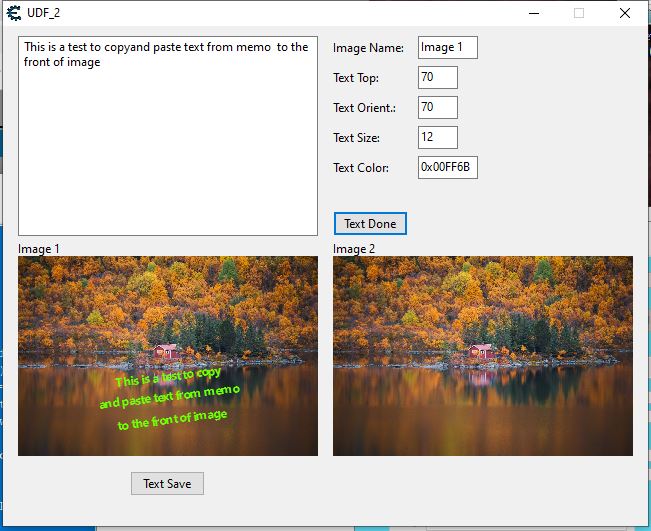
Here is the full code below. Of course there will be additions in other steps.
But the step I got stuck on: The new picture taken with a screenshot should be saved larger.
For example: like 800x600.
| Code: | local f = createForm() f.Width = 645 f.Height = 500
local Memo1 = createMemo(f) Memo1.setSize(300,200) Memo1.Top=10 Memo1.Left=15
local l1 = createLabel(f) l1.Left=330 l1.Top=14 l1.caption="Image Name:"
local l2 = createLabel(f) l2.Left=330 l2.Top=44 l2.caption="Text Top:"
local l3 = createLabel(f) l3.Left=330 l3.Top=74 l3.caption="Text Orient.:"
local l4 = createLabel(f) l4.Left=330 l4.Top=104 l4.caption="Text Size:"
local l5 = createLabel(f) l5.Left=330 l5.Top=134 l5.caption="Text Color:"
local l6 = createLabel(f) l6.Left=15 l6.Top=215 l6.caption="Image 1"
local l7 = createLabel(f) l7.Left=330 l7.Top=215 l7.caption="Image 2"
local e1 = createEdit(f) e1.Left = 415 e1.Top = 10 e1.Width = 60 e1.Text="Image 1"
local e2 = createEdit(f) e2.Left = 415 e2.Top = 40 e2.Width = 40 e2.Text="70"
local e3 = createEdit(f) e3.Left = 415 e3.Top = 70 e3.Width = 40 e3.Text="70"
local e4 = createEdit(f) e4.Left = 415 e4.Top = 100 e4.Width = 40 e4.Text="12"
local e5 = createEdit(f) e5.Left = 415 e5.Top = 130 e5.Width = 60 e5.Text="0x00FF6B"
local Image1 =createImage(f) Image1.setSize(300,200) Image1.Left = 15 Image1.Top = 230 Image1.Stretch = true
Image1.Picture.loadFromStream(findTableFile('image111.jpg').Stream)
local Image3 =createImage(f) Image3.setSize(300,200) Image3.Left = 330 Image3.Top = 230 Image3.Stretch = true
Image3.Picture.loadFromStream(findTableFile('image111.jpg').Stream)
local btn1 = createButton(f) btn1.Left = 330 btn1.Top = 185 btn1.Caption = 'Text Done'
local btn2 = createButton(f) btn2.Left = 127 btn2.Top = 445 btn2.Caption = 'Text Save'
test = [[
This is a test to copy
and paste text from memo
to the front of image
]]
Memo1.lines.add(test)
function PicText(item, top1)
if e1.Text=="Image 1" then
item = Image1 end
if e1.Text=="Image 2" then
item = Image3 end
if lbl then lbl.Destroy() end
lbl = createLabel(f)
lbl.Left = item.Left
lbl.Top = item.Top + top1
lbl.Font.Style = "fsBold"
lbl.Font.Color=e5.Text
lbl.Font.Orientation=e3.Text
lbl.FontSize = e4.Text
lbl.AutoSize = false
lbl.Height = item.Height
lbl.Width = item.Width
lbl.Alignment = "taCenter"
lbl.Layout = "tlCenter"
lbl.caption = Memo1.lines.Text
lbl.bringToFront()
end
btn1.onClick = function()
PicText(e1.Text, e2.Text)
end
function PhotoText()
local sc=getScreenCanvas()
local w=Image1.Width
local h=Image1.Height
sc=Image1.Canvas
local Image2 = createImage(f) Image2.Left=330 Image2.Top=230 Image2.Width=w Image2.Height=h
local btn3 = createButton(f) btn3.Left=445 btn3.Top=445 btn3.Caption='Pic Save'
Image2.Picture.Bitmap.Width=w
Image2.Picture.Bitmap.Height=h
Image2.canvas.copyRect(0,0,w,h,sc,0,0,w,h)
btn3.onClick = function()
local path = TrainerOrigin or getMainForm()
picture1 = Image2.Picture
if path then
picture1.saveToFile(path.."Pic1.jpeg")
end
end
end
btn2.OnClick = function()
PhotoText()
end |
| Description: |
|
| Filesize: |
67.48 KB |
| Viewed: |
2514 Time(s) |
|
_________________
|
|
| Back to top |
|
|
Corroder
Grandmaster Cheater Supreme
Reputation: 75
Joined: 10 Apr 2015
Posts: 1675
|
| Posted: Tue Jan 28, 2020 7:53 am Post subject: |
|
|
@Aylin, good job.
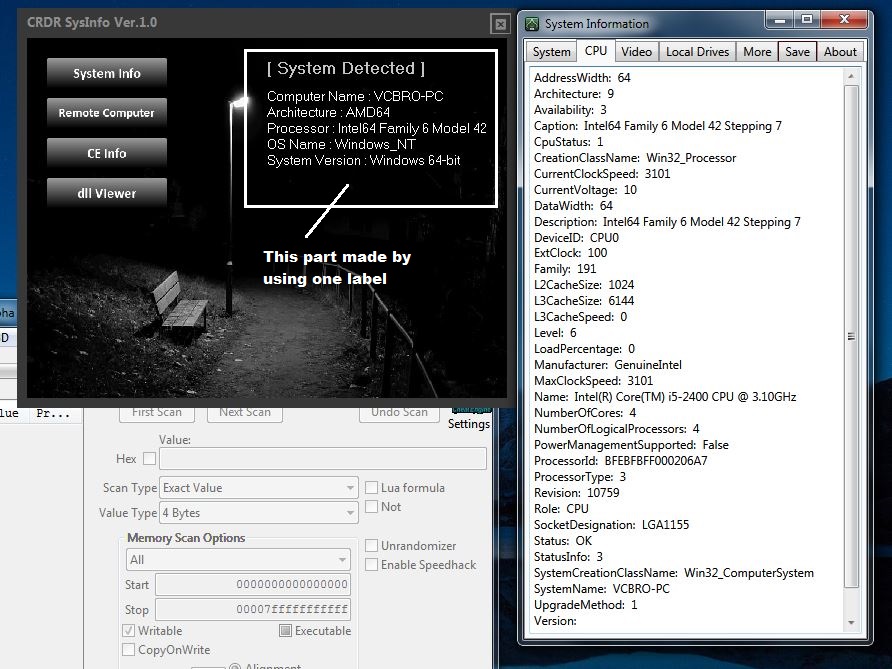
The attached picture is actually a project I am doing. See the part marked on the picture, that is why I need to get the process to write text in front of an image on the form. Btw, all info in this project did not use batch files or VBS script. It is done using C# mix with CE Lua.
EDIT :
Back to your case, you mean to save the image/canvas to local disk with resizing to a bigger size.
| Description: |
|
| Filesize: |
190.9 KB |
| Viewed: |
2317 Time(s) |
|
_________________
Stealing Code From Stolen Code...
And Admit It.. Hmmm....Typically LOL |
|
| Back to top |
|
|
AylinCE
Grandmaster Cheater Supreme
Reputation: 39
Joined: 16 Feb 2017
Posts: 1583
|
| Posted: Tue Jan 28, 2020 8:42 am Post subject: |
|
|
I can't do detailed things like you.
As I said: this was a surprise. 
I will develop this project when I have a spare time.
Note:
There are such programs on the market. Of course, more advanced ones.
However, I like using CE Lua.
I wish you success @Corroder. You are doing good work on the CE Lua horizon.
Go ahead, my friend, we follow you. 
_________________
|
|
| Back to top |
|
|
|
|
You cannot post new topics in this forum
You cannot reply to topics in this forum
You cannot edit your posts in this forum
You cannot delete your posts in this forum
You cannot vote in polls in this forum
You cannot attach files in this forum
You can download files in this forum
|
|
 FAQ
FAQ Search
 Memberlist
 Usergroups
 Register
 Profile
 Log in to check your private messages
 Log in


