| View previous topic :: View next topic |
| Author |
Message |
mohammedfenix1
Cheater
 Reputation: 0 Reputation: 0
Joined: 08 Feb 2015
Posts: 48
|
 Posted: Tue Mar 10, 2015 11:26 am Post subject: Anticheat problem Posted: Tue Mar 10, 2015 11:26 am Post subject: Anticheat problem |
 |
|
Hi all 
this time i'm trying to cheat Hitman absolution ....
when i try to open the debugger the game closing
i try to use "use VEH Debugger " but i got the same problem the game is closed
|
|
| Back to top |
|
 |
hhhuut
Grandmaster Cheater
 Reputation: 6 Reputation: 6
Joined: 08 Feb 2015
Posts: 607
|
| Posted: Tue Mar 10, 2015 1:06 pm Post subject: |
|
|
Then obviously the game contains an anti-debug protection....
Does the game load a file called xlive.dll? Because that one would be easy to bypass.
The kernelmode debugger doesn't work for you, does it? If so then try that one, perhaps the game doesn't look after loaded dbvm drivers (I don't own hitman so I don't know how it's protected)
Greetz
hhhuut
|
|
| Back to top |
|
|
mohammedfenix1
Cheater
Reputation: 0
Joined: 08 Feb 2015
Posts: 48
|
| Posted: Tue Mar 10, 2015 1:41 pm Post subject: |
|
|
In watch dogs i got the same problem like u see in this link http://forum.cheatengine.org/viewtopic.php?p=5580682&highlight=#5580682
but it was so easy to solve it i did like what i did in the list time
" i found the value and then find out what write to this address , the debugger opens without problem but when i'm trying to increase or decrease the value , the game is closing "
but this time it's not working with hitman
how can i know if the game load the xlive,dll or not ? i didn't find any xlive.dll file in the game location
and what u mean in kernelmode debugger ?
|
|
| Back to top |
|
|
hhhuut
Grandmaster Cheater
Reputation: 6
Joined: 08 Feb 2015
Posts: 607
|
| Posted: Tue Mar 10, 2015 2:47 pm Post subject: |
|
|
CE offers you three different kinds of debuggers.
The Windows- and the VEH-Debugger were the ones you've already tried.
The third one is the kernelmode debugger, but if you don't know how it's working or what to do to activate it you should probably leave your hands off this one ...
If there's not xlive.dll somewhere in the game directory then it is not XLive that protects the game ...
And when exactly does the game close? As soon as you attached the debugger or just when you want to find out what accesses/writes an address?
Btw: According to this thread I just found, it's pretty hard to bypass the anti-cheat resp. anti-debug protection.
There's also a trainer from MegaDev: http://de.megadev.info/Games~Hitman--Absolution~s-game-t-189.html#trainer
But for both, the one from MegaDev and the one from cheathappens, you'll have to pay to use the trainer ...
|
|
| Back to top |
|
|
mohammedfenix1
Cheater
Reputation: 0
Joined: 08 Feb 2015
Posts: 48
|
| Posted: Tue Mar 10, 2015 4:29 pm Post subject: |
|
|
| hhhuut wrote: | CE offers you three different kinds of debuggers.
The Windows- and the VEH-Debugger were the ones you've already tried.
The third one is the kernelmode debugger, but if you don't know how it's working or what to do to activate it you should probably leave your hands off this one ...
If there's not xlive.dll somewhere in the game directory then it is not XLive that protects the game ...
And when exactly does the game close? As soon as you attached the debugger or just when you want to find out what accesses/writes an address?
Btw: According to this thread I just found, it's pretty hard to bypass the anti-cheat resp. anti-debug protection.
There's also a trainer from MegaDev: http://de.megadev.info/Games~Hitman--Absolution~s-game-t-189.html#trainer
But for both, the one from MegaDev and the one from cheathappens, you'll have to pay to use the trainer ... |
i used the kernelmode debugger one time and he shut down my laptop lol
and about the trainer i do not need to pay for it i just downloaded from this link http://m0001.gamecopyworld.com/games/pc_hitman_absolution.shtml#Hitman: Absolution v1.0 [MULTI8] Fixed Files 2
and it's work and i saw the other link in cheat engine forum and then i asked this question
can you give me any tutorial about kernelmode debugger or any video 
|
|
| Back to top |
|
|
hhhuut
Grandmaster Cheater
Reputation: 6
Joined: 08 Feb 2015
Posts: 607
|
| Posted: Tue Mar 10, 2015 4:40 pm Post subject: |
|
|
Puuh, I don't have time to make a video right now, but some points how it works for me:
- Set your processor cout to two (in the msconfig window)
- Choose kernelmode debugger in CE
- Uncheck the "Use global debug routines" (I also unchecked "Ability to step through kernel code" but only because I don't need this one)
- restart computer
- Open CE again and try to run dbvm (right click on CE logo and click on the green label which says "Your system supports dbvm")
|
|
| Back to top |
|
|
mohammedfenix1
Cheater
Reputation: 0
Joined: 08 Feb 2015
Posts: 48
|
| Posted: Tue Mar 10, 2015 5:01 pm Post subject: |
|
|
sorry i didn't tell u when the game is closing coz i can't double the comment
the game freezing when i back to cheat engine and when i back to the game it's working i'm telling u that like a hint so when attach the debugger and i back to the game , the game stop working
i will try to use the kernelmode debugger and i will see
|
|
| Back to top |
|
|
hhhuut
Grandmaster Cheater
Reputation: 6
Joined: 08 Feb 2015
Posts: 607
|
| Posted: Tue Mar 10, 2015 5:19 pm Post subject: |
|
|
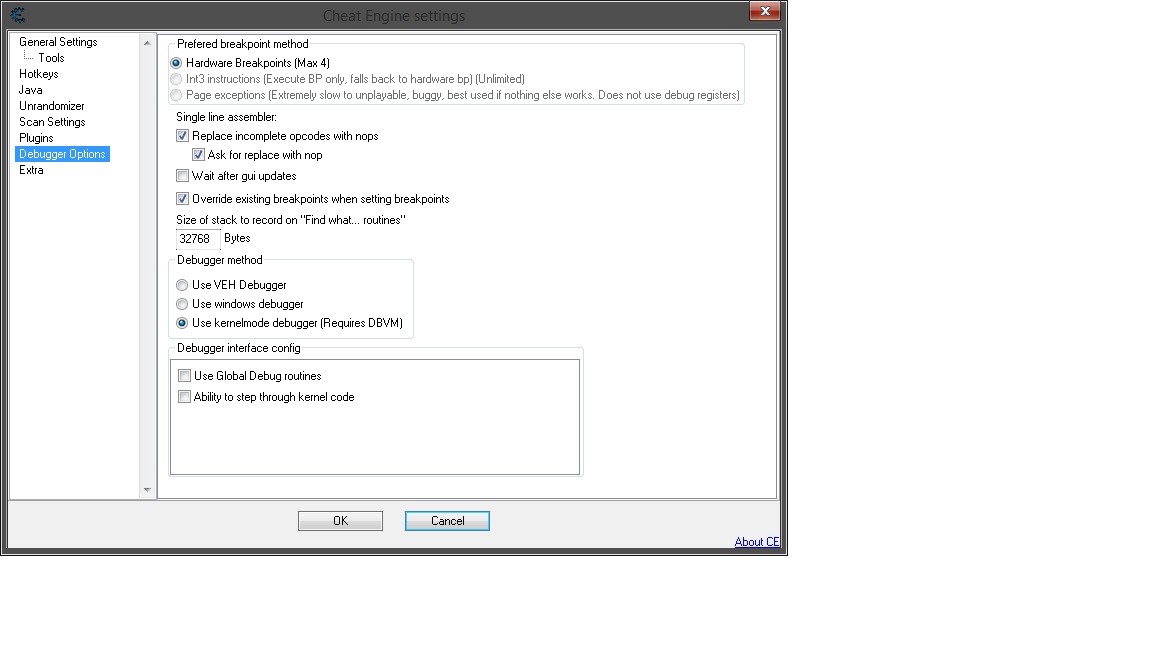
Here are my settings (in Windows and in CE) with which the KM-Debugger works quite well ...
| Description: |
| My Settings for the KM-Debugger (make sure you leave the "Use global debug routines" unchecked) |
|
| Filesize: |
92.31 KB |
| Viewed: |
12860 Time(s) |
|
| Description: |
| My settings in the msconfig |
|
| Filesize: |
39.7 KB |
| Viewed: |
12860 Time(s) |

|
|
|
| Back to top |
|
|
mohammedfenix1
Cheater
Reputation: 0
Joined: 08 Feb 2015
Posts: 48
|
| Posted: Tue Mar 10, 2015 6:15 pm Post subject: |
|
|
Thanks
and i try it and all the time the windows crashing
i solve the problem and then i try to open the db and this time the closed and windows explorer crashing i reopen the windows explorer and try to open the db again this time just the game closed
|
|
| Back to top |
|
|
Matroix123
Cheater
![]() Reputation: 0 Reputation: 0
Joined: 08 Mar 2015
Posts: 25
Location: Hell Land of The Week
|
| Posted: Thu Mar 12, 2015 8:13 am Post subject: . |
|
|
tell me your pc specifications then i can help you somehow ( even HDD size too )
_________________
It's piss easy |
|
| Back to top |
|
|
mohammedfenix1
Cheater
Reputation: 0
Joined: 08 Feb 2015
Posts: 48
|
| Posted: Thu Mar 12, 2015 3:43 pm Post subject: |
|
|
ok.
Ram =8GB
HD Graphics 3000
Total Available Graphics Memory: 5329 MB
HDD = 456.76 GB
Processor : intel core i5-2450 CPU @ 2.50Hz
|
|
| Back to top |
|
|
hhhuut
Grandmaster Cheater
Reputation: 6
Joined: 08 Feb 2015
Posts: 607
|
| Posted: Thu Mar 12, 2015 3:59 pm Post subject: |
|
|
| mohammedfenix1 wrote: | Thanks
and i try it and all the time the windows crashing
i solve the problem and then i try to open the db and this time the closed and windows explorer crashing i reopen the windows explorer and try to open the db again this time just the game closed |
Does that mean that enabling DBVM works for you with the settings I previously posted (or with any other settings, doesn't really matter)?
So basicly: Do you only have difficulties in attaching the kernelmode debugger to a specific game or do you have difficulites in getting DBVM to run properly?
|
|
| Back to top |
|
|
mohammedfenix1
Cheater
Reputation: 0
Joined: 08 Feb 2015
Posts: 48
|
| Posted: Thu Mar 12, 2015 4:40 pm Post subject: |
|
|
The settings does nothing and
with some games the windows shutting down and in another games nothing happening just the game crashing
|
|
| Back to top |
|
|
hhhuut
Grandmaster Cheater
Reputation: 6
Joined: 08 Feb 2015
Posts: 607
|
| Posted: Thu Mar 12, 2015 4:48 pm Post subject: |
|
|
But you enabled DBVM???
So when you right-click on the CE-Logo it says "You're running DBVM version X" in green letters in the bottom left corner?
Because it's logical that you can't attach the km-debugger without launching DBVM first!
|
|
| Back to top |
|
|
mohammedfenix1
Cheater
Reputation: 0
Joined: 08 Feb 2015
Posts: 48
|
| Posted: Thu Mar 12, 2015 5:16 pm Post subject: |
|
|
| Yes the DBVM is enabled but i mean it does nothing with db and the game still crashing when i'm using the db
|
|
| Back to top |
|
|
|

 FAQ
FAQ Search
 Memberlist
 Usergroups
 Register
 Profile
 Log in to check your private messages
 Log in


