 |
Cheat Engine
The Official Site of Cheat Engine
|
| View previous topic :: View next topic |
| Author |
Message |
ChrisFenix
How do I cheat?
![]() Reputation: 0 Reputation: 0
Joined: 21 Aug 2013
Posts: 2
|
 Posted: Wed Aug 21, 2013 10:56 pm Post subject: VB.Net Pointer & Offset Issues Posted: Wed Aug 21, 2013 10:56 pm Post subject: VB.Net Pointer & Offset Issues |
 |
|
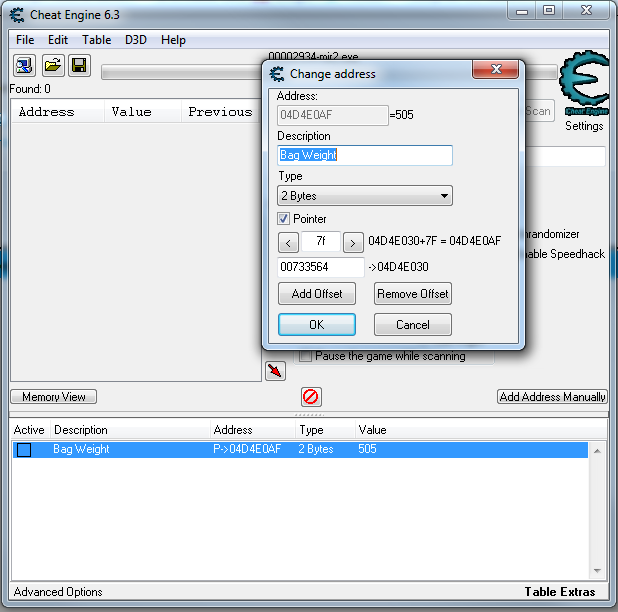
Hello there, I'm new to reading and writing memory in VB.Net but the game I am trying to "cheat" is one which kills the connection after something like 30 seconds of Cheat Engine being open. This hasn't been an issue as I still managed to find the Static Pointer I needed for bag weight in said game. (You run slow when you carry too much. Anyway) In cheat engine it works fine. I have my base address (00733564) and my offset (7F) In cheat engine as you can see from the picture. My 2 byte address does it's thing and returns it's value. Here is my code - I'm using the VB.Net module written by Cless which has got me pretty much all the way there apart from i'm reading the wrong address. I've actually somehow managed to get it changing the durability of my armour instead of making my bag weight nothing  slight issue hehe. anyway here's the code. Any insight on this would be great. I'm sure it's something simple! slight issue hehe. anyway here's the code. Any insight on this would be great. I'm sure it's something simple!
| Code: | | Me.Text = ReadPointerInteger("mir2", &H733564, &H7F).ToString() |
My code is as simple as that. Within the module this is what can be found -
| Code: |
'VB.NET Module
'Author : Cless
'How to use Read/Write Pointer
'Example Read
' Me.Text = ReadPointerInteger(Game exe name, &HPointer,&HOffset).ToString()
'
' Me.Text = ReadPointerInteger("gta_sa", &HB71A38,&H540).ToString()
' Or
' Me.Text = ReadPointerInteger("gta_sa", &HB71A38,&H540,&H544).ToString()
'Example Write
' WritePointerInteger(Game exe name,&HPointer,Value,&HOffset)
'
' WritePointerInteger("gta_sa",&HB71A38,1000,&H540)
' Or
' WritePointerInteger("gta_sa",&HB71A38,1000,&H540, &H544)
Module Trainer
Private Declare Function ReadMemoryByte Lib "kernel32" Alias "ReadProcessMemory" (ByVal Handle As Integer, ByVal Address As Integer, ByRef Value As Byte, Optional ByVal Size As Integer = 2, Optional ByRef Bytes As Integer = 0) As Byte
Private Declare Function ReadMemoryInteger Lib "kernel32" Alias "ReadProcessMemory" (ByVal Handle As Integer, ByVal Address As Integer, ByRef Value As Integer, Optional ByVal Size As Integer = 4, Optional ByRef Bytes As Integer = 0) As Integer
Private Declare Function ReadMemoryFloat Lib "kernel32" Alias "ReadProcessMemory" (ByVal Handle As Integer, ByVal Address As Integer, ByRef Value As Single, Optional ByVal Size As Integer = 4, Optional ByRef Bytes As Integer = 0) As Single
Private Declare Function ReadMemoryDouble Lib "kernel32" Alias "ReadProcessMemory" (ByVal Handle As Integer, ByVal Address As Integer, ByRef Value As Double, Optional ByVal Size As Integer = 8, Optional ByRef Bytes As Integer = 0) As Double
Private Declare Function WriteMemoryByte Lib "kernel32" Alias "WriteProcessMemory" (ByVal Handle As Integer, ByVal Address As Integer, ByRef Value As Byte, Optional ByVal Size As Integer = 2, Optional ByRef Bytes As Integer = 0) As Byte
Private Declare Function WriteMemoryInteger Lib "kernel32" Alias "WriteProcessMemory" (ByVal Handle As Integer, ByVal Address As Integer, ByRef Value As Integer, Optional ByVal Size As Integer = 4, Optional ByRef Bytes As Integer = 0) As Integer
Private Declare Function WriteMemoryFloat Lib "kernel32" Alias "WriteProcessMemory" (ByVal Handle As Integer, ByVal Address As Integer, ByRef Value As Single, Optional ByVal Size As Integer = 2, Optional ByRef Bytes As Integer = 0) As Single
Private Declare Function WriteMemoryDouble Lib "kernel32" Alias "WriteProcessMemory" (ByVal Handle As Integer, ByVal Address As Integer, ByRef Value As Double, Optional ByVal Size As Integer = 2, Optional ByRef Bytes As Integer = 0) As Double
Public Function ReadByte(ByVal EXENAME As String, ByVal Address As Integer) As Byte
Dim Value As Byte
If Process.GetProcessesByName(EXENAME).Length <> 0 Then
Dim Handle As Integer = Process.GetProcessesByName(EXENAME)(0).Handle
If Handle <> 0 Then
ReadMemoryByte(Handle, Address, Value)
End If
End If
Return Value
End Function
Public Function ReadInteger(ByVal EXENAME As String, ByVal Address As Integer) As Integer
Dim Value As Integer
If Process.GetProcessesByName(EXENAME).Length <> 0 Then
Dim Handle As Integer = Process.GetProcessesByName(EXENAME)(0).Handle
If Handle <> 0 Then
ReadMemoryInteger(Handle, Address, Value)
End If
End If
Return Value
End Function
Public Function ReadFloat(ByVal EXENAME As String, ByVal Address As Integer) As Single
Dim Value As Single
If Process.GetProcessesByName(EXENAME).Length <> 0 Then
Dim Handle As Integer = Process.GetProcessesByName(EXENAME)(0).Handle
If Handle <> 0 Then
ReadMemoryFloat(Handle, Address, Value)
End If
End If
Return Value
End Function
Public Function ReadDouble(ByVal EXENAME As String, ByVal Address As Integer) As Double
Dim Value As Double
If Process.GetProcessesByName(EXENAME).Length <> 0 Then
Dim Handle As Integer = Process.GetProcessesByName(EXENAME)(0).Handle
If Handle <> 0 Then
ReadMemoryByte(Handle, Address, Value)
End If
End If
Return Value
End Function
Public Function ReadPointerByte(ByVal EXENAME As String, ByVal Pointer As Integer, ByVal ParamArray Offset As Integer()) As Byte
Dim Value As Byte
If Process.GetProcessesByName(EXENAME).Length <> 0 Then
Dim Handle As Integer = Process.GetProcessesByName(EXENAME)(0).Handle
If Handle <> 0 Then
For Each I As Integer In Offset
ReadMemoryInteger(Handle, Pointer, Pointer)
Pointer += I
Next
ReadMemoryByte(Handle, Pointer, Value)
End If
Else
MsgBox("can't find process")
End If
Return Value
End Function
Public Function ReadPointerInteger(ByVal EXENAME As String, ByVal Pointer As Integer, ByVal ParamArray Offset As Integer() ) As Integer
Dim Value As Integer
If Process.GetProcessesByName(EXENAME).Length <> 0 Then
Dim Handle As Integer = Process.GetProcessesByName(EXENAME)(0).Handle
If Handle <> 0 Then
For Each I As Integer In Offset
ReadMemoryInteger(Handle, Pointer, Pointer)
Pointer += I
Next
ReadMemoryInteger(Handle, Pointer, Value)
End If
End If
Return Value
End Function
Public Function ReadPointerFloat(ByVal EXENAME As String, ByVal Pointer As Integer, ByVal ParamArray Offset As Integer()) As Single
Dim Value As Single
If Process.GetProcessesByName(EXENAME).Length <> 0 Then
Dim Handle As Integer = Process.GetProcessesByName(EXENAME)(0).Handle
If Handle <> 0 Then
For Each I As Integer In Offset
ReadMemoryInteger(Handle, Pointer, Pointer)
Pointer += I
Next
ReadMemoryFloat(Handle, Pointer, Value)
End If
End If
Return Value
End Function
Public Function ReadPointerDouble(ByVal EXENAME As String, ByVal Pointer As Integer, ByVal ParamArray Offset As Integer()) As Double
Dim Value As Double
If Process.GetProcessesByName(EXENAME).Length <> 0 Then
Dim Handle As Integer = Process.GetProcessesByName(EXENAME)(0).Handle
If Handle <> 0 Then
For Each I As Integer In Offset
ReadMemoryInteger(Handle, Pointer, Pointer)
Pointer += I
Next
ReadMemoryDouble(Handle, Pointer, Value)
End If
End If
Return Value
End Function
Public Sub WriteByte(ByVal EXENAME As String, ByVal Address As Integer, ByVal Value As Byte)
If Process.GetProcessesByName(EXENAME).Length <> 0 Then
Dim Handle As Integer = Process.GetProcessesByName(EXENAME)(0).Handle
If Handle <> 0 Then
WriteMemoryByte(Handle, Address, Value)
End If
End If
End Sub
Public Sub WriteInteger(ByVal EXENAME As String, ByVal Address As Integer, ByVal Value As Integer)
If Process.GetProcessesByName(EXENAME).Length <> 0 Then
Dim Handle As Integer = Process.GetProcessesByName(EXENAME)(0).Handle
If Handle <> 0 Then
WriteMemoryInteger(Handle, Address, Value)
End If
End If
End Sub
Public Sub WriteFloat(ByVal EXENAME As String, ByVal Address As Integer, ByVal Value As Single)
If Process.GetProcessesByName(EXENAME).Length <> 0 Then
Dim Handle As Integer = Process.GetProcessesByName(EXENAME)(0).Handle
If Handle <> 0 Then
WriteMemoryFloat(Handle, Address, Value)
End If
End If
End Sub
Public Sub WriteDouble(ByVal EXENAME As String, ByVal Address As Integer, ByVal Value As Double)
If Process.GetProcessesByName(EXENAME).Length <> 0 Then
Dim Handle As Integer = Process.GetProcessesByName(EXENAME)(0).Handle
If Handle <> 0 Then
WriteMemoryDouble(Handle, Address, Value)
End If
End If
End Sub
Public Sub WritePointerByte(ByVal EXENAME As String, ByVal Pointer As Integer, ByVal Value As Byte, ByVal ParamArray Offset As Integer())
If Process.GetProcessesByName(EXENAME).Length <> 0 Then
Dim Handle As Integer = Process.GetProcessesByName(EXENAME)(0).Handle
If Handle <> 0 Then
For Each I As Integer In Offset
ReadMemoryInteger(Handle, Pointer, Pointer)
Pointer += I
Next
WriteMemoryByte(Handle, Pointer, Value)
End If
End If
End Sub
Public Sub WritePointerInteger(ByVal EXENAME As String, ByVal Pointer As Integer, ByVal Value As Integer, ByVal ParamArray Offset As Integer())
If Process.GetProcessesByName(EXENAME).Length <> 0 Then
Dim Handle As Integer = Process.GetProcessesByName(EXENAME)(0).Handle
If Handle <> 0 Then
For Each I As Integer In Offset
ReadMemoryInteger(Handle, Pointer, Pointer)
Pointer += I
Next
WriteMemoryInteger(Handle, Pointer, Value)
End If
End If
End Sub
Public Sub WritePointerFloat(ByVal EXENAME As String, ByVal Pointer As Integer, ByVal Value As Single, ByVal ParamArray Offset As Integer())
If Process.GetProcessesByName(EXENAME).Length <> 0 Then
Dim Handle As Integer = Process.GetProcessesByName(EXENAME)(0).Handle
If Handle <> 0 Then
For Each I As Integer In Offset
ReadMemoryInteger(Handle, Pointer, Pointer)
Pointer += I
Next
WriteMemoryFloat(Handle, Pointer, Value)
End If
End If
End Sub
Public Sub WritePointerDouble(ByVal EXENAME As String, ByVal Pointer As Integer, ByVal Value As Double, ByVal ParamArray Offset As Integer())
If Process.GetProcessesByName(EXENAME).Length <> 0 Then
Dim Handle As Integer = Process.GetProcessesByName(EXENAME)(0).Handle
If Handle <> 0 Then
For Each I As Integer In Offset
ReadMemoryInteger(Handle, Pointer, Pointer)
Pointer += I
Next
WriteMemoryDouble(Handle, Pointer, Value)
End If
End If
End Sub
End Module |
I'm aware it's probably overkill posting the whole thing. Thanks for taking the time to read this anyway. Best wishes
Chris
Edit: It has to be that Integer is 4bits in my app and the address is supposed to be two. I tried the dropdown box to 4 and it gave me the same result in CE that I get from my .net app. Am I sending it as the wrong type or something? Sorry to come across as so green but we all start somewhere hehe. Oh also this game is an ex-multiplayer game. the servers have long since been down but the files were released and I like playing around. This game has always been a source for my tinkering ^^
| Description: |
|
| Filesize: |
64.38 KB |
| Viewed: |
8231 Time(s) |
|
|
|
| Back to top |
|
 |
ChrisFenix
How do I cheat?
![]() Reputation: 0 Reputation: 0
Joined: 21 Aug 2013
Posts: 2
|
| Posted: Thu Aug 22, 2013 1:22 pm Post subject: |
|
|
Just to let you all know. I worked it out in the end. I needed to just make a new function and use a short. If anyone would like that then -
| Code: | Private Declare Function ReadMemoryShort Lib "kernel32" Alias "ReadProcessMemory" (ByVal Handle As Integer, ByVal Address As Integer, ByRef Value As Short, Optional ByVal Size As Integer = 2, Optional ByRef Bytes As Integer = 0) As Short
Private Declare Function WriteMemoryShort Lib "kernel32" Alias "WriteProcessMemory" (ByVal Handle As Integer, ByVal Address As Integer, ByRef Value As Short, Optional ByVal Size As Integer = 2, Optional ByRef Bytes As Integer = 0) As Short
Public Function ReadPointerShort(ByVal EXENAME As String, ByVal Pointer As Integer, ByVal ParamArray Offset As Integer()) As Integer
Dim Value As Integer
If Process.GetProcessesByName(EXENAME).Length <> 0 Then
Dim Handle As Integer = Process.GetProcessesByName(EXENAME)(0).Handle
If Handle <> 0 Then
For Each I As Integer In Offset
ReadMemoryInteger(Handle, Pointer, Pointer)
Pointer += I
Next
ReadMemoryShort(Handle, Pointer, Value)
End If
End If
Return Value
End Function
Public Sub WritePointerShort(ByVal EXENAME As String, ByVal Pointer As Integer, ByVal Value As Integer, ByVal ParamArray Offset As Integer())
If Process.GetProcessesByName(EXENAME).Length <> 0 Then
Dim Handle As Integer = Process.GetProcessesByName(EXENAME)(0).Handle
If Handle <> 0 Then
For Each I As Integer In Offset
ReadMemoryInteger(Handle, Pointer, Pointer)
Pointer += I
Next
WriteMemoryShort(Handle, Pointer, Value)
End If
End If
End Sub |
now I just need to figure out how to "freeze" this value and to stop it from updating every time I pick something new up. Thanks for reading.
Kind regards
Chris
Edit: I've managaed to just do this using a timer for the moment, checking for a change in the address and re-poping it accordingly. I know I could NOP it but I have little to no experience with NOPs plus I know this pointer is used for many other values other than bag weight so I can't really make it do nothing. I did try to NOP the "dynamic" memory address which seemed to work perfectly (In cheat engine that is as I have no idea how to do such a thing in VB.Net as of yet) I did try to NOP the pointer as a laugh too and let's just say it didn't end well for my game haha. I guess I could get the Dynamic memory address each time using my static pointer + offset and just NOP the dynamic? But how would I use the pointer + offset to actually get the dynamic address each time? I'm still trying to get my head around it. As I said, for now I'm happy with the timer method but it would be much more efficient if I could NOP it. When picking items up while bag weight is over, for a split second it pops back up and slows my character down. Any pointers on this would be great *ba dum tsch*
Thank you, I'll be here all week.
|
|
| Back to top |
|
|
|
|
You cannot post new topics in this forum
You cannot reply to topics in this forum
You cannot edit your posts in this forum
You cannot delete your posts in this forum
You cannot vote in polls in this forum
You cannot attach files in this forum
You can download files in this forum
|
|
 FAQ
FAQ Search
 Memberlist
 Usergroups
 Register
 Profile
 Log in to check your private messages
 Log in


