| View previous topic :: View next topic |
| Author |
Message |
Shayde
Grandmaster Cheater
 Reputation: 5 Reputation: 5
Joined: 22 Apr 2008
Posts: 603
Location: UK
|
 Posted: Sun Apr 05, 2009 12:23 pm Post subject: My Firefox suddenly stopped working?? Posted: Sun Apr 05, 2009 12:23 pm Post subject: My Firefox suddenly stopped working?? |
 |
|
Ok all the times that i used Mozilla Firefox it used to work
and once i was on Firefox then it just got jammed
then i tried opening it again than this error came up:
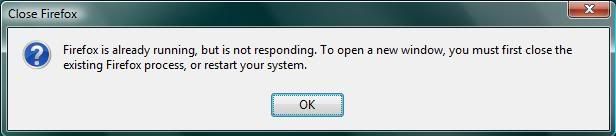
If you cant see the picture it says:
Firefox is already running,but is not responding. To open a new window,
you must first close the existing Firefox process, or restart you system.
Then i tried opening it 100's of times still the same error came so i
restarted my laptop then i opened Mozilla Firefox again
and it worked for like 5 minutes and then the same error keeps coming up
then i restarted again and went on Firefox and still the same error.
Then i uninstalled Firefox and installed it again and still the same problem
Sometimes i opened Task Manager to quit the process but no good
Anything i can do to fix it???
_________________
|
|
| Back to top |
|
 |
DreadFather
I post too much
![]() Reputation: 1 Reputation: 1
Joined: 22 Feb 2008
Posts: 2018
|
| Posted: Sun Apr 05, 2009 12:28 pm Post subject: |
|
|
| Try opening your Task Manager, go to processes and look for Firefox.exe . Right click it and select "End Process".
|
|
| Back to top |
|
|
Shayde
Grandmaster Cheater
Reputation: 5
Joined: 22 Apr 2008
Posts: 603
Location: UK
|
| Posted: Sun Apr 05, 2009 12:35 pm Post subject: |
|
|
thats not the problem
i already do that and when i open firefox again
5 minutes later it gets stuck
i close firefox and the same error comes then
i have to go on task manager again and end the process...
what can i do so the error stops coming all the times
_________________
|
|
| Back to top |
|
|
DreadFather
I post too much
![]() Reputation: 1 Reputation: 1
Joined: 22 Feb 2008
Posts: 2018
|
| Posted: Sun Apr 05, 2009 12:41 pm Post subject: |
|
|
| GangstaShaydee wrote: | thats not the problem
i already do that and when i open firefox again
5 minutes later it gets stuck
i close firefox and the same error comes then
i have to go on task manager again and end the process...
what can i do so the error stops coming all the times |
Might be that your FireFox is... Maybe outdated? Im not sure, post this in Computer Talk.
http://forum.cheatengine.org/viewforum.php?f=49
|
|
| Back to top |
|
|
Shayde
Grandmaster Cheater
Reputation: 5
Joined: 22 Apr 2008
Posts: 603
Location: UK
|
| Posted: Sun Apr 05, 2009 12:45 pm Post subject: |
|
|
ok thanks and no i dont think its outdated
because its the latesst firefox so wtf....???
_________________
|
|
| Back to top |
|
|
xV
I post too much
 Reputation: 1 Reputation: 1
Joined: 03 Jan 2008
Posts: 3783
Location: Seattle
|
| Posted: Sun Apr 05, 2009 12:59 pm Post subject: |
|
|
Any addons you recently installed that may somehow mess with the original coding?
_________________
|
|
| Back to top |
|
|
Hannah.
How do I cheat?
![]() Reputation: 13 Reputation: 13
Joined: 28 Aug 2008
Posts: 0
|
| Posted: Sun Apr 05, 2009 1:15 pm Post subject: |
|
|
That happened to me.
Run CHKDSK / ScanDisk. That's what got mine working. :3
_________________
THE CONSEQUENCES WILL NEVER BE THE SAAAAAAME |
|
| Back to top |
|
|
Arcobaleno
I post too much
 Reputation: 0 Reputation: 0
Joined: 28 Aug 2008
Posts: 2827
|
| Posted: Sun Apr 05, 2009 1:32 pm Post subject: |
|
|
Happen to me a few times....i just had to remove some add ons and update it.
_________________

+Rep me if i helped you. |
|
| Back to top |
|
|
:^(
Grandmaster Cheater
 Reputation: 109 Reputation: 109
Joined: 25 May 2007
Posts: 689
|
| Posted: Sun Apr 05, 2009 4:32 pm Post subject: |
|
|
| TastyToast wrote: | That happened to me.
Run CHKDSK / ScanDisk. That's what got mine working. :3 |
CONFICKER C >:O
_________________
|
|
| Back to top |
|
|
|

 FAQ
FAQ Search
 Memberlist
 Usergroups
 Register
 Profile
 Log in to check your private messages
 Log in


