 |
Cheat Engine
The Official Site of Cheat Engine
|
| View previous topic :: View next topic |
| Author |
Message |
Chase Payne
Grandmaster Cheater
 Reputation: 1 Reputation: 1
Joined: 20 Mar 2008
Posts: 533
|
 Posted: Tue May 20, 2008 8:06 pm Post subject: Posted: Tue May 20, 2008 8:06 pm Post subject: |
 |
|
| Quote: | I said 'a single dust particle can easily ruin a hard drive'.
I have proof to back that up... (from the link I provided) |
He still agrees that 1 spec of dust will kill your hard disk.
I'm done with you, your idiocy has maximised.
Last edited by Chase Payne on Wed May 21, 2008 6:22 am; edited 1 time in total |
|
| Back to top |
|
 |
Madman
I post too much
 Reputation: 1 Reputation: 1
Joined: 04 May 2006
Posts: 3978
|
| Posted: Wed May 21, 2008 4:43 am Post subject: |
|
|
| Ajax wrote: | | Chase Payne wrote: | | Quote: | | Dust in homes, offices, and other human environments consists of human skin cells, plant pollen, human and animal hairs, textile fibers, paper fibers, minerals from outdoor soil and dust, and many other materials which may be found in the local environment.[1] The precise composition of domestic dust can vary widely: |
| Quote: | | Earth, dust occurs in the atmosphere from various sources; soil dust lifted up by wind, volcanic eruptions, and pollution are some examples |
| Quote: | | The particles that make up house dust can easily become airborne, so care must be exercised when removing dust, as the activity intended to sanitize or remove dust may make it airborne. One way to repel dust is with some kind of electrical charge, but house dust can be removed by many methods, including wiping, swiping, or sweeping by hand, or with a dust cloth, sponge, feather duster, or broom, or by suction by a vacuum cleaner or air filter. |
Dust is in air, air filter traps dust...
Again... the air has dust in it. |
Your being hella literal dude. So what if it isn't a speck of dust. Maybe two specks of dust. You are just carrying a pointless conversation. And the air isn't filled of dust. If you really tried the light shining on thing, if it was filled with dust, you could barely see it. I can clearly see each particle, and there isn't that much. Maybe you just live in a place where it's dustier, but I don't. And you didn't answer my question. I know how PCs and Laptops work. I was talking about if the hard drive was enclosed, meaning that it is covered in some kind of external armor, how can a speck of dust get in, and that was aimed at madman. |
Here is a hard drive without the top guard on.
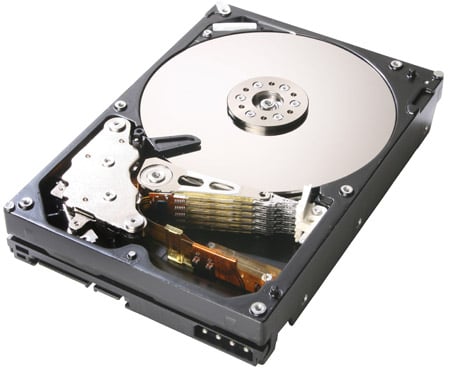
Here is a hard drive with the top guard on.

The only reason the top should ever be off, is during the manufacturing process, and if you are attempting to fix a broken one.
@ Chase:
See that disc shaped thing in the first picture? If a speck of dust is ever in contact with it, the arm will 'crash' into the disc, scratching it. That is called a 'head crash'; which is what the article I linked you to is about.
_________________
|
|
| Back to top |
|
|
Ajax
Grandmaster Cheater Supreme
 Reputation: 0 Reputation: 0
Joined: 28 Jan 2008
Posts: 1545
|
| Posted: Wed May 21, 2008 11:18 am Post subject: |
|
|
Eh.. this argument spun out of control. It's about richkid. Chase your just being a literal ass about it. Hard drives, when exposed can be damaged by dust. Why do you think it's so important to install fans to remove dust from inside?
_________________
http://forum.cheatengine.org/search.php < The almighty power of this forum =]
Every time someone uses my siggy, a noob dies, and a human being is born.
Drivers are always the answer to everything. |
|
| Back to top |
|
|
Madman
I post too much
Reputation: 1
Joined: 04 May 2006
Posts: 3978
|
| Posted: Wed May 21, 2008 12:48 pm Post subject: |
|
|
Well hard disks are really only vulnerable when it is exposed... the fans are there not only to remove dust, but to bring in cold air and take out hot air to keep temperatures down.
_________________
|
|
| Back to top |
|
|
qord
Expert Cheater
![]() Reputation: 0 Reputation: 0
Joined: 02 May 2008
Posts: 153
|
| Posted: Wed May 21, 2008 2:07 pm Post subject: |
|
|
| Thats a lot of spam just to tell the guy to try booting with a different hd. Sounds to me like its a ram issue, not hd. Have you opened it(case) up to listen for sounds? Has the cpu fan stopped working? If you have a spare hd you can use, try booting with it. If you have more than 1 stick of ram installed, pull one out and try to boot. Without a multimeter and the right attachments, trial and error is the only way you'll find the real problem.
|
|
| Back to top |
|
|
|
|
You cannot post new topics in this forum
You cannot reply to topics in this forum
You cannot edit your posts in this forum
You cannot delete your posts in this forum
You cannot vote in polls in this forum
You cannot attach files in this forum
You cannot download files in this forum
|
|
 FAQ
FAQ Search
 Memberlist
 Usergroups
 Register
 Profile
 Log in to check your private messages
 Log in


