AylinCE
Grandmaster Cheater Supreme
 Reputation: 39 Reputation: 39
Joined: 16 Feb 2017
Posts: 1596
|
 Posted: Sun Aug 16, 2026 7:34 am Post subject: CE-Trainers Interactive Plexus Effect [Module] Posted: Sun Aug 16, 2026 7:34 am Post subject: CE-Trainers Interactive Plexus Effect [Module] |
 |
|
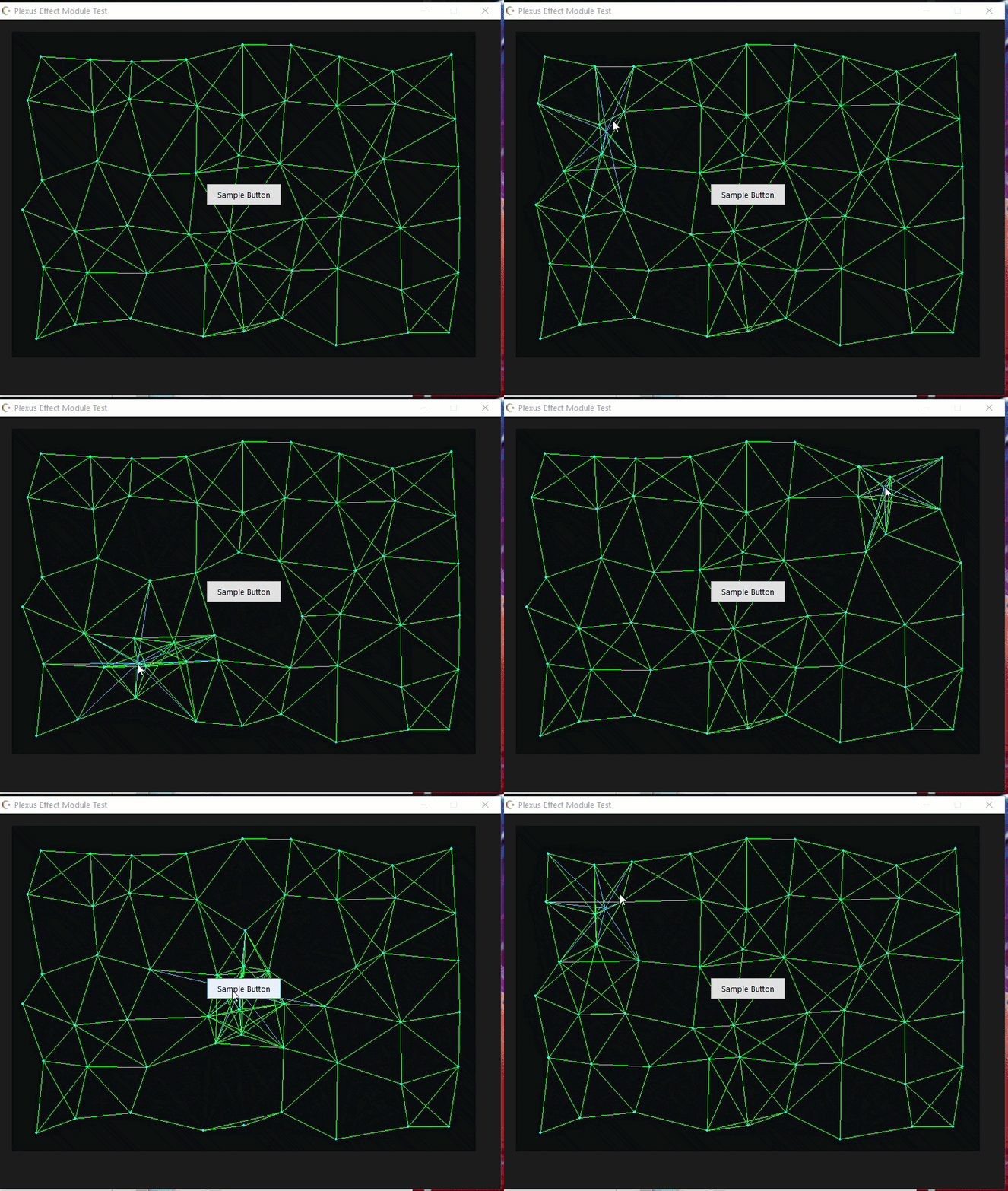
A lightweight, grid-based interactive plexus/magnet network background effect for Cheat Engine forms and panels, using LCL Canvas rendering.
I've added the necessary explanations in the code, and the image shows a sample version tested with a trainer.
 [/url] [/url]
| Code: | -- ============================================================================
-- Module: PlexusEffect (OOP / Multi-Instance Supported)
-- Author: ByAylinCE
-- Description: Interactive magnet network background effect for Cheat Engine Trainers / Lua Scripts.
-- ============================================================================
PlexusEffect = {}
PlexusEffect.__index = PlexusEffect
-- Constructor for creating unique instances
function PlexusEffect:new(parentControl)
local instance = setmetatable({}, PlexusEffect)
-- Unique Configuration Instance Parameters
instance.GRID_COLS = 9
instance.GRID_ROWS = 6
instance.RANDOM_JITTER = 25
instance.MAX_DISTANCE = 135
instance.MOUSE_RADIUS = 150
instance.MAGNET_FORCE = 0.12
-- Unique Color Options (BGR Format)
instance.COLOR_BG = 0x0A0805
instance.COLOR_LINE = 0xD08030
instance.COLOR_LINE_HOVER = 0xFFC040
instance.COLOR_NODE = 0xFFE080
-- Instance State
instance.parentControl = parentControl
instance.paintBox = nil
instance.renderTimer = nil
instance.points = {}
return instance
end
-- Initialize nodes specific to this instance
function PlexusEffect:initNodes()
self.points = {}
math.randomseed(os.time())
local w = self.parentControl.Width
local h = self.parentControl.Height
if w <= 0 then w = 800 end
if h <= 0 then h = 600 end
local cellW = w / self.GRID_COLS
local cellH = h / self.GRID_ROWS
for r = 1, self.GRID_ROWS do
for c = 1, self.GRID_COLS do
local centerX = (c - 0.5) * cellW
local centerY = (r - 0.5) * cellH
local offsetX = (math.random() - 0.5) * 2 * self.RANDOM_JITTER
local offsetY = (math.random() - 0.5) * 2 * self.RANDOM_JITTER
local origX = centerX + offsetX
local origY = centerY + offsetY
table.insert(self.points, {
x = origX,
y = origY,
baseX = origX,
baseY = origY
})
end
end
end
-- Attach and start render loop for this instance
function PlexusEffect:attach()
self:detach()
self.paintBox = createPaintBox(self.parentControl)
self.paintBox.Width = self.parentControl.Width
self.paintBox.Height = self.parentControl.Height
self.paintBox.Align = 'alClient'
self:initNodes()
self.paintBox.OnPaint = function(sender)
local canvas = sender.getCanvas()
local w = sender.Width
local h = sender.Height
local totalPoints = #self.points
-- 1. Clear background
canvas.Brush.Color = self.COLOR_BG
canvas.fillRect(0, 0, w, h)
-- 2. Mouse tracking relative to PaintBox
local screenX, screenY = getMousePos()
local mouseX, mouseY = sender.ScreenToClient(screenX, screenY)
local isMouseInside = (mouseX >= 0 and mouseX <= w and mouseY >= 0 and mouseY <= h)
-- 3. Physics update
for i = 1, totalPoints do
local p = self.points[i]
local targetX = p.baseX
local targetY = p.baseY
if isMouseInside then
local dx = mouseX - p.x
local dy = mouseY - p.y
local distToMouse = math.sqrt(dx * dx + dy * dy)
if distToMouse < self.MOUSE_RADIUS and distToMouse > 0 then
local pullFactor = (1 - (distToMouse / self.MOUSE_RADIUS))
targetX = p.baseX + (dx * pullFactor)
targetY = p.baseY + (dy * pullFactor)
end
end
p.x = p.x + (targetX - p.x) * self.MAGNET_FORCE
p.y = p.y + (targetY - p.y) * self.MAGNET_FORCE
end
-- 4. Draw network lines
canvas.Pen.Width = 1
canvas.Pen.Color = self.COLOR_LINE
for i = 1, totalPoints do
local p1 = self.points[i]
for j = i + 1, totalPoints do
local p2 = self.points[j]
local dx = p1.x - p2.x
local dy = p1.y - p2.y
local dist = math.sqrt(dx * dx + dy * dy)
if dist < self.MAX_DISTANCE then
canvas.moveTo(math.floor(p1.x), math.floor(p1.y))
canvas.lineTo(math.floor(p2.x), math.floor(p2.y))
end
end
if isMouseInside then
local dxM = p1.x - mouseX
local dyM = p1.y - mouseY
local distM = math.sqrt(dxM * dxM + dyM * dyM)
if distM < self.MOUSE_RADIUS then
canvas.Pen.Color = self.COLOR_LINE_HOVER
canvas.moveTo(math.floor(p1.x), math.floor(p1.y))
canvas.lineTo(math.floor(mouseX), math.floor(mouseY))
canvas.Pen.Color = self.COLOR_LINE
end
end
end
-- 5. Draw nodes
canvas.Brush.Color = self.COLOR_NODE
canvas.Pen.Color = self.COLOR_NODE
for i = 1, totalPoints do
local p = self.points[i]
canvas.ellipse(math.floor(p.x - 2), math.floor(p.y - 2), math.floor(p.x + 2), math.floor(p.y + 2))
end
end
-- Timer per instance (~40 FPS)
self.renderTimer = createTimer(self.parentControl)
self.renderTimer.Interval = 25
self.renderTimer.OnTimer = function()
if self.paintBox ~= nil then
self.paintBox.repaint()
end
end
end
-- Safely stop rendering
function PlexusEffect:detach()
if self.renderTimer ~= nil then
self.renderTimer.destroy()
self.renderTimer = nil
end
if self.paintBox ~= nil then
self.paintBox.destroy()
self.paintBox = nil
end
self.points = {}
end |
-- Example Form:
| Code: | -- Clean up previous form instance if exists
if MyMultiForm ~= nil then MyMultiForm.destroy() end
-- Get Screen DPI Scale factor (Default DPI: 96)
local dpiScale = getScreenDPI() / 96
-- Form Creation
MyMultiForm = createForm(false)
MyMultiForm.Caption = "Multi-Instance Plexus Test"
MyMultiForm.Width = math.floor(900 * dpiScale)
MyMultiForm.Height = math.floor(500 * dpiScale)
MyMultiForm.PopupMode="pmNone"
MyMultiForm.Position = 'poScreenCenter'
-- PANEL 1 (Blue / Cyan Theme)
local panel1 = createPanel(MyMultiForm)
panel1.Left = math.floor(20 * dpiScale)
panel1.Top = math.floor(20 * dpiScale)
panel1.Width = math.floor(410 * dpiScale)
panel1.Height = math.floor(420 * dpiScale)
-- Add interactive controls inside the panel (Layered over PaintBox)
local testBtn = createButton(panel1)
testBtn.Caption = "Sample Button"
testBtn.Width = 120
testBtn.Height = 35
testBtn.Left = (panel1.Width - testBtn.Width) / 2
testBtn.Top = (panel1.Height - testBtn.Height) / 2
testBtn.OnClick = function(sender) print(sender.Caption) end
local effect1 = PlexusEffect:new(panel1)
effect1.COLOR_LINE = 0xD08030 -- Cyan connection lines
effect1.COLOR_LINE_HOVER = 0xFFC040 -- Bright hover connection line
effect1.COLOR_NODE = 0xFFE080 -- Light blue nodes
effect1:attach()
-- PANEL 2 (Red / Orange Theme)
local panel2 = createPanel(MyMultiForm)
panel2.Left = math.floor(450 * dpiScale)
panel2.Top = math.floor(20 * dpiScale)
panel2.Width = math.floor(410 * dpiScale)
panel2.Height = math.floor(420 * dpiScale)
local effect2 = PlexusEffect:new(panel2)
effect2.COLOR_BG = 0x050515
effect2.COLOR_LINE = 0x2020D0 -- Red/Crimson connection lines
effect2.COLOR_LINE_HOVER = 0x4080FF -- Bright orange hover line
effect2.COLOR_NODE = 0x8080FF -- Light orange nodes
effect2.GRID_COLS = 6
effect2.GRID_ROWS = 4
effect2:attach()
-- Handle Form Closing & Clean-up
MyMultiForm.OnClose = function()
effect1:detach()
effect2:detach()
return caFree
end
MyMultiForm.show()
|
This will probably interest admins who create crazy trainers. 
Enjoy it until we meet again in another, even crazier article.
_________________
|
|

 FAQ
FAQ Search
 Memberlist
 Usergroups
 Register
 Profile
 Log in to check your private messages
 Log in


