| View previous topic :: View next topic |
| Author |
Message |
Dark Byte
Site Admin
 Reputation: 475 Reputation: 475
Joined: 09 May 2003
Posts: 26006
Location: The netherlands
|
 Posted: Mon May 04, 2026 1:32 am Post subject: Posted: Mon May 04, 2026 1:32 am Post subject: |
 |
|
From what i understand wayland doesn't allow windows positions to be set by code and the autofil is a window
launch CE in X11 mode using | Code: | | QT_QPA_PLATFORM=xcb ./cheatengine-x86_64 |
it should work then
parameter `-platform xcb` might work as well
_________________
Tools give you results. Knowledge gives you control.
Like my help? Join me on Patreon so i can keep helping |
|
| Back to top |
|
 |
ParkourPenguin
I post too much
 Reputation: 155 Reputation: 155
Joined: 06 Jul 2014
Posts: 4777
|
| Posted: Mon May 04, 2026 12:18 pm Post subject: |
|
|
If the popup sets the widget as the transient parent, you should be able to position the popup. There might be more I'm missing.
There's a QCompleter class that's designed for this:
https://doc.qt.io/qt-6/qtwidgets-tools-customcompleter-example.html
_________________
I don't know where I'm going, but I'll figure it out when I get there. |
|
| Back to top |
|
|
Dark Byte
Site Admin
Reputation: 475
Joined: 09 May 2003
Posts: 26006
Location: The netherlands
|
| Posted: Tue May 05, 2026 7:07 am Post subject: |
|
|
i've updated the tutorial and g-tutorial as well now. Also fixed a few tiny issues like the pointermap generation and got rid of a dependency on glu that wasn't used anyhow
https://cheatengine.org/download/CheatEngineLinux766-4.zip
_________________
Tools give you results. Knowledge gives you control.
Like my help? Join me on Patreon so i can keep helping |
|
| Back to top |
|
|
ParkourPenguin
I post too much
Reputation: 155
Joined: 06 Jul 2014
Posts: 4777
|
| Posted: Tue May 05, 2026 4:45 pm Post subject: |
|
|
The autocomplete popup window in the Lua engine is positioned correctly.
Clicking on the light bulb window in the tutorial no longer crashes the tutorial.
CE sometimes iterates over all modules of a process. When this happens, it blocks the main thread, making the GUI freeze. For small programs like `cat`, this is barely noticeable; for the tutorial, this freezes the GUI of CE for a few seconds. This happens once when CE starts up (targets its own modules I think), four times when opening a process (once immediately after "calling open" is printed, twice asynchronously after the first completes and "openProcessEpilogue" is printed, then again after "openProcessEpilogue exit"), every 5 seconds when the memory viewer window is opened, once when CE is closed, and some other times too.
This is probably the cause of the lag I was experiencing when typing.
For `cat`, this is the output of each iteration:
| Code: | 0x55f765317000 has proper mappings
0x7f04734f0000 has proper mappings
0x7f0473717000 has proper mappings
0x7f0473719000 has proper mappings
0x7f0473744000 has a different machine type |
I don't know what work CE is doing here, but could this be sped up at all? Maybe cache the results, or move the work to a separate thread?
A few extra things I found this afternoon:
Clicking above / below the scrollbar in the disassembler doesn't move the disassembler view at all.
The "Spawn diagram" window (right click in the disassembler) doesn't print newlines properly. Several blocks spawn, but each block is 1 line with all the instructions separated by spaces.
Memory Viewer -> Tools -> Dissect code doesn't work (finds 0 of everything; memory viewer -> view -> referenced functions shows nothing), but this Lua code does work:
| Code: | local dc = getDissectCode()
dc.dissect'libc.so.6'
print(#dc.getReferencedFunctions()) -- 1589 |
After executing this, memory viewer -> view -> referenced functions shows callers and callees as expected.
Memory Viewer -> Debug -> Break froze both CE's process and `cat`. Sending an interrupt signal to `cat` (Ctrl+C) didn't kill it.
The hint windows created by hovering over various widgets appear in the task bar and are marked as important, forcing the task bar to be shown. I think this is an issue with the lazarus qt6 interface, not CE.
I can't repeat this, but one time when I closed CE, it crashed with an access violation. I think it had something to do with debugging the process.
_________________
I don't know where I'm going, but I'll figure it out when I get there. |
|
| Back to top |
|
|
Harik
How do I cheat?
![]() Reputation: 0 Reputation: 0
Joined: 09 May 2026
Posts: 4
|
| Posted: Sat May 09, 2026 3:36 pm Post subject: |
|
|
| Dark Byte wrote: | i've updated the tutorial and g-tutorial as well now. Also fixed a few tiny issues like the pointermap generation and got rid of a dependency on glu that wasn't used anyhow
(URL blocked due to being a new user) |
Very cool, I was just looking up how to get it working for steam games under WINE and found that you'd got a port to linux working! I'm using the 766-4 version.
Most of the issues I saw were reported already like the iterating over all modules every few seconds when the memory viewer is open. Annoying one I didn't see is new popups tend to show up on the main display where they're underneath the game being worked on, and not all of them can be alt-tabbed to. Not sure if it's possible to tell the gui to place them on the same monitor as the CE window, but if there's a way that'd be nice. (using X11, not wayland here)
Pointermap generation is crashing for me:
| Code: | _CPUCOUNT=0
Getting _cpucount
qt.core.qobject.connect: QObject::disconnect: No such slot QComboBox::_q_returnPressed()
Generating pointermap
TReversePointerListHandler.create
Querying memoryregions
After split:
Allocating 524288 bytes to 'buffer'
Initial scan to determine the memory needed
Secondary scan actually allocating the memory and filling in the data
filling linked list
after filling the linked list
resetting the progressbar
after resetting the progressbar
Freeing the buffer
After freeing the buffer
Freeing the InModulePointerMap
TReversePointerListHandler.create properly finished
After pointermap generation
TReversePointerListHandler.InitPointerListEntries enter
|
and a popup shows with 'Error during scan: Failure copying target process memory(Access violation)'
Attaching a debugger is flaky and if it crashes you have to kill -CONT the game process as it often leaves a thread stopped... Not a problem since if I'm doing more intense reverse-engineering I've got other tools.
I noticed the allocation information was incorrect in the memory viewer, it claimed every 4k page was its own allocation and the size was always wonky.
Thank you! I barely use windows anymore and missed being able to use CE on games and this solves that nicely.
E: Ok I did find a showstopper. I can't use pointerscanned addresses on games in linux (games running under proton, at least) because it doesn't consider the main executable to be a mapping. It understands "libwhatever"+offset but not "game.exe"+offset. It may take some work to figure out the correct mappings for wine/proton.
|
|
| Back to top |
|
|
Dark Byte
Site Admin
Reputation: 475
Joined: 09 May 2003
Posts: 26006
Location: The netherlands
|
| Posted: Sun May 10, 2026 1:36 am Post subject: |
|
|
for the alt tab issue tick the option to show all windows in the taskbar. Else they may also be invisible to window switch routines
as for the pointer, didn't you get a notification that the target is running under proton?
you should copy a windows install dir to windowsdir which will then let ce launch the windows build into the target process.
_________________
Tools give you results. Knowledge gives you control.
Like my help? Join me on Patreon so i can keep helping |
|
| Back to top |
|
|
Harik
How do I cheat?
![]() Reputation: 0 Reputation: 0
Joined: 09 May 2026
Posts: 4
|
| Posted: Sun May 10, 2026 2:37 pm Post subject: |
|
|
| Dark Byte wrote: | for the alt tab issue tick the option to show all windows in the taskbar. Else they may also be invisible to window switch routines
as for the pointer, didn't you get a notification that the target is running under proton?
you should copy a windows install dir to windowsdir which will then let ce launch the windows build into the target process. |
I did not get a notification, no. I was just evaluating the linux build to see if it would work universally for what I'm working on.
The base location of games under proton seems consistent so at x140000000 and replacing "game.exe"+offset with the absolute address works for pointerchased headers. there's a mapping to that effect in /proc/maps so there should be a way to extract the name in the future. Would make most tables copy over nicely. I was able to use my own pointer-chased windows table on linux with a quick script to modify "game.exe"+offset to 14000000+offset in the table.
I'm launching with umu which just invokes the steam runtime and proton outside steam. It's using steam's installed proton directory by default so it should be identical to games running under steam.
|
|
| Back to top |
|
|
Dark Byte
Site Admin
Reputation: 475
Joined: 09 May 2003
Posts: 26006
Location: The netherlands
|
| Posted: Wed May 13, 2026 1:00 pm Post subject: |
|
|
There's a bunch of fixes at https://cheatengine.org/download/CheatEngineLinux766-6.zip
probably still occasional lag spikes as that's something I have to do later, but a lot of crashes should be fixed
_________________
Tools give you results. Knowledge gives you control.
Like my help? Join me on Patreon so i can keep helping |
|
| Back to top |
|
|
InfoManiac742
How do I cheat?
![]() Reputation: 0 Reputation: 0
Joined: 24 May 2026
Posts: 1
|
| Posted: Sun May 24, 2026 4:48 pm Post subject: |
|
|
| Thank you so much! This Linux build has been extremely helpful to me! I was just wondering if there were any plans to release a non-trial version of this at some point? It's still been very useful regardless so I don't have to mess around with gdb python scripting lol
|
|
| Back to top |
|
|
Harik
How do I cheat?
![]() Reputation: 0 Reputation: 0
Joined: 09 May 2026
Posts: 4
|
| Posted: Fri Jun 05, 2026 1:41 am Post subject: |
|
|
Been testing -6 for a while and saw the same error with 77:
can't complete pointermap generation:
| Code: |
Generating pointermap
TReversePointerListHandler.create
Querying memoryregions
_CPUCOUNT=24
After split:
Allocating 524288 bytes to 'buffer'
Initial scan to determine the memory needed
Secondary scan actually allocating the memory and filling in the data
WARNING: TQtWidgetSet.MessageBox() unspecified dialog type.
Freeing the buffer
After freeing the buffer
TReversePointerListHandler.create: Exception:Access violation (count=4787)
TMemScan destructor
Terminated
|
77 had the same behavior but stdout is flooded with the following whenever it's running:
| Code: |
ext_changememoryprotection(1, dc888e60, 8,7)
Returned from extension with result ffffffff
|
so I'm not sure what the actual log output was.
I had to kill the process at that point, "Unnamed" was using 100% CPU and you couldn't click OK on the error popup.
I works on trivial programs but larger ones break. I'll look for a free game or something that reproduces it.
I think the lag with memory view open is still happening in 77 as well.
|
|
| Back to top |
|
|
Dark Byte
Site Admin
Reputation: 475
Joined: 09 May 2003
Posts: 26006
Location: The netherlands
|
| Posted: Fri Jun 05, 2026 8:01 am Post subject: |
|
|
is the game you've targeted a proton game or a native linux game ?
And how much ram and swap space do you have ? and how much ram does the game use itself ?
_________________
Tools give you results. Knowledge gives you control.
Like my help? Join me on Patreon so i can keep helping |
|
| Back to top |
|
|
Harik
How do I cheat?
![]() Reputation: 0 Reputation: 0
Joined: 09 May 2026
Posts: 4
|
| Posted: Fri Jun 05, 2026 9:31 am Post subject: |
|
|
Proton. I've tried to use CE itself under proton for proton games but didn't have much luck.
Game itself isn't that big (top has it around 5gb when it first boots, maybe 6-7 later) and there's plenty of free RAM. I'll see if I can find a minimal reproducer for it.
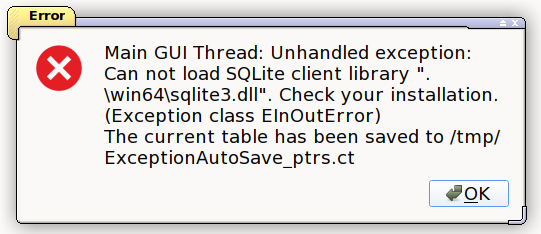
E: I tried pulling in a pointer database exported from windows and it throws an error about sqlite3
There's no sqlite3.dll included in the package, and it should be .so anyway.
| Description: |
|
| Filesize: |
30.87 KB |
| Viewed: |
9913 Time(s) |
|
|
|
| Back to top |
|
|
Dark Byte
Site Admin
Reputation: 475
Joined: 09 May 2003
Posts: 26006
Location: The netherlands
|
| Posted: Fri Jun 05, 2026 10:05 am Post subject: |
|
|
I've reuploaded 7.7: https://cheatengine.org/download/CheatEngineLinux77.zip
maybe it'll work better now (also fixes some performance issues with the addresslist)
_________________
Tools give you results. Knowledge gives you control.
Like my help? Join me on Patreon so i can keep helping |
|
| Back to top |
|
|
|

 FAQ
FAQ Search
 Memberlist
 Usergroups
 Register
 Profile
 Log in to check your private messages
 Log in


