wbx001
How do I cheat?
![]() Reputation: 0 Reputation: 0
Joined: 23 Apr 2026
Posts: 4
|
 Posted: Thu Apr 23, 2026 6:44 am Post subject: Mono Instance Scanner & Deep Pointer Support Posted: Thu Apr 23, 2026 6:44 am Post subject: Mono Instance Scanner & Deep Pointer Support |
 |
|
A powerful developer tool and API for Cheat Engine to scan, wrap, and manipulate Mono objects with ease.
🌟 Key Features
Deep Scanning: Recursively scan class instances and add them to your address list with one click.
Smart BackingField Mapping: Access auto-properties like <Speed>k__BackingField simply by using .Speed in Lua.
Metatable Wrapper: Provides a Lua-native way to read and write Mono fields.
Pointer Chain Support: Automatically resolves nested pointers when recursion depth is set (>0).
API-First Design: Easily integrate Mono object manipulation into your own scripts.
🛠 Installation
Place MonoApi.lua into your Cheat Engine autorun folder.
Place MonoScannerUI.lua into the same autorun folder.
Restart Cheat Engine and attach to a Mono-based game.
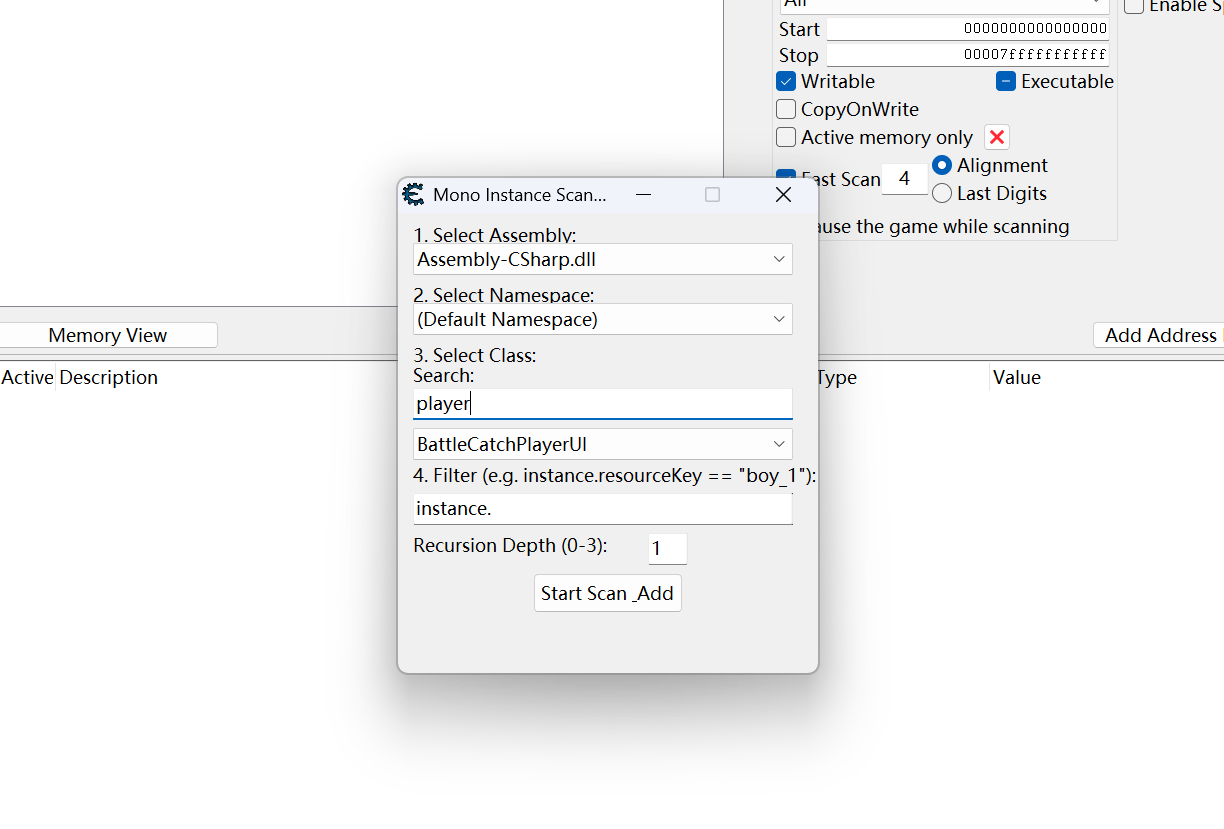
Right-click anywhere in the Address List and select "Scan Mono Instances".
💻 Scripting API Usage
Pure Lua Example
lua
| Code: |
-- Get all instances of ExperienceManager with 1 level of nested pointers
local managers = getMonoInstances("OctoberStudio", "ExperienceManager", 1)
if #managers > 0 then
local mgr = managers[1]
print("Current XP: " .. mgr.Experience) -- Auto-maps from <Experience>k__BackingField
mgr.Experience = 99999 -- Direct memory write
-- Accessing nested object (requires depth >= 1)
if mgr.PlayerStats then
mgr.PlayerStats.Health = 100
end
end
|
Cheat Engine Auto Assembler (AA) Example
You can trigger Lua API logic directly from a standard AA script using the {$lua} block. This is perfect for "One-Click" cheats.
asm
| Code: |
[ENABLE]
{$lua}
-- This block runs when the script is enabled
local list = getMonoInstances("OctoberStudio", "ExperienceManager", 0)
if #list > 0 then
-- Example: Set a specific field on all found instances
for i, inst in ipairs(list) do
inst.Experience = 999999
inst.Level = 100
end
print("Experience Manager patches applied!")
else
print("Error: No instances found. Please enter the game world first.")
end
{$asm}
[DISABLE]
// Usually, no action is needed here for Lua-based memory writes
|
⚠️ Notes
Namespace: Use "" (empty string) for the Default Namespace.
Case Sensitivity: Class and Namespace names must match exactly as shown in the Mono Disassembler.
IL2CPP: This tool is designed for Mono runtimes. It will not work on games using the IL2CPP backend.
Update:
V1.1:
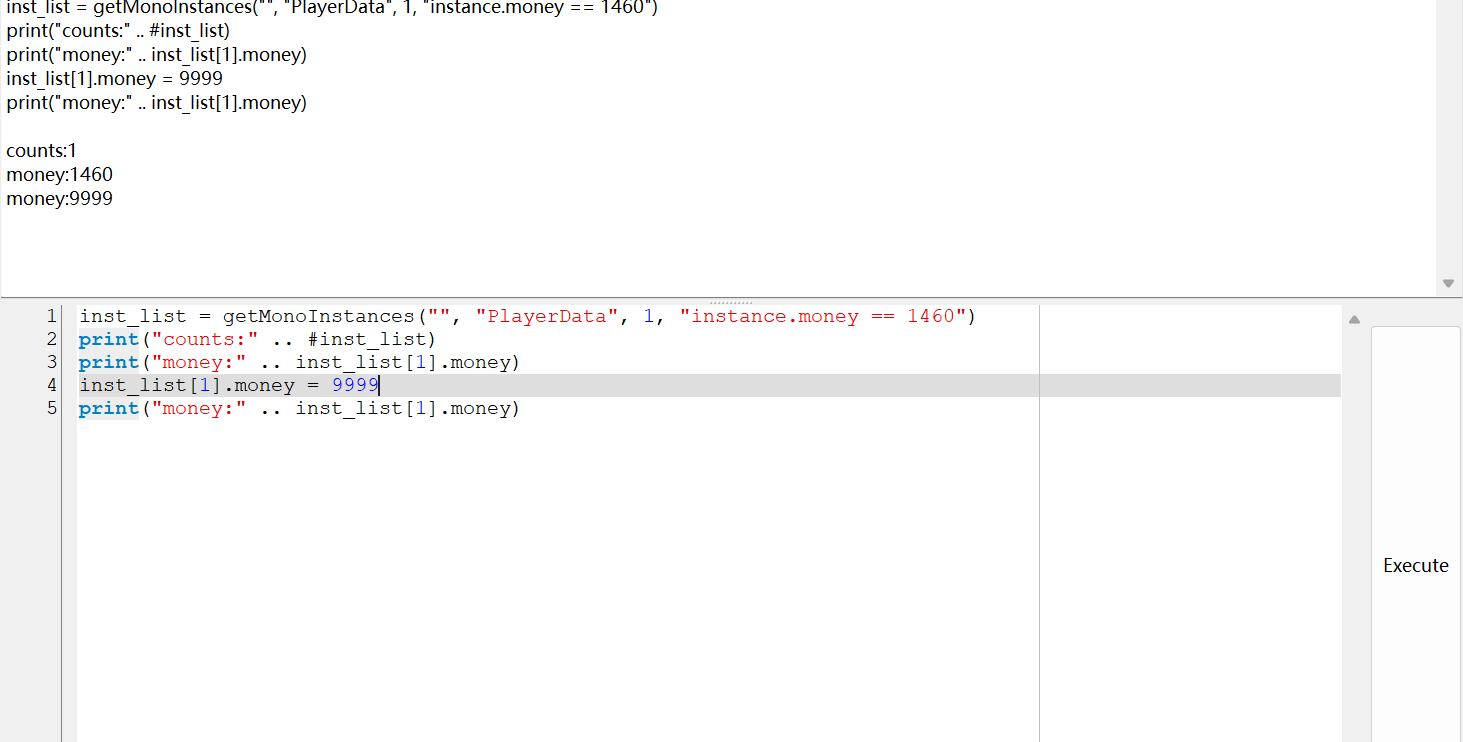
Lua Filter Expression: Added a real-time filtering field. You can now use Lua logic to filter thousands of instances.
Syntax: Must use the instance.fieldName format.
Example: instance.money == 1460 and instance.resourceKey == "boy_1"
Deep String Parsing: Enhanced System.String support.
The scanner now automatically resolves Mono String pointers.
Displays actual text content in the Address List using Unicode String type.
Dynamic Instance Counter:
The root group header now displays the class name along with the total count of matched instances.
Format: ClassName: Count (e.g., PlayerData: 3).
MonoScannerUI v1.2:
Fix Double type
MonoScannerUI v1.3:
1.Dropdowns default to the first item — the assembly, namespace, and class comboboxes all pre-select their first entry when the form opens.
2.The window stays open after a search — clicking Start Scan & Add runs the scan but does not close the scanner form, so the user can adjust the selection and rescan.
3.New: keyword filter for the class list — a search box above the class combobox filters the class names in real time (case-insensitive substring match) as the user types.
monoApi.lua v1.2:
1. getMonoInstances(ns, cls, maxDepth, filterStr) -> getMonoInstances(image, ns, cls, maxDepth, filterStr)
image default to "Assembly-CSharp"
return objects now have new fields
| Code: |
local instance = getMonoInstances(image, ns, cls, maxDepth, filterStr)[1]
instance._address -- Numeric memory address of the underlying Mono object.
instance._class --Class handle used to construct the wrapper.
instance._fields --Map of raw field name → `{ offset, type, fieldHandle }`. The keys are the **metadata** names, i.e. `<Hp>k__BackingField` for an auto-property.
instance._nameMap --Map of clean name → metadata name, populated only for auto-properties.
|
2. Every field on a wrapper also exposes a synthetic read-only attribute named `<Field>_addr` that returns the absolute memory address of the field's storage slot. This lets callers drop into raw `read*` / `write*` calls for things the wrapper does not support natively (pointers, strings, exotic types) without having to recompute the offset themselves.
| Code: |
local p = list[1]
local hpAddr = p.Hp_addr -- e.g. 0x1FDE7CF11D8
print(readInteger(hpAddr)) -- equivalent to p.Hp
writeInteger(hpAddr, 9999) -- equivalent to p.Hp = 9999
|
3. Fix search bug.
| Description: |
|
| Filesize: |
99.21 KB |
| Viewed: |
4790 Time(s) |
|
| Description: |
|
| Filesize: |
36.72 KB |
| Viewed: |
4789 Time(s) |
|
| Description: |
|
| Filesize: |
64.9 KB |
| Viewed: |
4789 Time(s) |

|
| Description: |
|

Download |
| Filename: |
MonoScannerUI.lua |
| Filesize: |
11.53 KB |
| Downloaded: |
433 Time(s) |
| Description: |
|
Download |
| Filename: |
monoApi.lua |
| Filesize: |
8.26 KB |
| Downloaded: |
410 Time(s) |
|
|

 FAQ
FAQ Search
 Memberlist
 Usergroups
 Register
 Profile
 Log in to check your private messages
 Log in


