| View previous topic :: View next topic |
| Author |
Message |
Corroder
Grandmaster Cheater Supreme
 Reputation: 75 Reputation: 75
Joined: 10 Apr 2015
Posts: 1674
|
 Posted: Tue Feb 25, 2020 1:24 am Post subject: Lua socket failed (CE 6.4) Posted: Tue Feb 25, 2020 1:24 am Post subject: Lua socket failed (CE 6.4) |
 |
|
Hi, I try to make a chat app using CE 6.4, since Lua socket doesn't have compiled build for Lua 5.3, so I am using CE 6.4 and celuasocket package from here:
https://cheatengine.org/forum/viewtopic.php?p=5512293&sid=67fa4d0bb35e661c45565b0998d0fb7a
But when test server-side script it makes CE crash.
server function:
| Code: | function connect2server()
host = '127.0.0.1'
port = '3818'
socket = require("socket")
--local server = socket.bind(host, port)
server = socket.connect(host, port)
server:settimeout(0)
client_tab = {}
conn_count = 0
sMemo.Lines.Add("Server turned on " .. host .. ":" .. port)
while 1 do
local conn = server:accept()
if conn then
conn_count = conn_count + 1
client_tab[conn_count] = conn
sMemo.Lines.Add("Server a client successfully connect!")
btnConnect.Visible = false
btnDisconnect.Visible = false
end
for conn_count, client in pairs(client_tab) do
local recvt, sendt, status = socket.select({client}, nil, 1)
if #recvt > 0 then
local receive, receive_status = client:receive()
if receive_status ~= "closed" then
if receive then
assert(client:send("Client " .. conn_count .. " Send : "))
assert(client:send(receive .. "\n"))
sMemo.Lines.Add("Receive Client " .. conn_count .. " : ", receive)
end
else
table.remove(client_tab, conn_count)
client:close()
sMemo.Lines.Add("Client " .. conn_count .. " disconnect!")
end
end
end
end
end
|
client function:
| Code: | function con2server()
local socket = require("socket")
local host = "127.0.0.1" or edtServer.Text
local port = 8080 or edtPort.Text
local sock = assert(socket.connect(host, port))
sock:settimeout(0)
local input, recvt, sendt, status
while true do
input = sEdit.Text --io.read()
if #input > 0 then
assert(sock:send(input .. "\n"))
end
recvt, sendt, status = socket.select({sock}, nil, 1)
while #recvt > 0 do
local response, receive_status = sock:receive()
if receive_status ~= "closed" then
if response then
--print(response)
sMemo.Lines.Add(response)
recvt, sendt, status = socket.select({sock}, nil, 1)
end
else
break
end
end
end
end
|
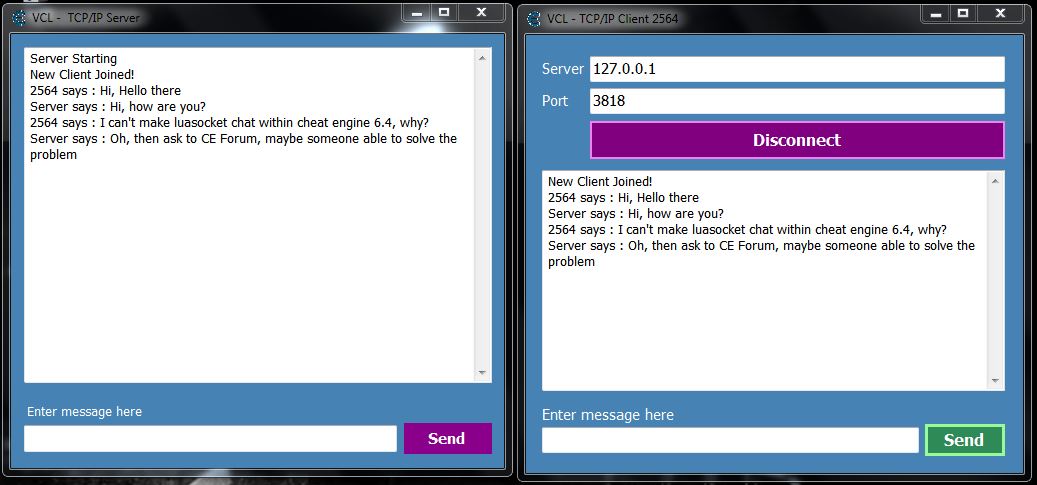
I did make ones using VB.Net and it work properly. I want try using Luasocket inside CE environments.
Any helps?
| Description: |
| Works Chat App With VB Net |
|
| Filesize: |
80.35 KB |
| Viewed: |
6363 Time(s) |
|
_________________
Stealing Code From Stolen Code...
And Admit It.. Hmmm....Typically LOL |
|
| Back to top |
|
 |
Liger
Cheater
 Reputation: 0 Reputation: 0
Joined: 26 Jan 2019
Posts: 36
Location: don't have
|
|
| Back to top |
|
|
Corroder
Grandmaster Cheater Supreme
Reputation: 75
Joined: 10 Apr 2015
Posts: 1674
|
| Posted: Thu Feb 27, 2020 6:57 pm Post subject: |
|
|
For CE Lua, problem fix:
Client side:
| Code: | function talker()
local socket = require("socket")
host = host or "localhost"
port = port or 8080
if arg then
host = arg[1] or host
port = arg[2] or port
end
sMemo.Lines.Add("Attempting connection to host '" ..host.. "' and port " ..port.. "...")
--print("Attempting connection to host '" ..host.. "' and port " ..port.. "...")
c = assert(socket.connect(host, port))
sMemo.Lines.Add("Connected! Please type stuff (empty line to stop):")
btnSend.Enabled = true
end
function sendM()
-- print("Connected! Please type stuff (empty line to stop):")
l = sEdit.Text
-- l = io.read()
while l and l ~= "" and not e do
assert(c:send(l .. "\n"))
l = sEdit.Text
-- l = io.read()
end
end |
Server side:
| Code: | function connect2server()
host = '127.0.0.1'
port = '8080'
socket = require("socket")
local server = socket.bind(host, port)
--server = socket.connect(host, port)
server:settimeout(0)
client_tab = {}
conn_count = 0
sMemo.Lines.Add("Server turned on " .. host .. ":" .. port)
while 1 do
local conn = server:accept()
if conn then
conn_count = conn_count + 1
client_tab[conn_count] = conn
sMemo.Lines.Add("Server a client successfully connect!")
btnConnect.Visible = false
btnDisconnect.Visible = true
end
for conn_count, client in pairs(client_tab) do
local recvt, sendt, status = socket.select({client}, nil, 1)
if #recvt > 0 then
local receive, receive_status = client:receive()
if receive_status ~= "closed" then
if receive then
assert(client:send("Client " .. conn_count .. " Send : "))
assert(client:send(receive .. "\n"))
sMemo.Lines.Add("Receive Client " .. conn_count .. " : ", receive)
end
else
table.remove(client_tab, conn_count)
client:close()
sMemo.Lines.Add("Client " .. conn_count .. " disconnect!")
end
end
end
end
end
|
NOTE: Work with CE 6.4
VB Net Version (NET 4.5.2) 839Kb. Download here (copy-paste the link below to your browser):
https://mega.nz/#!W48XgLKQ!_Hn8IxLV0BobSxAEwPVfxmY0O3TScslSWSgCm-0nrdk
_________________
Stealing Code From Stolen Code...
And Admit It.. Hmmm....Typically LOL |
|
| Back to top |
|
|
Liger
Cheater
Reputation: 0
Joined: 26 Jan 2019
Posts: 36
Location: don't have
|
| Posted: Fri Feb 28, 2020 6:54 am Post subject: |
|
|
| Corroder wrote: | For CE Lua, problem fix:
Client side:
| Code: | function talker()
local socket = require("socket")
host = host or "localhost"
port = port or 8080
if arg then
host = arg[1] or host
port = arg[2] or port
end
sMemo.Lines.Add("Attempting connection to host '" ..host.. "' and port " ..port.. "...")
--print("Attempting connection to host '" ..host.. "' and port " ..port.. "...")
c = assert(socket.connect(host, port))
sMemo.Lines.Add("Connected! Please type stuff (empty line to stop):")
btnSend.Enabled = true
end
function sendM()
-- print("Connected! Please type stuff (empty line to stop):")
l = sEdit.Text
-- l = io.read()
while l and l ~= "" and not e do
assert(c:send(l .. "\n"))
l = sEdit.Text
-- l = io.read()
end
end |
Server side:
| Code: | function connect2server()
host = '127.0.0.1'
port = '8080'
socket = require("socket")
local server = socket.bind(host, port)
--server = socket.connect(host, port)
server:settimeout(0)
client_tab = {}
conn_count = 0
sMemo.Lines.Add("Server turned on " .. host .. ":" .. port)
while 1 do
local conn = server:accept()
if conn then
conn_count = conn_count + 1
client_tab[conn_count] = conn
sMemo.Lines.Add("Server a client successfully connect!")
btnConnect.Visible = false
btnDisconnect.Visible = true
end
for conn_count, client in pairs(client_tab) do
local recvt, sendt, status = socket.select({client}, nil, 1)
if #recvt > 0 then
local receive, receive_status = client:receive()
if receive_status ~= "closed" then
if receive then
assert(client:send("Client " .. conn_count .. " Send : "))
assert(client:send(receive .. "\n"))
sMemo.Lines.Add("Receive Client " .. conn_count .. " : ", receive)
end
else
table.remove(client_tab, conn_count)
client:close()
sMemo.Lines.Add("Client " .. conn_count .. " disconnect!")
end
end
end
end
end
|
|
CE code does not work, I think it lacks the connection files or the like
_________________
(^_^) |
|
| Back to top |
|
|
Corroder
Grandmaster Cheater Supreme
Reputation: 75
Joined: 10 Apr 2015
Posts: 1674
|
| Posted: Fri Feb 28, 2020 12:08 pm Post subject: |
|
|
| Liger wrote: |
CE code does not work, I think it lacks the connection files or the like |
Yup..true.
_________________
Stealing Code From Stolen Code...
And Admit It.. Hmmm....Typically LOL |
|
| Back to top |
|
|
Liger
Cheater
Reputation: 0
Joined: 26 Jan 2019
Posts: 36
Location: don't have
|
| Posted: Fri Feb 28, 2020 12:52 pm Post subject: |
|
|
If it works for you correctly, you can send me the entire project, please🥰
_________________
(^_^) |
|
| Back to top |
|
|
Corroder
Grandmaster Cheater Supreme
Reputation: 75
Joined: 10 Apr 2015
Posts: 1674
|
| Posted: Sat Feb 29, 2020 9:15 am Post subject: |
|
|
I want to share, but the CE Chat project using Lua socket is unstable. I mean sometimes it works but too much more it failed. I think because of the TCP connection problem. So I will not share the unstable project. I should try using another net Lua module or just embedding the VB chat project to CE Script.
_________________
Stealing Code From Stolen Code...
And Admit It.. Hmmm....Typically LOL |
|
| Back to top |
|
|
Dark Byte
Site Admin
 Reputation: 474 Reputation: 474
Joined: 09 May 2003
Posts: 25958
Location: The netherlands
|
| Posted: Sat Feb 29, 2020 10:14 am Post subject: |
|
|
The biggest issue is that these days most people don't know how to configure their router's port forwarding configuration, so that means you'll also have to implement the UPnP protocol and hope it's enabled in the router as well
also don't forget that sockets on windows can read and send less than you want, so always make sure you do actually send/receive everything and if not continue from where it stopped
_________________
Tools give you results. Knowledge gives you control.
Like my help? Join me on Patreon so i can keep helping |
|
| Back to top |
|
|
Corroder
Grandmaster Cheater Supreme
Reputation: 75
Joined: 10 Apr 2015
Posts: 1674
|
| Posted: Sat Feb 29, 2020 7:59 pm Post subject: |
|
|
Thanks, DB for information. Yes. I know about UPnP. On my machine, it was set already.
I work for Lua Socket from home computer, without a router/server. connect to the web using wireless wi-fi.
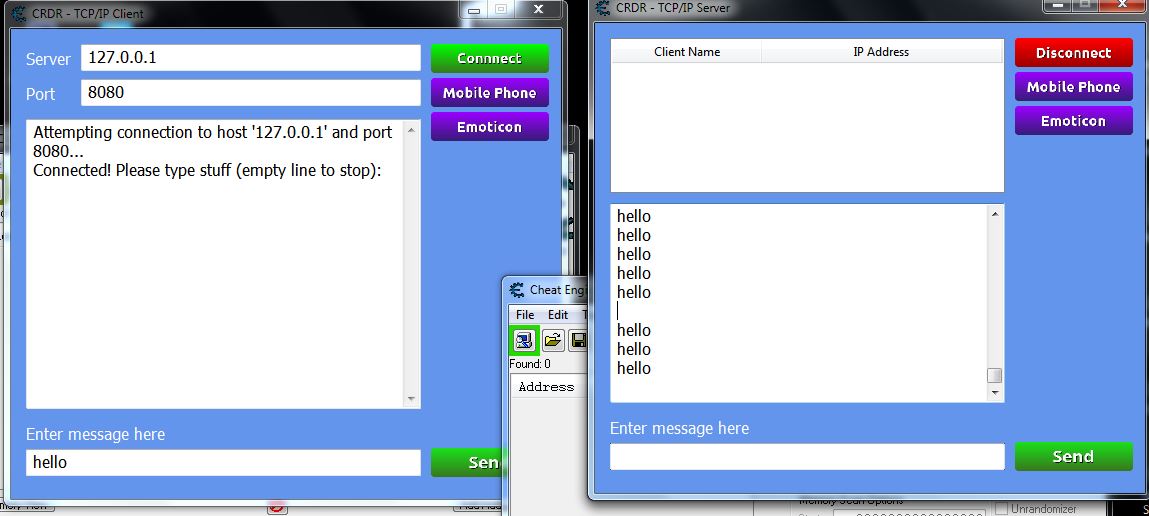
So, The chat app I made using CE and Lua Socket, actually it works correctly and doesn't have a problem with code scripts. I have tested it and it works. The problem is on NET configurations.
Anyhow for who want do the same project with my project and plan to publish the project, I suggest to (for windows OS) :
- Check and set network connections (look on Network and Sharing Center)
- Check and set IP via Adapter Setting (Generally set as auto on windows)
- Check and set Port Forwarding (If use router/server, completely with NAT Firewall is good) or use Port Forward on Windows if not have a router (google it)
- Check and set UPnP as mentioned by DB (look on Change advanced sharing setting > Network Discovery) or use UPnP Port Mapper (a Java app toolkit for the easy setting)
WARNING:
Be careful with the UPnP setting in case it has a security risk. (Search for UPnP Mirai Global Attack 2016, article, for more info)
EDIT:
See this tutorial for Port Forwarding on Windows 7 :
https://www.youtube.com/watch?v=goVA35MWPH4
https://www.dummies.com/computers/operating-systems/windows-7/how-to-open-a-port-in-the-windows-7-firewall/
| Description: |
|
| Filesize: |
84.63 KB |
| Viewed: |
6151 Time(s) |
|
_________________
Stealing Code From Stolen Code...
And Admit It.. Hmmm....Typically LOL |
|
| Back to top |
|
|
Liger
Cheater
Reputation: 0
Joined: 26 Jan 2019
Posts: 36
Location: don't have
|
| Posted: Sat Mar 07, 2020 12:39 pm Post subject: |
|
|
| Corroder wrote: | Thanks, DB for information. Yes. I know about UPnP. On my machine, it was set already.
I work for Lua Socket from home computer, without a router/server. connect to the web using wireless wi-fi.
So, The chat app I made using CE and Lua Socket, actually it works correctly and doesn't have a problem with code scripts. I have tested it and it works. The problem is on NET configurations.
Anyhow for who want do the same project with my project and plan to publish the project, I suggest to (for windows OS) :
- Check and set network connections (look on Network and Sharing Center)
- Check and set IP via Adapter Setting (Generally set as auto on windows)
- Check and set Port Forwarding (If use router/server, completely with NAT Firewall is good) or use Port Forward on Windows if not have a router (google it)
- Check and set UPnP as mentioned by DB (look on Change advanced sharing setting > Network Discovery) or use UPnP Port Mapper (a Java app toolkit for the easy setting)
WARNING:
Be careful with the UPnP setting in case it has a security risk. (Search for UPnP Mirai Global Attack 2016, article, for more info)
EDIT:
See this tutorial for Port Forwarding on Windows 7 :
https://www.youtube.com/watch?v=goVA35MWPH4
https://www.dummies.com/computers/operating-systems/windows-7/how-to-open-a-port-in-the-windows-7-firewall/ |
So can you send me this project 😊
_________________
(^_^) |
|
| Back to top |
|
|
Corroder
Grandmaster Cheater Supreme
Reputation: 75
Joined: 10 Apr 2015
Posts: 1674
|
| Posted: Sat Mar 07, 2020 9:50 pm Post subject: |
|
|
Download CE Chat: (CE Version 6.4) copy-paste the link to your browser.
https://mega.nz/#!bhUjCYxA!VM3gSy9XzLbLcMo1REeVgoLCrvJKm4sF4PtU5cCHoLg
Note: Need some modifying.
The works one is (Java Version):
https://forum.cheatengine.org/viewtopic.php?t=613532
_________________
Stealing Code From Stolen Code...
And Admit It.. Hmmm....Typically LOL |
|
| Back to top |
|
|
Liger
Cheater
Reputation: 0
Joined: 26 Jan 2019
Posts: 36
Location: don't have
|
| Posted: Sun Mar 08, 2020 2:51 pm Post subject: |
|
|
What's wrong, I have downloaded 'socket' files
I get this error
CE 64-bit
Error:error loading module 'socket.core' from file 'C:\Program Files\Cheat Engine 7.0\socket\core.dll':
%1 is not a valid Win32 application.
CE 32-bit
Error:error loading module 'socket.core' from file 'C:\Program Files\Cheat Engine 7.0\socket\core.dll':
The specified module could not be found.
_________________
(^_^) |
|
| Back to top |
|
|
Corroder
Grandmaster Cheater Supreme
Reputation: 75
Joined: 10 Apr 2015
Posts: 1674
|
| Posted: Sun Mar 08, 2020 5:03 pm Post subject: |
|
|
Did you use CE 6.4 ?. I said use CE 6.4
_________________
Stealing Code From Stolen Code...
And Admit It.. Hmmm....Typically LOL |
|
| Back to top |
|
|
Liger
Cheater
Reputation: 0
Joined: 26 Jan 2019
Posts: 36
Location: don't have
|
| Posted: Mon Mar 09, 2020 10:12 am Post subject: |
|
|
Does it only work on CE 6.4?
_________________
(^_^) |
|
| Back to top |
|
|
Corroder
Grandmaster Cheater Supreme
Reputation: 75
Joined: 10 Apr 2015
Posts: 1674
|
| Posted: Mon Mar 09, 2020 10:53 pm Post subject: |
|
|
Yes. Lua socket was not compatible with Lua 5.2 or 5.3 and CE 7.0 using Lua 5.3 interpreter. If you want Luasocket to work with Lua 5.3 then you need to build and compile the Lua socket which adjusts to Lua 5.3 environment. Or try to do googling if there is Lua socket compatible with Lua 5.3. I did it but not found what I am looking for.
CE 6.4 uses Lua 5.1 interpreter which compatible with Lua socket.
_________________
Stealing Code From Stolen Code...
And Admit It.. Hmmm....Typically LOL |
|
| Back to top |
|
|
|

 FAQ
FAQ Search
 Memberlist
 Usergroups
 Register
 Profile
 Log in to check your private messages
 Log in


