| View previous topic :: View next topic |
| Author |
Message |
BeastKing
Master Cheater
 Reputation: 0 Reputation: 0
Joined: 02 Mar 2008
Posts: 317
Location: Between A and B
|
 Posted: Fri Jun 27, 2008 2:05 pm Post subject: How 2 manage slave and master hard drive Posted: Fri Jun 27, 2008 2:05 pm Post subject: How 2 manage slave and master hard drive |
 |
|
| I can't figure out how to change my slave drive to a master drive. can som1 help me. I'm not use to windows xp pro
|
|
| Back to top |
|
 |
Localhost
I post too much
 Reputation: 0 Reputation: 0
Joined: 28 Apr 2007
Posts: 3402
|
| Posted: Fri Jun 27, 2008 2:09 pm Post subject: |
|
|
Open up your computer.
Find your too hard drives...
One should be at the end of the IDE cable, and one should be in the middle of the IDE cable... switch them...
Reboot! Your OS probably wont load unless there is an OS on the slave drive, but w/e!
_________________
|
|
| Back to top |
|
|
SFP+
Comp. talk moderator
 Reputation: 26 Reputation: 26
Joined: 02 May 2007
Posts: 1228
Location: Sweden
|
| Posted: Fri Jun 27, 2008 2:14 pm Post subject: |
|
|
You choose it on the back of the hard drive, there are small objects(don't know the word in english) whcih you can pull out. 
the white thing, there should be descriptions on the top, like Master, Slave, Cable select. Simply put it in like it says.
|
|
| Back to top |
|
|
FullyAwesome
I post too much
![]() Reputation: 0 Reputation: 0
Joined: 05 Apr 2007
Posts: 4438
Location: Land Down Under
|
| Posted: Fri Jun 27, 2008 8:08 pm Post subject: |
|
|
they're called jumpers aren't they?
_________________
Last edited by FullyAwesome on Fri Jun 27, 2008 8:59 pm; edited 1 time in total |
|
| Back to top |
|
|
Mozilla Firefox
Grandmaster Cheater Supreme
 Reputation: 0 Reputation: 0
Joined: 06 Feb 2007
Posts: 1250
|
| Posted: Fri Jun 27, 2008 8:39 pm Post subject: |
|
|
| Get a SATA drive.
|
|
| Back to top |
|
|
BeastKing
Master Cheater
Reputation: 0
Joined: 02 Mar 2008
Posts: 317
Location: Between A and B
|
| Posted: Fri Jun 27, 2008 9:36 pm Post subject: |
|
|
| ok, so I switch the jumpers to where they suppose to be, thanks to Safko for the simplification but now it sez NTLDR missing and I couldn't go back to the desktop. (I'm on another computer).... so how do I find the NTLDR?
|
|
| Back to top |
|
|
Daaamon
Grandmaster Cheater Supreme
 Reputation: 0 Reputation: 0
Joined: 12 May 2007
Posts: 1443
Location: Southern California
|
| Posted: Fri Jun 27, 2008 10:51 pm Post subject: |
|
|
flip the little switch on your HD to the LEFT (Its the left for my Maxtor, lol).
Connect one END of your IDE to the OTHER END of your IDE
_________________
|
|
| Back to top |
|
|
BeastKing
Master Cheater
Reputation: 0
Joined: 02 Mar 2008
Posts: 317
Location: Between A and B
|
| Posted: Sat Jun 28, 2008 12:27 am Post subject: |
|
|
now it says, primary disk 1 not found
Edit: also by the way ask me to strike F1 (whcih I did) and after rebooting, a message said that "media test faliure, check connection cable" I've check the cable and its fine unless you want me to thriple check it to make sure, because I think I'm sure the cable is fine.
|
|
| Back to top |
|
|
SFP+
Comp. talk moderator
Reputation: 26
Joined: 02 May 2007
Posts: 1228
Location: Sweden
|
| Posted: Sat Jun 28, 2008 4:03 am Post subject: |
|
|
| BeastKing wrote: | now it says, primary disk 1 not found
Edit: also by the way ask me to strike F1 (whcih I did) and after rebooting, a message said that "media test faliure, check connection cable" I've check the cable and its fine unless you want me to thriple check it to make sure, because I think I'm sure the cable is fine. |
How are your hdd jumpered? Master? Slave? Also - which spot does it use in your IDE Cable? The one at the end is Master, middle - Slave.
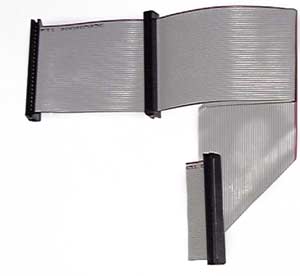
The one at the bottom is supposed to be connected to the motheroard, the one in the "middle" is Slave, and the one at the end(top left) is master.
|
|
| Back to top |
|
|
Noz3001
I'm a spammer
 Reputation: 26 Reputation: 26
Joined: 29 May 2006
Posts: 6220
Location: /dev/null
|
| Posted: Sat Jun 28, 2008 9:10 am Post subject: |
|
|
| Make sure the hard drives aren't sharing a power lead. Seriously, mine fucks up if they do.
|
|
| Back to top |
|
|
BeastKing
Master Cheater
Reputation: 0
Joined: 02 Mar 2008
Posts: 317
Location: Between A and B
|
| Posted: Sat Jun 28, 2008 6:10 pm Post subject: |
|
|
damn, I got myself in a bigger hole. when it boots, it couldn't find both primary and secondary HD, 0 and 1! also the error message, "media test faliure, check connection" still comes up. I can't seem to find my way out of it, I have to another computer just to type this message
By the way, I use master IDE cables for both
|
|
| Back to top |
|
|
SFP+
Comp. talk moderator
Reputation: 26
Joined: 02 May 2007
Posts: 1228
Location: Sweden
|
| Posted: Sun Jun 29, 2008 5:34 am Post subject: |
|
|
| BeastKing wrote: | damn, I got myself in a bigger hole. when it boots, it couldn't find both primary and secondary HD, 0 and 1! also the error message, "media test faliure, check connection" still comes up. I can't seem to find my way out of it, I have to another computer just to type this message
By the way, I use master IDE cables for both |
Then you have two IDE cables? One per HDD? Make sure they're both jumpered as master if that's the case.
|
|
| Back to top |
|
|
Jani
Grandmaster Cheater
![]() Reputation: 2 Reputation: 2
Joined: 29 Dec 2006
Posts: 804
|
| Posted: Sun Jun 29, 2008 5:39 am Post subject: |
|
|
| Also, after messing with the order, check your BIOS settings to make sure that the boot order is right (for HDDs).
|
|
| Back to top |
|
|
|

 FAQ
FAQ Search
 Memberlist
 Usergroups
 Register
 Profile
 Log in to check your private messages
 Log in


