| View previous topic :: View next topic |
| Author |
Message |
painless95
How do I cheat?
![]() Reputation: 0 Reputation: 0
Joined: 07 Apr 2008
Posts: 2
|
 Posted: Sat Apr 12, 2008 6:16 pm Post subject: Posted: Sat Apr 12, 2008 6:16 pm Post subject: |
 |
|
Hey sup Dude Im soo confused on step 7 
so could u maybe add a picture or explain some more 2 me thanks !! xD
|
|
| Back to top |
|
 |
Labyrnth
Moderator
![]() Reputation: 10 Reputation: 10
Joined: 28 Nov 2006
Posts: 6300
|
|
| Back to top |
|
|
wownoobwow
How do I cheat?
![]() Reputation: 0 Reputation: 0
Joined: 12 Apr 2008
Posts: 5
Location: not uk, england,london >.> <.<
|
| Posted: Sun Apr 13, 2008 1:25 pm Post subject: |
|
|
on step 9, first impressions  >.> <.< wtf. >.> <.< wtf.
haven't given it a serious attempt yet but g luck to me
btw how many steps r der?
|
|
| Back to top |
|
|
xMurtaghx
I post too much
 Reputation: 1 Reputation: 1
Joined: 13 Apr 2008
Posts: 3611
Location: Gayville, South Dakota, 57031, United States of America
|
| Posted: Sun Apr 13, 2008 8:32 pm Post subject: question |
|
|
am i a noob?
_________________

Scania- Lvl 117 DK✔

WE WILL MISS GMS!
 |
|
| Back to top |
|
|
himank
How do I cheat?
![]() Reputation: 0 Reputation: 0
Joined: 12 May 2007
Posts: 9
|
| Posted: Fri Apr 18, 2008 2:37 pm Post subject: |
|
|
how do i hack in simcity classic? 
PM me if you know.
|
|
| Back to top |
|
|
happyboyz
Cheater
 Reputation: 0 Reputation: 0
Joined: 28 May 2006
Posts: 30
|
| Posted: Sat Apr 19, 2008 9:05 am Post subject: |
|
|
Hey for all those that have problems with step 8 of the tutorial... don't panic.
I've had the same problem too. First, go to the cheatengine settings, under the code finder tab, select Memory Access Exceptions and click okay.
Get the 1st pointer (shouldn't be a problem) and then right-click on the address of the new pointer in your address list and select "Find out what accesses this address", followed by "Find out what access this pointer".
Click on change value in the tutorial and the opcode that changed the value should appear in the debugger. Double click on the opcode to open the "More Information" window and take note of the value of the address to get the pointer, and take note of the offset: displayed as "18" in the line of code "00000000 - eax[eax+18]". It's good to write down all the offsets to the various pointers (you'll find out why later).
Then, click on New Scan, check the "Hex" box and type in the value of the address of the pointer into the value box and hit "First Scan". You should have one address. If you have 2, restart your tutorial and redo the steps above, or take note on what to do below*. If you get no results, it is good to stop your debugger (click on the stop button in the window) and search again.
Take note of the address of the pointer. Then, click on the "Add Address Manually" which is located at the top-right of the address list and a new window should appear.
At the bottom of the window, check the "Pointer" box and an extension should appear. Then, click on the "Add pointer" button once if it's the pointer to the 1st pointer, twice if it's the pointer to the second pointer, and so on. Now a new input line for a pointer should appear. Type in the respective offsets for all the pointers (1st pointer on the 1st line, 2nd on the 2nd line, and so on). Then, in the last line, type in the address of the newest pointer you have (displayed in your scan results list). Press "OK".
Repeat this with the new pointer, then repeat it again and again with the newest pointer each time until you get a static address when you search for the pointer value (which means that it is the last pointer you need to enter) - and there you have it! You have completed step 8!
*Note: If you have more than one result when scanning for a pointer, restart the tutorial and redo it, or you can add all the pointers into your address list (via the "Add Address Manually" button, type in the address and the offset), then freeze one of them and click on the "change value" button in your tutorial. If the value changes, delete the pointer that you have frozen; it is useless. Repeat until you have 1 pointer left. It should work.
If you have any questions, feel free to pm me. If you want me to include pictures you can tell me too. Tell me whether you succeeded, or tell me anything. If you really liked it, you can +rep too (i don't mind) 
|
|
| Back to top |
|
|
Mario13
Newbie cheater
![]() Reputation: 0 Reputation: 0
Joined: 28 May 2007
Posts: 14
|
| Posted: Fri May 09, 2008 10:42 am Post subject: |
|
|
| step 7 is very hard man where is the []box?
|
|
| Back to top |
|
|
godpwnage
Advanced Cheater
 Reputation: 0 Reputation: 0
Joined: 08 Feb 2008
Posts: 80
Location: My Computer, Hacking Flash Games :3
|
|
| Back to top |
|
|
Dav0115
How do I cheat?
![]() Reputation: 0 Reputation: 0
Joined: 31 May 2008
Posts: 5
|
| Posted: Thu Jun 05, 2008 3:28 pm Post subject: |
|
|
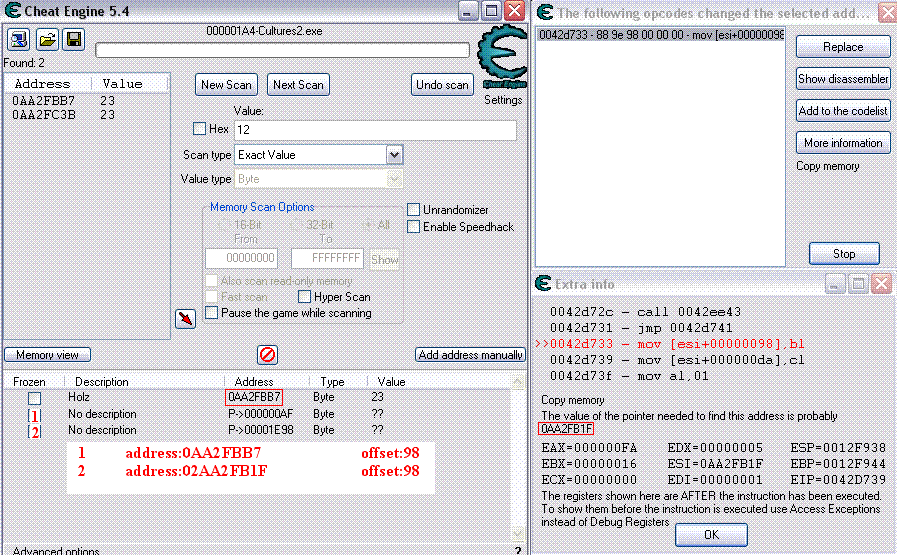
hello im new hear and i learned a lot in the tutorial but when i try to hack a game i got a problem...
| Description: |
| i know this scan was in bytes but can i hack it too, or not? |
|
| Filesize: |
51.04 KB |
| Viewed: |
10960 Time(s) |
|
|
|
| Back to top |
|
|
happyboyz
Cheater
Reputation: 0
Joined: 28 May 2006
Posts: 30
|
| Posted: Fri Jun 06, 2008 8:46 am Post subject: |
|
|
Start a new search, tick the "Hex" box, and enter 0AA2FB1F as your value. Click on first scan. You should get one result*. Click on Add address manually, tick Pointer and punch in the address and the offset. What you did wrong was that you entered the value of the pointer as the address of the pointer. In the more information box, 0AA2FB1F is the VALUE of the pointer, not the ADDRESS of the pointer. So, you have to manually seek the address of the pointer and add it in instead.
Psst... If you get more than one address, add of them as pointers into your address list (via the "Add Address Manually" button, type in the address and the offset), then freeze one of them and see if it actually freezes that particular value in the game. If it isn't frozen (value is able to change), delete the pointer that you have frozen; it is useless. Repeat until you have 1 pointer left. It should work.
|
|
| Back to top |
|
|
Dav0115
How do I cheat?
![]() Reputation: 0 Reputation: 0
Joined: 31 May 2008
Posts: 5
|
| Posted: Mon Jun 09, 2008 1:13 am Post subject: |
|
|
| ty ur answer was very helpful but.... i got more then 30k addresses when i search with bytes and 0 addresses when i search with 4 byte :'-(
|
|
| Back to top |
|
|
happyboyz
Cheater
Reputation: 0
Joined: 28 May 2006
Posts: 30
|
| Posted: Wed Jun 11, 2008 6:40 am Post subject: |
|
|
You can try using the Pointer scanner. Right click on the main address you have there "Holz" and select pointer scan for this address. Choose either Injected or Default.
Or MAYBE you can try to change the scanning method in the settings panel to Memory Access Exceptions under the Code Finder tab instead of using Debug Registers and search in 4 bytes, although I'm not sure if that'll work. Then when you add in the pointers into your address list make sure u change them to "byte" instead of "4 bytes"
|
|
| Back to top |
|
|
Dav0115
How do I cheat?
![]() Reputation: 0 Reputation: 0
Joined: 31 May 2008
Posts: 5
|
| Posted: Fri Jun 20, 2008 11:43 am Post subject: |
|
|
i got a new problem...
in game i changed the value but when the value change by anything its normaly again and not ,,My value'', but that game is a normal computer game so it cant been serverside....  
|
|
| Back to top |
|
|
happyboyz
Cheater
Reputation: 0
Joined: 28 May 2006
Posts: 30
|
| Posted: Sat Jun 21, 2008 8:41 am Post subject: |
|
|
| In that case maybe you've gotten a wrong address. In some games, you can't get what you want by searching for the exact value itself. for example the way the game calculates the life is by , where x is the number of lives lost. so in this case u have to calculate and search "x"
|
|
| Back to top |
|
|
Dav0115
How do I cheat?
![]() Reputation: 0 Reputation: 0
Joined: 31 May 2008
Posts: 5
|
| Posted: Tue Jun 24, 2008 8:30 pm Post subject: |
|
|
so when i have 100 live and decrease it with 5 i get 95 and i should search 5 (5=,,x'') when i decrease it with 15 i get 80 so i have to search 15 right?
Ps: srry that im so irritating and because my bad english
|
|
| Back to top |
|
|
|

 FAQ
FAQ Search
 Memberlist
 Usergroups
 Register
 Profile
 Log in to check your private messages
 Log in


